Brand Collage Social Template
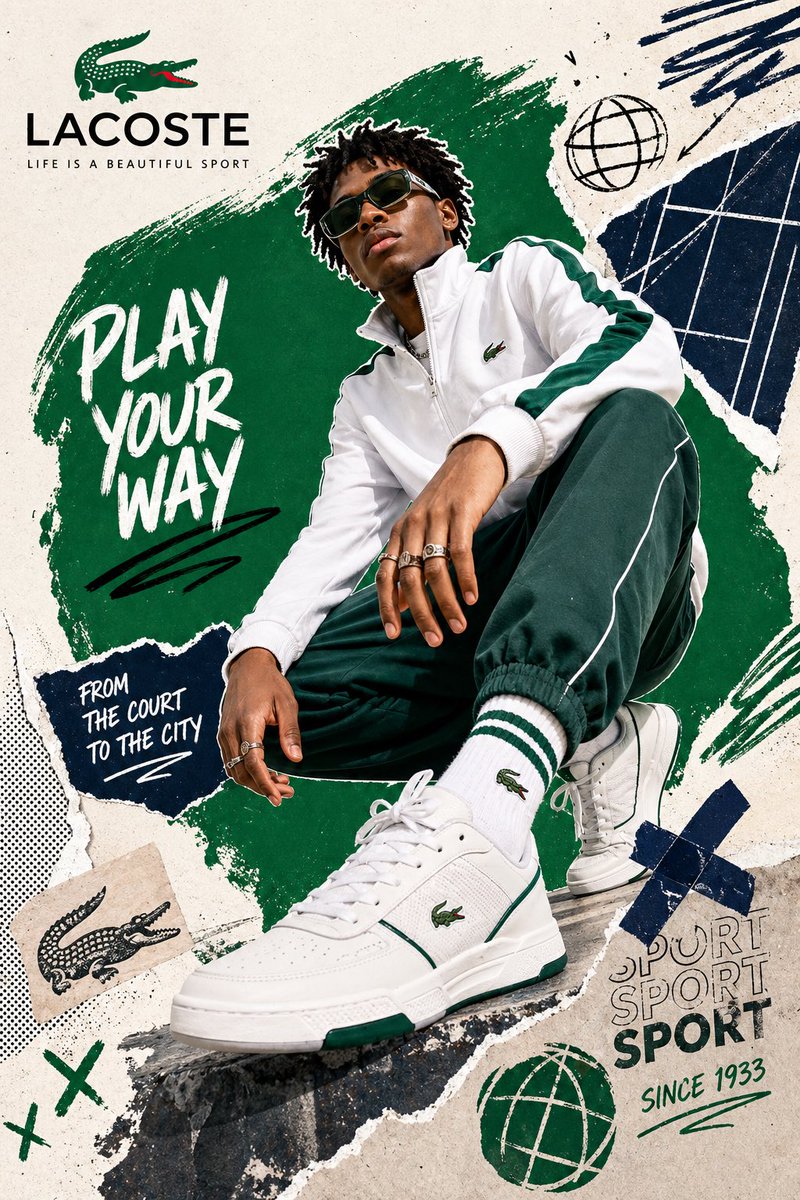
[BRAND NAME = CHANGE TO YOUR BRAND]. Act as a Social Media Art Director and Digital Collage Artist specializing in bold, youth-oriented brand content for Instagram and digital camp
- Category
- UI & Interfaces
- Model
- GPT Image 2
- Creator
- EvoLinkAI
- Source language
- en
- Source ID
- ui-125
Full prompt
[BRAND NAME = CHANGE TO YOUR BRAND].
Act as a Social Media Art Director and Digital Collage Artist specializing in bold, youth-oriented brand content for Instagram and digital campaigns. PHASE 1: CONCEPTUAL FRAMEWORK Create a dynamic digital collage that merges fashion photography with graphic design chaos. This is controlled rebellion – a composition that feels spontaneous and energetic while maintaining brand coherence. The aesthetic is anti-polished: torn edges, layered textures, hand-drawn elements, and bold color blocking that screams confidence and movement. PHASE 2: MODEL & PHOTOGRAPHY - Subject: One model (diverse casting, age 18-30) in a dynamic, confident pose - Pose Energy: 80% attitude, 20% natural – sitting, jumping, mid-motion, or power stance (avoid static standing) - Outfit: Street style/athleisure that aligns with [BRAND NAME] aesthetic – casual but styled - Hero Product: Feature 1 signature [BRAND NAME] product prominently (sneakers, bag, apparel) – this is the visual anchor - Photography Style: Editorial fashion cutout – model extracted from background with clean edges - Camera Angle: Slight low angle to empower subject (hero perspective) - Crop: Full body or 3/4 body showing hero product clearly - Background Removal: Model cut out cleanly for layering over collage elements PHASE 3: COLOR BLOCKING FOUNDATION - Primary Color Blob: Large organic shape (40-60% of composition) in bold, saturated brand color behind/around model - Shape Style: Irregular, hand-painted aesthetic – think Photoshop brush strokes or torn paper texture (NOT perfect geometric shapes) - Color Selection (Autonomous): Choose 1 hero color from [BRAND NAME] palette: - Texture: Visible brush strokes, grain, or subtle noise (15-25% opacity) – avoid flat digital fills - Placement: Blob positioned to frame model without obscuring key product details PHASE 4: GRAPHIC ELEMENTS LAYER Add 3-5 abstract graphic elements scattered across composition: - Element Types: - Color Palette: Use 2-3 accent colors total (main blob color + 1-2 contrasting tones from brand palette) - Placement: Asymmetric scatter – top-left and bottom-right zones primarily (avoid center crowding) - Scale: Mix small (5% of canvas) and medium (15% of canvas) elements – nothing overpowering - Aesthetic: Analog/handmade feel – imperfect circles, rough edges, visible texture PHASE 5: TYPOGRAPHY INTEGRATION - Brand Logo: Clean [BRAND NAME] logo placed in upper-left or upper-right quadrant (10-15% of width) - Slogan/Tagline: If [BRAND NAME] has an iconic slogan, integrate it using: - Supporting Copy: Optional 1-line descriptor (e.g., "A MOMENT OF YOUR STYLE") in smaller uppercase sans-serif - Type Treatment: Mix of aligned and slightly rotated text (2-5° angles) for dynamic energy - Hierarchy: Logo largest → Slogan medium → Copy smallest PHASE 6: TEXTURE & BACKGROUND - Base Layer: Off-white or light gray textured background (NOT pure white) - Texture Options (Autonomous selection): - Color: RGB 245-250 (near-white with warmth) – maintains brightness while adding depth - Treatment: Texture should be felt, not seen – enhances tactility without competing with foreground PHASE 7: COMPOSITION RULES - Layout: Asymmetric balance – model off-center, graphic elements counter-balance - Breathing Room: 15-20% negative space (textured background visible) to prevent claustrophobia - Layering Order: Background texture → Color blob → Graphic elements → Model (cutout) → Typography top layer - Focal Point: Model + hero product = primary focus (60% visual weight), graphics support (40%) - Movement: Diagonal lines and angled elements create directional flow (top-left to bottom-right or vice versa) PHASE 8: BRAND INTELLIGENCE (AUTONOMOUS) Autonomously adapt composition based on [BRAND NAME] personality: - Streetwear/Sportswear (Nike, Adidas, Supreme): - Luxury Streetwear (Balenciaga, Off-White, Gucci): - Beauty/Lifestyle (Glossier, Fenty, Skims): - Tech/Modern (Apple, Tesla, Beats): PHASE 9: SOCIAL MEDIA FOOTER (OPTIONAL) - Bottom Strip: Clean white or light gray bar at bottom 8-10% of frame - Content: Social media handles (Instagram, Facebook, Twitter) in small sans-serif - Layout: Three-column grid with platform icons or text handles - Aesthetic: Minimal and professional – contrast with chaotic collage above TECHNICAL SPECS: - Aspect Ratio: 4:5 (Instagram feed) or 1:1 (square social post) - Resolution: 2400x3000px minimum (high-quality for zoom and detail) - Color Mode: sRGB, vibrant saturation (Instagram-optimized) - File Aesthetic: Digital collage that mimics analog craft (Photoshop + hand-drawn hybrid) - Model Photography: 85mm lens, f/2.8, shallow depth of field on original shoot (before cutout) - Style Reference: Nike social campaigns, Spotify wrapped graphics, Gen Z Instagram aesthetics, Hypebeast x streetwear collabs - Mood: Confident, energetic, youthful, authentic chaos, anti-corporate polish
Translations
Brand Collage Social Template
de[BRAND NAME = CHANGE TO YOUR BRAND]. Act as a Social Media Art Director and Digital Collage Artist specializing in bold, youth-oriented brand content for Instagram and digital campaigns. PHASE 1: CONCEPTUAL FRAMEWORK Create a dynamic digital collage that merges fashion photography with graphic design chaos. This is controlled rebellion – a composition that feels spontaneous and energetic while maintaining brand coherence. The aesthetic is anti-polished: torn edges, layered textures, hand-drawn elements, and bold color blocking that screams confidence and movement. PHASE 2: MODEL & PHOTOGRAPHY - Subject: One model (diverse casting, age 18-30) in a dynamic, confident pose - Pose Energy: 80% attitude, 20% natural – sitting, jumping, mid-motion, or power stance (avoid static standing) - Outfit: Street style/athleisure that aligns with [BRAND NAME] aesthetic – casual but styled - Hero Product: Feature 1 signature [BRAND NAME] product prominently (sneakers, bag, apparel) – this is the visual anchor - Photography Style: Editorial fashion cutout – model extracted from background with clean edges - Camera Angle: Slight low angle to empower subject (hero perspective) - Crop: Full body or 3/4 body showing hero product clearly - Background Removal: Model cut out cleanly for layering over collage elements PHASE 3: COLOR BLOCKING FOUNDATION - Primary Color Blob: Large organic shape (40-60% of composition) in bold, saturated brand color behind/around model - Shape Style: Irregular, hand-painted aesthetic – think Photoshop brush strokes or torn paper texture (NOT perfect geometric shapes) - Color Selection (Autonomous): Choose 1 hero color from [BRAND NAME] palette: - Texture: Visible brush strokes, grain, or subtle noise (15-25% opacity) – avoid flat digital fills - Placement: Blob positioned to frame model without obscuring key product details PHASE 4: GRAPHIC ELEMENTS LAYER Add 3-5 abstract graphic elements scattered across composition: - Element Types: - Color Palette: Use 2-3 accent colors total (main blob color + 1-2 contrasting tones from brand palette) - Placement: Asymmetric scatter – top-left and bottom-right zones primarily (avoid center crowding) - Scale: Mix small (5% of canvas) and medium (15% of canvas) elements – nothing overpowering - Aesthetic: Analog/handmade feel – imperfect circles, rough edges, visible texture PHASE 5: TYPOGRAPHY INTEGRATION - Brand Logo: Clean [BRAND NAME] logo placed in upper-left or upper-right quadrant (10-15% of width) - Slogan/Tagline: If [BRAND NAME] has an iconic slogan, integrate it using: - Supporting Copy: Optional 1-line descriptor (e.g., "A MOMENT OF YOUR STYLE") in smaller uppercase sans-serif - Type Treatment: Mix of aligned and slightly rotated text (2-5° angles) for dynamic energy - Hierarchy: Logo largest → Slogan medium → Copy smallest PHASE 6: TEXTURE & BACKGROUND - Base Layer: Off-white or light gray textured background (NOT pure white) - Texture Options (Autonomous selection): - Color: RGB 245-250 (near-white with warmth) – maintains brightness while adding depth - Treatment: Texture should be felt, not seen – enhances tactility without competing with foreground PHASE 7: COMPOSITION RULES - Layout: Asymmetric balance – model off-center, graphic elements counter-balance - Breathing Room: 15-20% negative space (textured background visible) to prevent claustrophobia - Layering Order: Background texture → Color blob → Graphic elements → Model (cutout) → Typography top layer - Focal Point: Model + hero product = primary focus (60% visual weight), graphics support (40%) - Movement: Diagonal lines and angled elements create directional flow (top-left to bottom-right or vice versa) PHASE 8: BRAND INTELLIGENCE (AUTONOMOUS) Autonomously adapt composition based on [BRAND NAME] personality: - Streetwear/Sportswear (Nike, Adidas, Supreme): - Luxury Streetwear (Balenciaga, Off-White, Gucci): - Beauty/Lifestyle (Glossier, Fenty, Skims): - Tech/Modern (Apple, Tesla, Beats): PHASE 9: SOCIAL MEDIA FOOTER (OPTIONAL) - Bottom Strip: Clean white or light gray bar at bottom 8-10% of frame - Content: Social media handles (Instagram, Facebook, Twitter) in small sans-serif - Layout: Three-column grid with platform icons or text handles - Aesthetic: Minimal and professional – contrast with chaotic collage above TECHNICAL SPECS: - Aspect Ratio: 4:5 (Instagram feed) or 1:1 (square social post) - Resolution: 2400x3000px minimum (high-quality for zoom and detail) - Color Mode: sRGB, vibrant saturation (Instagram-optimized) - File Aesthetic: Digital collage that mimics analog craft (Photoshop + hand-drawn hybrid) - Model Photography: 85mm lens, f/2.8, shallow depth of field on original shoot (before cutout) - Style Reference: Nike social campaigns, Spotify wrapped graphics, Gen Z Instagram aesthetics, Hypebeast x streetwear collabs - Mood: Confident, energetic, youthful, authentic chaos, anti-corporate polish
Brand Collage Social Template
en[BRAND NAME = CHANGE TO YOUR BRAND]. Act as a Social Media Art Director and Digital Collage Artist specializing in bold, youth-oriented brand content for Instagram and digital campaigns. PHASE 1: CONCEPTUAL FRAMEWORK Create a dynamic digital collage that merges fashion photography with graphic design chaos. This is controlled rebellion – a composition that feels spontaneous and energetic while maintaining brand coherence. The aesthetic is anti-polished: torn edges, layered textures, hand-drawn elements, and bold color blocking that screams confidence and movement. PHASE 2: MODEL & PHOTOGRAPHY - Subject: One model (diverse casting, age 18-30) in a dynamic, confident pose - Pose Energy: 80% attitude, 20% natural – sitting, jumping, mid-motion, or power stance (avoid static standing) - Outfit: Street style/athleisure that aligns with [BRAND NAME] aesthetic – casual but styled - Hero Product: Feature 1 signature [BRAND NAME] product prominently (sneakers, bag, apparel) – this is the visual anchor - Photography Style: Editorial fashion cutout – model extracted from background with clean edges - Camera Angle: Slight low angle to empower subject (hero perspective) - Crop: Full body or 3/4 body showing hero product clearly - Background Removal: Model cut out cleanly for layering over collage elements PHASE 3: COLOR BLOCKING FOUNDATION - Primary Color Blob: Large organic shape (40-60% of composition) in bold, saturated brand color behind/around model - Shape Style: Irregular, hand-painted aesthetic – think Photoshop brush strokes or torn paper texture (NOT perfect geometric shapes) - Color Selection (Autonomous): Choose 1 hero color from [BRAND NAME] palette: - Texture: Visible brush strokes, grain, or subtle noise (15-25% opacity) – avoid flat digital fills - Placement: Blob positioned to frame model without obscuring key product details PHASE 4: GRAPHIC ELEMENTS LAYER Add 3-5 abstract graphic elements scattered across composition: - Element Types: - Color Palette: Use 2-3 accent colors total (main blob color + 1-2 contrasting tones from brand palette) - Placement: Asymmetric scatter – top-left and bottom-right zones primarily (avoid center crowding) - Scale: Mix small (5% of canvas) and medium (15% of canvas) elements – nothing overpowering - Aesthetic: Analog/handmade feel – imperfect circles, rough edges, visible texture PHASE 5: TYPOGRAPHY INTEGRATION - Brand Logo: Clean [BRAND NAME] logo placed in upper-left or upper-right quadrant (10-15% of width) - Slogan/Tagline: If [BRAND NAME] has an iconic slogan, integrate it using: - Supporting Copy: Optional 1-line descriptor (e.g., "A MOMENT OF YOUR STYLE") in smaller uppercase sans-serif - Type Treatment: Mix of aligned and slightly rotated text (2-5° angles) for dynamic energy - Hierarchy: Logo largest → Slogan medium → Copy smallest PHASE 6: TEXTURE & BACKGROUND - Base Layer: Off-white or light gray textured background (NOT pure white) - Texture Options (Autonomous selection): - Color: RGB 245-250 (near-white with warmth) – maintains brightness while adding depth - Treatment: Texture should be felt, not seen – enhances tactility without competing with foreground PHASE 7: COMPOSITION RULES - Layout: Asymmetric balance – model off-center, graphic elements counter-balance - Breathing Room: 15-20% negative space (textured background visible) to prevent claustrophobia - Layering Order: Background texture → Color blob → Graphic elements → Model (cutout) → Typography top layer - Focal Point: Model + hero product = primary focus (60% visual weight), graphics support (40%) - Movement: Diagonal lines and angled elements create directional flow (top-left to bottom-right or vice versa) PHASE 8: BRAND INTELLIGENCE (AUTONOMOUS) Autonomously adapt composition based on [BRAND NAME] personality: - Streetwear/Sportswear (Nike, Adidas, Supreme): - Luxury Streetwear (Balenciaga, Off-White, Gucci): - Beauty/Lifestyle (Glossier, Fenty, Skims): - Tech/Modern (Apple, Tesla, Beats): PHASE 9: SOCIAL MEDIA FOOTER (OPTIONAL) - Bottom Strip: Clean white or light gray bar at bottom 8-10% of frame - Content: Social media handles (Instagram, Facebook, Twitter) in small sans-serif - Layout: Three-column grid with platform icons or text handles - Aesthetic: Minimal and professional – contrast with chaotic collage above TECHNICAL SPECS: - Aspect Ratio: 4:5 (Instagram feed) or 1:1 (square social post) - Resolution: 2400x3000px minimum (high-quality for zoom and detail) - Color Mode: sRGB, vibrant saturation (Instagram-optimized) - File Aesthetic: Digital collage that mimics analog craft (Photoshop + hand-drawn hybrid) - Model Photography: 85mm lens, f/2.8, shallow depth of field on original shoot (before cutout) - Style Reference: Nike social campaigns, Spotify wrapped graphics, Gen Z Instagram aesthetics, Hypebeast x streetwear collabs - Mood: Confident, energetic, youthful, authentic chaos, anti-corporate polish
Brand Collage Social Template
es[BRAND NAME = CHANGE TO YOUR BRAND]. Act as a Social Media Art Director and Digital Collage Artist specializing in bold, youth-oriented brand content for Instagram and digital campaigns. PHASE 1: CONCEPTUAL FRAMEWORK Create a dynamic digital collage that merges fashion photography with graphic design chaos. This is controlled rebellion – a composition that feels spontaneous and energetic while maintaining brand coherence. The aesthetic is anti-polished: torn edges, layered textures, hand-drawn elements, and bold color blocking that screams confidence and movement. PHASE 2: MODEL & PHOTOGRAPHY - Subject: One model (diverse casting, age 18-30) in a dynamic, confident pose - Pose Energy: 80% attitude, 20% natural – sitting, jumping, mid-motion, or power stance (avoid static standing) - Outfit: Street style/athleisure that aligns with [BRAND NAME] aesthetic – casual but styled - Hero Product: Feature 1 signature [BRAND NAME] product prominently (sneakers, bag, apparel) – this is the visual anchor - Photography Style: Editorial fashion cutout – model extracted from background with clean edges - Camera Angle: Slight low angle to empower subject (hero perspective) - Crop: Full body or 3/4 body showing hero product clearly - Background Removal: Model cut out cleanly for layering over collage elements PHASE 3: COLOR BLOCKING FOUNDATION - Primary Color Blob: Large organic shape (40-60% of composition) in bold, saturated brand color behind/around model - Shape Style: Irregular, hand-painted aesthetic – think Photoshop brush strokes or torn paper texture (NOT perfect geometric shapes) - Color Selection (Autonomous): Choose 1 hero color from [BRAND NAME] palette: - Texture: Visible brush strokes, grain, or subtle noise (15-25% opacity) – avoid flat digital fills - Placement: Blob positioned to frame model without obscuring key product details PHASE 4: GRAPHIC ELEMENTS LAYER Add 3-5 abstract graphic elements scattered across composition: - Element Types: - Color Palette: Use 2-3 accent colors total (main blob color + 1-2 contrasting tones from brand palette) - Placement: Asymmetric scatter – top-left and bottom-right zones primarily (avoid center crowding) - Scale: Mix small (5% of canvas) and medium (15% of canvas) elements – nothing overpowering - Aesthetic: Analog/handmade feel – imperfect circles, rough edges, visible texture PHASE 5: TYPOGRAPHY INTEGRATION - Brand Logo: Clean [BRAND NAME] logo placed in upper-left or upper-right quadrant (10-15% of width) - Slogan/Tagline: If [BRAND NAME] has an iconic slogan, integrate it using: - Supporting Copy: Optional 1-line descriptor (e.g., "A MOMENT OF YOUR STYLE") in smaller uppercase sans-serif - Type Treatment: Mix of aligned and slightly rotated text (2-5° angles) for dynamic energy - Hierarchy: Logo largest → Slogan medium → Copy smallest PHASE 6: TEXTURE & BACKGROUND - Base Layer: Off-white or light gray textured background (NOT pure white) - Texture Options (Autonomous selection): - Color: RGB 245-250 (near-white with warmth) – maintains brightness while adding depth - Treatment: Texture should be felt, not seen – enhances tactility without competing with foreground PHASE 7: COMPOSITION RULES - Layout: Asymmetric balance – model off-center, graphic elements counter-balance - Breathing Room: 15-20% negative space (textured background visible) to prevent claustrophobia - Layering Order: Background texture → Color blob → Graphic elements → Model (cutout) → Typography top layer - Focal Point: Model + hero product = primary focus (60% visual weight), graphics support (40%) - Movement: Diagonal lines and angled elements create directional flow (top-left to bottom-right or vice versa) PHASE 8: BRAND INTELLIGENCE (AUTONOMOUS) Autonomously adapt composition based on [BRAND NAME] personality: - Streetwear/Sportswear (Nike, Adidas, Supreme): - Luxury Streetwear (Balenciaga, Off-White, Gucci): - Beauty/Lifestyle (Glossier, Fenty, Skims): - Tech/Modern (Apple, Tesla, Beats): PHASE 9: SOCIAL MEDIA FOOTER (OPTIONAL) - Bottom Strip: Clean white or light gray bar at bottom 8-10% of frame - Content: Social media handles (Instagram, Facebook, Twitter) in small sans-serif - Layout: Three-column grid with platform icons or text handles - Aesthetic: Minimal and professional – contrast with chaotic collage above TECHNICAL SPECS: - Aspect Ratio: 4:5 (Instagram feed) or 1:1 (square social post) - Resolution: 2400x3000px minimum (high-quality for zoom and detail) - Color Mode: sRGB, vibrant saturation (Instagram-optimized) - File Aesthetic: Digital collage that mimics analog craft (Photoshop + hand-drawn hybrid) - Model Photography: 85mm lens, f/2.8, shallow depth of field on original shoot (before cutout) - Style Reference: Nike social campaigns, Spotify wrapped graphics, Gen Z Instagram aesthetics, Hypebeast x streetwear collabs - Mood: Confident, energetic, youthful, authentic chaos, anti-corporate polish
Brand Collage Social Template
fr[BRAND NAME = CHANGE TO YOUR BRAND]. Act as a Social Media Art Director and Digital Collage Artist specializing in bold, youth-oriented brand content for Instagram and digital campaigns. PHASE 1: CONCEPTUAL FRAMEWORK Create a dynamic digital collage that merges fashion photography with graphic design chaos. This is controlled rebellion – a composition that feels spontaneous and energetic while maintaining brand coherence. The aesthetic is anti-polished: torn edges, layered textures, hand-drawn elements, and bold color blocking that screams confidence and movement. PHASE 2: MODEL & PHOTOGRAPHY - Subject: One model (diverse casting, age 18-30) in a dynamic, confident pose - Pose Energy: 80% attitude, 20% natural – sitting, jumping, mid-motion, or power stance (avoid static standing) - Outfit: Street style/athleisure that aligns with [BRAND NAME] aesthetic – casual but styled - Hero Product: Feature 1 signature [BRAND NAME] product prominently (sneakers, bag, apparel) – this is the visual anchor - Photography Style: Editorial fashion cutout – model extracted from background with clean edges - Camera Angle: Slight low angle to empower subject (hero perspective) - Crop: Full body or 3/4 body showing hero product clearly - Background Removal: Model cut out cleanly for layering over collage elements PHASE 3: COLOR BLOCKING FOUNDATION - Primary Color Blob: Large organic shape (40-60% of composition) in bold, saturated brand color behind/around model - Shape Style: Irregular, hand-painted aesthetic – think Photoshop brush strokes or torn paper texture (NOT perfect geometric shapes) - Color Selection (Autonomous): Choose 1 hero color from [BRAND NAME] palette: - Texture: Visible brush strokes, grain, or subtle noise (15-25% opacity) – avoid flat digital fills - Placement: Blob positioned to frame model without obscuring key product details PHASE 4: GRAPHIC ELEMENTS LAYER Add 3-5 abstract graphic elements scattered across composition: - Element Types: - Color Palette: Use 2-3 accent colors total (main blob color + 1-2 contrasting tones from brand palette) - Placement: Asymmetric scatter – top-left and bottom-right zones primarily (avoid center crowding) - Scale: Mix small (5% of canvas) and medium (15% of canvas) elements – nothing overpowering - Aesthetic: Analog/handmade feel – imperfect circles, rough edges, visible texture PHASE 5: TYPOGRAPHY INTEGRATION - Brand Logo: Clean [BRAND NAME] logo placed in upper-left or upper-right quadrant (10-15% of width) - Slogan/Tagline: If [BRAND NAME] has an iconic slogan, integrate it using: - Supporting Copy: Optional 1-line descriptor (e.g., "A MOMENT OF YOUR STYLE") in smaller uppercase sans-serif - Type Treatment: Mix of aligned and slightly rotated text (2-5° angles) for dynamic energy - Hierarchy: Logo largest → Slogan medium → Copy smallest PHASE 6: TEXTURE & BACKGROUND - Base Layer: Off-white or light gray textured background (NOT pure white) - Texture Options (Autonomous selection): - Color: RGB 245-250 (near-white with warmth) – maintains brightness while adding depth - Treatment: Texture should be felt, not seen – enhances tactility without competing with foreground PHASE 7: COMPOSITION RULES - Layout: Asymmetric balance – model off-center, graphic elements counter-balance - Breathing Room: 15-20% negative space (textured background visible) to prevent claustrophobia - Layering Order: Background texture → Color blob → Graphic elements → Model (cutout) → Typography top layer - Focal Point: Model + hero product = primary focus (60% visual weight), graphics support (40%) - Movement: Diagonal lines and angled elements create directional flow (top-left to bottom-right or vice versa) PHASE 8: BRAND INTELLIGENCE (AUTONOMOUS) Autonomously adapt composition based on [BRAND NAME] personality: - Streetwear/Sportswear (Nike, Adidas, Supreme): - Luxury Streetwear (Balenciaga, Off-White, Gucci): - Beauty/Lifestyle (Glossier, Fenty, Skims): - Tech/Modern (Apple, Tesla, Beats): PHASE 9: SOCIAL MEDIA FOOTER (OPTIONAL) - Bottom Strip: Clean white or light gray bar at bottom 8-10% of frame - Content: Social media handles (Instagram, Facebook, Twitter) in small sans-serif - Layout: Three-column grid with platform icons or text handles - Aesthetic: Minimal and professional – contrast with chaotic collage above TECHNICAL SPECS: - Aspect Ratio: 4:5 (Instagram feed) or 1:1 (square social post) - Resolution: 2400x3000px minimum (high-quality for zoom and detail) - Color Mode: sRGB, vibrant saturation (Instagram-optimized) - File Aesthetic: Digital collage that mimics analog craft (Photoshop + hand-drawn hybrid) - Model Photography: 85mm lens, f/2.8, shallow depth of field on original shoot (before cutout) - Style Reference: Nike social campaigns, Spotify wrapped graphics, Gen Z Instagram aesthetics, Hypebeast x streetwear collabs - Mood: Confident, energetic, youthful, authentic chaos, anti-corporate polish
Brand Collage Social Template
ja[BRAND NAME = CHANGE TO YOUR BRAND]. Act as a Social Media Art Director and Digital Collage Artist specializing in bold, youth-oriented brand content for Instagram and digital campaigns. PHASE 1: CONCEPTUAL FRAMEWORK Create a dynamic digital collage that merges fashion photography with graphic design chaos. This is controlled rebellion – a composition that feels spontaneous and energetic while maintaining brand coherence. The aesthetic is anti-polished: torn edges, layered textures, hand-drawn elements, and bold color blocking that screams confidence and movement. PHASE 2: MODEL & PHOTOGRAPHY - Subject: One model (diverse casting, age 18-30) in a dynamic, confident pose - Pose Energy: 80% attitude, 20% natural – sitting, jumping, mid-motion, or power stance (avoid static standing) - Outfit: Street style/athleisure that aligns with [BRAND NAME] aesthetic – casual but styled - Hero Product: Feature 1 signature [BRAND NAME] product prominently (sneakers, bag, apparel) – this is the visual anchor - Photography Style: Editorial fashion cutout – model extracted from background with clean edges - Camera Angle: Slight low angle to empower subject (hero perspective) - Crop: Full body or 3/4 body showing hero product clearly - Background Removal: Model cut out cleanly for layering over collage elements PHASE 3: COLOR BLOCKING FOUNDATION - Primary Color Blob: Large organic shape (40-60% of composition) in bold, saturated brand color behind/around model - Shape Style: Irregular, hand-painted aesthetic – think Photoshop brush strokes or torn paper texture (NOT perfect geometric shapes) - Color Selection (Autonomous): Choose 1 hero color from [BRAND NAME] palette: - Texture: Visible brush strokes, grain, or subtle noise (15-25% opacity) – avoid flat digital fills - Placement: Blob positioned to frame model without obscuring key product details PHASE 4: GRAPHIC ELEMENTS LAYER Add 3-5 abstract graphic elements scattered across composition: - Element Types: - Color Palette: Use 2-3 accent colors total (main blob color + 1-2 contrasting tones from brand palette) - Placement: Asymmetric scatter – top-left and bottom-right zones primarily (avoid center crowding) - Scale: Mix small (5% of canvas) and medium (15% of canvas) elements – nothing overpowering - Aesthetic: Analog/handmade feel – imperfect circles, rough edges, visible texture PHASE 5: TYPOGRAPHY INTEGRATION - Brand Logo: Clean [BRAND NAME] logo placed in upper-left or upper-right quadrant (10-15% of width) - Slogan/Tagline: If [BRAND NAME] has an iconic slogan, integrate it using: - Supporting Copy: Optional 1-line descriptor (e.g., "A MOMENT OF YOUR STYLE") in smaller uppercase sans-serif - Type Treatment: Mix of aligned and slightly rotated text (2-5° angles) for dynamic energy - Hierarchy: Logo largest → Slogan medium → Copy smallest PHASE 6: TEXTURE & BACKGROUND - Base Layer: Off-white or light gray textured background (NOT pure white) - Texture Options (Autonomous selection): - Color: RGB 245-250 (near-white with warmth) – maintains brightness while adding depth - Treatment: Texture should be felt, not seen – enhances tactility without competing with foreground PHASE 7: COMPOSITION RULES - Layout: Asymmetric balance – model off-center, graphic elements counter-balance - Breathing Room: 15-20% negative space (textured background visible) to prevent claustrophobia - Layering Order: Background texture → Color blob → Graphic elements → Model (cutout) → Typography top layer - Focal Point: Model + hero product = primary focus (60% visual weight), graphics support (40%) - Movement: Diagonal lines and angled elements create directional flow (top-left to bottom-right or vice versa) PHASE 8: BRAND INTELLIGENCE (AUTONOMOUS) Autonomously adapt composition based on [BRAND NAME] personality: - Streetwear/Sportswear (Nike, Adidas, Supreme): - Luxury Streetwear (Balenciaga, Off-White, Gucci): - Beauty/Lifestyle (Glossier, Fenty, Skims): - Tech/Modern (Apple, Tesla, Beats): PHASE 9: SOCIAL MEDIA FOOTER (OPTIONAL) - Bottom Strip: Clean white or light gray bar at bottom 8-10% of frame - Content: Social media handles (Instagram, Facebook, Twitter) in small sans-serif - Layout: Three-column grid with platform icons or text handles - Aesthetic: Minimal and professional – contrast with chaotic collage above TECHNICAL SPECS: - Aspect Ratio: 4:5 (Instagram feed) or 1:1 (square social post) - Resolution: 2400x3000px minimum (high-quality for zoom and detail) - Color Mode: sRGB, vibrant saturation (Instagram-optimized) - File Aesthetic: Digital collage that mimics analog craft (Photoshop + hand-drawn hybrid) - Model Photography: 85mm lens, f/2.8, shallow depth of field on original shoot (before cutout) - Style Reference: Nike social campaigns, Spotify wrapped graphics, Gen Z Instagram aesthetics, Hypebeast x streetwear collabs - Mood: Confident, energetic, youthful, authentic chaos, anti-corporate polish
Brand Collage Social Template
ko[BRAND NAME = CHANGE TO YOUR BRAND]. Act as a Social Media Art Director and Digital Collage Artist specializing in bold, youth-oriented brand content for Instagram and digital campaigns. PHASE 1: CONCEPTUAL FRAMEWORK Create a dynamic digital collage that merges fashion photography with graphic design chaos. This is controlled rebellion – a composition that feels spontaneous and energetic while maintaining brand coherence. The aesthetic is anti-polished: torn edges, layered textures, hand-drawn elements, and bold color blocking that screams confidence and movement. PHASE 2: MODEL & PHOTOGRAPHY - Subject: One model (diverse casting, age 18-30) in a dynamic, confident pose - Pose Energy: 80% attitude, 20% natural – sitting, jumping, mid-motion, or power stance (avoid static standing) - Outfit: Street style/athleisure that aligns with [BRAND NAME] aesthetic – casual but styled - Hero Product: Feature 1 signature [BRAND NAME] product prominently (sneakers, bag, apparel) – this is the visual anchor - Photography Style: Editorial fashion cutout – model extracted from background with clean edges - Camera Angle: Slight low angle to empower subject (hero perspective) - Crop: Full body or 3/4 body showing hero product clearly - Background Removal: Model cut out cleanly for layering over collage elements PHASE 3: COLOR BLOCKING FOUNDATION - Primary Color Blob: Large organic shape (40-60% of composition) in bold, saturated brand color behind/around model - Shape Style: Irregular, hand-painted aesthetic – think Photoshop brush strokes or torn paper texture (NOT perfect geometric shapes) - Color Selection (Autonomous): Choose 1 hero color from [BRAND NAME] palette: - Texture: Visible brush strokes, grain, or subtle noise (15-25% opacity) – avoid flat digital fills - Placement: Blob positioned to frame model without obscuring key product details PHASE 4: GRAPHIC ELEMENTS LAYER Add 3-5 abstract graphic elements scattered across composition: - Element Types: - Color Palette: Use 2-3 accent colors total (main blob color + 1-2 contrasting tones from brand palette) - Placement: Asymmetric scatter – top-left and bottom-right zones primarily (avoid center crowding) - Scale: Mix small (5% of canvas) and medium (15% of canvas) elements – nothing overpowering - Aesthetic: Analog/handmade feel – imperfect circles, rough edges, visible texture PHASE 5: TYPOGRAPHY INTEGRATION - Brand Logo: Clean [BRAND NAME] logo placed in upper-left or upper-right quadrant (10-15% of width) - Slogan/Tagline: If [BRAND NAME] has an iconic slogan, integrate it using: - Supporting Copy: Optional 1-line descriptor (e.g., "A MOMENT OF YOUR STYLE") in smaller uppercase sans-serif - Type Treatment: Mix of aligned and slightly rotated text (2-5° angles) for dynamic energy - Hierarchy: Logo largest → Slogan medium → Copy smallest PHASE 6: TEXTURE & BACKGROUND - Base Layer: Off-white or light gray textured background (NOT pure white) - Texture Options (Autonomous selection): - Color: RGB 245-250 (near-white with warmth) – maintains brightness while adding depth - Treatment: Texture should be felt, not seen – enhances tactility without competing with foreground PHASE 7: COMPOSITION RULES - Layout: Asymmetric balance – model off-center, graphic elements counter-balance - Breathing Room: 15-20% negative space (textured background visible) to prevent claustrophobia - Layering Order: Background texture → Color blob → Graphic elements → Model (cutout) → Typography top layer - Focal Point: Model + hero product = primary focus (60% visual weight), graphics support (40%) - Movement: Diagonal lines and angled elements create directional flow (top-left to bottom-right or vice versa) PHASE 8: BRAND INTELLIGENCE (AUTONOMOUS) Autonomously adapt composition based on [BRAND NAME] personality: - Streetwear/Sportswear (Nike, Adidas, Supreme): - Luxury Streetwear (Balenciaga, Off-White, Gucci): - Beauty/Lifestyle (Glossier, Fenty, Skims): - Tech/Modern (Apple, Tesla, Beats): PHASE 9: SOCIAL MEDIA FOOTER (OPTIONAL) - Bottom Strip: Clean white or light gray bar at bottom 8-10% of frame - Content: Social media handles (Instagram, Facebook, Twitter) in small sans-serif - Layout: Three-column grid with platform icons or text handles - Aesthetic: Minimal and professional – contrast with chaotic collage above TECHNICAL SPECS: - Aspect Ratio: 4:5 (Instagram feed) or 1:1 (square social post) - Resolution: 2400x3000px minimum (high-quality for zoom and detail) - Color Mode: sRGB, vibrant saturation (Instagram-optimized) - File Aesthetic: Digital collage that mimics analog craft (Photoshop + hand-drawn hybrid) - Model Photography: 85mm lens, f/2.8, shallow depth of field on original shoot (before cutout) - Style Reference: Nike social campaigns, Spotify wrapped graphics, Gen Z Instagram aesthetics, Hypebeast x streetwear collabs - Mood: Confident, energetic, youthful, authentic chaos, anti-corporate polish
Brand Collage Social Template
pt[BRAND NAME = CHANGE TO YOUR BRAND]. Act as a Social Media Art Director and Digital Collage Artist specializing in bold, youth-oriented brand content for Instagram and digital campaigns. PHASE 1: CONCEPTUAL FRAMEWORK Create a dynamic digital collage that merges fashion photography with graphic design chaos. This is controlled rebellion – a composition that feels spontaneous and energetic while maintaining brand coherence. The aesthetic is anti-polished: torn edges, layered textures, hand-drawn elements, and bold color blocking that screams confidence and movement. PHASE 2: MODEL & PHOTOGRAPHY - Subject: One model (diverse casting, age 18-30) in a dynamic, confident pose - Pose Energy: 80% attitude, 20% natural – sitting, jumping, mid-motion, or power stance (avoid static standing) - Outfit: Street style/athleisure that aligns with [BRAND NAME] aesthetic – casual but styled - Hero Product: Feature 1 signature [BRAND NAME] product prominently (sneakers, bag, apparel) – this is the visual anchor - Photography Style: Editorial fashion cutout – model extracted from background with clean edges - Camera Angle: Slight low angle to empower subject (hero perspective) - Crop: Full body or 3/4 body showing hero product clearly - Background Removal: Model cut out cleanly for layering over collage elements PHASE 3: COLOR BLOCKING FOUNDATION - Primary Color Blob: Large organic shape (40-60% of composition) in bold, saturated brand color behind/around model - Shape Style: Irregular, hand-painted aesthetic – think Photoshop brush strokes or torn paper texture (NOT perfect geometric shapes) - Color Selection (Autonomous): Choose 1 hero color from [BRAND NAME] palette: - Texture: Visible brush strokes, grain, or subtle noise (15-25% opacity) – avoid flat digital fills - Placement: Blob positioned to frame model without obscuring key product details PHASE 4: GRAPHIC ELEMENTS LAYER Add 3-5 abstract graphic elements scattered across composition: - Element Types: - Color Palette: Use 2-3 accent colors total (main blob color + 1-2 contrasting tones from brand palette) - Placement: Asymmetric scatter – top-left and bottom-right zones primarily (avoid center crowding) - Scale: Mix small (5% of canvas) and medium (15% of canvas) elements – nothing overpowering - Aesthetic: Analog/handmade feel – imperfect circles, rough edges, visible texture PHASE 5: TYPOGRAPHY INTEGRATION - Brand Logo: Clean [BRAND NAME] logo placed in upper-left or upper-right quadrant (10-15% of width) - Slogan/Tagline: If [BRAND NAME] has an iconic slogan, integrate it using: - Supporting Copy: Optional 1-line descriptor (e.g., "A MOMENT OF YOUR STYLE") in smaller uppercase sans-serif - Type Treatment: Mix of aligned and slightly rotated text (2-5° angles) for dynamic energy - Hierarchy: Logo largest → Slogan medium → Copy smallest PHASE 6: TEXTURE & BACKGROUND - Base Layer: Off-white or light gray textured background (NOT pure white) - Texture Options (Autonomous selection): - Color: RGB 245-250 (near-white with warmth) – maintains brightness while adding depth - Treatment: Texture should be felt, not seen – enhances tactility without competing with foreground PHASE 7: COMPOSITION RULES - Layout: Asymmetric balance – model off-center, graphic elements counter-balance - Breathing Room: 15-20% negative space (textured background visible) to prevent claustrophobia - Layering Order: Background texture → Color blob → Graphic elements → Model (cutout) → Typography top layer - Focal Point: Model + hero product = primary focus (60% visual weight), graphics support (40%) - Movement: Diagonal lines and angled elements create directional flow (top-left to bottom-right or vice versa) PHASE 8: BRAND INTELLIGENCE (AUTONOMOUS) Autonomously adapt composition based on [BRAND NAME] personality: - Streetwear/Sportswear (Nike, Adidas, Supreme): - Luxury Streetwear (Balenciaga, Off-White, Gucci): - Beauty/Lifestyle (Glossier, Fenty, Skims): - Tech/Modern (Apple, Tesla, Beats): PHASE 9: SOCIAL MEDIA FOOTER (OPTIONAL) - Bottom Strip: Clean white or light gray bar at bottom 8-10% of frame - Content: Social media handles (Instagram, Facebook, Twitter) in small sans-serif - Layout: Three-column grid with platform icons or text handles - Aesthetic: Minimal and professional – contrast with chaotic collage above TECHNICAL SPECS: - Aspect Ratio: 4:5 (Instagram feed) or 1:1 (square social post) - Resolution: 2400x3000px minimum (high-quality for zoom and detail) - Color Mode: sRGB, vibrant saturation (Instagram-optimized) - File Aesthetic: Digital collage that mimics analog craft (Photoshop + hand-drawn hybrid) - Model Photography: 85mm lens, f/2.8, shallow depth of field on original shoot (before cutout) - Style Reference: Nike social campaigns, Spotify wrapped graphics, Gen Z Instagram aesthetics, Hypebeast x streetwear collabs - Mood: Confident, energetic, youthful, authentic chaos, anti-corporate polish
Brand Collage Social Template
ru[BRAND NAME = CHANGE TO YOUR BRAND]. Act as a Social Media Art Director and Digital Collage Artist specializing in bold, youth-oriented brand content for Instagram and digital campaigns. PHASE 1: CONCEPTUAL FRAMEWORK Create a dynamic digital collage that merges fashion photography with graphic design chaos. This is controlled rebellion – a composition that feels spontaneous and energetic while maintaining brand coherence. The aesthetic is anti-polished: torn edges, layered textures, hand-drawn elements, and bold color blocking that screams confidence and movement. PHASE 2: MODEL & PHOTOGRAPHY - Subject: One model (diverse casting, age 18-30) in a dynamic, confident pose - Pose Energy: 80% attitude, 20% natural – sitting, jumping, mid-motion, or power stance (avoid static standing) - Outfit: Street style/athleisure that aligns with [BRAND NAME] aesthetic – casual but styled - Hero Product: Feature 1 signature [BRAND NAME] product prominently (sneakers, bag, apparel) – this is the visual anchor - Photography Style: Editorial fashion cutout – model extracted from background with clean edges - Camera Angle: Slight low angle to empower subject (hero perspective) - Crop: Full body or 3/4 body showing hero product clearly - Background Removal: Model cut out cleanly for layering over collage elements PHASE 3: COLOR BLOCKING FOUNDATION - Primary Color Blob: Large organic shape (40-60% of composition) in bold, saturated brand color behind/around model - Shape Style: Irregular, hand-painted aesthetic – think Photoshop brush strokes or torn paper texture (NOT perfect geometric shapes) - Color Selection (Autonomous): Choose 1 hero color from [BRAND NAME] palette: - Texture: Visible brush strokes, grain, or subtle noise (15-25% opacity) – avoid flat digital fills - Placement: Blob positioned to frame model without obscuring key product details PHASE 4: GRAPHIC ELEMENTS LAYER Add 3-5 abstract graphic elements scattered across composition: - Element Types: - Color Palette: Use 2-3 accent colors total (main blob color + 1-2 contrasting tones from brand palette) - Placement: Asymmetric scatter – top-left and bottom-right zones primarily (avoid center crowding) - Scale: Mix small (5% of canvas) and medium (15% of canvas) elements – nothing overpowering - Aesthetic: Analog/handmade feel – imperfect circles, rough edges, visible texture PHASE 5: TYPOGRAPHY INTEGRATION - Brand Logo: Clean [BRAND NAME] logo placed in upper-left or upper-right quadrant (10-15% of width) - Slogan/Tagline: If [BRAND NAME] has an iconic slogan, integrate it using: - Supporting Copy: Optional 1-line descriptor (e.g., "A MOMENT OF YOUR STYLE") in smaller uppercase sans-serif - Type Treatment: Mix of aligned and slightly rotated text (2-5° angles) for dynamic energy - Hierarchy: Logo largest → Slogan medium → Copy smallest PHASE 6: TEXTURE & BACKGROUND - Base Layer: Off-white or light gray textured background (NOT pure white) - Texture Options (Autonomous selection): - Color: RGB 245-250 (near-white with warmth) – maintains brightness while adding depth - Treatment: Texture should be felt, not seen – enhances tactility without competing with foreground PHASE 7: COMPOSITION RULES - Layout: Asymmetric balance – model off-center, graphic elements counter-balance - Breathing Room: 15-20% negative space (textured background visible) to prevent claustrophobia - Layering Order: Background texture → Color blob → Graphic elements → Model (cutout) → Typography top layer - Focal Point: Model + hero product = primary focus (60% visual weight), graphics support (40%) - Movement: Diagonal lines and angled elements create directional flow (top-left to bottom-right or vice versa) PHASE 8: BRAND INTELLIGENCE (AUTONOMOUS) Autonomously adapt composition based on [BRAND NAME] personality: - Streetwear/Sportswear (Nike, Adidas, Supreme): - Luxury Streetwear (Balenciaga, Off-White, Gucci): - Beauty/Lifestyle (Glossier, Fenty, Skims): - Tech/Modern (Apple, Tesla, Beats): PHASE 9: SOCIAL MEDIA FOOTER (OPTIONAL) - Bottom Strip: Clean white or light gray bar at bottom 8-10% of frame - Content: Social media handles (Instagram, Facebook, Twitter) in small sans-serif - Layout: Three-column grid with platform icons or text handles - Aesthetic: Minimal and professional – contrast with chaotic collage above TECHNICAL SPECS: - Aspect Ratio: 4:5 (Instagram feed) or 1:1 (square social post) - Resolution: 2400x3000px minimum (high-quality for zoom and detail) - Color Mode: sRGB, vibrant saturation (Instagram-optimized) - File Aesthetic: Digital collage that mimics analog craft (Photoshop + hand-drawn hybrid) - Model Photography: 85mm lens, f/2.8, shallow depth of field on original shoot (before cutout) - Style Reference: Nike social campaigns, Spotify wrapped graphics, Gen Z Instagram aesthetics, Hypebeast x streetwear collabs - Mood: Confident, energetic, youthful, authentic chaos, anti-corporate polish
Brand Collage Social Template
tr[BRAND NAME = CHANGE TO YOUR BRAND]. Act as a Social Media Art Director and Digital Collage Artist specializing in bold, youth-oriented brand content for Instagram and digital campaigns. PHASE 1: CONCEPTUAL FRAMEWORK Create a dynamic digital collage that merges fashion photography with graphic design chaos. This is controlled rebellion – a composition that feels spontaneous and energetic while maintaining brand coherence. The aesthetic is anti-polished: torn edges, layered textures, hand-drawn elements, and bold color blocking that screams confidence and movement. PHASE 2: MODEL & PHOTOGRAPHY - Subject: One model (diverse casting, age 18-30) in a dynamic, confident pose - Pose Energy: 80% attitude, 20% natural – sitting, jumping, mid-motion, or power stance (avoid static standing) - Outfit: Street style/athleisure that aligns with [BRAND NAME] aesthetic – casual but styled - Hero Product: Feature 1 signature [BRAND NAME] product prominently (sneakers, bag, apparel) – this is the visual anchor - Photography Style: Editorial fashion cutout – model extracted from background with clean edges - Camera Angle: Slight low angle to empower subject (hero perspective) - Crop: Full body or 3/4 body showing hero product clearly - Background Removal: Model cut out cleanly for layering over collage elements PHASE 3: COLOR BLOCKING FOUNDATION - Primary Color Blob: Large organic shape (40-60% of composition) in bold, saturated brand color behind/around model - Shape Style: Irregular, hand-painted aesthetic – think Photoshop brush strokes or torn paper texture (NOT perfect geometric shapes) - Color Selection (Autonomous): Choose 1 hero color from [BRAND NAME] palette: - Texture: Visible brush strokes, grain, or subtle noise (15-25% opacity) – avoid flat digital fills - Placement: Blob positioned to frame model without obscuring key product details PHASE 4: GRAPHIC ELEMENTS LAYER Add 3-5 abstract graphic elements scattered across composition: - Element Types: - Color Palette: Use 2-3 accent colors total (main blob color + 1-2 contrasting tones from brand palette) - Placement: Asymmetric scatter – top-left and bottom-right zones primarily (avoid center crowding) - Scale: Mix small (5% of canvas) and medium (15% of canvas) elements – nothing overpowering - Aesthetic: Analog/handmade feel – imperfect circles, rough edges, visible texture PHASE 5: TYPOGRAPHY INTEGRATION - Brand Logo: Clean [BRAND NAME] logo placed in upper-left or upper-right quadrant (10-15% of width) - Slogan/Tagline: If [BRAND NAME] has an iconic slogan, integrate it using: - Supporting Copy: Optional 1-line descriptor (e.g., "A MOMENT OF YOUR STYLE") in smaller uppercase sans-serif - Type Treatment: Mix of aligned and slightly rotated text (2-5° angles) for dynamic energy - Hierarchy: Logo largest → Slogan medium → Copy smallest PHASE 6: TEXTURE & BACKGROUND - Base Layer: Off-white or light gray textured background (NOT pure white) - Texture Options (Autonomous selection): - Color: RGB 245-250 (near-white with warmth) – maintains brightness while adding depth - Treatment: Texture should be felt, not seen – enhances tactility without competing with foreground PHASE 7: COMPOSITION RULES - Layout: Asymmetric balance – model off-center, graphic elements counter-balance - Breathing Room: 15-20% negative space (textured background visible) to prevent claustrophobia - Layering Order: Background texture → Color blob → Graphic elements → Model (cutout) → Typography top layer - Focal Point: Model + hero product = primary focus (60% visual weight), graphics support (40%) - Movement: Diagonal lines and angled elements create directional flow (top-left to bottom-right or vice versa) PHASE 8: BRAND INTELLIGENCE (AUTONOMOUS) Autonomously adapt composition based on [BRAND NAME] personality: - Streetwear/Sportswear (Nike, Adidas, Supreme): - Luxury Streetwear (Balenciaga, Off-White, Gucci): - Beauty/Lifestyle (Glossier, Fenty, Skims): - Tech/Modern (Apple, Tesla, Beats): PHASE 9: SOCIAL MEDIA FOOTER (OPTIONAL) - Bottom Strip: Clean white or light gray bar at bottom 8-10% of frame - Content: Social media handles (Instagram, Facebook, Twitter) in small sans-serif - Layout: Three-column grid with platform icons or text handles - Aesthetic: Minimal and professional – contrast with chaotic collage above TECHNICAL SPECS: - Aspect Ratio: 4:5 (Instagram feed) or 1:1 (square social post) - Resolution: 2400x3000px minimum (high-quality for zoom and detail) - Color Mode: sRGB, vibrant saturation (Instagram-optimized) - File Aesthetic: Digital collage that mimics analog craft (Photoshop + hand-drawn hybrid) - Model Photography: 85mm lens, f/2.8, shallow depth of field on original shoot (before cutout) - Style Reference: Nike social campaigns, Spotify wrapped graphics, Gen Z Instagram aesthetics, Hypebeast x streetwear collabs - Mood: Confident, energetic, youthful, authentic chaos, anti-corporate polish
Brand Collage Social Template
zh-CN[BRAND NAME = CHANGE TO YOUR BRAND]. Act as a Social Media Art Director and Digital Collage Artist specializing in bold, youth-oriented brand content for Instagram and digital campaigns. PHASE 1: CONCEPTUAL FRAMEWORK Create a dynamic digital collage that merges fashion photography with graphic design chaos. This is controlled rebellion – a composition that feels spontaneous and energetic while maintaining brand coherence. The aesthetic is anti-polished: torn edges, layered textures, hand-drawn elements, and bold color blocking that screams confidence and movement. PHASE 2: MODEL & PHOTOGRAPHY - Subject: One model (diverse casting, age 18-30) in a dynamic, confident pose - Pose Energy: 80% attitude, 20% natural – sitting, jumping, mid-motion, or power stance (avoid static standing) - Outfit: Street style/athleisure that aligns with [BRAND NAME] aesthetic – casual but styled - Hero Product: Feature 1 signature [BRAND NAME] product prominently (sneakers, bag, apparel) – this is the visual anchor - Photography Style: Editorial fashion cutout – model extracted from background with clean edges - Camera Angle: Slight low angle to empower subject (hero perspective) - Crop: Full body or 3/4 body showing hero product clearly - Background Removal: Model cut out cleanly for layering over collage elements PHASE 3: COLOR BLOCKING FOUNDATION - Primary Color Blob: Large organic shape (40-60% of composition) in bold, saturated brand color behind/around model - Shape Style: Irregular, hand-painted aesthetic – think Photoshop brush strokes or torn paper texture (NOT perfect geometric shapes) - Color Selection (Autonomous): Choose 1 hero color from [BRAND NAME] palette: - Texture: Visible brush strokes, grain, or subtle noise (15-25% opacity) – avoid flat digital fills - Placement: Blob positioned to frame model without obscuring key product details PHASE 4: GRAPHIC ELEMENTS LAYER Add 3-5 abstract graphic elements scattered across composition: - Element Types: - Color Palette: Use 2-3 accent colors total (main blob color + 1-2 contrasting tones from brand palette) - Placement: Asymmetric scatter – top-left and bottom-right zones primarily (avoid center crowding) - Scale: Mix small (5% of canvas) and medium (15% of canvas) elements – nothing overpowering - Aesthetic: Analog/handmade feel – imperfect circles, rough edges, visible texture PHASE 5: TYPOGRAPHY INTEGRATION - Brand Logo: Clean [BRAND NAME] logo placed in upper-left or upper-right quadrant (10-15% of width) - Slogan/Tagline: If [BRAND NAME] has an iconic slogan, integrate it using: - Supporting Copy: Optional 1-line descriptor (e.g., "A MOMENT OF YOUR STYLE") in smaller uppercase sans-serif - Type Treatment: Mix of aligned and slightly rotated text (2-5° angles) for dynamic energy - Hierarchy: Logo largest → Slogan medium → Copy smallest PHASE 6: TEXTURE & BACKGROUND - Base Layer: Off-white or light gray textured background (NOT pure white) - Texture Options (Autonomous selection): - Color: RGB 245-250 (near-white with warmth) – maintains brightness while adding depth - Treatment: Texture should be felt, not seen – enhances tactility without competing with foreground PHASE 7: COMPOSITION RULES - Layout: Asymmetric balance – model off-center, graphic elements counter-balance - Breathing Room: 15-20% negative space (textured background visible) to prevent claustrophobia - Layering Order: Background texture → Color blob → Graphic elements → Model (cutout) → Typography top layer - Focal Point: Model + hero product = primary focus (60% visual weight), graphics support (40%) - Movement: Diagonal lines and angled elements create directional flow (top-left to bottom-right or vice versa) PHASE 8: BRAND INTELLIGENCE (AUTONOMOUS) Autonomously adapt composition based on [BRAND NAME] personality: - Streetwear/Sportswear (Nike, Adidas, Supreme): - Luxury Streetwear (Balenciaga, Off-White, Gucci): - Beauty/Lifestyle (Glossier, Fenty, Skims): - Tech/Modern (Apple, Tesla, Beats): PHASE 9: SOCIAL MEDIA FOOTER (OPTIONAL) - Bottom Strip: Clean white or light gray bar at bottom 8-10% of frame - Content: Social media handles (Instagram, Facebook, Twitter) in small sans-serif - Layout: Three-column grid with platform icons or text handles - Aesthetic: Minimal and professional – contrast with chaotic collage above TECHNICAL SPECS: - Aspect Ratio: 4:5 (Instagram feed) or 1:1 (square social post) - Resolution: 2400x3000px minimum (high-quality for zoom and detail) - Color Mode: sRGB, vibrant saturation (Instagram-optimized) - File Aesthetic: Digital collage that mimics analog craft (Photoshop + hand-drawn hybrid) - Model Photography: 85mm lens, f/2.8, shallow depth of field on original shoot (before cutout) - Style Reference: Nike social campaigns, Spotify wrapped graphics, Gen Z Instagram aesthetics, Hypebeast x streetwear collabs - Mood: Confident, energetic, youthful, authentic chaos, anti-corporate polish
Brand Collage Social Template
zh-TW[BRAND NAME = CHANGE TO YOUR BRAND]. Act as a Social Media Art Director and Digital Collage Artist specializing in bold, youth-oriented brand content for Instagram and digital campaigns. PHASE 1: CONCEPTUAL FRAMEWORK Create a dynamic digital collage that merges fashion photography with graphic design chaos. This is controlled rebellion – a composition that feels spontaneous and energetic while maintaining brand coherence. The aesthetic is anti-polished: torn edges, layered textures, hand-drawn elements, and bold color blocking that screams confidence and movement. PHASE 2: MODEL & PHOTOGRAPHY - Subject: One model (diverse casting, age 18-30) in a dynamic, confident pose - Pose Energy: 80% attitude, 20% natural – sitting, jumping, mid-motion, or power stance (avoid static standing) - Outfit: Street style/athleisure that aligns with [BRAND NAME] aesthetic – casual but styled - Hero Product: Feature 1 signature [BRAND NAME] product prominently (sneakers, bag, apparel) – this is the visual anchor - Photography Style: Editorial fashion cutout – model extracted from background with clean edges - Camera Angle: Slight low angle to empower subject (hero perspective) - Crop: Full body or 3/4 body showing hero product clearly - Background Removal: Model cut out cleanly for layering over collage elements PHASE 3: COLOR BLOCKING FOUNDATION - Primary Color Blob: Large organic shape (40-60% of composition) in bold, saturated brand color behind/around model - Shape Style: Irregular, hand-painted aesthetic – think Photoshop brush strokes or torn paper texture (NOT perfect geometric shapes) - Color Selection (Autonomous): Choose 1 hero color from [BRAND NAME] palette: - Texture: Visible brush strokes, grain, or subtle noise (15-25% opacity) – avoid flat digital fills - Placement: Blob positioned to frame model without obscuring key product details PHASE 4: GRAPHIC ELEMENTS LAYER Add 3-5 abstract graphic elements scattered across composition: - Element Types: - Color Palette: Use 2-3 accent colors total (main blob color + 1-2 contrasting tones from brand palette) - Placement: Asymmetric scatter – top-left and bottom-right zones primarily (avoid center crowding) - Scale: Mix small (5% of canvas) and medium (15% of canvas) elements – nothing overpowering - Aesthetic: Analog/handmade feel – imperfect circles, rough edges, visible texture PHASE 5: TYPOGRAPHY INTEGRATION - Brand Logo: Clean [BRAND NAME] logo placed in upper-left or upper-right quadrant (10-15% of width) - Slogan/Tagline: If [BRAND NAME] has an iconic slogan, integrate it using: - Supporting Copy: Optional 1-line descriptor (e.g., "A MOMENT OF YOUR STYLE") in smaller uppercase sans-serif - Type Treatment: Mix of aligned and slightly rotated text (2-5° angles) for dynamic energy - Hierarchy: Logo largest → Slogan medium → Copy smallest PHASE 6: TEXTURE & BACKGROUND - Base Layer: Off-white or light gray textured background (NOT pure white) - Texture Options (Autonomous selection): - Color: RGB 245-250 (near-white with warmth) – maintains brightness while adding depth - Treatment: Texture should be felt, not seen – enhances tactility without competing with foreground PHASE 7: COMPOSITION RULES - Layout: Asymmetric balance – model off-center, graphic elements counter-balance - Breathing Room: 15-20% negative space (textured background visible) to prevent claustrophobia - Layering Order: Background texture → Color blob → Graphic elements → Model (cutout) → Typography top layer - Focal Point: Model + hero product = primary focus (60% visual weight), graphics support (40%) - Movement: Diagonal lines and angled elements create directional flow (top-left to bottom-right or vice versa) PHASE 8: BRAND INTELLIGENCE (AUTONOMOUS) Autonomously adapt composition based on [BRAND NAME] personality: - Streetwear/Sportswear (Nike, Adidas, Supreme): - Luxury Streetwear (Balenciaga, Off-White, Gucci): - Beauty/Lifestyle (Glossier, Fenty, Skims): - Tech/Modern (Apple, Tesla, Beats): PHASE 9: SOCIAL MEDIA FOOTER (OPTIONAL) - Bottom Strip: Clean white or light gray bar at bottom 8-10% of frame - Content: Social media handles (Instagram, Facebook, Twitter) in small sans-serif - Layout: Three-column grid with platform icons or text handles - Aesthetic: Minimal and professional – contrast with chaotic collage above TECHNICAL SPECS: - Aspect Ratio: 4:5 (Instagram feed) or 1:1 (square social post) - Resolution: 2400x3000px minimum (high-quality for zoom and detail) - Color Mode: sRGB, vibrant saturation (Instagram-optimized) - File Aesthetic: Digital collage that mimics analog craft (Photoshop + hand-drawn hybrid) - Model Photography: 85mm lens, f/2.8, shallow depth of field on original shoot (before cutout) - Style Reference: Nike social campaigns, Spotify wrapped graphics, Gen Z Instagram aesthetics, Hypebeast x streetwear collabs - Mood: Confident, energetic, youthful, authentic chaos, anti-corporate polish