AI 编程助手宣传信息图
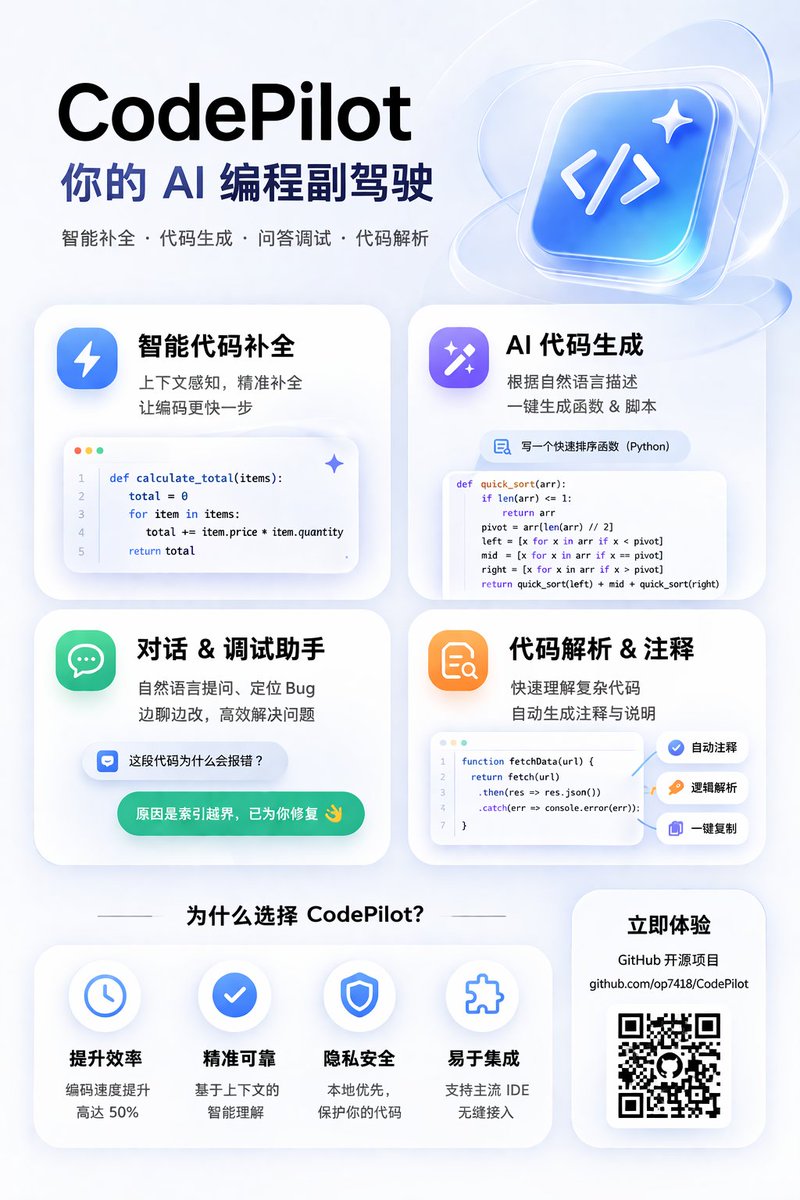
为一款 AI 编程工具生成现代感十足的磨砂玻璃风格宣传海报,包含一个 2x2 的功能卡片网格(展示代码片段)以及一个优势说明板块。
- Category
- Charts & Infographics
- Model
- GPT Image 2
- Creator
- 歸藏(guizang.ai)
- Source language
- en
- Source ID
- 13774
- Published
- Apr 16, 2026
Full prompt
{
  "type": "app promotional infographic poster",
  "style": "clean, modern, glassmorphism, soft shadows, 3D icons",
  "theme": "{argument name=\"primary color theme\" default=\"blue and white\"}",
  "header": {
    "title": "{argument name=\"app name\" default=\"CodePilot\"}",
    "subtitle": "{argument name=\"subtitle\" default=\"你的 AI 编程副驾驶\"}",
    "features_list": "智能补全 · 代码生成 · 问答调试 · 代码解析",
    "main_icon": "glossy 3D rounded square, blue gradient, white {argument name=\"main icon symbol\" default=\"</>\"} and sparkles"
  },
  "layout": {
    "sections": [
      {
        "title": "feature_cards",
        "position": "middle grid",
        "count": 4,
        "items": [
          {
            "label": "智能代码补全",
            "icon": "blue lightning bolt",
            "description": "上下文感知, 精准补全 让编码更快一步",
            "ui_element": "macOS style code window with Python calculate_total function"
          },
          {
            "label": "AI 代码生成",
            "icon": "purple magic wand",
            "description": "根据自然语言描述 一键生成函数 & 脚本",
            "ui_element": "chat prompt bubble and code window with Python quick_sort function"
          },
          {
            "label": "对话 & 调试助手",
            "icon": "green chat bubble",
            "description": "自然语言提问、定位 Bug 边聊边改, 高效解决问题",
            "ui_element": "chat interface with user question and green AI resolution bubble"
          },
          {
            "label": "代码解析 & 注释",
            "icon": "orange document with magnifying glass",
            "description": "快速理解复杂代码 自动生成注释与说明",
            "ui_element": "code window with JS fetchData function and 3 floating action tags: 自动注释, 逻辑解析, 一键复制"
          }
        ]
      },
      {
        "title": "为什么选择 CodePilot?",
        "position": "bottom left",
        "count": 4,
        "labels": ["提升效率", "精准可靠", "隐私安全", "易于集成"],
        "icons": ["clock", "checkmark", "shield", "puzzle piece"]
      },
      {
        "title": "立即体验",
        "position": "bottom right",
        "count": 1,
        "elements": ["GitHub 开源项目", "{argument name=\"github link\" default=\"github.com/op7418/CodePilot\"}", "QR code"]
      }
    ]
  }
}
Translations
AI 编程助手宣传信息图
en{ "type": "app promotional infographic poster", "style": "clean, modern, glassmorphism, soft shadows, 3D icons", "theme": "{argument name=\"primary color theme\" default=\"blue and white\"}", "header": { "title": "{argument name=\"app name\" default=\"CodePilot\"}", "subtitle": "{argument name=\"subtitle\" default=\"你的 AI 编程副驾驶\"}", "features_list": "智能补全 · 代码生成 · 问答调试 · 代码解析", "main_icon": "glossy 3D rounded square, blue gradient, white {argument name=\"main icon symbol\" default=\"</>\"} and sparkles" }, "layout": { "sections": [ { "title": "feature_cards", "position": "middle grid", "count": 4, "items": [ { "label": "智能代码补全", "icon": "blue lightning bolt", "description": "上下文感知, 精准补全 让编码更快一步", "ui_element": "macOS style code window with Python calculate_total function" }, { "label": "AI 代码生成", "icon": "purple magic wand", "description": "根据自然语言描述 一键生成函数 & 脚本", "ui_element": "chat prompt bubble and code window with Python quick_sort function" }, { "label": "对话 & 调试助手", "icon": "green chat bubble", "description": "自然语言提问、定位 Bug 边聊边改, 高效解决问题", "ui_element": "chat interface with user question and green AI resolution bubble" }, { "label": "代码解析 & 注释", "icon": "orange document with magnifying glass", "description": "快速理解复杂代码 自动生成注释与说明", "ui_element": "code window with JS fetchData function and 3 floating action tags: 自动注释, 逻辑解析, 一键复制" } ] }, { "title": "为什么选择 CodePilot?", "position": "bottom left", "count": 4, "labels": ["提升效率", "精准可靠", "隐私安全", "易于集成"], "icons": ["clock", "checkmark", "shield", "puzzle piece"] }, { "title": "立即体验", "position": "bottom right", "count": 1, "elements": ["GitHub 开源项目", "{argument name=\"github link\" default=\"github.com/op7418/CodePilot\"}", "QR code"] } ] } }
AI 编程助手宣传信息图
zh-CN{ "type": "应用宣传信息图海报", "style": "简洁、现代、磨砂玻璃风格、柔和阴影、3D 图标", "theme": "{argument name=\"primary color theme\" default=\"蓝白配色\"}", "header": { "title": "{argument name=\"app name\" default=\"CodePilot\"}", "subtitle": "{argument name=\"subtitle\" default=\"你的 AI 编程副驾驶\"}", "features_list": "智能补全 · 代码生成 · 问答调试 · 代码解析", "main_icon": "光泽感 3D 圆角正方形,蓝色渐变,白色 {argument name=\"main icon symbol\" default=\"</>\"} 及闪光效果" }, "layout": { "sections": [ { "title": "feature_cards", "position": "中间网格", "count": 4, "items": [ { "label": "智能代码补全", "icon": "蓝色闪电", "description": "上下文感知,精准补全,让编码快人一步", "ui_element": "macOS 风格代码窗口,展示 Python calculate_total 函数" }, { "label": "AI 代码生成", "icon": "紫色魔法棒", "description": "根据自然语言描述,一键生成函数与脚本", "ui_element": "聊天提示气泡和展示 Python quick_sort 函数的代码窗口" }, { "label": "对话 & 调试助手", "icon": "绿色聊天气泡", "description": "通过自然语言提问定位 Bug,边聊边改,高效解决问题", "ui_element": "包含用户提问和绿色 AI 解决方案气泡的聊天界面" }, { "label": "代码解析 & 注释", "icon": "带有放大镜的橙色文档", "description": "快速理解复杂代码,自动生成注释与说明", "ui_element": "展示 JS fetchData 函数的代码窗口,带有 3 个浮动操作标签:自动注释、逻辑解析、一键复制" } ] }, { "title": "为什么选择 CodePilot?", "position": "左下角", "count": 4, "labels": ["提升效率", "精准可靠", "隐私安全", "易于集成"], "icons": ["时钟", "对勾", "盾牌", "拼图块"] }, { "title": "立即体验", "position": "右下角", "count": 1, "elements": ["GitHub 开源项目", "{argument name=\"github link\" default=\"github.com/op7418/CodePilot\"}", "二维码"] } ] } }