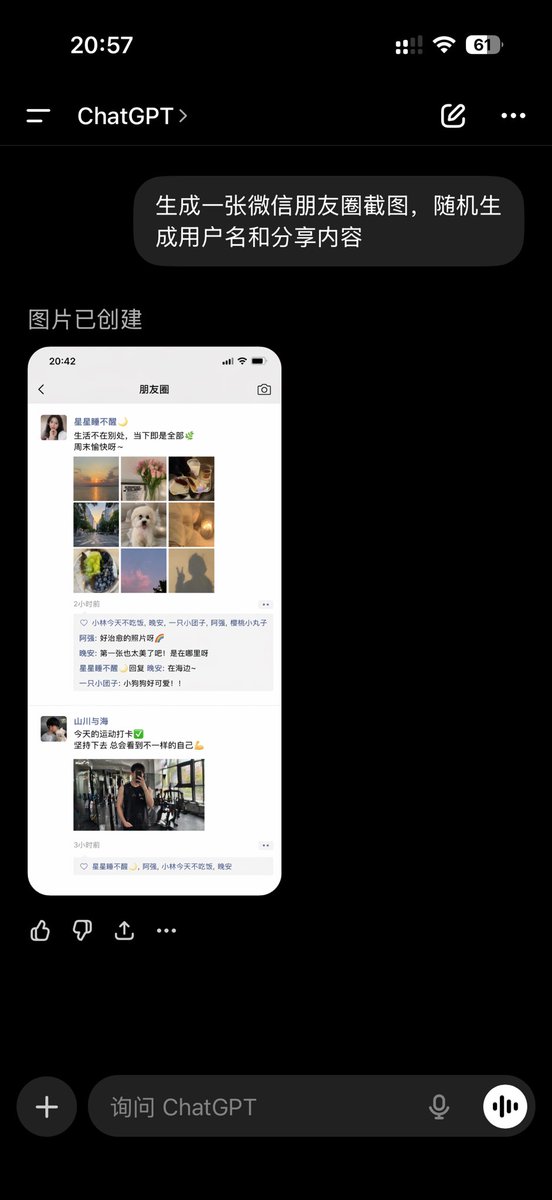
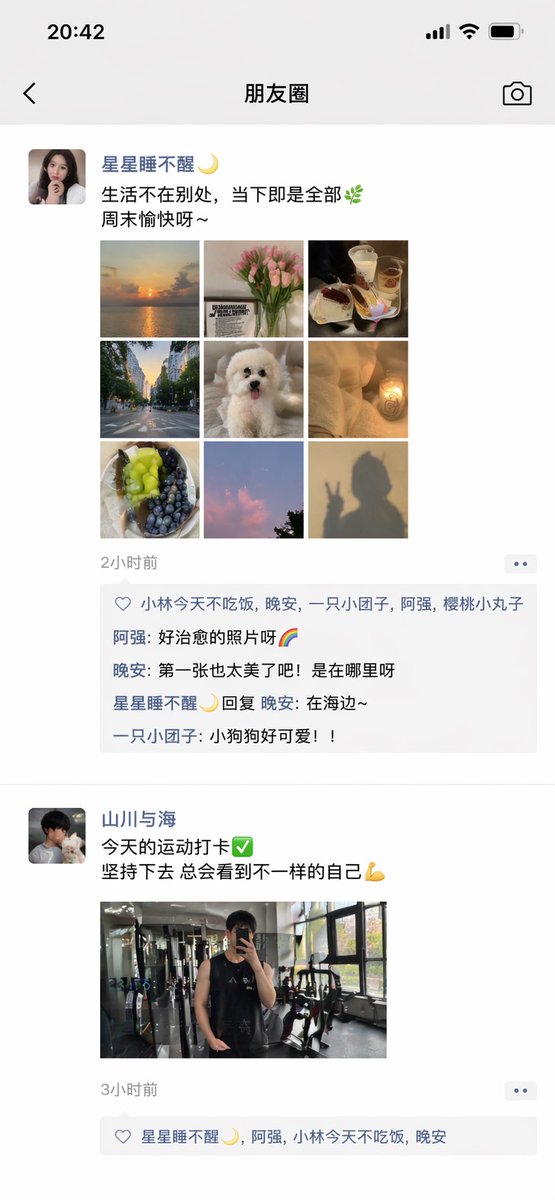
ChatGPT 应用展示微信朋友圈截图
一张逼真的中文 ChatGPT 移动端应用截图,展示了生成的微信朋友圈模拟界面,适用于社交媒体 UI 演示及 AI 图像生成展示。
- Category
- Charts & Infographics
- Model
- GPT Image 2
- Creator
- CY.Sean
- Source language
- en
- Source ID
- 14480
- Published
- Apr 21, 2026
Full prompt
A realistic dark-mode smartphone screenshot of the ChatGPT mobile app in Chinese, shown full screen on a black background with an iPhone-style status bar. The top status bar shows the time 20:57 on the left, small cellular signal, Wi‑Fi, and battery icons on the right, with the battery reading 61. Below it is the ChatGPT conversation header with a left menu icon, the title ChatGPT, a pencil/edit icon, and a three-dot menu icon. In the chat area, show 1 user message bubble in Chinese reading “生成一张微信朋友圈截图,随机生成用户名和分享内容”, displayed as a rounded dark gray bubble aligned to the right. Beneath it, show an assistant response area with the Chinese text “图片已创建”. Under that, display 1 generated image preview: a tall rounded-rectangle screenshot mockup of a WeChat Moments page on a white phone screen. Inside the generated image, include a top bar with the time 20:42 and the title “朋友圈”. Show 2 separate Moments posts. The first post has a female profile photo and the username “星星都不醒”, followed by a short Chinese caption about life and weekends, then a 3x3 collage containing exactly 9 square images: sunset over water, flowers, plated food, a tree-lined road, a white fluffy dog, a warm glowing lamp, green fruit or dessert, pink clouds or sky, and a silhouette shadow photo. Below it, include a timestamp line “2小时前”, a likes row with exactly 3 usernames, and a comments block with exactly 3 short Chinese comments. The second post has a male profile photo and the username “山川与海”, followed by a short fitness-themed Chinese caption with a green check emoji and flexed biceps emoji, then exactly 1 gym mirror selfie image, and a timestamp line “3小时前” with a likes row beneath. Outside the generated image preview but still within the ChatGPT app screenshot, show a horizontal row of 4 action icons below the image: thumbs up, thumbs down, share/export, and more. At the bottom of the screen, include the ChatGPT input bar in dark mode with a circular plus button on the left, placeholder text “询问 ChatGPT”, a microphone icon, and a round voice button on the right. Use authentic mobile UI proportions, crisp typography, realistic Chinese app interface details, and photorealistic screenshot rendering so it looks like a genuine capture of the ChatGPT app displaying an AI-generated WeChat Moments screenshot.
Translations
ChatGPT 应用展示微信朋友圈截图
enA realistic dark-mode smartphone screenshot of the ChatGPT mobile app in Chinese, shown full screen on a black background with an iPhone-style status bar. The top status bar shows the time 20:57 on the left, small cellular signal, Wi‑Fi, and battery icons on the right, with the battery reading 61. Below it is the ChatGPT conversation header with a left menu icon, the title ChatGPT, a pencil/edit icon, and a three-dot menu icon. In the chat area, show 1 user message bubble in Chinese reading “生成一张微信朋友圈截图,随机生成用户名和分享内容”, displayed as a rounded dark gray bubble aligned to the right. Beneath it, show an assistant response area with the Chinese text “图片已创建”. Under that, display 1 generated image preview: a tall rounded-rectangle screenshot mockup of a WeChat Moments page on a white phone screen. Inside the generated image, include a top bar with the time 20:42 and the title “朋友圈”. Show 2 separate Moments posts. The first post has a female profile photo and the username “星星都不醒”, followed by a short Chinese caption about life and weekends, then a 3x3 collage containing exactly 9 square images: sunset over water, flowers, plated food, a tree-lined road, a white fluffy dog, a warm glowing lamp, green fruit or dessert, pink clouds or sky, and a silhouette shadow photo. Below it, include a timestamp line “2小时前”, a likes row with exactly 3 usernames, and a comments block with exactly 3 short Chinese comments. The second post has a male profile photo and the username “山川与海”, followed by a short fitness-themed Chinese caption with a green check emoji and flexed biceps emoji, then exactly 1 gym mirror selfie image, and a timestamp line “3小时前” with a likes row beneath. Outside the generated image preview but still within the ChatGPT app screenshot, show a horizontal row of 4 action icons below the image: thumbs up, thumbs down, share/export, and more. At the bottom of the screen, include the ChatGPT input bar in dark mode with a circular plus button on the left, placeholder text “询问 ChatGPT”, a microphone icon, and a round voice button on the right. Use authentic mobile UI proportions, crisp typography, realistic Chinese app interface details, and photorealistic screenshot rendering so it looks like a genuine capture of the ChatGPT app displaying an AI-generated WeChat Moments screenshot.
ChatGPT 应用展示微信朋友圈截图
zh-CN一张逼真的 ChatGPT 移动端应用深色模式手机截图,在黑色背景下全屏显示,带有 iPhone 风格的状态栏。顶部状态栏左侧显示时间 20:57,右侧显示小型蜂窝信号、Wi-Fi 和电量图标,电量显示为 61%。下方是 ChatGPT 对话标题栏,包含左侧菜单图标、标题“ChatGPT”、编辑图标以及三点菜单图标。在聊天区域,显示 1 条用户气泡消息,内容为“生成一张微信朋友圈截图,随机生成用户名和分享内容”,以右对齐的深灰色圆角气泡显示。下方显示助手回复区域,文字为“图片已创建”。在该回复下方,显示 1 张生成的图像预览:一张白色手机屏幕上的微信朋友圈页面长条圆角截图。在生成的图像内部,顶部栏显示时间 20:42 和标题“朋友圈”。展示 2 条独立的朋友圈动态。第一条动态包含女性头像和用户名“星星都不醒”,后跟一段关于生活和周末的简短中文文案,接着是一个 3x3 的拼图,包含 9 张正方形图片:水面落日、花朵、精致餐点、林荫大道、白色毛绒小狗、暖光灯、绿色水果或甜点、粉色云朵或天空,以及一张剪影照片。下方包含时间戳“2小时前”、一行 3 个点赞用户名,以及一个包含 3 条简短中文评论的评论区。第二条动态包含男性头像和用户名“山川与海”,后跟一段健身主题的简短中文文案,带有绿色对勾表情和肱二头肌表情,接着是 1 张健身房镜面自拍,下方显示时间戳“3小时前”及一行点赞。在生成的图像预览之外、ChatGPT 应用截图之内,在图片下方显示一行 4 个操作图标:点赞、点踩、分享/导出和更多。在屏幕底部,包含深色模式的 ChatGPT 输入栏,左侧有一个圆形加号按钮,占位符文字为“询问 ChatGPT”,右侧有一个麦克风图标和一个圆形语音按钮。使用真实的移动端 UI 比例、清晰的排版、逼真的中文应用界面细节以及照片级渲染,使其看起来像是 ChatGPT 应用展示 AI 生成微信朋友圈截图的真实截屏。