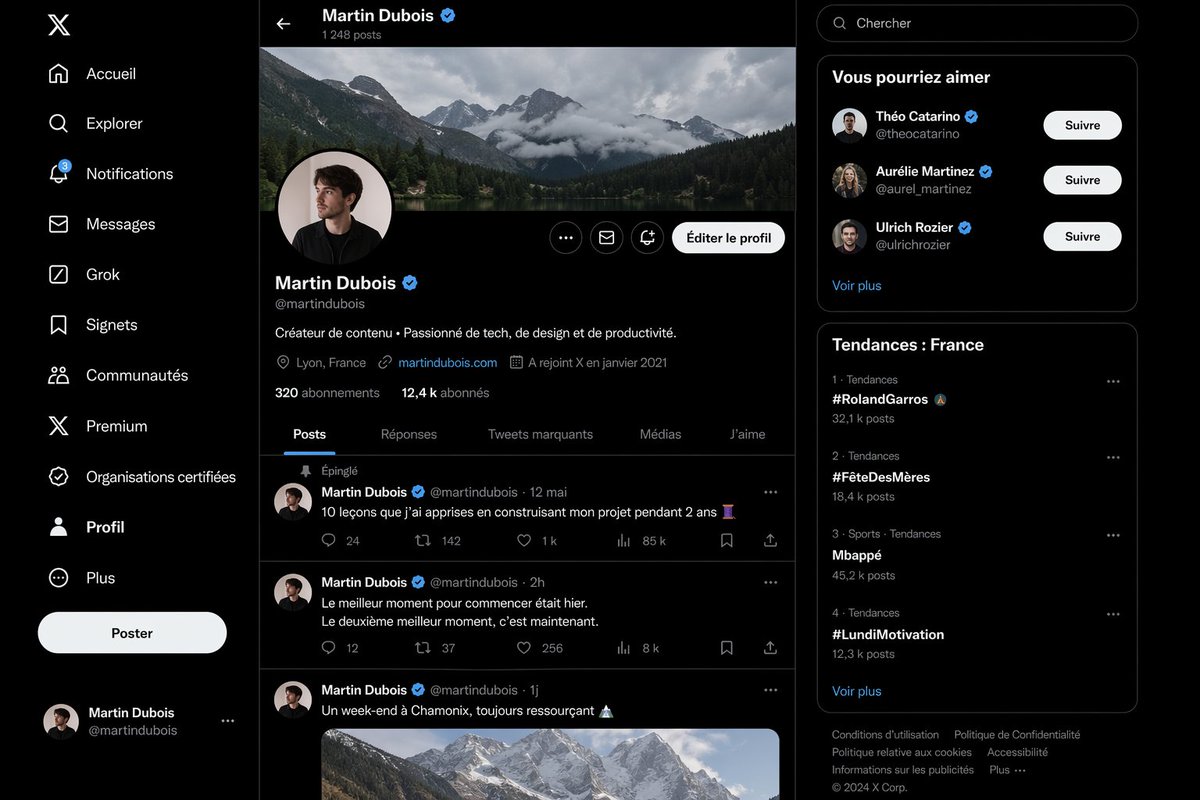
逼真的 X 个人资料页面模型
一个法语版的桌面端 X 风格个人资料界面,具有照片级真实感,适用于展示 AI 生成的社交媒体 UI 截图和产品对比演示。
- Category
- Charts & Infographics
- Model
- GPT Image 2
- Creator
- Firisis
- Source language
- en
- Source ID
- 14559
- Published
- Apr 21, 2026
Full prompt
Create a highly realistic dark-mode social media interface mockup that closely resembles the desktop X/Twitter layout in French, shown as a full-browser screenshot with three vertical columns on a black background and subtle dark gray separators. The left sidebar contains exactly 11 navigation items stacked vertically with white icons and labels: “Accueil”, “Explorer”, “Notifications” with a small blue badge showing 3, “Messages”, “Grok”, “Signets”, “Communautés”, “Premium”, “Organisations certifiées”, “Profil”, and “Plus”. At the top of this sidebar place the white X logo, near the lower-middle add a large rounded white button labeled “Poster”, and at the bottom show a compact logged-in account block for Martin Dubois with handle @martindubois and a small circular avatar. The center column is the main profile page for {argument name="profile name" default="Martin Dubois"}, with a top bar showing a back arrow, the name “Martin Dubois” and a blue verification badge, and underneath the text “1 248 posts”. Below that, include a wide panoramic cover photo of dramatic cloudy alpine mountains above a forest lake. Overlapping the bottom-left of the banner, place a circular profile picture of a young man in dark clothing, face slightly obscured or blurred, with a pale background and a thin border. On the right side of the profile header place three small circular action buttons and one prominent rounded light button labeled “Éditer le profil”. Under the avatar show the display name Martin Dubois with a blue verification badge, the handle @martindubois, and a one-line bio in French: “Créateur de contenu • Passionné de tech, de design et de productivité.” Then add a metadata row with exactly 4 items: location “Lyon, France”, website “martindubois.com”, and “A rejoint X en janvier 2021”, followed by a follower row reading “320 abonnements” and “12,4 k abonnés”. Add a horizontal tab bar with exactly 5 tabs: “Posts”, “Réponses”, “Tweets marquants”, “Médias”, and “J’aime”, with “Posts” active and underlined in blue. Beneath the tabs, show a feed containing exactly 3 visible posts by Martin Dubois. Post 1 is pinned, indicated by “Épinglé”, dated “12 mai”, with the French text “10 leçons que j’ai apprises en construisant mon projet pendant 2 ans” followed by an emoji, and an engagement row with 5 values: 24 replies, 142 reposts, 1 k likes, 85 k views, and a bookmark/share area. Post 2 is dated “2h” with the French text “Le meilleur moment pour commencer était hier. Le deuxième meilleur moment, c’est maintenant.” and engagement values 12 replies, 37 reposts, 256 likes, and 8 k views. Post 3 is dated “1j” with the French text “Un week-end à Chamonix, toujours ressourçant” followed by a mountain emoji, and includes a large embedded image of snowy mountain peaks under soft daylight. Use circular avatars at the left of each post and thin separators between posts. The right sidebar starts with a rounded search field containing the placeholder “Chercher”. Below it, include a card titled “Vous pourriez aimer” with exactly 3 suggested profiles, each with avatar, display name, handle, blue verification badge, and a white rounded “Suivre” button: “Théo Catarino” @theocatarino, “Aurélie Martinez” @aurel_martinez, and “Ulrich Rozier” @ulrichrozier. Add a “Voir plus” link at the bottom of that card. Under it, create a trends card titled “Tendances : France” listing exactly 4 trends in ranked order with category and post counts: 1. “#RolandGarros” with “32,1 k posts”, 2. “#FêteDesMères” with “18,4 k posts”, 3. “Mbappé” with “45,2 k posts”, 4. “#LundiMotivation” with “12,3 k posts”. Add a “Voir plus” link below the trend list. At the very bottom place a compact footer with multiple small gray legal links and “© 2024 X Corp.”. The entire image should look almost indistinguishable from a real desktop screenshot: crisp typography, authentic spacing, realistic UI proportions, subtle rounded cards, white and gray text on near-black surfaces, blue accent color, polished anti-aliased icons, and a clean modern product-design aesthetic.Translations
逼真的 X 个人资料页面模型
enCreate a highly realistic dark-mode social media interface mockup that closely resembles the desktop X/Twitter layout in French, shown as a full-browser screenshot with three vertical columns on a black background and subtle dark gray separators. The left sidebar contains exactly 11 navigation items stacked vertically with white icons and labels: “Accueil”, “Explorer”, “Notifications” with a small blue badge showing 3, “Messages”, “Grok”, “Signets”, “Communautés”, “Premium”, “Organisations certifiées”, “Profil”, and “Plus”. At the top of this sidebar place the white X logo, near the lower-middle add a large rounded white button labeled “Poster”, and at the bottom show a compact logged-in account block for Martin Dubois with handle @martindubois and a small circular avatar. The center column is the main profile page for {argument name="profile name" default="Martin Dubois"}, with a top bar showing a back arrow, the name “Martin Dubois” and a blue verification badge, and underneath the text “1 248 posts”. Below that, include a wide panoramic cover photo of dramatic cloudy alpine mountains above a forest lake. Overlapping the bottom-left of the banner, place a circular profile picture of a young man in dark clothing, face slightly obscured or blurred, with a pale background and a thin border. On the right side of the profile header place three small circular action buttons and one prominent rounded light button labeled “Éditer le profil”. Under the avatar show the display name Martin Dubois with a blue verification badge, the handle @martindubois, and a one-line bio in French: “Créateur de contenu • Passionné de tech, de design et de productivité.” Then add a metadata row with exactly 4 items: location “Lyon, France”, website “martindubois.com”, and “A rejoint X en janvier 2021”, followed by a follower row reading “320 abonnements” and “12,4 k abonnés”. Add a horizontal tab bar with exactly 5 tabs: “Posts”, “Réponses”, “Tweets marquants”, “Médias”, and “J’aime”, with “Posts” active and underlined in blue. Beneath the tabs, show a feed containing exactly 3 visible posts by Martin Dubois. Post 1 is pinned, indicated by “Épinglé”, dated “12 mai”, with the French text “10 leçons que j’ai apprises en construisant mon projet pendant 2 ans” followed by an emoji, and an engagement row with 5 values: 24 replies, 142 reposts, 1 k likes, 85 k views, and a bookmark/share area. Post 2 is dated “2h” with the French text “Le meilleur moment pour commencer était hier. Le deuxième meilleur moment, c’est maintenant.” and engagement values 12 replies, 37 reposts, 256 likes, and 8 k views. Post 3 is dated “1j” with the French text “Un week-end à Chamonix, toujours ressourçant” followed by a mountain emoji, and includes a large embedded image of snowy mountain peaks under soft daylight. Use circular avatars at the left of each post and thin separators between posts. The right sidebar starts with a rounded search field containing the placeholder “Chercher”. Below it, include a card titled “Vous pourriez aimer” with exactly 3 suggested profiles, each with avatar, display name, handle, blue verification badge, and a white rounded “Suivre” button: “Théo Catarino” @theocatarino, “Aurélie Martinez” @aurel_martinez, and “Ulrich Rozier” @ulrichrozier. Add a “Voir plus” link at the bottom of that card. Under it, create a trends card titled “Tendances : France” listing exactly 4 trends in ranked order with category and post counts: 1. “#RolandGarros” with “32,1 k posts”, 2. “#FêteDesMères” with “18,4 k posts”, 3. “Mbappé” with “45,2 k posts”, 4. “#LundiMotivation” with “12,3 k posts”. Add a “Voir plus” link below the trend list. At the very bottom place a compact footer with multiple small gray legal links and “© 2024 X Corp.”. The entire image should look almost indistinguishable from a real desktop screenshot: crisp typography, authentic spacing, realistic UI proportions, subtle rounded cards, white and gray text on near-black surfaces, blue accent color, polished anti-aliased icons, and a clean modern product-design aesthetic.
逼真的 X 个人资料页面模型
zh-CN创建一个高度逼真的深色模式社交媒体界面模型,外观需高度还原桌面端 X/Twitter 的法语布局,以全浏览器截图形式呈现,背景为黑色,配有细微的深灰色分隔线。左侧边栏包含 11 个垂直排列的导航项,配有白色图标和标签:“Accueil”(首页)、“Explorer”(探索)、“Notifications”(通知,带有一个显示数字 3 的蓝色小徽章)、“Messages”(消息)、“Grok”、“Signets”(书签)、“Communautés”(社区)、“Premium”、“Organisations certifiées”(认证组织)、“Profil”(个人资料)以及“Plus”(更多)。在此侧边栏顶部放置白色 X Logo,在偏下方位置添加一个大的圆形白色按钮,标签为“Poster”(发布),底部显示 Martin Dubois 的紧凑型登录账户栏,包含账号 @martindubois 和一个小圆形头像。中间栏为 {argument name="profile name" default="Martin Dubois"} 的主个人资料页面,顶部栏显示返回箭头、“Martin Dubois”名称及蓝色认证徽章,下方显示“1 248 posts”(1248 条帖子)。下方包含一张宽幅全景封面照片,展示阿尔卑斯山脉云雾缭绕的壮丽景色及森林湖泊。在横幅左下方重叠放置一张年轻男性的圆形头像,身着深色服装,面部略微模糊或遮挡,背景浅淡,带有细边框。在个人资料标题栏右侧放置三个小型圆形操作按钮和一个显眼的浅色圆角按钮,标签为“Éditer le profil”(编辑个人资料)。在头像下方显示显示名称 Martin Dubois 及蓝色认证徽章、账号 @martindubois,以及一行法语简介:“Créateur de contenu • Passionné de tech, de design et de productivité.”(内容创作者 • 热衷于科技、设计与生产力)。随后添加一行包含 4 个项目的元数据:地点“Lyon, France”(法国里昂)、网站“martindubois.com”以及“A rejoint X en janvier 2021”(于 2021 年 1 月加入 X),紧接着是关注者行,显示“320 abonnements”(320 个关注)和“12,4 k abonnés”(1.24 万粉丝)。添加一个包含 5 个标签的水平选项卡栏:“Posts”(帖子)、“Réponses”(回复)、“Tweets marquants”(精选推文)、“Médias”(媒体)和“J’aime”(喜欢),其中“Posts”处于激活状态并带有蓝色下划线。在选项卡下方,展示一个包含 3 条 Martin Dubois 可见帖子的信息流。第 1 条帖子为置顶,标注“Épinglé”(置顶),日期为“12 mai”(5 月 12 日),法语文本为“10 leçons que j’ai apprises en construisant mon projet pendant 2 ans”(我在构建项目 2 年中学到的 10 课)并附带表情符号,互动行包含 5 个数值:24 条回复、142 次转发、1 k 次喜欢、85 k 次浏览,以及书签/分享区域。第 2 条帖子日期为“2h”(2 小时前),法语文本为“Le meilleur moment pour commencer était hier. Le deuxième meilleur moment, c’est maintenant.”(开始的最佳时间是昨天。第二个最佳时间是现在。),互动数值为 12 条回复、37 次转发、256 次喜欢和 8 k 次浏览。第 3 条帖子日期为“1j”(1 天前),法语文本为“Un week-end à Chamonix, toujours ressourçant”(在霞慕尼度过的周末,总是令人恢复活力)并附带山脉表情符号,包含一张柔和日光下雪山峰顶的大型嵌入式图片。每条帖子左侧使用圆形头像,帖子之间使用细分隔线。右侧边栏顶部为一个圆角搜索框,占位符为“Chercher”(搜索)。下方包含一张标题为“Vous pourriez aimer”(你可能感兴趣)的卡片,列出 3 个建议关注的个人资料,每个包含头像、显示名称、账号、蓝色认证徽章和一个白色圆角“Suivre”(关注)按钮:“Théo Catarino” @theocatarino、“Aurélie Martinez” @aurel_martinez 和“Ulrich Rozier” @ulrichrozier。在该卡片底部添加“Voir plus”(查看更多)链接。下方创建一个标题为“Tendances : France”(趋势:法国)的趋势卡片,按排名列出 4 个趋势,包含类别和帖子数量:1. “#RolandGarros” 附带 “32,1 k posts”,2. “#FêteDesMères” 附带 “18,4 k posts”,3. “Mbappé” 附带 “45,2 k posts”,4. “#LundiMotivation” 附带 “12,3 k posts”。在趋势列表下方添加“Voir plus”(查看更多)链接。最底部放置一个紧凑的页脚,包含多个小型灰色法律链接和“© 2024 X Corp.”。整张图像应看起来与真实的桌面端截图几乎无异:清晰的排版、地道的间距、逼真的 UI 比例、细腻的圆角卡片、深色背景上的黑白文字、蓝色强调色、精致的抗锯齿图标,以及简洁现代的产品设计美学。