日本 AI 工具对比缩略图
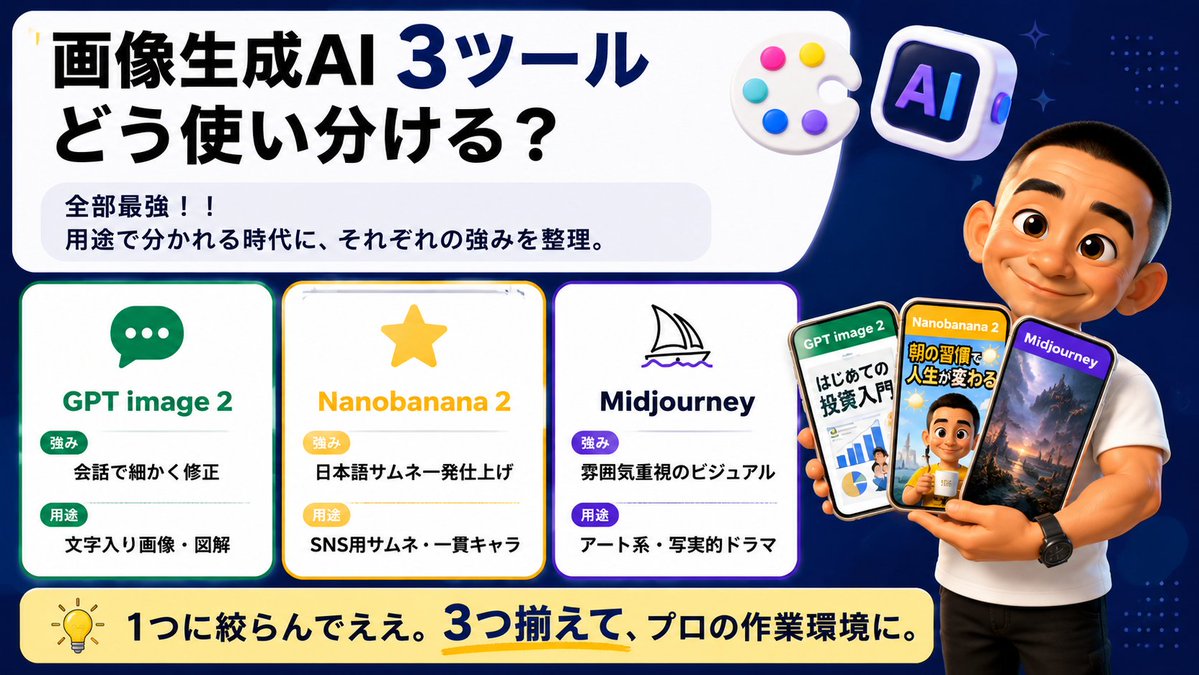
生成一张醒目的日本社交媒体缩略图,通过卡片、手机示例和演示者对比三款图像生成 AI 工具。
- Category
- Charts & Infographics
- Model
- GPT Image 2
- Creator
- Ai-BOW
- Source language
- en
- Source ID
- 21585
- Published
- May 19, 2026
Full prompt
Goal: Create a wide Japanese social-media comparison thumbnail about how to use three image-generation AI tools, with a clean tech infographic look and a presenter holding example phone screens.

Canvas: 16:9 horizontal banner, dark navy blue background with subtle dotted patterns and small sparkle accents. Use a large rounded white headline panel across the upper left and center, leaving the right side for the presenter. Bright, high-contrast, polished YouTube/X thumbnail style with crisp vector text, soft shadows, rounded cards, and glossy 3D icons.

Main headline area: In the large white rounded rectangle, place bold Japanese headline text: {argument name="headline text" default="画像生成AI 3ツール\nどう使い分ける?"}. Make “3ツール” extra large and dark blue, with the rest in heavy black. Under it, add a pale gray rounded sub-box containing two lines: “全部最強!!” and “用途で分かれる時代に、それぞれの強みを整理。”

Top decorative icons: Include exactly 2 floating 3D icons near the top right of the headline panel: 1 white artist palette with 5 colored paint dots, and 1 rounded square AI app icon with the letters “AI” in purple-blue neon.

Comparison section: Place exactly 3 rounded white tool cards aligned horizontally across the lower left/middle, each with a colored border, an icon, a title, and two labeled rows. Card 1 has a green border and chat bubble icon, title “GPT image 2”, label “強み” with text “会話で細かく修正”, label “用途” with text “文字入り画像・図解”. Card 2 has a yellow border and star icon, title “Nanobanana 2”, label “強み” with text “日本語サムネ一発仕上げ”, label “用途” with text “SNS用サムネ・一貫キャラ”. Card 3 has a purple border and simple sailboat line icon, title “Midjourney”, label “強み” with text “雰囲気重視のビジュアル”, label “用途” with text “アート系・写実的ドラマ”. Use green/yellow/purple pill badges for the labels and keep all Japanese text bold and readable.

Presenter and phones: On the right side, show a muscular casually dressed male presenter in a fitted white T-shirt and black pants, cropped from head to thighs, standing in front of the navy background. His face should be intentionally covered by a plain skin-tone rectangular blur/censor block. He holds exactly 3 smartphones fanned in his hand. Phone 1 is labeled “GPT image 2” and shows an investment beginner infographic with charts and Japanese text; phone 2 is labeled “Nanobanana 2” and shows a Japanese morning-routine thumbnail with a person and bold yellow text; phone 3 is labeled “Midjourney” and shows a cinematic fantasy landscape with mountains and dramatic lighting. The phones should overlap slightly and have glossy black bezels.

Bottom banner: Add a long rounded pale yellow banner across the bottom with a lightbulb icon on the left and bold Japanese text: {argument name="bottom message" default="1つに絞らんでええ。3つ揃えて、プロの作業環境に。"}. Emphasize “3つ揃えて” in dark blue with a yellow underline.

Visual style: Japanese creator thumbnail, modern infographic, clean rounded rectangles, thick bold typography, high readability, dark blue/white/yellow/green/purple palette, subtle glow around cards, professional but friendly. Avoid extra cards, extra phones, watermarks, or unreadable small text.
Translations
日本 AI 工具对比缩略图
enGoal: Create a wide Japanese social-media comparison thumbnail about how to use three image-generation AI tools, with a clean tech infographic look and a presenter holding example phone screens. Canvas: 16:9 horizontal banner, dark navy blue background with subtle dotted patterns and small sparkle accents. Use a large rounded white headline panel across the upper left and center, leaving the right side for the presenter. Bright, high-contrast, polished YouTube/X thumbnail style with crisp vector text, soft shadows, rounded cards, and glossy 3D icons. Main headline area: In the large white rounded rectangle, place bold Japanese headline text: {argument name="headline text" default="画像生成AI 3ツール\nどう使い分ける?"}. Make “3ツール” extra large and dark blue, with the rest in heavy black. Under it, add a pale gray rounded sub-box containing two lines: “全部最強!!” and “用途で分かれる時代に、それぞれの強みを整理。” Top decorative icons: Include exactly 2 floating 3D icons near the top right of the headline panel: 1 white artist palette with 5 colored paint dots, and 1 rounded square AI app icon with the letters “AI” in purple-blue neon. Comparison section: Place exactly 3 rounded white tool cards aligned horizontally across the lower left/middle, each with a colored border, an icon, a title, and two labeled rows. Card 1 has a green border and chat bubble icon, title “GPT image 2”, label “強み” with text “会話で細かく修正”, label “用途” with text “文字入り画像・図解”. Card 2 has a yellow border and star icon, title “Nanobanana 2”, label “強み” with text “日本語サムネ一発仕上げ”, label “用途” with text “SNS用サムネ・一貫キャラ”. Card 3 has a purple border and simple sailboat line icon, title “Midjourney”, label “強み” with text “雰囲気重視のビジュアル”, label “用途” with text “アート系・写実的ドラマ”. Use green/yellow/purple pill badges for the labels and keep all Japanese text bold and readable. Presenter and phones: On the right side, show a muscular casually dressed male presenter in a fitted white T-shirt and black pants, cropped from head to thighs, standing in front of the navy background. His face should be intentionally covered by a plain skin-tone rectangular blur/censor block. He holds exactly 3 smartphones fanned in his hand. Phone 1 is labeled “GPT image 2” and shows an investment beginner infographic with charts and Japanese text; phone 2 is labeled “Nanobanana 2” and shows a Japanese morning-routine thumbnail with a person and bold yellow text; phone 3 is labeled “Midjourney” and shows a cinematic fantasy landscape with mountains and dramatic lighting. The phones should overlap slightly and have glossy black bezels. Bottom banner: Add a long rounded pale yellow banner across the bottom with a lightbulb icon on the left and bold Japanese text: {argument name="bottom message" default="1つに絞らんでええ。3つ揃えて、プロの作業環境に。"}. Emphasize “3つ揃えて” in dark blue with a yellow underline. Visual style: Japanese creator thumbnail, modern infographic, clean rounded rectangles, thick bold typography, high readability, dark blue/white/yellow/green/purple palette, subtle glow around cards, professional but friendly. Avoid extra cards, extra phones, watermarks, or unreadable small text.
日本 AI 工具对比缩略图
zh-CN目标:制作一张宽幅的日本社交媒体对比缩略图,介绍如何使用三款图像生成 AI 工具,采用简洁的科技信息图风格,并包含一位手持手机示例屏幕的演示者。 画布:16:9 横向横幅,深海军蓝背景,带有微妙的圆点图案和细小的闪光点缀。在左上角和中心使用一个巨大的圆角白色标题面板,右侧留给演示者。明亮、高对比度、精致的 YouTube/X 缩略图风格,配有清晰的矢量文字、柔和的阴影、圆角卡片和光泽感的 3D 图标。 主标题区域:在巨大的白色圆角矩形中,放置醒目的日语标题文本:{argument name="headline text" default="画像生成AI 3ツール\nどう使い分ける?"}(图像生成 AI 3 款工具,如何区分使用?)。将“3ツール”放大并设为深蓝色,其余部分设为粗体黑色。在其下方,添加一个浅灰色圆角子框,包含两行文字:“全部最強!!”(全部最强!!)和“用途で分かれる時代に、それぞれの強みを整理。”(在按用途划分的时代,整理各自的优势。) 顶部装饰图标:在标题面板右上角附近包含 2 个浮动的 3D 图标:1 个带有 5 个彩色颜料点的白色调色板,以及 1 个带有紫色-蓝色霓虹灯“AI”字母的圆角方形 AI 应用图标。 对比部分:在左下/中部水平放置 3 张圆角白色工具卡片,每张卡片带有彩色边框、图标、标题和两行标签行。卡片 1 带有绿色边框和聊天气泡图标,标题为“GPT image 2”,标签“強み”(优势)对应文本“会話で細かく修正”(通过对话精细修改),标签“用途”对应文本“文字入り画像・図解”(带文字图像/图解)。卡片 2 带有黄色边框和星星图标,标题为“Nanobanana 2”,标签“強み”对应文本“日本語サムネ一発仕上げ”(日语缩略图一键完成),标签“用途”对应文本“SNS用サムネ・一貫キャラ”(SNS 缩略图/一致性角色)。卡片 3 带有紫色边框和简单的帆船线条图标,标题为“Midjourney”,标签“強み”对应文本“雰囲気重視のビジュアル”(注重氛围的视觉效果),标签“用途”对应文本“アート系・写実的ドラマ”(艺术系/写实戏剧)。标签使用绿色/黄色/紫色胶囊徽章,并保持所有日语文本粗体且易读。 演示者和手机:在右侧,展示一位穿着修身白色 T 恤和黑色长裤、休闲装扮的肌肉型男性演示者,从头部到大腿进行裁剪,站在海军蓝背景前。他的脸部应刻意用一个纯肤色的矩形模糊/遮挡块遮住。他手中扇形展开拿着 3 部智能手机。手机 1 标注为“GPT image 2”,显示一张带有图表和日语文本的投资入门信息图;手机 2 标注为“Nanobanana 2”,显示一张带有人物和醒目黄色文本的日语晨间例行缩略图;手机 3 标注为“Midjourney”,显示一张带有山脉和戏剧性光影的电影感奇幻风景图。手机应略微重叠,并带有光泽感的黑色边框。 底部横幅:在底部添加一个长圆角浅黄色横幅,左侧带有灯泡图标,并配有醒目的日语文本:{argument name="bottom message" default="1つに絞らんでええ。3つ揃えて、プロの作業環境に。"}(不必只选一个。集齐 3 个,打造专业工作环境。)。将“3つ揃えて”设为深蓝色并带有黄色下划线以示强调。 视觉风格:日本创作者缩略图、现代信息图、简洁的圆角矩形、粗体排版、高可读性、深蓝/白/黄/绿/紫配色、卡片周围有微妙的发光效果,专业且友好。避免使用多余的卡片、多余的手机、水印或难以阅读的小字。