Hermes Agent 手绘速记信息图
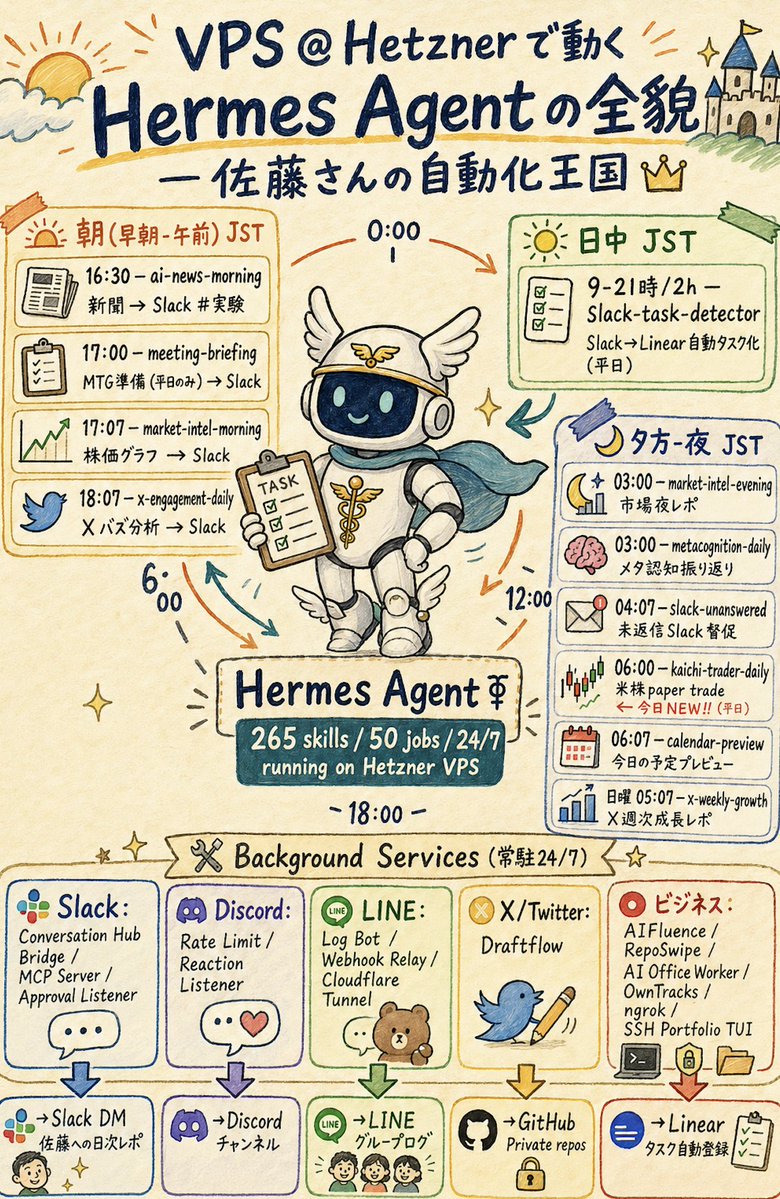
一张日式手绘风格的速记海报,直观展示了运行在 Hetzner VPS 上的 Hermes Agent、其每日定时任务以及后台服务。
- Category
- Charts & Infographics
- Model
- GPT Image 2
- Creator
- たかお @10人でユニコーンを証明する社長🦄
- Source language
- en
- Source ID
- 21595
- Published
- May 19, 2026
Full prompt
Goal: Create a vertical hand-drawn graphic recording infographic in Japanese about {argument name="main topic" default="VPS @ Hetznerで動く Hermes Agentの全貌"}, with a friendly automation-kingdom theme and a central mascot robot.

Canvas: Portrait 2:3 poster, warm cream paper background, watercolor marker texture, dark navy handwritten lettering, loose sketch lines, pastel accent colors, small sparkles, arrows, doodles, and imperfect hand-drawn boxes.

Header: At the very top, draw a sunrise/cloud doodle on the left and a small castle on a hill on the right. Large title text reads “VPS @ Hetznerで動く Hermes Agentの全貌”. Under it, add the subtitle “— 佐藤さんの自動化王国” with a small crown icon.

Central subject: In the middle, draw a cute Hermes-themed robot mascot wearing a winged helmet, headphones, white rounded armor, small wing decorations on boots, and a teal cape. The robot smiles through a dark glass face screen and holds a clipboard labeled “TASK”. Around it, place circular time arrows and labels “0:00”, “6:00”, “12:00”, and “18:00”. Beneath the robot, add a nameplate reading “Hermes Agent ⚚” and a dark teal stats plaque reading “265 skills / 50 jobs / 24/7 running on Hetzner VPS”.

Main schedule layout: Use exactly 3 large schedule panels around the mascot. Left panel is orange and titled “朝(早朝・午前)JST”; it contains exactly 4 task rows with icons: 1) newspaper icon, “16:30 — ai-news-morning / 新聞 → Slack #実験”; 2) clipboard icon, “17:00 — meeting-briefing / MTG準備(平日のみ)→ Slack”; 3) rising chart icon, “17:07 — market-intel-morning / 株価グラフ → Slack”; 4) blue bird icon, “18:07 — x-engagement-daily / X バズ分析 → Slack”. Upper right panel is green and titled “日中 JST”; it contains exactly 1 task card with checklist icon: “9–21時 / 2h — Slack-task-detector / Slack→Linear 自動タスク化(平日)”. Right panel is blue and titled “夕方・夜 JST”; it contains exactly 6 task rows with icons: 1) moon and chart, “03:00 — market-intel-evening / 市場夜レポ”; 2) pink brain, “03:00 — metacognition-daily / メタ認知振り返り”; 3) envelope alert, “04:07 — slack-unanswered / 未返信 Slack 督促”; 4) candlestick chart, “06:00 — kaichi-trader-daily / 米株 paper trade / ← 今日NEW!!(平日)”; 5) calendar, “06:07 — calendar-preview / 今日の予定プレビュー”; 6) bar chart, “日曜 05:07 — x-weekly-growth / X 週次成長レポ”.

Background services section: Across the lower third, add a ribbon title “Background Services(常駐24/7)” with a crossed-tools icon and stars. Below it, create exactly 5 vertical service cards, each with a logo-style icon, service list, down arrow, and destination box. Card 1: “Slack:” with multicolor Slack-like dots, services “Conversation Hub / Bridge / MCP Server / Approval Listener”, destination “→Slack DM / 佐藤への日次レポ” with a small face doodle. Card 2: “Discord:” with purple gamepad logo, services “Rate Limit / Reaction Listener”, destination “→Discord / チャンネル”. Card 3: “LINE:” with green LINE icon and small bear/family doodle, services “Log Bot / Webhook Relay / Cloudflare Tunnel”, destination “→LINE / グループログ”. Card 4: “X/Twitter:” with yellow X badge, blue bird holding a pencil, service “Draftflow”, destination “→GitHub / Private repos” with a lock icon. Card 5: “ビジネス:” with red target icon, services “AIFluence / RepoSwipe / AI Office Worker / OwnTracks / ngrok / SSH Portfolio TUI”, destination “→Linear / タスク自動登録” with checklist icon.

Visual style: Japanese sketchnote, analog marker and colored pencil, playful but information-dense, clean enough to read, charming imperfect typography, cream background, navy ink, orange/green/blue/purple/red outlined boxes, small decorative arrows and sparkles. Keep all visible text handwritten and preserve the Japanese/English mixed labels exactly where specified.

Constraints: Use exactly 3 main schedule panels, exactly 11 scheduled task rows total, exactly 5 background service cards, and exactly 5 destination boxes. Do not add extra brands, watermarks, QR codes, photorealism, or typed sans-serif UI styling.
Translations
Hermes Agent 手绘速记信息图
enGoal: Create a vertical hand-drawn graphic recording infographic in Japanese about {argument name="main topic" default="VPS @ Hetznerで動く Hermes Agentの全貌"}, with a friendly automation-kingdom theme and a central mascot robot. Canvas: Portrait 2:3 poster, warm cream paper background, watercolor marker texture, dark navy handwritten lettering, loose sketch lines, pastel accent colors, small sparkles, arrows, doodles, and imperfect hand-drawn boxes. Header: At the very top, draw a sunrise/cloud doodle on the left and a small castle on a hill on the right. Large title text reads “VPS @ Hetznerで動く Hermes Agentの全貌”. Under it, add the subtitle “— 佐藤さんの自動化王国” with a small crown icon. Central subject: In the middle, draw a cute Hermes-themed robot mascot wearing a winged helmet, headphones, white rounded armor, small wing decorations on boots, and a teal cape. The robot smiles through a dark glass face screen and holds a clipboard labeled “TASK”. Around it, place circular time arrows and labels “0:00”, “6:00”, “12:00”, and “18:00”. Beneath the robot, add a nameplate reading “Hermes Agent ⚚” and a dark teal stats plaque reading “265 skills / 50 jobs / 24/7 running on Hetzner VPS”. Main schedule layout: Use exactly 3 large schedule panels around the mascot. Left panel is orange and titled “朝(早朝・午前)JST”; it contains exactly 4 task rows with icons: 1) newspaper icon, “16:30 — ai-news-morning / 新聞 → Slack #実験”; 2) clipboard icon, “17:00 — meeting-briefing / MTG準備(平日のみ)→ Slack”; 3) rising chart icon, “17:07 — market-intel-morning / 株価グラフ → Slack”; 4) blue bird icon, “18:07 — x-engagement-daily / X バズ分析 → Slack”. Upper right panel is green and titled “日中 JST”; it contains exactly 1 task card with checklist icon: “9–21時 / 2h — Slack-task-detector / Slack→Linear 自動タスク化(平日)”. Right panel is blue and titled “夕方・夜 JST”; it contains exactly 6 task rows with icons: 1) moon and chart, “03:00 — market-intel-evening / 市場夜レポ”; 2) pink brain, “03:00 — metacognition-daily / メタ認知振り返り”; 3) envelope alert, “04:07 — slack-unanswered / 未返信 Slack 督促”; 4) candlestick chart, “06:00 — kaichi-trader-daily / 米株 paper trade / ← 今日NEW!!(平日)”; 5) calendar, “06:07 — calendar-preview / 今日の予定プレビュー”; 6) bar chart, “日曜 05:07 — x-weekly-growth / X 週次成長レポ”. Background services section: Across the lower third, add a ribbon title “Background Services(常駐24/7)” with a crossed-tools icon and stars. Below it, create exactly 5 vertical service cards, each with a logo-style icon, service list, down arrow, and destination box. Card 1: “Slack:” with multicolor Slack-like dots, services “Conversation Hub / Bridge / MCP Server / Approval Listener”, destination “→Slack DM / 佐藤への日次レポ” with a small face doodle. Card 2: “Discord:” with purple gamepad logo, services “Rate Limit / Reaction Listener”, destination “→Discord / チャンネル”. Card 3: “LINE:” with green LINE icon and small bear/family doodle, services “Log Bot / Webhook Relay / Cloudflare Tunnel”, destination “→LINE / グループログ”. Card 4: “X/Twitter:” with yellow X badge, blue bird holding a pencil, service “Draftflow”, destination “→GitHub / Private repos” with a lock icon. Card 5: “ビジネス:” with red target icon, services “AIFluence / RepoSwipe / AI Office Worker / OwnTracks / ngrok / SSH Portfolio TUI”, destination “→Linear / タスク自動登録” with checklist icon. Visual style: Japanese sketchnote, analog marker and colored pencil, playful but information-dense, clean enough to read, charming imperfect typography, cream background, navy ink, orange/green/blue/purple/red outlined boxes, small decorative arrows and sparkles. Keep all visible text handwritten and preserve the Japanese/English mixed labels exactly where specified. Constraints: Use exactly 3 main schedule panels, exactly 11 scheduled task rows total, exactly 5 background service cards, and exactly 5 destination boxes. Do not add extra brands, watermarks, QR codes, photorealism, or typed sans-serif UI styling.
Hermes Agent 手绘速记信息图
zh-CN目标:创作一张竖版手绘风格的日文信息图,主题为 {argument name="main topic" default="VPS @ Hetzner 上运行的 Hermes Agent 全貌"},采用友好的“自动化王国”主题,并以一个中心机器人作为吉祥物。 画布:2:3 比例竖版海报,暖色米色纸张背景,水彩马克笔质感,深蓝色手写字体,随性的草图线条,柔和的强调色,点缀小星星、箭头、涂鸦以及不规则的手绘方框。 页眉:在最上方,左侧绘制日出/云朵涂鸦,右侧绘制山丘上的小城堡。大标题文字为“VPS @ Hetzner 上运行的 Hermes Agent 全貌”。下方添加副标题“— 佐藤先生的自动化王国”,并配有一个小皇冠图标。 中心主体:在中间绘制一个可爱的 Hermes 主题机器人吉祥物,戴着带翅膀的头盔、耳机、白色圆润盔甲,靴子上有小翅膀装饰,披着青色斗篷。机器人通过深色玻璃面罩微笑,手中拿着写有“TASK”字样的剪贴板。周围放置环形时间箭头,并标注“0:00”、“6:00”、“12:00”和“18:00”。在机器人下方,添加一个写有“Hermes Agent ⚚”的铭牌,以及一个深青色的数据牌,上面写着“265 技能 / 50 个任务 / 24/7 运行于 Hetzner VPS”。 主要日程布局:在吉祥物周围使用 3 个大型日程面板。左侧面板为橙色,标题为“朝(早朝・午前)JST”;包含 4 行任务,每行配有图标:1) 报纸图标,“16:30 — ai-news-morning / 新闻 → Slack #实验”;2) 剪贴板图标,“17:00 — meeting-briefing / 会议准备(仅限工作日)→ Slack”;3) 上升趋势图图标,“17:07 — market-intel-morning / 股价图表 → Slack”;4) 蓝鸟图标,“18:07 — x-engagement-daily / X 热门分析 → Slack”。右上角面板为绿色,标题为“日中 JST”;包含 1 个带有复选框图标的任务卡片:“9–21 时 / 2 小时 — Slack-task-detector / Slack→Linear 自动任务化(工作日)”。右侧面板为蓝色,标题为“夕方・夜 JST”;包含 6 行任务,每行配有图标:1) 月亮与图表,“03:00 — market-intel-evening / 市场夜间报告”;2) 粉色大脑,“03:00 — metacognition-daily / 元认知回顾”;3) 信封提醒,“04:07 — slack-unanswered / 未回复 Slack 催办”;4) K 线图,“06:00 — kaichi-trader-daily / 美股模拟交易 / ← 今日新增!!(工作日)”;5) 日历,“06:07 — calendar-preview / 今日日程预览”;6) 条形图,“周日 05:07 — x-weekly-growth / X 周度增长报告”。 后台服务部分:在下三分之一处,添加一个丝带标题“Background Services(常驻 24/7)”,配有交叉工具图标和星星。在下方创建 5 个垂直服务卡片,每张卡片包含一个 Logo 风格图标、服务列表、向下箭头和目标框。卡片 1:“Slack:”配有多色 Slack 风格圆点,服务内容“Conversation Hub / Bridge / MCP Server / Approval Listener”,目标“→Slack DM / 给佐藤的日报”,配有一个小脸涂鸦。卡片 2:“Discord:”配有紫色游戏手柄 Logo,服务内容“Rate Limit / Reaction Listener”,目标“→Discord / 频道”。卡片 3:“LINE:”配有绿色 LINE 图标和小熊/家庭涂鸦,服务内容“Log Bot / Webhook Relay / Cloudflare Tunnel”,目标“→LINE / 群组日志”。卡片 4:“X/Twitter:”配有黄色 X 徽章,拿着铅笔的蓝鸟,服务内容“Draftflow”,目标“→GitHub / 私有仓库”,配有一个锁图标。卡片 5:“商务:”配有红色目标图标,服务内容“AIFluence / RepoSwipe / AI Office Worker / OwnTracks / ngrok / SSH Portfolio TUI”,目标“→Linear / 任务自动注册”,配有复选框图标。 视觉风格:日式速记风格,模拟马克笔和彩色铅笔质感,生动且信息密度高,清晰易读,具有迷人的不完美字体,米色背景,深蓝色墨水,橙/绿/蓝/紫/红色的轮廓框,装饰性的小箭头和星星。所有可见文字保持手写感,并严格保留指定的日文/英文混合标签。 约束条件:使用 3 个主要日程面板,总计 11 行定时任务,5 个后台服务卡片,以及 5 个目标框。不要添加额外的品牌、水印、二维码、照片级真实感或打字机风格的 UI 设计。