本地 Web 应用标注演示
生成一个逼真的 localhost Web 应用预览,展示用于在 Build Web Apps 工作流中请求 UI 调整的标注覆盖层。
- Category
- Charts & Infographics
- Model
- GPT Image 2
- Creator
- 马特Matt
- Source language
- en
- Source ID
- 22642
- Published
- May 25, 2026
Full prompt
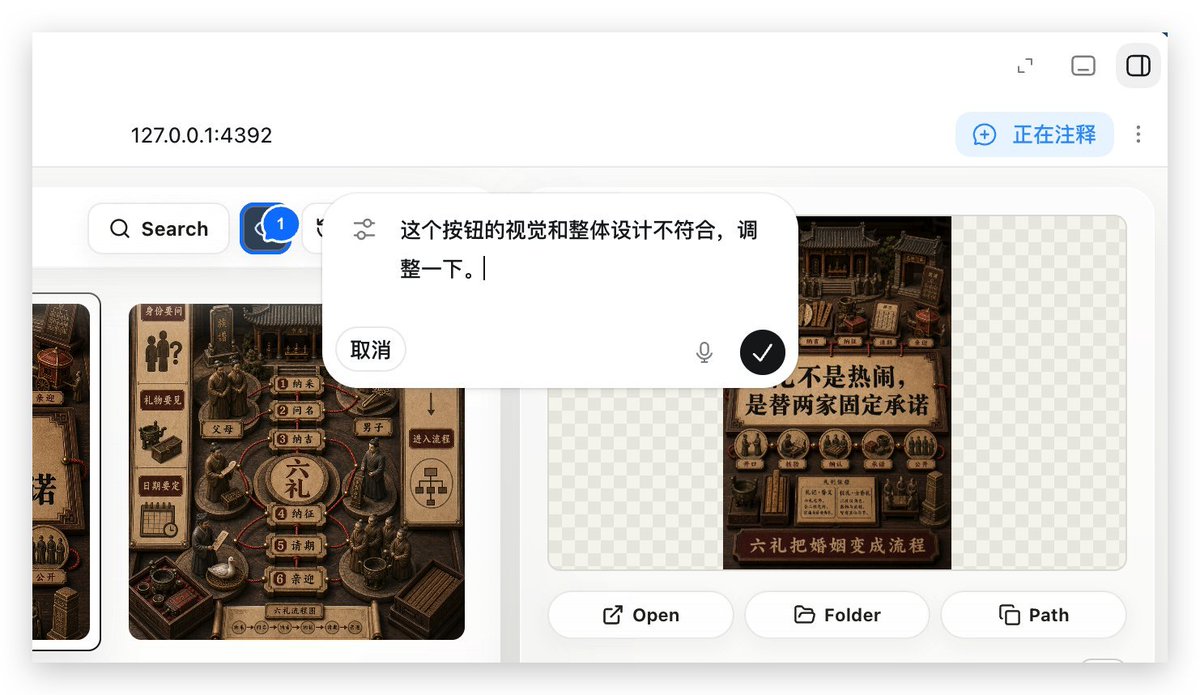
Using REFERENCE_0 as the context, create a follow-up screenshot that shows the selected “Build Web Apps” tool in action as a local web app preview. Replace the plugin list view with a browser-like localhost workspace at {argument name="local address" default="127.0.0.1:4392"}, clean white UI, soft shadows, and rounded panels.

Main change: show an app-building/annotation interface rather than the original plugin directory. Add a top bar with the local address on the left and exactly 3 small window/control icons on the right. Add a blue annotation status pill on the upper right with the text {argument name="annotation status" default="正在注释"} and a vertical three-dot menu beside it.

Content area: create a gallery-style UI with Chinese poster/card designs inside rounded white panels. Include a left toolbar row with a Search button and a blue comment/annotation button carrying a badge labeled “1”. Show at least two visible poster/card thumbnails, using dark brown traditional Chinese visual styling, while leaving some checkerboard transparent-placeholder areas in the right panel.

Overlay: place a large floating rounded annotation input bubble centered near the top-middle of the content. It should look like an inline AI comment editor, with a sliders/settings icon on the left, Chinese instruction text {argument name="comment text" default="这个按钮的视觉和整体设计不符合,调整一下。"}, a “取消” cancel button, a small microphone icon, and a black circular confirm button with a white checkmark.

Bottom of the right preview panel: add exactly 3 action buttons labeled “Open”, “Folder”, and “Path”, each with a simple line icon. Keep the screenshot realistic, like a product demo of using Build Web Apps plus built-in HTML annotation to request UI refinements.
Translations
本地 Web 应用标注演示
enUsing REFERENCE_0 as the context, create a follow-up screenshot that shows the selected “Build Web Apps” tool in action as a local web app preview. Replace the plugin list view with a browser-like localhost workspace at {argument name="local address" default="127.0.0.1:4392"}, clean white UI, soft shadows, and rounded panels. Main change: show an app-building/annotation interface rather than the original plugin directory. Add a top bar with the local address on the left and exactly 3 small window/control icons on the right. Add a blue annotation status pill on the upper right with the text {argument name="annotation status" default="正在注释"} and a vertical three-dot menu beside it. Content area: create a gallery-style UI with Chinese poster/card designs inside rounded white panels. Include a left toolbar row with a Search button and a blue comment/annotation button carrying a badge labeled “1”. Show at least two visible poster/card thumbnails, using dark brown traditional Chinese visual styling, while leaving some checkerboard transparent-placeholder areas in the right panel. Overlay: place a large floating rounded annotation input bubble centered near the top-middle of the content. It should look like an inline AI comment editor, with a sliders/settings icon on the left, Chinese instruction text {argument name="comment text" default="这个按钮的视觉和整体设计不符合,调整一下。"}, a “取消” cancel button, a small microphone icon, and a black circular confirm button with a white checkmark. Bottom of the right preview panel: add exactly 3 action buttons labeled “Open”, “Folder”, and “Path”, each with a simple line icon. Keep the screenshot realistic, like a product demo of using Build Web Apps plus built-in HTML annotation to request UI refinements.
本地 Web 应用标注演示
zh-CN以 REFERENCE_0 为上下文,创建一个后续截图,展示所选的“Build Web Apps”工具作为本地 Web 应用预览的运行效果。将插件列表视图替换为 {argument name="local address" default="127.0.0.1:4392"} 的浏览器风格 localhost 工作区,采用简洁的白色 UI、柔和阴影和圆角面板。 主要变化:展示一个应用构建/标注界面,而非原始的插件目录。添加一个顶部栏,左侧显示本地地址,右侧显示 3 个小型窗口/控制图标。在右上角添加一个蓝色的标注状态胶囊,文字为 {argument name="annotation status" default="正在注释"},旁边附带一个垂直的三点菜单。 内容区域:创建一个画廊风格的 UI,在圆角白色面板内展示中文海报/卡片设计。包含一个左侧工具栏行,带有搜索按钮和一个带有“1”标记的蓝色评论/标注按钮。至少显示两个可见的海报/卡片缩略图,采用深棕色中式传统视觉风格,同时在右侧面板保留一些棋盘格透明占位区域。 覆盖层:在内容区域中上部居中放置一个大型浮动圆角标注输入气泡。它应看起来像一个内嵌式 AI 评论编辑器,左侧带有滑块/设置图标,包含中文指令文本 {argument name="comment text" default="这个按钮的视觉和整体设计不符合,调整一下。"}、“取消”按钮、一个小麦克风图标,以及一个带有白色对勾的黑色圆形确认按钮。 右侧预览面板底部:添加 3 个操作按钮,分别标注为“Open”、“Folder”和“Path”,每个按钮配有一个简单的线条图标。保持截图的真实感,如同使用 Build Web Apps 结合内置 HTML 标注来请求 UI 优化的产品演示。