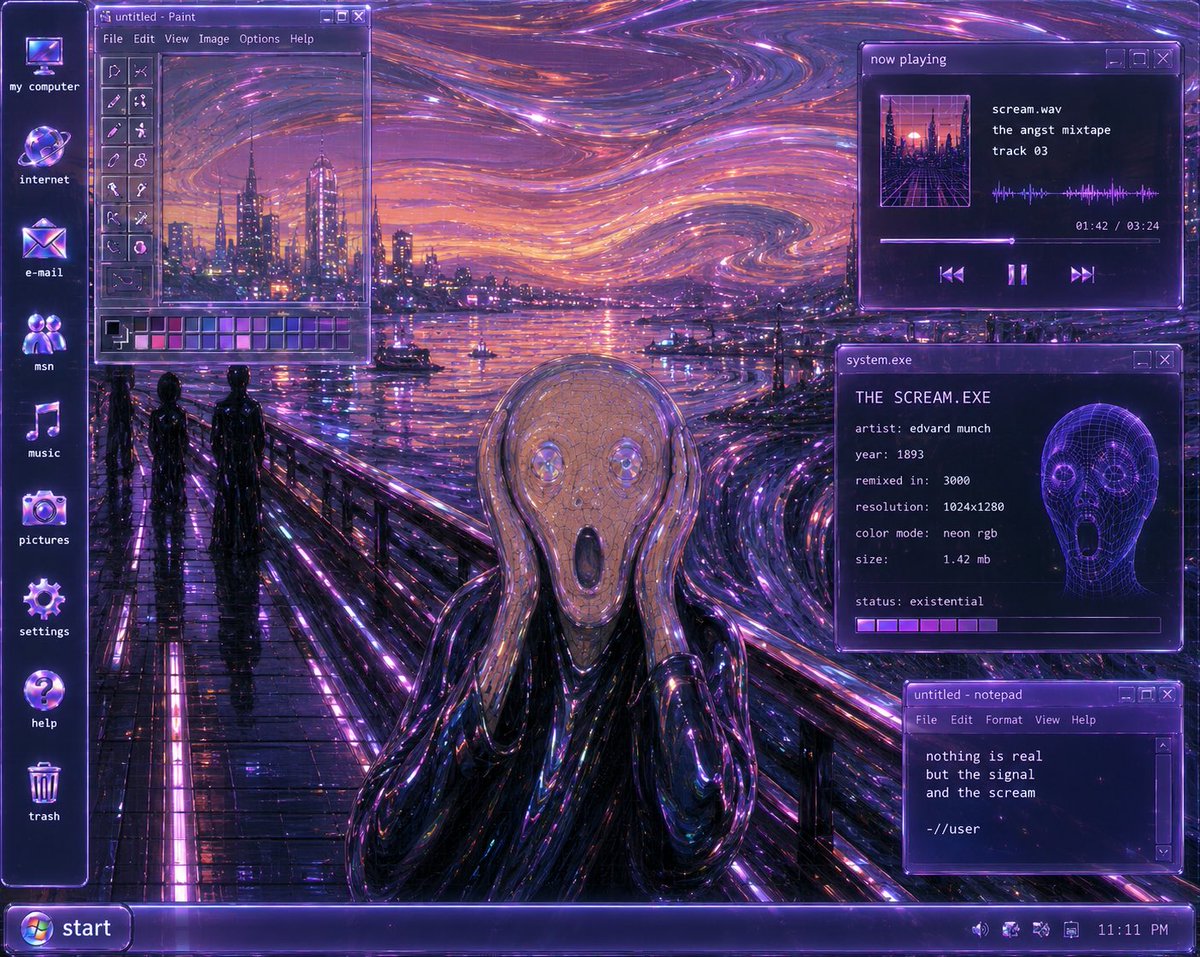
Y2K 未来主义《呐喊》桌面
生成一张霓虹 Windows XP 风格的《呐喊》桌面重制版,包含蒸汽波 UI 窗口、图标以及赛博朋克表现主义场景。
- Category
- Charts & Infographics
- Model
- GPT Image 2
- Creator
- Justin
- Source language
- en
- Source ID
- 23501
- Published
- May 31, 2026
Full prompt
Goal: Create a surreal Y2K-futurist Windows XP desktop remix of Edvard Munch’s The Scream, as if the painting is the actual computer wallpaper and the OS interface is floating on top.

Canvas: 4:3 desktop screenshot, 1024×768 feel, glossy late-1990s/early-2000s computer UI. Dominant palette is neon violet, ultraviolet, magenta, electric blue, black chrome, and orange sunset highlights. Everything should glow with CRT bloom, glassy transparency, scanline-like softness, and cyberpunk reflections.

Background wallpaper: Reimagine {argument name="painting subject" default="Edvard Munch’s The Scream"} as a futuristic neon harbor scene. The iconic bridge walkway runs from the lower left toward the center, wet and mirror-reflective with bright purple light strips. The sky is a swirling expressionist vortex of luminous purple, pink, orange, and blue strokes, like liquid fiber-optic trails. A futuristic city skyline rises across the water with glowing towers and reflections. Two dark human silhouettes stand on the bridge at left. In the lower center foreground, include the screaming figure in a glossy black chrome robe, hands raised to its face; the face area is covered by a flat muted mauve-gray rectangular block, like an intentional censor or missing image placeholder.

Desktop shell: Add a vertical icon column on the far left with exactly 8 desktop icons, each glowing purple-blue with small white lowercase labels: 1) my computer, 2) internet, 3) e-mail, 4) msn, 5) music, 6) pictures, 7) settings, 8) help, plus a trash can icon near the bottom labeled trash. Use chunky Y2K icon styling with glass orb effects.

Taskbar: Along the bottom, create a translucent purple Windows XP-style taskbar. On the far left is a rounded Start button with the Windows logo and the label {argument name="start button text" default="start"}. On the far right system tray, include tiny status icons and the clock reading {argument name="clock time" default="11:11 PM"}.

Open windows: Include exactly 4 floating translucent purple application windows with pixel fonts, beveled borders, and small minimize/maximize/close buttons.

Window 1, upper left: A Microsoft Paint-style window titled “untitled - Paint”. It has a menu bar reading “File  Edit  View  Image  Options  Help”, a vertical tool palette on the left, a small canvas showing a mini version of the neon harbor skyline and swirling sky, and a color palette strip along the bottom with many purple, pink, blue, and gray swatches.

Window 2, upper right: A music player window titled “now playing”. It shows square album art of a neon city grid, the track information: “scream.wav”, “the angst mixtape”, “track 03”. Add a waveform visualization, progress time “01:42 / 03:24”, a progress bar, and three playback controls: previous, pause, next.

Window 3, middle right: A system info window titled “system.exe”. Text inside should read: “THE SCREAM.EXE”, “artist: edvard munch”, “year: 1893”, “remixed in: 3000”, “resolution: 1024x1280”, “color mode: neon rgb”, “size: 1.42 mb”, “status: existential”. Include a glowing purple wireframe skull/head graphic on the right and a segmented loading bar along the bottom.

Window 4, lower right: A notepad window titled “untitled - notepad”. Menu bar reads “File  Edit  Format  View  Help”. Body text reads exactly: “nothing is real”, “but the signal”, “and the scream”, blank line, “-//user”.

Visual style: {argument name="style phrase" default="Y2K futurism, cyberpunk vaporwave, translucent Windows XP interface, neon expressionist oil-paint texture"}. Make the interface crisp enough to read, but integrate it with the painterly, swirling neon environment. Use intense glossy reflections, purple rim lighting, glass panels, pixelated UI typography, and nostalgic early-internet aesthetics.

Constraints: No modern flat design, no photorealistic people, no extra windows beyond the 4 specified, no extra desktop icons beyond the listed icons and trash, no watermark, preserve the legibility of all visible UI text.
Translations
Y2K 未来主义《呐喊》桌面
enGoal: Create a surreal Y2K-futurist Windows XP desktop remix of Edvard Munch’s The Scream, as if the painting is the actual computer wallpaper and the OS interface is floating on top. Canvas: 4:3 desktop screenshot, 1024×768 feel, glossy late-1990s/early-2000s computer UI. Dominant palette is neon violet, ultraviolet, magenta, electric blue, black chrome, and orange sunset highlights. Everything should glow with CRT bloom, glassy transparency, scanline-like softness, and cyberpunk reflections. Background wallpaper: Reimagine {argument name="painting subject" default="Edvard Munch’s The Scream"} as a futuristic neon harbor scene. The iconic bridge walkway runs from the lower left toward the center, wet and mirror-reflective with bright purple light strips. The sky is a swirling expressionist vortex of luminous purple, pink, orange, and blue strokes, like liquid fiber-optic trails. A futuristic city skyline rises across the water with glowing towers and reflections. Two dark human silhouettes stand on the bridge at left. In the lower center foreground, include the screaming figure in a glossy black chrome robe, hands raised to its face; the face area is covered by a flat muted mauve-gray rectangular block, like an intentional censor or missing image placeholder. Desktop shell: Add a vertical icon column on the far left with exactly 8 desktop icons, each glowing purple-blue with small white lowercase labels: 1) my computer, 2) internet, 3) e-mail, 4) msn, 5) music, 6) pictures, 7) settings, 8) help, plus a trash can icon near the bottom labeled trash. Use chunky Y2K icon styling with glass orb effects. Taskbar: Along the bottom, create a translucent purple Windows XP-style taskbar. On the far left is a rounded Start button with the Windows logo and the label {argument name="start button text" default="start"}. On the far right system tray, include tiny status icons and the clock reading {argument name="clock time" default="11:11 PM"}. Open windows: Include exactly 4 floating translucent purple application windows with pixel fonts, beveled borders, and small minimize/maximize/close buttons. Window 1, upper left: A Microsoft Paint-style window titled “untitled - Paint”. It has a menu bar reading “File Edit View Image Options Help”, a vertical tool palette on the left, a small canvas showing a mini version of the neon harbor skyline and swirling sky, and a color palette strip along the bottom with many purple, pink, blue, and gray swatches. Window 2, upper right: A music player window titled “now playing”. It shows square album art of a neon city grid, the track information: “scream.wav”, “the angst mixtape”, “track 03”. Add a waveform visualization, progress time “01:42 / 03:24”, a progress bar, and three playback controls: previous, pause, next. Window 3, middle right: A system info window titled “system.exe”. Text inside should read: “THE SCREAM.EXE”, “artist: edvard munch”, “year: 1893”, “remixed in: 3000”, “resolution: 1024x1280”, “color mode: neon rgb”, “size: 1.42 mb”, “status: existential”. Include a glowing purple wireframe skull/head graphic on the right and a segmented loading bar along the bottom. Window 4, lower right: A notepad window titled “untitled - notepad”. Menu bar reads “File Edit Format View Help”. Body text reads exactly: “nothing is real”, “but the signal”, “and the scream”, blank line, “-//user”. Visual style: {argument name="style phrase" default="Y2K futurism, cyberpunk vaporwave, translucent Windows XP interface, neon expressionist oil-paint texture"}. Make the interface crisp enough to read, but integrate it with the painterly, swirling neon environment. Use intense glossy reflections, purple rim lighting, glass panels, pixelated UI typography, and nostalgic early-internet aesthetics. Constraints: No modern flat design, no photorealistic people, no extra windows beyond the 4 specified, no extra desktop icons beyond the listed icons and trash, no watermark, preserve the legibility of all visible UI text.
Y2K 未来主义《呐喊》桌面
zh-CN目标:创作一张超现实的 Y2K 未来主义 Windows XP 桌面重制版,以爱德华·蒙克的《呐喊》为背景,仿佛画作本身就是电脑壁纸,而操作系统界面则悬浮于其上。 画布:4:3 桌面截图,1024×768 的质感,带有 20 世纪 90 年代末至 21 世纪初的亮面电脑 UI。主色调为霓虹紫、紫外光色、品红、电光蓝、黑铬色以及橙色落日高光。整体应呈现 CRT 显示器的光晕感、玻璃般的透明度、类似扫描线的柔和感以及赛博朋克风格的反射效果。 背景壁纸:将 {argument name="painting subject" default="爱德华·蒙克的《呐喊》"} 重构为一个未来主义的霓虹港口场景。标志性的桥梁步道从左下角延伸至中心,湿润且具有镜面反射效果,带有明亮的紫色灯带。天空是充满表现主义色彩的漩涡,由发光的紫色、粉色、橙色和蓝色笔触构成,如同液态光纤轨迹。未来主义的城市天际线在水面另一侧升起,伴有发光的塔楼和倒影。左侧桥上有两个深色的人影。在左下方的中心前景处,加入那个身穿亮面黑铬长袍的呐喊人物,双手捂脸;面部区域被一个平面的暗紫色-灰色矩形块遮盖,如同刻意的审查或缺失的图像占位符。 桌面外壳:在最左侧添加一列垂直图标,共 8 个桌面图标,每个图标都散发着紫蓝色光芒,并带有白色小写字母标签:1) my computer,2) internet,3) e-mail,4) msn,5) music,6) pictures,7) settings,8) help,底部附近还有一个标为 trash 的回收站图标。使用厚实的 Y2K 图标样式,并带有玻璃球效果。 任务栏:在底部创建一个半透明的紫色 Windows XP 风格任务栏。最左侧是一个圆角的“开始”按钮,带有 Windows 徽标和标签 {argument name="start button text" default="start"}。最右侧的系统托盘中,包含微小的状态图标和显示为 {argument name="clock time" default="11:11 PM"} 的时钟。 打开的窗口:包含 4 个悬浮的半透明紫色应用程序窗口,带有像素字体、斜面边框以及微小的最小化/最大化/关闭按钮。 窗口 1,左上角:一个 Microsoft Paint 风格的窗口,标题为“untitled - Paint”。菜单栏显示“File Edit View Image Options Help”,左侧有垂直工具栏,小画布上显示着霓虹港口天际线和漩涡天空的微缩版本,底部有一条包含多种紫色、粉色、蓝色和灰色色块的调色板。 窗口 2,右上角:一个音乐播放器窗口,标题为“now playing”。显示霓虹城市网格的方形专辑封面,曲目信息为:“scream.wav”、“the angst mixtape”、“track 03”。添加波形可视化效果、进度时间“01:42 / 03:24”、进度条以及三个播放控制按钮:上一曲、暂停、下一曲。 窗口 3,右侧中部:一个系统信息窗口,标题为“system.exe”。内部文本应显示:“THE SCREAM.EXE”、“artist: edvard munch”、“year: 1893”、“remixed in: 3000”、“resolution: 1024x1280”、“color mode: neon rgb”、“size: 1.42 mb”、“status: existential”。右侧包含一个发光的紫色线框骷髅/头部图形,底部有一个分段加载条。 窗口 4,右下角:一个记事本窗口,标题为“untitled - notepad”。菜单栏显示“File Edit Format View Help”。正文文本精确显示为:“nothing is real”、“but the signal”、“and the scream”、空行、“-//user”。 视觉风格:{argument name="style phrase" default="Y2K 未来主义,赛博朋克蒸汽波,半透明 Windows XP 界面,霓虹表现主义油画质感"}。使界面清晰易读,同时将其与绘画般的漩涡霓虹环境融为一体。使用强烈的亮面反射、紫色轮廓光、玻璃面板、像素化 UI 排版以及怀旧的早期互联网美学。 约束条件:禁止使用现代扁平化设计,禁止出现照片级真实的人物,除指定的 4 个窗口外不得有额外窗口,除列出的图标和回收站外不得有额外桌面图标,禁止添加水印,确保所有可见 UI 文本的可读性。