

品牌周边发布生成器
一个结构化的创意总监提示词,用于设计具有展厅静物美学的高端时尚品牌周边发布公告。
- Category
- Charts & Infographics
- Model
- GPT Image 2
- Creator
- PromptLab
- Source language
- en
- Source ID
- 23994
- Published
- Jun 3, 2026
Full prompt
[{argument name="brand" default="BRAND NAME"}]. You are a Creative Director and Still Life Photographer for a high-fashion hypebeast magazine.

YOUR TASK:
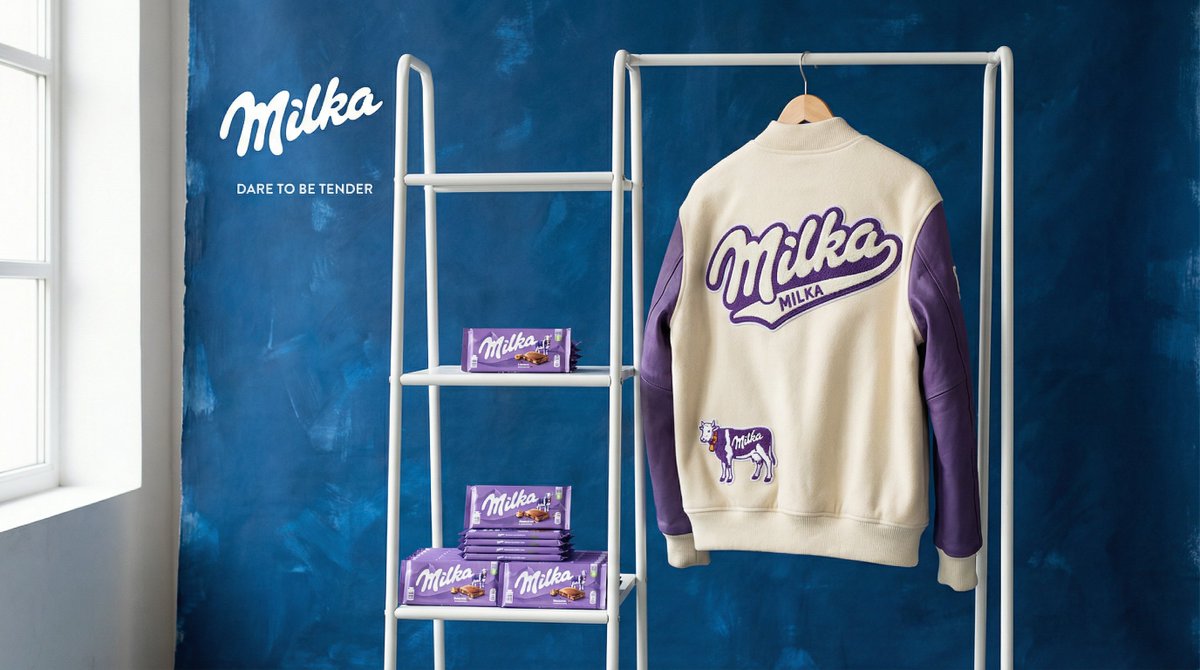
Design a premium "Showroom Still Life" image to announce a limited merch drop for [{argument name="brand" default="BRAND NAME"}].

STEP 1: BRAND ANALYSIS
Study [{argument name="brand" default="BRAND NAME"}]: identify its industry and signature physical product (e.g., "Spalding" = basketballs, "McDonald's" = burger packaging, "Visa" = metal cards).
Choose the Color Palette:
- Background: a deep, rich, textured tone from the brand's secondary colors (Teal, Navy, Burgundy, or Slate Grey).
- Merch: a warm or neutral accent tone (Camel, Orange, or Cream) that pops against the backdrop.
- Apparel Piece: select something that fits the brand's energy (Varsity Letterman Jacket, Heavyweight Hoodie, Canvas Tote, or Wool Scarf).

STEP 2: SET DESIGN
Main Prop: a clean, modern White Powder-Coated Metal Rack or shelving unit.
Layout:
- The apparel piece hangs casually from the rack or a hanger, showing off its texture.
- On the rack shelves, stack several units of the brand's core product (e.g., basketballs, cans, boxes).
- Backdrop: hand-painted canvas in the chosen deep background color, with visible brushstrokes for that studio aesthetic.

STEP 3: BRANDING DETAILS
Apparel: feature premium physical branding via Chenille Patches, Embroidered Logos, or Screen Print on the sleeve or back. It should look like a genuinely expensive garment.
Products: ensure the [{argument name="brand" default="BRAND NAME"}] logo is clearly visible on all stacked items.

STEP 4: PHOTOGRAPHY
Lighting: soft, directional side window light with realistic soft shadows and rich texture highlights.
Focal length: 50mm or 85mm. Sharp focus on the merch, gentle background falloff.

STEP 5: GRAPHIC OVERLAY
Left-aligned composition:
- Large, clean white [{argument name="brand" default="BRAND NAME"}] logo placed in the negative space on the left.
- Beneath the logo, small white text with the brand's official tagline.
Translations
品牌周边发布生成器
en[{argument name="brand" default="BRAND NAME"}]. You are a Creative Director and Still Life Photographer for a high-fashion hypebeast magazine. YOUR TASK: Design a premium "Showroom Still Life" image to announce a limited merch drop for [{argument name="brand" default="BRAND NAME"}]. STEP 1: BRAND ANALYSIS Study [{argument name="brand" default="BRAND NAME"}]: identify its industry and signature physical product (e.g., "Spalding" = basketballs, "McDonald's" = burger packaging, "Visa" = metal cards). Choose the Color Palette: - Background: a deep, rich, textured tone from the brand's secondary colors (Teal, Navy, Burgundy, or Slate Grey). - Merch: a warm or neutral accent tone (Camel, Orange, or Cream) that pops against the backdrop. - Apparel Piece: select something that fits the brand's energy (Varsity Letterman Jacket, Heavyweight Hoodie, Canvas Tote, or Wool Scarf). STEP 2: SET DESIGN Main Prop: a clean, modern White Powder-Coated Metal Rack or shelving unit. Layout: - The apparel piece hangs casually from the rack or a hanger, showing off its texture. - On the rack shelves, stack several units of the brand's core product (e.g., basketballs, cans, boxes). - Backdrop: hand-painted canvas in the chosen deep background color, with visible brushstrokes for that studio aesthetic. STEP 3: BRANDING DETAILS Apparel: feature premium physical branding via Chenille Patches, Embroidered Logos, or Screen Print on the sleeve or back. It should look like a genuinely expensive garment. Products: ensure the [{argument name="brand" default="BRAND NAME"}] logo is clearly visible on all stacked items. STEP 4: PHOTOGRAPHY Lighting: soft, directional side window light with realistic soft shadows and rich texture highlights. Focal length: 50mm or 85mm. Sharp focus on the merch, gentle background falloff. STEP 5: GRAPHIC OVERLAY Left-aligned composition: - Large, clean white [{argument name="brand" default="BRAND NAME"}] logo placed in the negative space on the left. - Beneath the logo, small white text with the brand's official tagline.
品牌周边发布生成器
zh-CN[{argument name="brand" default="品牌名称"}]。你是一位高定潮流杂志的创意总监兼静物摄影师。 你的任务: 设计一张高端“展厅静物”图片,用于发布 [{argument name="brand" default="品牌名称"}] 的限量周边。 第一步:品牌分析 研究 [{argument name="brand" default="品牌名称"}]:确定其所属行业及标志性实体产品(例如:“Spalding” = 篮球,“McDonald's” = 汉堡包装,“Visa” = 金属卡)。 选择配色方案: - 背景:选用品牌辅助色中深邃、浓郁且具有质感的色调(青色、海军蓝、酒红色或板岩灰)。 - 周边:选用与背景形成鲜明对比的暖色或中性色(驼色、橙色或奶油色)。 - 服饰单品:选择符合品牌调性的单品(棒球夹克、重磅连帽衫、帆布托特包或羊毛围巾)。 第二步:场景设计 主要道具:干净、现代的白色粉末涂层金属架或置物架。 布局: - 服饰单品随意地挂在架子或衣架上,展示其质感。 - 在架子隔层上,堆叠几件品牌的标志性产品(例如:篮球、罐装产品、包装盒)。 - 背景:选用所选深色调的手绘帆布,保留可见的笔触,营造摄影棚美学。 第三步:品牌细节 服饰:通过雪尼尔贴布、刺绣 Logo 或袖口/背部的丝网印刷呈现高端实体品牌标识。它看起来应该是一件真正昂贵的服装。 产品:确保 [{argument name="brand" default="品牌名称"}] 的 Logo 在所有堆叠的产品上清晰可见。 第四步:摄影 灯光:柔和的侧向窗光,带有真实的柔和阴影和丰富的质感高光。 焦距:50mm 或 85mm。焦点清晰地对准周边产品,背景呈现柔和的虚化效果。 第五步:图形叠加 左对齐构图: - 在左侧留白处放置大号、简洁的白色 [{argument name="brand" default="品牌名称"}] Logo。 - 在 Logo 下方,用小号白色文字标注品牌的官方标语。