Manus GPT Image 2.0 对比演示 Slides
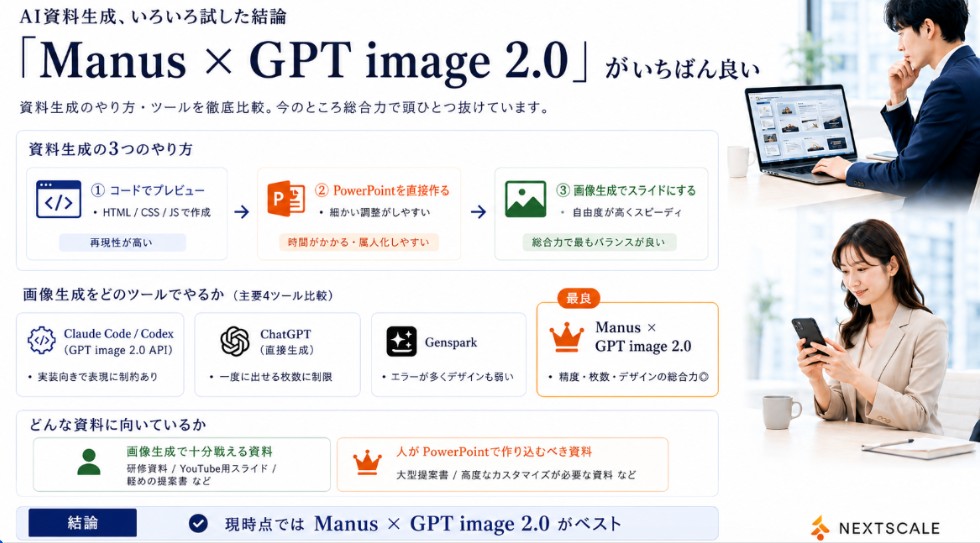
一张日式企业信息图表 Slides,对比了 AI 演示文稿生成方法与工具,非常适合社交媒体发布或演示文稿。
- Category
- Charts & Infographics
- Model
- GPT Image 2
- Creator
- 石丸真平 | AIの人《本当に仕事で使えるAIを発信》
- Source language
- en
- Source ID
- 24036
- Published
- Jun 3, 2026
Full prompt
Goal: Create a polished Japanese business infographic slide comparing AI presentation-material generation methods and tools, with a corporate white, navy, orange, and green palette. The main message is that Manus × GPT image 2.0 is currently the best overall option.

Canvas: Wide 16:9 landscape slide, clean white background, thin light-gray card borders, deep navy typography, subtle blue-gray shadows. Leave a right-side vertical photo strip occupying about 24% of the canvas.

Header: At top left, small Japanese lead-in text using {argument name="small header text" default="AI資料生成、いろいろ試した結論"}. Below it, a very large elegant serif headline using {argument name="main headline text" default="「Manus × GPT image 2.0」がいちばん良い"}. Under the headline, add a smaller subtitle using {argument name="subtitle text" default="資料生成のやり方・ツールを徹底比較。今のところ総合力で頭ひとつ抜けています。"}.

Right photo area: Add exactly 2 realistic business lifestyle photos stacked vertically with soft bright office lighting. Top photo: a Japanese businessman in a navy suit working at a laptop showing slide thumbnails, seated near a window, face softly blurred. Bottom photo: a Japanese businesswoman in a beige blazer looking at a smartphone at a desk, face softly blurred. Keep the photos cropped cleanly with white margins, matching the slide’s corporate look.

Section 1 layout: Create a large rounded rectangle card titled "資料生成の3つのやり方". Inside it place exactly 3 horizontal method cards connected by two right-pointing arrows. Method 1: blue code icon, label "① コードでプレビュー", small text "HTML / CSS / JSで作成", bottom pill "再現性が高い". Method 2: orange PowerPoint icon, label "② PowerPointを直接作る", small text "細かい調整がしやすい", bottom pill "時間がかかる・属人化しやすい". Method 3: green image icon, label "③ 画像生成でスライドにする", small text "自由度が高くスピーディ", bottom pill "総合力で最もバランスが良い".

Section 2 layout: Below, add a title "画像生成をどのツールでやるか(主要4ツール比較)" and exactly 4 equal comparison cards in a row. Card 1: Claude Code / Codex, gear/code icon, sublabel "(GPT image 2.0 API)", bullet "実装向きで表現に制約あり". Card 2: ChatGPT, OpenAI knot icon, sublabel "(直接生成)", bullet "一度に出せる枚数に制限". Card 3: Genspark, sparkle icon, bullet "エラーが多くデザインも弱い". Card 4: highlighted best card with orange border and crown icon, small orange badge "最良", title using {argument name="best tool name" default="Manus × GPT image 2.0"}, bullet "精度・枚数・デザインの総合力◎".

Section 3 layout: Add a rounded box titled "どんな資料に向いているか" with exactly 2 side-by-side suitability cards. Left card with green person icon: title "画像生成で十分戦える資料", examples "研修資料 / YouTube用スライド / 軽めの提案書 など". Right card with orange crown icon: title "人がPowerPointで作り込むべき資料", examples "大型提案書 / 高度なカスタマイズが必要な資料 など".

Bottom conclusion bar: Full-width light-blue conclusion strip with a navy label box reading "結論", a circular check icon, and large conclusion text using {argument name="conclusion text" default="現時点では Manus × GPT image 2.0 がベスト"}.

Branding: Bottom right place a small orange abstract mark and the word "NEXTSCALE" in dark gray. Keep all text crisp and aligned, use Japanese business-slide typography, avoid clutter, and do not add any extra cards beyond the counted 3 method cards, 4 tool cards, 2 suitability cards, and 2 photos.
Translations
Manus GPT Image 2.0 对比演示 Slides
enGoal: Create a polished Japanese business infographic slide comparing AI presentation-material generation methods and tools, with a corporate white, navy, orange, and green palette. The main message is that Manus × GPT image 2.0 is currently the best overall option. Canvas: Wide 16:9 landscape slide, clean white background, thin light-gray card borders, deep navy typography, subtle blue-gray shadows. Leave a right-side vertical photo strip occupying about 24% of the canvas. Header: At top left, small Japanese lead-in text using {argument name="small header text" default="AI資料生成、いろいろ試した結論"}. Below it, a very large elegant serif headline using {argument name="main headline text" default="「Manus × GPT image 2.0」がいちばん良い"}. Under the headline, add a smaller subtitle using {argument name="subtitle text" default="資料生成のやり方・ツールを徹底比較。今のところ総合力で頭ひとつ抜けています。"}. Right photo area: Add exactly 2 realistic business lifestyle photos stacked vertically with soft bright office lighting. Top photo: a Japanese businessman in a navy suit working at a laptop showing slide thumbnails, seated near a window, face softly blurred. Bottom photo: a Japanese businesswoman in a beige blazer looking at a smartphone at a desk, face softly blurred. Keep the photos cropped cleanly with white margins, matching the slide’s corporate look. Section 1 layout: Create a large rounded rectangle card titled "資料生成の3つのやり方". Inside it place exactly 3 horizontal method cards connected by two right-pointing arrows. Method 1: blue code icon, label "① コードでプレビュー", small text "HTML / CSS / JSで作成", bottom pill "再現性が高い". Method 2: orange PowerPoint icon, label "② PowerPointを直接作る", small text "細かい調整がしやすい", bottom pill "時間がかかる・属人化しやすい". Method 3: green image icon, label "③ 画像生成でスライドにする", small text "自由度が高くスピーディ", bottom pill "総合力で最もバランスが良い". Section 2 layout: Below, add a title "画像生成をどのツールでやるか(主要4ツール比較)" and exactly 4 equal comparison cards in a row. Card 1: Claude Code / Codex, gear/code icon, sublabel "(GPT image 2.0 API)", bullet "実装向きで表現に制約あり". Card 2: ChatGPT, OpenAI knot icon, sublabel "(直接生成)", bullet "一度に出せる枚数に制限". Card 3: Genspark, sparkle icon, bullet "エラーが多くデザインも弱い". Card 4: highlighted best card with orange border and crown icon, small orange badge "最良", title using {argument name="best tool name" default="Manus × GPT image 2.0"}, bullet "精度・枚数・デザインの総合力◎". Section 3 layout: Add a rounded box titled "どんな資料に向いているか" with exactly 2 side-by-side suitability cards. Left card with green person icon: title "画像生成で十分戦える資料", examples "研修資料 / YouTube用スライド / 軽めの提案書 など". Right card with orange crown icon: title "人がPowerPointで作り込むべき資料", examples "大型提案書 / 高度なカスタマイズが必要な資料 など". Bottom conclusion bar: Full-width light-blue conclusion strip with a navy label box reading "結論", a circular check icon, and large conclusion text using {argument name="conclusion text" default="現時点では Manus × GPT image 2.0 がベスト"}. Branding: Bottom right place a small orange abstract mark and the word "NEXTSCALE" in dark gray. Keep all text crisp and aligned, use Japanese business-slide typography, avoid clutter, and do not add any extra cards beyond the counted 3 method cards, 4 tool cards, 2 suitability cards, and 2 photos.
Manus GPT Image 2.0 对比演示 Slides
zh-CN目标:制作一张精美的日式商务信息图表 Slides,对比 AI 演示文稿生成方法与工具,采用企业白、深蓝、橙色和绿色的配色方案。核心信息是:Manus × GPT image 2.0 是目前综合表现最佳的方案。 画布:16:9 宽屏横向 Slides,简洁的白色背景,细浅灰色卡片边框,深蓝色字体,带有微妙的蓝灰色阴影。在画布右侧留出约 24% 的垂直照片区域。 页眉:左上角使用小号日文引导文字 {argument name="small header text" default="AI 资料生成,多方尝试后的结论"}。下方使用超大号优雅衬线标题 {argument name="main headline text" default="“Manus × GPT image 2.0” 是最佳选择"}。标题下方添加副标题 {argument name="subtitle text" default="深度对比资料生成方法与工具。目前在综合实力上遥遥领先。"}。 右侧照片区域:垂直堆叠 2 张写实的商务生活照,采用柔和明亮的办公室光线。上方照片:一名身穿深蓝色西装的日本商务男士坐在窗边使用笔记本电脑查看 Slides 缩略图,面部轻微模糊。下方照片:一名身穿米色西装的日本商务女士在办公桌前查看智能手机,面部轻微模糊。照片需保持整洁的裁剪和白色边距,以符合 Slides 的企业风格。 第 1 部分布局:创建一个名为“资料生成的 3 种方法”的大型圆角矩形卡片。内部放置 3 张水平排列的方法卡片,并由两个向右的箭头连接。方法 1:蓝色代码图标,标签“① 代码预览”,小字“通过 HTML / CSS / JS 创建”,底部胶囊标签“可复现性高”。方法 2:橙色 PowerPoint 图标,标签“② 直接制作 PowerPoint”,小字“易于精细调整”,底部胶囊标签“耗时且依赖个人技能”。方法 3:绿色图像图标,标签“③ 通过图像生成制作 Slides”,小字“自由度高且速度快”,底部胶囊标签“综合实力最均衡”。 第 2 部分布局:下方添加标题“图像生成工具选择(4 大主流工具对比)”,并排 4 张等大的对比卡片。卡片 1:Claude Code / Codex,齿轮/代码图标,子标签“(GPT image 2.0 API)”,要点“适合实现,表现力受限”。卡片 2:ChatGPT,OpenAI 结图标,子标签“(直接生成)”,要点“单次生成页数有限”。卡片 3:Genspark,火花图标,要点“错误较多,设计感较弱”。卡片 4:高亮显示的最佳卡片,带有橙色边框和皇冠图标,橙色小徽章“最良”,标题使用 {argument name="best tool name" default="Manus × GPT image 2.0"},要点“精度、页数、设计的综合实力 ◎”。 第 3 部分布局:添加一个名为“适用于哪些资料”的圆角框,内含 2 张并排的适用性卡片。左侧卡片(绿色人物图标):标题“适合使用图像生成制作的资料”,示例“培训资料 / YouTube 用 Slides / 简易提案书等”。右侧卡片(橙色皇冠图标):标题“适合人工使用 PowerPoint 精细制作的资料”,示例“大型提案书 / 需要高度定制化的资料等”。 底部结论栏:全宽浅蓝色结论条,包含一个深蓝色标签框,内写“结论”,配有圆形勾选图标,以及大号结论文字 {argument name="conclusion text" default="目前 Manus × GPT image 2.0 是最佳方案"}。 品牌标识:右下角放置一个小型橙色抽象标志和深灰色的“NEXTSCALE”字样。保持所有文字清晰对齐,使用日式商务 Slides 排版风格,避免杂乱,且不要添加超出规定数量(3 张方法卡片、4 张工具卡片、2 张适用性卡片和 2 张照片)的额外卡片。