柔和 3D 应用功能图标网格
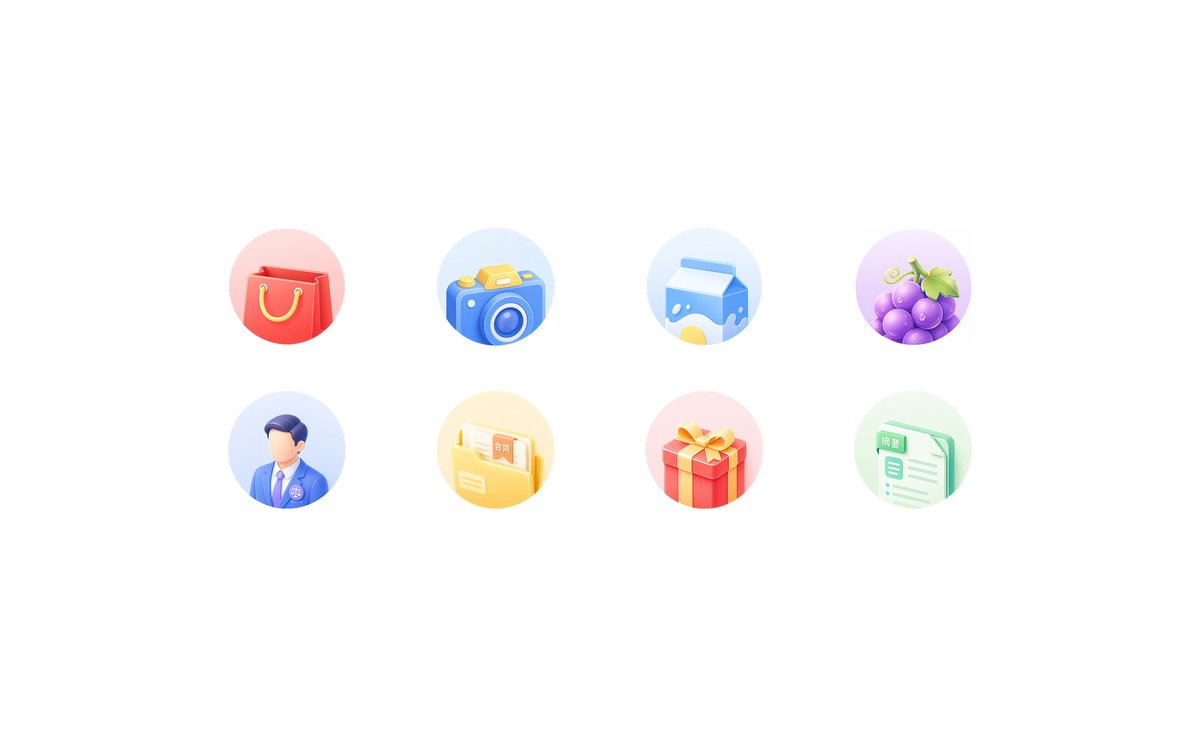
为移动端首页功能区生成一组由八个柔和拟态 3D 应用快捷图标组成的整洁两行网格。
- Category
- Charts & Infographics
- Model
- GPT Image 2
- Creator
- 🍙fan
- Source language
- en
- Source ID
- 24168
- Published
- Jun 4, 2026
Full prompt
Goal: Create a clean light-neumorphic app shortcut icon set on a white background, suitable for a mobile app feature grid or homepage “king kong area”.

Canvas: Wide horizontal canvas, approximately 16:9, pure white background with generous empty margins. Center the icon group horizontally and vertically with lots of whitespace.

Layout: Arrange exactly 8 circular feature icons in a 4-column by 2-row grid. Use even spacing, with each icon inside a soft pastel circular disc about the same size. No titles under the icons.

Icon style: Soft 3D clay/neumorphic rendering, rounded edges, glossy highlights, subtle ambient occlusion, gentle shadows, pastel gradients, miniature toy-like objects, clean commercial UI style. Each circular background should be a faint pastel gradient matching the icon color. Use high-key lighting from the upper left, no harsh outlines, no dark background.

Icon count and subjects, left to right:
1. Red shopping bag with yellow rope handles on a pale pink circle.
2. Blue camera with yellow shutter button and circular lens on a pale blue circle.
3. Blue-and-white milk carton with a yellow splash graphic on a pale blue circle.
4. Purple grapes with green leaves and tendril on a pale lavender circle.
5. Faceless male professional avatar wearing a blue suit, white shirt, purple tie, and small circular badge on a pale blue circle.
6. Yellow document folder containing papers, one paper visibly labeled 「合同」, on a pale yellow circle.
7. Red gift box with yellow ribbon and bow on a pale pink circle.
8. Mint-green document sheet with checklist lines, a tab visibly labeled 「摘要」, on a pale green circle.

Customization: The icon set should represent {argument name="app category" default="general lifestyle and services"}; keep the visible Chinese labels exactly as {argument name="folder label" default="合同"} and {argument name="document label" default="摘要"} if text is included.

Constraints: Generate only the 8 icons described above, no extra icons, no captions, no watermark, no frame, no mockup device, no people beyond the single faceless avatar icon, and preserve the airy white composition.
Translations
柔和 3D 应用功能图标网格
enGoal: Create a clean light-neumorphic app shortcut icon set on a white background, suitable for a mobile app feature grid or homepage “king kong area”. Canvas: Wide horizontal canvas, approximately 16:9, pure white background with generous empty margins. Center the icon group horizontally and vertically with lots of whitespace. Layout: Arrange exactly 8 circular feature icons in a 4-column by 2-row grid. Use even spacing, with each icon inside a soft pastel circular disc about the same size. No titles under the icons. Icon style: Soft 3D clay/neumorphic rendering, rounded edges, glossy highlights, subtle ambient occlusion, gentle shadows, pastel gradients, miniature toy-like objects, clean commercial UI style. Each circular background should be a faint pastel gradient matching the icon color. Use high-key lighting from the upper left, no harsh outlines, no dark background. Icon count and subjects, left to right: 1. Red shopping bag with yellow rope handles on a pale pink circle. 2. Blue camera with yellow shutter button and circular lens on a pale blue circle. 3. Blue-and-white milk carton with a yellow splash graphic on a pale blue circle. 4. Purple grapes with green leaves and tendril on a pale lavender circle. 5. Faceless male professional avatar wearing a blue suit, white shirt, purple tie, and small circular badge on a pale blue circle. 6. Yellow document folder containing papers, one paper visibly labeled 「合同」, on a pale yellow circle. 7. Red gift box with yellow ribbon and bow on a pale pink circle. 8. Mint-green document sheet with checklist lines, a tab visibly labeled 「摘要」, on a pale green circle. Customization: The icon set should represent {argument name="app category" default="general lifestyle and services"}; keep the visible Chinese labels exactly as {argument name="folder label" default="合同"} and {argument name="document label" default="摘要"} if text is included. Constraints: Generate only the 8 icons described above, no extra icons, no captions, no watermark, no frame, no mockup device, no people beyond the single faceless avatar icon, and preserve the airy white composition.
柔和 3D 应用功能图标网格
zh-CN目标:在白色背景上创建一组整洁的轻拟态应用快捷图标,适用于移动应用功能网格或首页“金刚区”。 画布:宽横向画布,比例约为 16:9,纯白色背景,留有充足的空白边距。将图标组在水平和垂直方向上居中,并保留大量留白。 布局:将 8 个圆形功能图标排列成 4 列 2 行的网格。间距均匀,每个图标位于大小相近的柔和粉彩色圆形底盘内。图标下方不加标题。 图标风格:柔和的 3D 粘土/拟态渲染,圆角边缘,光泽高光,细腻的环境光遮蔽,柔和的阴影,粉彩色渐变,微型玩具般的物体,简洁的商业 UI 风格。每个圆形背景应为与图标颜色相匹配的淡粉彩色渐变。使用来自左上角的高调照明,无生硬轮廓,无深色背景。 图标数量及主体(从左至右): 1. 带有黄色绳柄的红色购物袋,置于淡粉色圆圈上。 2. 带有黄色快门按钮和圆形镜头的蓝色相机,置于淡蓝色圆圈上。 3. 带有黄色飞溅图形的蓝白牛奶盒,置于淡蓝色圆圈上。 4. 带有绿叶和卷须的紫色葡萄,置于淡薰衣草色圆圈上。 5. 身着蓝色西装、白衬衫、紫色领带并佩戴小圆形徽章的无面男性职业头像,置于淡蓝色圆圈上。 6. 装着文件的黄色文件夹,其中一份文件上清晰标注“合同”字样,置于淡黄色圆圈上。 7. 带有黄色丝带和蝴蝶结的红色礼盒,置于淡粉色圆圈上。 8. 带有清单线条的薄荷绿文档页,标签上清晰标注“摘要”字样,置于淡绿色圆圈上。 自定义:图标集应代表 {argument name="app category" default="通用生活与服务"};如果包含文字,请务必将可见的中文字符保持为 {argument name="folder label" default="合同"} 和 {argument name="document label" default="摘要"}。 约束:仅生成上述 8 个图标,不添加额外图标、标题、水印、边框或样机设备,除单个无面头像图标外不包含人物,并保持通透的白色构图。