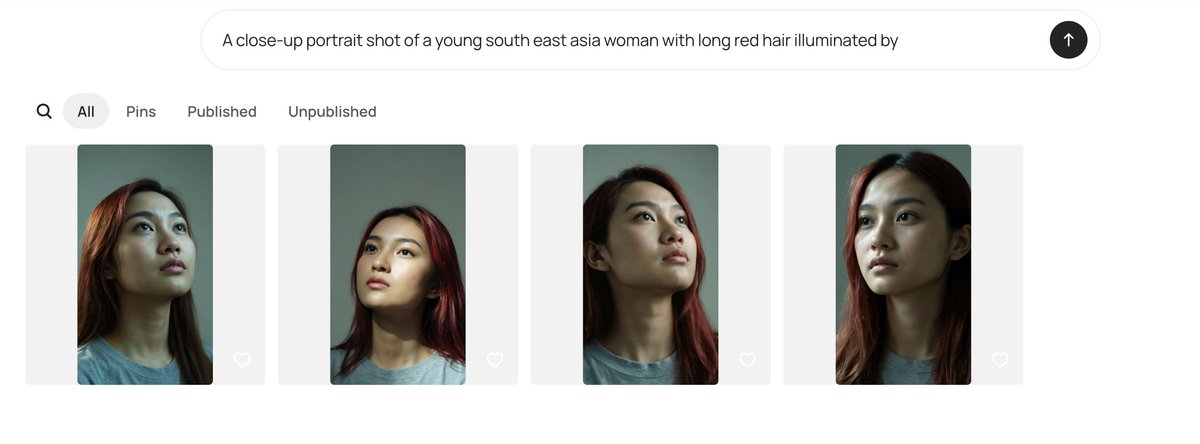
AI 画廊人像 UI 截图
一个用于生成极简 AI 图像画廊截图的结构化提示词,包含四个带有模糊处理的人像缩略图及一个提示词输入栏。
- Category
- Charts & Infographics
- Model
- GPT Image 2
- Creator
- λL-D1 | AI for Buzzer 🍉
- Source language
- en
- Source ID
- 24205
- Published
- Jun 4, 2026
Full prompt
Goal: Create a clean desktop web app screenshot showing an AI image generation gallery interface for comparing portrait outputs.

Canvas: Wide horizontal browser-like screenshot, approximately 1200×410 px, white background with generous margins, minimal modern UI.

Top input area: Centered rounded prompt bar near the top, light gray outline, containing the exact prompt text: “A close-up portrait shot of a young south east asia woman with long red hair illuminated by”. At the far right inside the bar is a black circular submit button with a white upward arrow.

Navigation row: Beneath the prompt bar, aligned left, show exactly 5 navigation elements: 1 magnifying-glass search icon, 2 selected pill tab labeled “All”, 3 text tab labeled “Pins”, 4 text tab labeled “Published”, 5 text tab labeled “Unpublished”. Use dark gray text, with the selected “All” tab in a light gray rounded pill.

Gallery layout: Show exactly 4 image cards in one horizontal row, evenly spaced. Each card is a pale gray rounded rectangle background with a vertical portrait thumbnail centered inside it and a small white outline heart icon near the lower-right corner of the card.

Portrait thumbnails: Each thumbnail depicts a close-up portrait of {argument name="subject description" default="a young Southeast Asian woman"} with {argument name="hair color" default="long red hair"}, wearing a plain gray T-shirt, photographed from the shoulders up against a muted green-gray background. The lighting is moody and directional, with realistic skin texture, dark shadows under the chin and neck, and warm reddish highlights in the hair. The face in each thumbnail is obscured by a soft rectangular blur censor block in muted beige-gray tones.

Count and variation of the 4 portraits: 1 left card shows the woman slightly angled with hair falling over the left side and the head cropped near the top; 2 second card shows a straighter centered head-and-shoulders crop with red hair framing both sides; 3 third card shows the chin lifted and neck elongated, face turned slightly upward with red hair visible on the right; 4 fourth card shows the closest crop, head high in frame, red hair along both sides, with the darkest face blur rectangle.

Visual style: Minimal white UI, soft shadows or very subtle borders, rounded corners, neutral gray typography, realistic generated portrait thumbnails. Keep the interface uncluttered and preserve the exact visible text labels. Do not add logos, watermarks, extra buttons, or additional gallery items.
Translations
AI 画廊人像 UI 截图
enGoal: Create a clean desktop web app screenshot showing an AI image generation gallery interface for comparing portrait outputs. Canvas: Wide horizontal browser-like screenshot, approximately 1200×410 px, white background with generous margins, minimal modern UI. Top input area: Centered rounded prompt bar near the top, light gray outline, containing the exact prompt text: “A close-up portrait shot of a young south east asia woman with long red hair illuminated by”. At the far right inside the bar is a black circular submit button with a white upward arrow. Navigation row: Beneath the prompt bar, aligned left, show exactly 5 navigation elements: 1 magnifying-glass search icon, 2 selected pill tab labeled “All”, 3 text tab labeled “Pins”, 4 text tab labeled “Published”, 5 text tab labeled “Unpublished”. Use dark gray text, with the selected “All” tab in a light gray rounded pill. Gallery layout: Show exactly 4 image cards in one horizontal row, evenly spaced. Each card is a pale gray rounded rectangle background with a vertical portrait thumbnail centered inside it and a small white outline heart icon near the lower-right corner of the card. Portrait thumbnails: Each thumbnail depicts a close-up portrait of {argument name="subject description" default="a young Southeast Asian woman"} with {argument name="hair color" default="long red hair"}, wearing a plain gray T-shirt, photographed from the shoulders up against a muted green-gray background. The lighting is moody and directional, with realistic skin texture, dark shadows under the chin and neck, and warm reddish highlights in the hair. The face in each thumbnail is obscured by a soft rectangular blur censor block in muted beige-gray tones. Count and variation of the 4 portraits: 1 left card shows the woman slightly angled with hair falling over the left side and the head cropped near the top; 2 second card shows a straighter centered head-and-shoulders crop with red hair framing both sides; 3 third card shows the chin lifted and neck elongated, face turned slightly upward with red hair visible on the right; 4 fourth card shows the closest crop, head high in frame, red hair along both sides, with the darkest face blur rectangle. Visual style: Minimal white UI, soft shadows or very subtle borders, rounded corners, neutral gray typography, realistic generated portrait thumbnails. Keep the interface uncluttered and preserve the exact visible text labels. Do not add logos, watermarks, extra buttons, or additional gallery items.
AI 画廊人像 UI 截图
zh-CN目标:创建一个简洁的桌面端 Web 应用截图,展示用于对比人像输出的 AI 图像生成画廊界面。 画布:宽幅水平浏览器风格截图,尺寸约为 1200×410 像素,白色背景,留白充裕,采用极简现代 UI。 顶部输入区:顶部中央设有一个圆角提示词输入栏,带有浅灰色轮廓,内含确切的提示词文本:“A close-up portrait shot of a young south east asia woman with long red hair illuminated by”。输入栏最右侧是一个带有白色向上箭头的黑色圆形提交按钮。 导航栏:在输入栏下方左对齐显示 5 个导航元素:1 个放大镜搜索图标,2 个标记为“All”的选中状态胶囊标签,3 个标记为“Pins”的文本标签,4 个标记为“Published”的文本标签,5 个标记为“Unpublished”的文本标签。使用深灰色文本,选中的“All”标签采用浅灰色圆角胶囊背景。 画廊布局:在同一水平行中显示 4 张均匀分布的图像卡片。每张卡片均为浅灰色圆角矩形背景,中心放置一个垂直人像缩略图,卡片右下角附近有一个白色轮廓的心形图标。 人像缩略图:每个缩略图都描绘了 {argument name="subject description" default="一位年轻的东南亚女性"} 的特写人像,留着 {argument name="hair color" default="长红发"},身穿素色灰色 T 恤,从肩部以上拍摄,背景为柔和的灰绿色。光影效果具有情绪感和方向性,呈现真实的皮肤纹理,下巴和颈部有深色阴影,头发带有温暖的红光高光。每个缩略图中的面部均被一个柔和的矩形模糊遮罩覆盖,呈现出柔和的米灰色调。 4 张人像的构图与变化:1 左侧卡片显示女性略微倾斜,头发垂在左侧,头部在顶部附近被裁剪;2 第二张卡片显示更直的居中头部和肩部裁剪,红发环绕两侧;3 第三张卡片显示下巴抬起,颈部拉长,面部略微向上转动,右侧可见红发;4 第四张卡片显示最近的裁剪,头部在画面中位置较高,两侧有红发,面部模糊矩形颜色最深。 视觉风格:极简白色 UI,柔和阴影或极其细微的边框,圆角设计,中性灰色排版,逼真的 AI 生成人像缩略图。保持界面整洁,并保留所有可见的文本标签。请勿添加任何 Logo、水印、额外按钮或其他画廊项目。