日语 AI 键盘应用海报
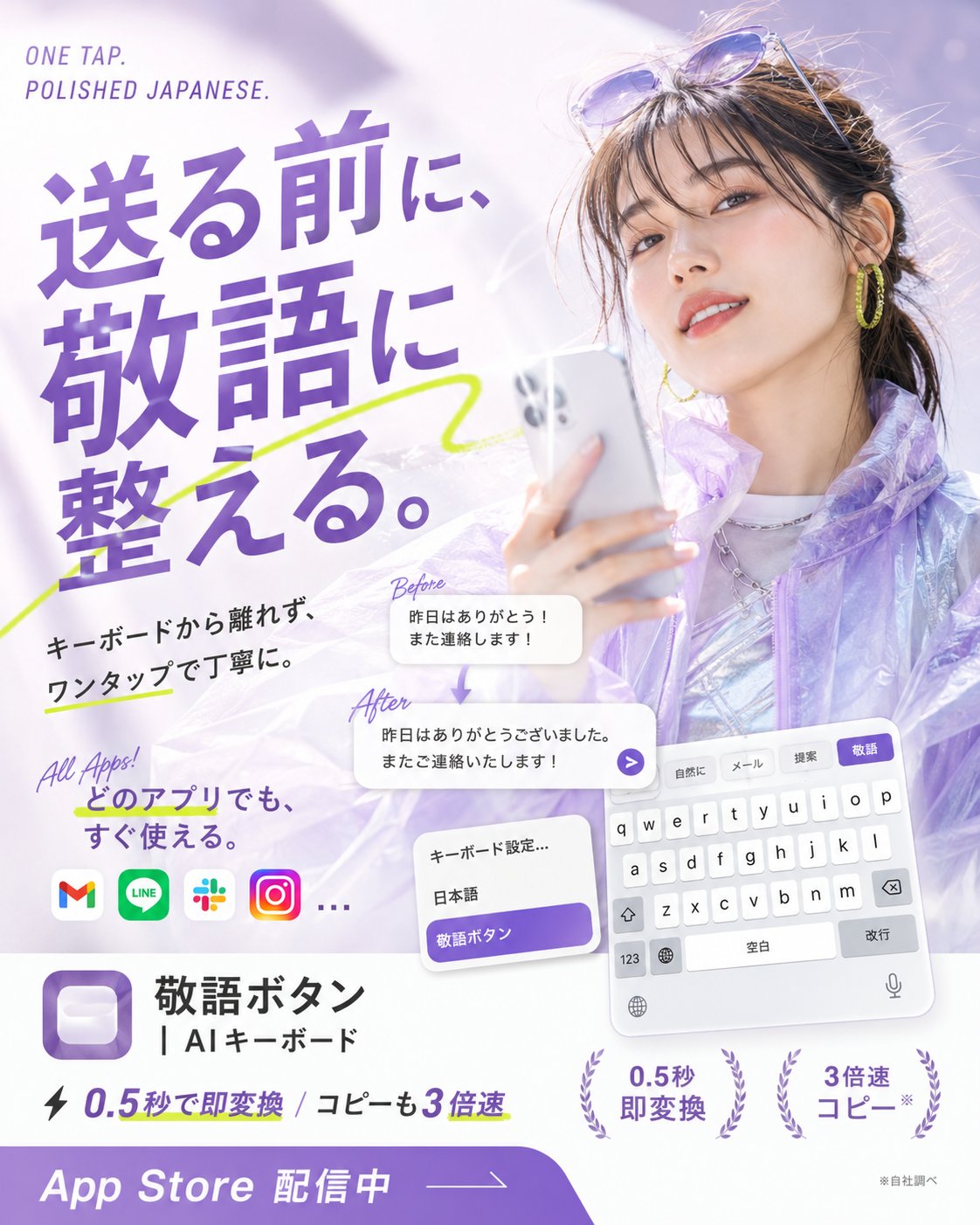
一张用于日语 AI 敬语键盘应用的方形宣传海报,非常适合 App Store 营销和社交媒体广告。
- Category
- UI & Interfaces
- Model
- GPT Image 2
- Creator
- いつき | 20歳AI起業家
- Source language
- en
- Source ID
- 27595
- Published
- Jul 3, 2026
Full prompt
Goal: Create a glossy Japanese App Store promotional poster for an AI keyboard app that converts casual Japanese into polite keigo with one tap, combining fashion photography, app UI mockups, and bold typography.

Canvas: Square 1:1 poster, bright white and lavender palette, high-key lighting, soft bokeh, airy translucent gradients, polished mobile-app advertising style.

Main visual: On the right half, show a stylish young Japanese woman holding a silver smartphone, photographed like a beauty/fashion ad. She has dark brown hair tied back with loose bangs, sunglasses resting on her head, yellow hoop earrings, subtle makeup, a slight smile, and a translucent iridescent lavender jacket over a shiny silver top. Use a dreamy pale purple background with soft light flares.

Headline and text layout: On the upper left, place small English text “ONE TAP. POLISHED JAPANESE.” Above the main copy. The largest Japanese headline should dominate the left side in bold purple type: {argument name="headline text" default="送る前に、敬語に整える。"} Add a neon yellow-green hand-drawn underline/swoosh crossing behind the headline.

Supporting copy: Below the headline, add black Japanese body text: {argument name="supporting copy" default="キーボードから離れず、ワンタップで丁寧に。"} Add a handwritten purple note “All Apps!” and Japanese text {argument name="all apps text" default="どのアプリでも、すぐ使える。"}

App compatibility row: Show exactly 4 recognizable rounded app icons plus an ellipsis: Gmail, LINE, Slack, Instagram, then “…”.

Transformation example: In the center-lower area, show exactly 2 rounded white message cards connected by a small downward purple arrow. The top card is labeled “Before” in handwritten purple script and contains: {argument name="before message" default="昨日はありがとう!また連絡します!"} The bottom card is labeled “After” and contains: {argument name="after message" default="昨日はありがとうございました。またご連絡いたします!"} Add a small purple circular send arrow button at the right edge of the after card.

Keyboard UI mockups: In the lower right, show a tilted iPhone-style Japanese keyboard panel with exactly 4 suggestion tabs at the top labeled “自然に”, “メール”, “提案”, and highlighted purple “敬語”. Include white QWERTY keys, space bar labeled “空白”, return key labeled “改行”, globe, microphone, and number key. Near it, show a smaller settings card with exactly 3 rows: “キーボード設定…”, “日本語”, and a purple highlighted row “敬語ボタン”.

App identity block: In the lower left, display a purple rounded-square app icon with a soft white keycap-like button inside. To its right, write the app name in Japanese: {argument name="app name" default="敬語ボタン"} and the subtitle “| AIキーボード”.

Feature claims: Along the bottom middle, include a lightning icon and the text “0.5秒で即変換 / コピーも3倍速”. Add exactly 2 laurel-badge claims on the lower right: “0.5秒 即変換” and “3倍速 コピー*”. Add tiny footnote text “※自社調べ”.

Bottom call-to-action: A thick purple curved banner spans the bottom edge with large white text “App Store 配信中” and a thin arrow line pointing right.

Visual style: Premium Japanese startup ad, clean editorial layout, bold purple typography, soft shadows, translucent glassmorphism cards, energetic lime marker accents, crisp readable UI text, no watermark, no extra logos beyond the specified app icons.
Translations
日语 AI 键盘应用海报
enGoal: Create a glossy Japanese App Store promotional poster for an AI keyboard app that converts casual Japanese into polite keigo with one tap, combining fashion photography, app UI mockups, and bold typography. Canvas: Square 1:1 poster, bright white and lavender palette, high-key lighting, soft bokeh, airy translucent gradients, polished mobile-app advertising style. Main visual: On the right half, show a stylish young Japanese woman holding a silver smartphone, photographed like a beauty/fashion ad. She has dark brown hair tied back with loose bangs, sunglasses resting on her head, yellow hoop earrings, subtle makeup, a slight smile, and a translucent iridescent lavender jacket over a shiny silver top. Use a dreamy pale purple background with soft light flares. Headline and text layout: On the upper left, place small English text “ONE TAP. POLISHED JAPANESE.” Above the main copy. The largest Japanese headline should dominate the left side in bold purple type: {argument name="headline text" default="送る前に、敬語に整える。"} Add a neon yellow-green hand-drawn underline/swoosh crossing behind the headline. Supporting copy: Below the headline, add black Japanese body text: {argument name="supporting copy" default="キーボードから離れず、ワンタップで丁寧に。"} Add a handwritten purple note “All Apps!” and Japanese text {argument name="all apps text" default="どのアプリでも、すぐ使える。"} App compatibility row: Show exactly 4 recognizable rounded app icons plus an ellipsis: Gmail, LINE, Slack, Instagram, then “…”. Transformation example: In the center-lower area, show exactly 2 rounded white message cards connected by a small downward purple arrow. The top card is labeled “Before” in handwritten purple script and contains: {argument name="before message" default="昨日はありがとう!また連絡します!"} The bottom card is labeled “After” and contains: {argument name="after message" default="昨日はありがとうございました。またご連絡いたします!"} Add a small purple circular send arrow button at the right edge of the after card. Keyboard UI mockups: In the lower right, show a tilted iPhone-style Japanese keyboard panel with exactly 4 suggestion tabs at the top labeled “自然に”, “メール”, “提案”, and highlighted purple “敬語”. Include white QWERTY keys, space bar labeled “空白”, return key labeled “改行”, globe, microphone, and number key. Near it, show a smaller settings card with exactly 3 rows: “キーボード設定…”, “日本語”, and a purple highlighted row “敬語ボタン”. App identity block: In the lower left, display a purple rounded-square app icon with a soft white keycap-like button inside. To its right, write the app name in Japanese: {argument name="app name" default="敬語ボタン"} and the subtitle “| AIキーボード”. Feature claims: Along the bottom middle, include a lightning icon and the text “0.5秒で即変換 / コピーも3倍速”. Add exactly 2 laurel-badge claims on the lower right: “0.5秒 即変換” and “3倍速 コピー*”. Add tiny footnote text “※自社調べ”. Bottom call-to-action: A thick purple curved banner spans the bottom edge with large white text “App Store 配信中” and a thin arrow line pointing right. Visual style: Premium Japanese startup ad, clean editorial layout, bold purple typography, soft shadows, translucent glassmorphism cards, energetic lime marker accents, crisp readable UI text, no watermark, no extra logos beyond the specified app icons.
日语 AI 键盘应用海报
zh-CN目标:为一款 AI 键盘应用制作一张精美的日语 App Store 宣传海报。该应用可一键将随意的日语转换为礼貌的敬语,海报需结合时尚摄影、应用 UI 模型和醒目的排版。 画布:1:1 方形海报,采用明亮的白色和淡紫色调,高调照明,柔和的背景虚化,轻盈的半透明渐变,呈现精致的移动应用广告风格。 主视觉:右半部分展示一位时尚的年轻日本女性,手持银色智能手机,拍摄风格类似于美妆/时尚广告。她留着深棕色头发,扎着马尾,留有松散的刘海,头上戴着太阳镜,佩戴黄色圆环耳环,妆容精致,面带微笑,身穿闪亮的银色上衣,外搭半透明的虹彩淡紫色夹克。背景使用梦幻般的淡紫色,并带有柔和的光晕。 标题与文字布局:左上角放置小号英文文本“ONE TAP. POLISHED JAPANESE.”,位于主文案上方。左侧主导位置应为最大的日语标题,采用粗体紫色字体:{argument name="headline text" default="送る前に、敬語に整える。"} 在标题后方添加一条荧光黄绿色的手绘下划线/扫尾效果。 辅助文案:在标题下方,添加黑色日语正文:{argument name="supporting copy" default="キーボードから離れず、ワンタップで丁寧に。"} 添加手写紫色便签“All Apps!”以及日语文本 {argument name="all apps text" default="どのアプリでも、すぐ使える。"} 应用兼容性展示行:展示 4 个可识别的圆角应用图标及省略号:Gmail、LINE、Slack、Instagram,然后是“...”。 转换示例:在中心偏下区域,展示 2 个圆角白色消息卡片,中间由一个小型的紫色向下箭头连接。上方卡片用紫色手写体标注“Before”,内容为:{argument name="before message" default="昨日はありがとう!また連絡します!"} 下方卡片标注“After”,内容为:{argument name="after message" default="昨日はありがとうございました。またご連絡いたします!"} 在 After 卡片的右侧边缘添加一个紫色圆形发送箭头按钮。 键盘 UI 模型:在右下方,展示一个倾斜的 iPhone 风格日语键盘面板,顶部有 4 个建议标签,分别标注为“自然に”、“メール”、“提案”,以及高亮显示的紫色“敬語”。包含白色 QWERTY 按键、标注为“空白”的空格键、标注为“改行”的回车键、地球仪、麦克风和数字键。在其附近,展示一个较小的设置卡片,包含 3 行内容:“キーボード設定…”、“日本語”以及高亮显示的紫色行“敬語ボタン”。 应用标识区:左下方展示一个紫色圆角方形应用图标,内部有一个柔和的白色键帽状按钮。右侧写上日语应用名称:{argument name="app name" default="敬語ボタン"} 以及副标题“| AIキーボード”。 功能声明:在底部中间,包含一个闪电图标和文本“0.5秒で即変換 / コピーも3倍速”。在右下方添加 2 个月桂叶徽章样式的声明:“0.5秒 即変換”和“3倍速 コピー*”。添加微小的脚注文本“※自社調べ”。 底部行动号召:底部边缘横跨一条粗紫色弧形横幅,上面写有白色大字“App Store 配信中”,并有一条指向右侧的细箭头线。 视觉风格:高端日本初创企业广告,简洁的编辑排版,醒目的紫色字体,柔和的阴影,半透明的玻璃拟态卡片,充满活力的青柠色记号笔点缀,清晰易读的 UI 文字,无水印,除指定的应用图标外无额外 Logo。