暗黑风格动漫 Prompt Foundry UI
一份详细的 Prompt,用于生成暗黑风格桌面 AI 提示词工具界面,包含动漫演唱会预览和 Mio 风格的 Agent 聊天工作流。
- Category
- UI & Interfaces
- Model
- GPT Image 2
- Creator
- ひゅぺる
- Source language
- en
- Source ID
- 27829
- Published
- Jul 6, 2026
Full prompt
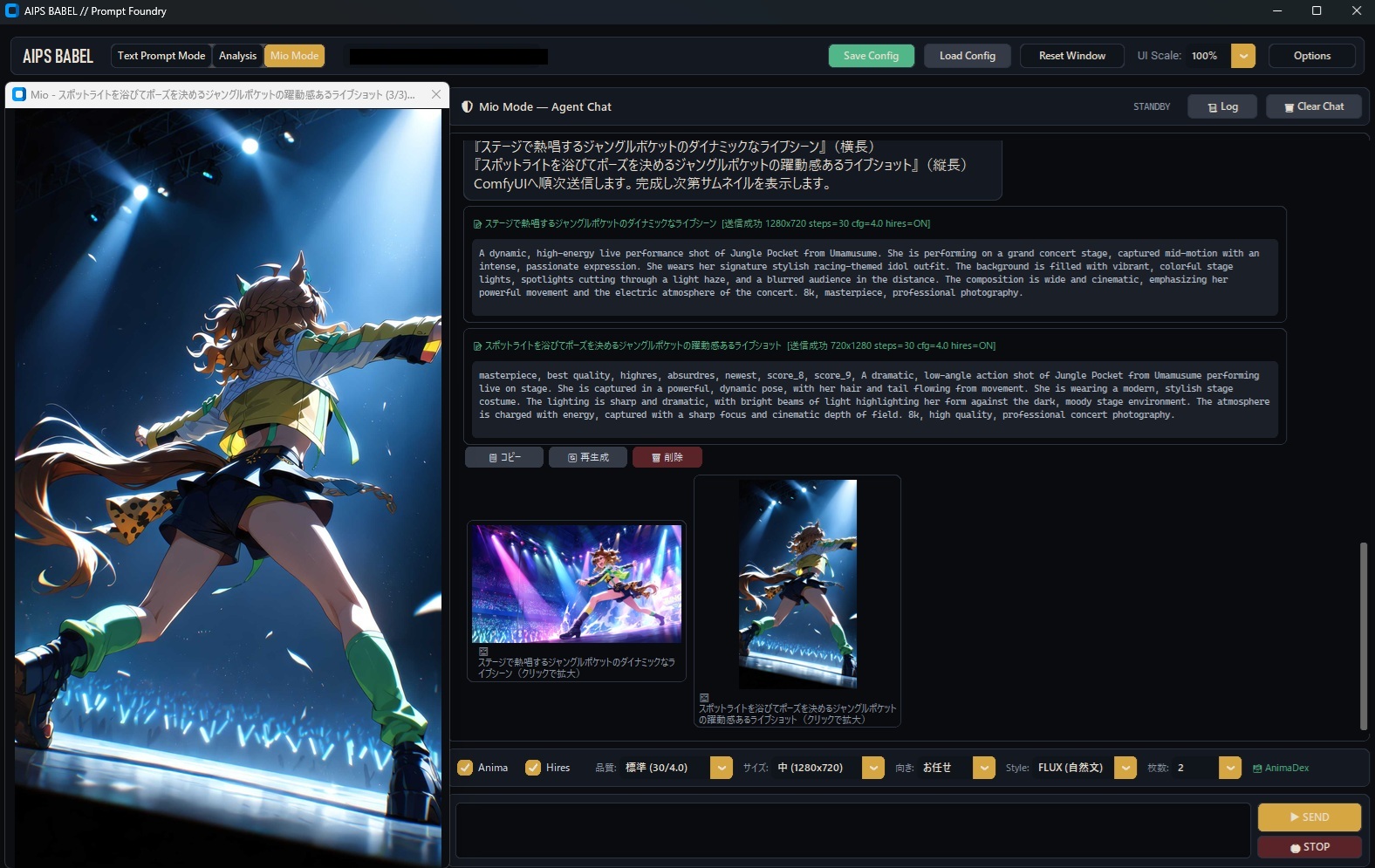
Goal: Create a dark desktop application screenshot for {argument name="app name" default="AIPS BABEL // Prompt Foundry"}, showing an AI image-prompt generation tool with an integrated anime chat assistant and generated image preview.

Canvas: 16:9 widescreen desktop window, approximately 1200×760, sharp UI capture style, dark charcoal theme with thin blue-gray borders and gold accent buttons. Include a Windows-style title bar at the very top with minimize, maximize, and close icons.

Layout: Split the interface into 2 main columns. The left column is a large image preview panel occupying about one third of the width. The right column is the prompt/chat workspace occupying about two thirds of the width. Add a top navigation strip across the app, a tab strip above the left preview, a chat header above the right workspace, a scrollable message area in the middle, thumbnail previews below the messages, and a control/input bar along the bottom.

Top navigation: At the upper left show the app label “AIPS BABEL”. Add exactly 3 mode tabs: “Text Prompt Mode”, “Analysis”, and a highlighted gold “Mio Mode”. In the center/top area include a long black redacted-looking text field. On the right add exactly 5 controls: green “Save Config”, gray “Load Config”, gray “Reset Window”, “UI Scale: 100%” with a small gold dropdown button, and gray “Options”.

Left preview panel: Show a tall anime concert illustration filling nearly the full left pane. The subject is {argument name="character description" default="a dynamic anime horse-girl idol with brown twin-tail hair, animal ears, long tail, racing-idol outfit, shorts, gloves, and green leg warmers"}. She is viewed from a dramatic low angle from behind/side, mid-performance with one arm extended, standing on a glossy stage edge under intense blue-white spotlights. The background contains a dark concert venue with blue glow sticks and particles/confetti. The image should look like high-quality anime key art with cinematic lighting. Above the preview, include a browser-like tab title in Japanese: “Mio - スポットライトを浴びてポーズを決めるジャングルポケットの躍動感あるライブショット (3/3)...” with a small close button.

Right workspace header: Title the panel “Mio Mode — Agent Chat”. On the far right show status “STANDBY” and exactly 2 buttons: “Log” and “Clear Chat”.

Message area: Use a dark scrollable chat panel with Japanese prompt text at the top, followed by exactly 2 large prompt cards with green Japanese titles and monospaced English prompt bodies. The first card should describe a dynamic high-energy live performance shot of Jungle Pocket from Uma Musume on a grand concert stage, wide cinematic composition, intense colorful lights, spotlight cutting through haze, blurred audience, professional photography. The second card should be the selected/final version and include quality tags such as “masterpiece, best quality, highres, absurdres, newest, score_8, score_9” and a low-angle live-on-stage action shot. Under the prompt cards place exactly 3 small action buttons labeled in Japanese: “コピー”, “再生成”, and a red “削除”.

Thumbnail section: Beneath the chat cards show exactly 2 generated thumbnail cards. The left thumbnail is a wide concert-stage anime image with magenta and blue lights; the right thumbnail is a vertical crop matching the large left preview. Each thumbnail has a Japanese caption underneath; the left begins with “ステージで躍動するジャングルポケットのダイナミックなライ...” and the right begins with “スポットライトを浴びてポーズを決めるジャングルポケット...”.

Bottom controls: Create one horizontal settings bar with exactly 8 visible controls: checked “Anima”, checked “Hires”, quality label “品質: 標準 (30/4.0)” with a gold dropdown, size label “サイズ: 中 (1280×720)” with a gold dropdown, orientation label “向き: お任せ” with a gold dropdown, style label “Style: FLUX (自然文)” with a gold dropdown, count label “枚数: 2” with a gold dropdown, and a small green “AnimaDex” label. Below it, include a long empty black input box and on the right exactly 2 stacked buttons: gold “SEND” and red “STOP”.

Visual style: Realistic app mockup/screenshot, crisp text where possible, dark futuristic UI, subtle shadows, thin outlines, compact spacing, gold highlights for selected controls, green accents for active states. Keep the anime preview vibrant and luminous, contrasting with the dark interface.

Constraints: Include no extra panels beyond the described layout. Preserve the visible mix of English UI labels and Japanese prompt labels. The interface should look like a local ComfyUI-style prompt foundry tool rather than a website.
Translations
暗黑风格动漫 Prompt Foundry UI
enGoal: Create a dark desktop application screenshot for {argument name="app name" default="AIPS BABEL // Prompt Foundry"}, showing an AI image-prompt generation tool with an integrated anime chat assistant and generated image preview. Canvas: 16:9 widescreen desktop window, approximately 1200×760, sharp UI capture style, dark charcoal theme with thin blue-gray borders and gold accent buttons. Include a Windows-style title bar at the very top with minimize, maximize, and close icons. Layout: Split the interface into 2 main columns. The left column is a large image preview panel occupying about one third of the width. The right column is the prompt/chat workspace occupying about two thirds of the width. Add a top navigation strip across the app, a tab strip above the left preview, a chat header above the right workspace, a scrollable message area in the middle, thumbnail previews below the messages, and a control/input bar along the bottom. Top navigation: At the upper left show the app label “AIPS BABEL”. Add exactly 3 mode tabs: “Text Prompt Mode”, “Analysis”, and a highlighted gold “Mio Mode”. In the center/top area include a long black redacted-looking text field. On the right add exactly 5 controls: green “Save Config”, gray “Load Config”, gray “Reset Window”, “UI Scale: 100%” with a small gold dropdown button, and gray “Options”. Left preview panel: Show a tall anime concert illustration filling nearly the full left pane. The subject is {argument name="character description" default="a dynamic anime horse-girl idol with brown twin-tail hair, animal ears, long tail, racing-idol outfit, shorts, gloves, and green leg warmers"}. She is viewed from a dramatic low angle from behind/side, mid-performance with one arm extended, standing on a glossy stage edge under intense blue-white spotlights. The background contains a dark concert venue with blue glow sticks and particles/confetti. The image should look like high-quality anime key art with cinematic lighting. Above the preview, include a browser-like tab title in Japanese: “Mio - スポットライトを浴びてポーズを決めるジャングルポケットの躍動感あるライブショット (3/3)...” with a small close button. Right workspace header: Title the panel “Mio Mode — Agent Chat”. On the far right show status “STANDBY” and exactly 2 buttons: “Log” and “Clear Chat”. Message area: Use a dark scrollable chat panel with Japanese prompt text at the top, followed by exactly 2 large prompt cards with green Japanese titles and monospaced English prompt bodies. The first card should describe a dynamic high-energy live performance shot of Jungle Pocket from Uma Musume on a grand concert stage, wide cinematic composition, intense colorful lights, spotlight cutting through haze, blurred audience, professional photography. The second card should be the selected/final version and include quality tags such as “masterpiece, best quality, highres, absurdres, newest, score_8, score_9” and a low-angle live-on-stage action shot. Under the prompt cards place exactly 3 small action buttons labeled in Japanese: “コピー”, “再生成”, and a red “削除”. Thumbnail section: Beneath the chat cards show exactly 2 generated thumbnail cards. The left thumbnail is a wide concert-stage anime image with magenta and blue lights; the right thumbnail is a vertical crop matching the large left preview. Each thumbnail has a Japanese caption underneath; the left begins with “ステージで躍動するジャングルポケットのダイナミックなライ...” and the right begins with “スポットライトを浴びてポーズを決めるジャングルポケット...”. Bottom controls: Create one horizontal settings bar with exactly 8 visible controls: checked “Anima”, checked “Hires”, quality label “品質: 標準 (30/4.0)” with a gold dropdown, size label “サイズ: 中 (1280×720)” with a gold dropdown, orientation label “向き: お任せ” with a gold dropdown, style label “Style: FLUX (自然文)” with a gold dropdown, count label “枚数: 2” with a gold dropdown, and a small green “AnimaDex” label. Below it, include a long empty black input box and on the right exactly 2 stacked buttons: gold “SEND” and red “STOP”. Visual style: Realistic app mockup/screenshot, crisp text where possible, dark futuristic UI, subtle shadows, thin outlines, compact spacing, gold highlights for selected controls, green accents for active states. Keep the anime preview vibrant and luminous, contrasting with the dark interface. Constraints: Include no extra panels beyond the described layout. Preserve the visible mix of English UI labels and Japanese prompt labels. The interface should look like a local ComfyUI-style prompt foundry tool rather than a website.
暗黑风格动漫 Prompt Foundry UI
zh-CN目标:创建一个暗黑风格的桌面应用程序截图,用于 {argument name="app name" default="AIPS BABEL // Prompt Foundry"},展示一个集成了动漫聊天助手和生成图像预览的 AI 图像提示词生成工具。 画布:16:9 宽屏桌面窗口,尺寸约为 1200×760,清晰的 UI 截屏风格,深炭灰色主题,配有细蓝灰色边框和金色强调按钮。在最顶部包含一个 Windows 风格的标题栏,带有最小化、最大化和关闭图标。 布局:将界面分为 2 个主要列。左侧列是一个占据约三分之一宽度的图像预览面板。右侧列是占据约三分之二宽度的提示词/聊天工作区。在应用顶部添加一个导航条,左侧预览上方添加一个标签页栏,右侧工作区上方添加一个聊天标题,中间是一个可滚动的消息区域,消息下方是缩略图预览,底部是一个控制/输入栏。 顶部导航:左上角显示应用标签 “AIPS BABEL”。添加 3 个模式标签:“Text Prompt Mode”、“Analysis” 以及一个高亮的金色 “Mio Mode”。在顶部中心区域包含一个长条状的黑色遮盖文本框。右侧添加 5 个控件:绿色的 “Save Config”、灰色的 “Load Config”、灰色的 “Reset Window”、“UI Scale: 100%”(带有一个小的金色下拉按钮)以及灰色的 “Options”。 左侧预览面板:展示一张占据几乎整个左侧面板的竖版动漫演唱会插图。主体是 {argument name="character description" default="一位充满活力的动漫马娘偶像,留着棕色双马尾,有动物耳朵、长尾巴,穿着赛车偶像装、短裤、手套和绿色腿套"}。她以极具张力的低角度从后方/侧方被拍摄,正处于表演中,一只手臂伸展,站在光亮的舞台边缘,处于强烈的蓝白色聚光灯下。背景是一个暗黑风格的演唱会现场,有蓝色荧光棒和粒子/彩带。图像应呈现高质量动漫关键视觉图的质感,并带有电影级光影。在预览上方,包含一个类似浏览器的标签页标题,使用日语:“Mio - スポットライトを浴びてポーズを決めるジャングルポケットの躍動感あるライブショット (3/3)...”,并带有一个小的关闭按钮。 右侧工作区标题:面板标题为 “Mio Mode — Agent Chat”。最右侧显示状态 “STANDBY” 以及 2 个按钮:“Log” 和 “Clear Chat”。 消息区域:使用一个深色的可滚动聊天面板,顶部是日语提示词文本,随后是 2 个带有绿色日语标题和等宽字体英文提示词内容的大型提示词卡片。第一张卡片应描述《赛马娘》中 Jungle Pocket 在大型演唱会舞台上充满活力的现场表演镜头,宽幅电影构图,强烈的彩色灯光,聚光灯穿透烟雾,模糊的观众,专业摄影风格。第二张卡片应为选中/最终版本,并包含质量标签,如 “masterpiece, best quality, highres, absurdres, newest, score_8, score_9” 以及一个低角度舞台现场动作镜头。在提示词卡片下方放置 3 个带有日语标签的小型操作按钮:“コピー”、“再生成” 以及一个红色的 “削除”。 缩略图部分:在聊天卡片下方显示 2 个生成的缩略图卡片。左侧缩略图是一张带有洋红色和蓝色灯光的宽幅演唱会舞台动漫图像;右侧缩略图是一个与左侧大预览相匹配的竖向裁剪图。每个缩略图下方都有日语标题;左侧以 “ステージで躍動するジャングルポケットのダイナミックなライ...” 开头,右侧以 “スポットライトを浴びてポーズを決めるジャングルポケット...” 开头。 底部控件:创建一个水平设置栏,包含 8 个可见控件:勾选 “Anima”、勾选 “Hires”、质量标签 “品質: 標準 (30/4.0)”(带金色下拉菜单)、尺寸标签 “サイズ: 中 (1280×720)”(带金色下拉菜单)、方向标签 “向き: お任せ”(带金色下拉菜单)、样式标签 “Style: FLUX (自然文)”(带金色下拉菜单)、数量标签 “枚数: 2”(带金色下拉菜单)以及一个小型的绿色 “AnimaDex” 标签。在其下方,包含一个长条状的空白黑色输入框,右侧有 2 个堆叠的按钮:金色的 “SEND” 和红色的 “STOP”。 视觉风格:写实的应用程序模型/截图,文字尽可能清晰,暗黑未来感 UI,微妙的阴影,细线条,紧凑的间距,选中控件使用金色高亮,激活状态使用绿色强调。保持动漫预览的鲜艳和明亮,与暗黑界面形成对比。 约束:除描述的布局外,不要包含额外的面板。保留可见的英文 UI 标签和日语提示词标签的混合。界面应看起来像一个本地的 ComfyUI 风格的 Prompt Foundry 工具,而不是一个网站。