DevKnow SaaS 着陆页
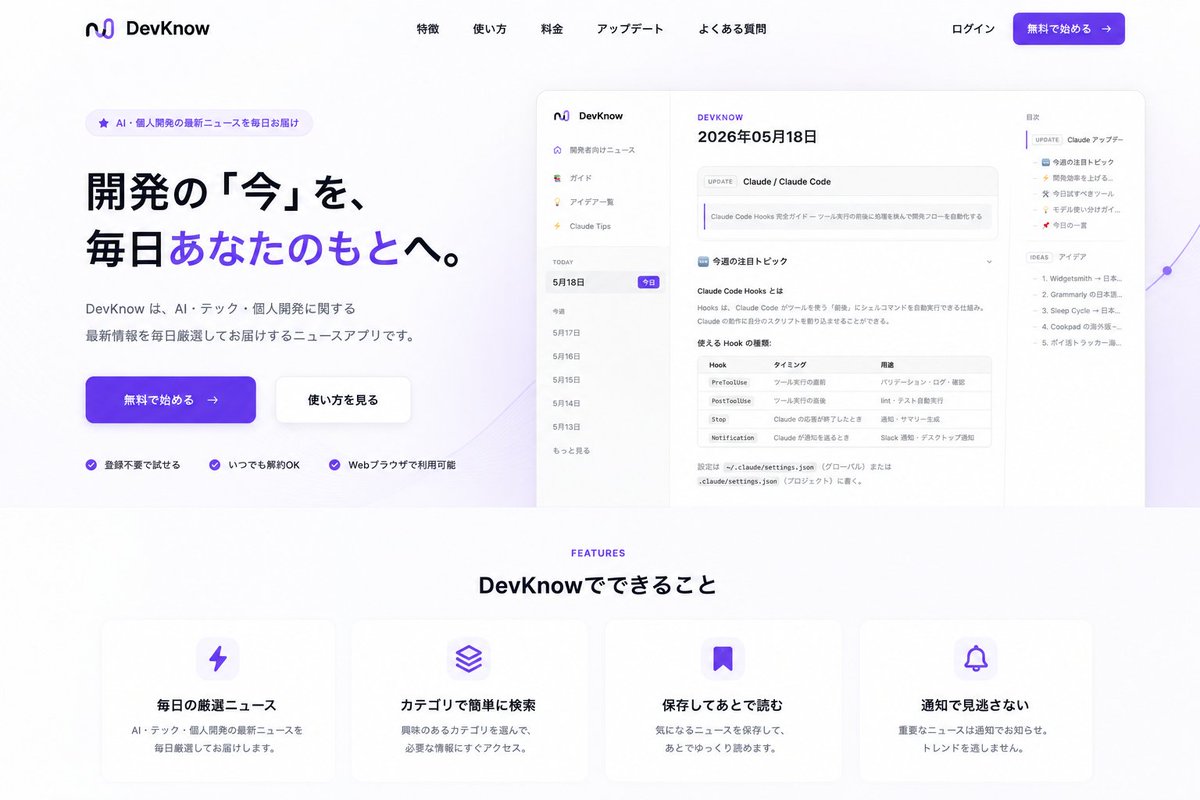
根据现有的应用截图,生成一个精美的日语 SaaS 着陆页,包含首屏 CTA、产品模型、导航栏和功能卡片。
- Category
- Charts & Infographics
- Model
- GPT Image 2
- Creator
- ヒロ AIを使った開発(Claude, Cursor, GPT..)
- Source language
- en
- Source ID
- 21402
- Published
- May 18, 2026
Full prompt
Using REFERENCE_0 as the product UI screenshot, turn it into a polished Japanese SaaS landing page for {argument name="product name" default="DevKnow"}. Keep the app screenshot recognizable but place it inside a large rounded browser/mockup preview on the right side of the hero section, slightly scaled down with soft shadow and a subtle purple abstract line/gradient accent behind it.

Layout: Create a clean desktop landing page with a white background and purple brand accents. Add a top navigation bar with the existing logo/name on the left, five centered menu links labeled 「特徴」, 「使い方」, 「料金」, 「アップデート」, 「よくある質問」, and on the right 「ログイン」 plus a purple CTA button labeled 「無料で始める →」.

Hero section: On the left, add a small rounded badge reading 「AI・個人開発の最新ニュースを毎日お届け」. Add a large bold Japanese headline: {argument name="hero headline" default="開発の「今」を、毎日あなたのもとへ。"} with the phrase 「あなたのもとへ」 highlighted in purple. Below it, add supporting copy: {argument name="hero description" default="DevKnow は、AI・テック・個人開発に関する最新情報を毎日厳選してお届けするニュースアプリです。"}. Add two hero buttons: a primary purple 「無料で始める →」 button and a secondary white 「使い方を見る」 button. Under the buttons, add exactly 3 trust points with small purple check icons: 「登録不要で始める」, 「いつでも解約OK」, 「Webブラウザで利用可能」.

Features section: Beneath the hero, add a centered section label “FEATURES” in purple and the heading 「DevKnow でできること」. Create exactly 4 rounded feature cards in one row with soft shadows and purple icons: 1) lightning icon, title 「毎日の厳選ニュース」, description 「AI・テック・個人開発の最新ニュースを毎日厳選してお届けします。」; 2) stacked layers icon, title 「カテゴリで簡単に検索」, description 「興味のあるカテゴリを選んで、必要な情報にすぐアクセス。」; 3) bookmark icon, title 「保存してあとで読む」, description 「気になるニュースを保存して、あとでゆっくり読めます。」; 4) bell icon, title 「通知で見逃さない」, description 「重要なニュースは通知でお知らせ。トレンドを逃しません。」

Style constraints: Make it look like a modern production-ready landing page, not a raw app screenshot. Use spacious margins, rounded corners, subtle shadows, purple gradient buttons, crisp Japanese typography, and remove any clutter outside the composed landing page. Keep the reference app UI content visible but secondary to the landing page design.
Translations
DevKnow SaaS 着陆页
enUsing REFERENCE_0 as the product UI screenshot, turn it into a polished Japanese SaaS landing page for {argument name="product name" default="DevKnow"}. Keep the app screenshot recognizable but place it inside a large rounded browser/mockup preview on the right side of the hero section, slightly scaled down with soft shadow and a subtle purple abstract line/gradient accent behind it. Layout: Create a clean desktop landing page with a white background and purple brand accents. Add a top navigation bar with the existing logo/name on the left, five centered menu links labeled 「特徴」, 「使い方」, 「料金」, 「アップデート」, 「よくある質問」, and on the right 「ログイン」 plus a purple CTA button labeled 「無料で始める →」. Hero section: On the left, add a small rounded badge reading 「AI・個人開発の最新ニュースを毎日お届け」. Add a large bold Japanese headline: {argument name="hero headline" default="開発の「今」を、毎日あなたのもとへ。"} with the phrase 「あなたのもとへ」 highlighted in purple. Below it, add supporting copy: {argument name="hero description" default="DevKnow は、AI・テック・個人開発に関する最新情報を毎日厳選してお届けするニュースアプリです。"}. Add two hero buttons: a primary purple 「無料で始める →」 button and a secondary white 「使い方を見る」 button. Under the buttons, add exactly 3 trust points with small purple check icons: 「登録不要で始める」, 「いつでも解約OK」, 「Webブラウザで利用可能」. Features section: Beneath the hero, add a centered section label “FEATURES” in purple and the heading 「DevKnow でできること」. Create exactly 4 rounded feature cards in one row with soft shadows and purple icons: 1) lightning icon, title 「毎日の厳選ニュース」, description 「AI・テック・個人開発の最新ニュースを毎日厳選してお届けします。」; 2) stacked layers icon, title 「カテゴリで簡単に検索」, description 「興味のあるカテゴリを選んで、必要な情報にすぐアクセス。」; 3) bookmark icon, title 「保存してあとで読む」, description 「気になるニュースを保存して、あとでゆっくり読めます。」; 4) bell icon, title 「通知で見逃さない」, description 「重要なニュースは通知でお知らせ。トレンドを逃しません。」 Style constraints: Make it look like a modern production-ready landing page, not a raw app screenshot. Use spacious margins, rounded corners, subtle shadows, purple gradient buttons, crisp Japanese typography, and remove any clutter outside the composed landing page. Keep the reference app UI content visible but secondary to the landing page design.
DevKnow SaaS 着陆页
zh-CN以 REFERENCE_0 作为产品 UI 截图,将其转化为一个精美的日语 SaaS 着陆页,用于 {argument name="product name" default="DevKnow"}。保持应用截图的可辨识度,将其放置在首屏右侧一个带有大圆角的浏览器/模型预览框中,适当缩小尺寸,并配以柔和的阴影和背景中微妙的紫色抽象线条/渐变装饰。 布局:创建一个简洁的桌面端着陆页,采用白色背景和紫色品牌色调。添加顶部导航栏,左侧放置现有 Logo/名称,中间居中放置五个菜单链接:「特徴」、「使い方」、「料金」、「アップデート」、「よくある質問」,右侧放置「ログイン」以及一个紫色的 CTA 按钮「無料で始める →」。 首屏区域:左侧添加一个圆角小徽章,文字为「AI・個人開発の最新ニュースを毎日お届け」。添加一个醒目的日语大标题:{argument name="hero headline" default="開発の「今」を、毎日あなたのもとへ。"},并将「あなたのもとへ」短语以紫色高亮显示。下方添加辅助文案:{argument name="hero description" default="DevKnow は、AI・テック・個人開発に関する最新情報を毎日厳選してお届けするニュースアプリです。"}。添加两个首屏按钮:一个紫色的主按钮「無料で始める →」和一个白色的次按钮「使い方を見る」。在按钮下方,添加 3 个带有紫色小勾选图标的信任点:「登録不要で始める」、「いつでも解約OK」、「Webブラウザで利用可能」。 功能区域:在首屏下方,添加一个居中的紫色“FEATURES”标签和标题「DevKnow でできること」。创建 4 个带柔和阴影和紫色图标的圆角功能卡片,排列在一行:1) 闪电图标,标题「毎日の厳選ニュース」,描述「AI・テック・個人開発の最新ニュースを毎日厳選してお届けします。」;2) 堆叠图层图标,标题「カテゴリで簡単に検索」,描述「興味のあるカテゴリを選んで、必要な情報にすぐアクセス。」;3) 书签图标,标题「保存してあとで読む」,描述「気になるニュースを保存して、あとでゆっくり読めます。」;4) 铃铛图标,标题「通知で見逃さない」,描述「重要なニュースは通知でお知らせ。トレンドを逃しません。」 样式约束:使其看起来像一个现代化的、可直接上线的着陆页,而不是原始的应用截图。使用宽敞的页边距、圆角、微妙的阴影、紫色渐变按钮、清晰的日语排版,并移除着陆页设计之外的所有杂乱元素。保持参考应用 UI 内容可见,但将其作为着陆页设计的辅助部分。