孔雀数字油画练习表
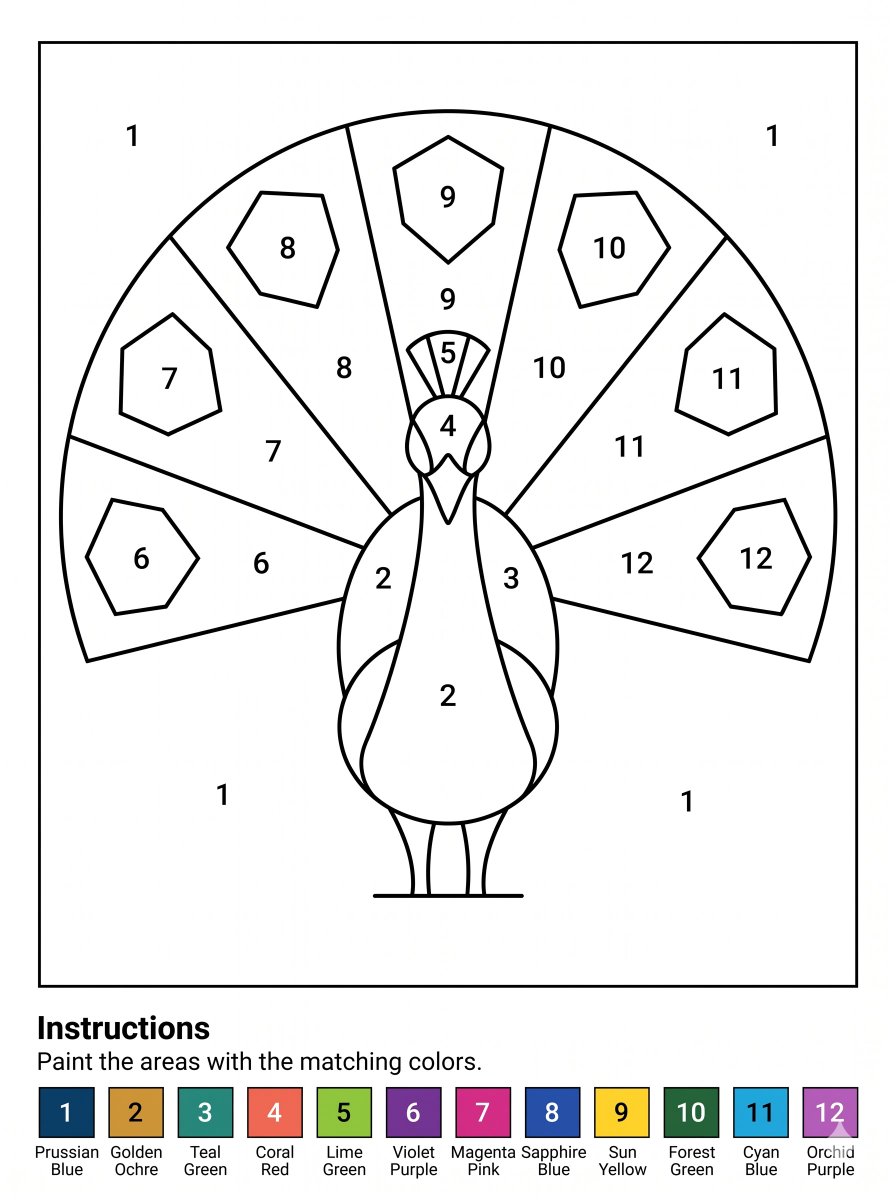
生成一张清晰可打印的 A4 孔雀数字油画练习表,包含编号区域和 12 色色标,适用于课堂或儿童涂色活动。
- Category
- Charts & Infographics
- Model
- GPT Image 2
- Creator
- Danny Q
- Source language
- en
- Source ID
- 21944
- Published
- May 21, 2026
Full prompt
Goal: Create a printable paint-by-numbers worksheet featuring a stylized peacock, designed for children or beginners.

Canvas: A4 portrait page at 300 DPI, clean white background, black line art only in the main worksheet area, with a thin rectangular border around the drawing. Leave a bottom instruction and color legend band below the bordered artwork.

Main artwork: Center a simple front-facing peacock with a large semicircular fan tail. Use bold, smooth black outlines and large enclosed regions for coloring. The peacock has a rounded body, two slim legs, small feet on a horizontal ground line, a narrow neck, a pointed beak, round side face patches, a small crest, and two folded wing shapes along the body. Behind it, create a fan tail divided into exactly 7 large radial feather panels, labeled left to right with numbers 6, 7, 8, 9, 10, 11, and 12. Add exactly 7 smaller polygonal feather-eye shapes inside the fan, one per panel, also labeled 6 through 12. Put additional labels on the bird: body and lower wings use 2, right wing uses 3, face uses 4, crest uses 5. Fill the plain background areas inside the border with the number 1 in four places: upper left, upper right, lower left, and lower right.

Numbering and regions: Use exactly 12 paint colors, represented only by black numeric labels inside the enclosed regions. Keep all numbers large, centered, and easy to read. Avoid shading, texture, gradients, or filled color in the drawing area.

Bottom text: Below the drawing border, add a bold heading reading “Instructions”, followed by the sentence “Paint the areas with the matching colors.”

Color legend: At the very bottom, create exactly 12 square color swatches in one horizontal row, each with a white or black number centered on the swatch and a two-line color name underneath. The swatches are: 1 Prussian Blue, 2 Golden Ochre, 3 Teal Green, 4 Coral Red, 5 Lime Green, 6 Violet Purple, 7 Magenta Pink, 8 Sapphire Blue, 9 Sun Yellow, 10 Forest Green, 11 Cyan Blue, 12 Orchid Purple.

Style constraints: Crisp vector-like worksheet, high-contrast black outlines, no grayscale fills in the drawing, no extra decorations, no watermark, keep the layout print-ready and easy to color.
Translations
孔雀数字油画练习表
enGoal: Create a printable paint-by-numbers worksheet featuring a stylized peacock, designed for children or beginners. Canvas: A4 portrait page at 300 DPI, clean white background, black line art only in the main worksheet area, with a thin rectangular border around the drawing. Leave a bottom instruction and color legend band below the bordered artwork. Main artwork: Center a simple front-facing peacock with a large semicircular fan tail. Use bold, smooth black outlines and large enclosed regions for coloring. The peacock has a rounded body, two slim legs, small feet on a horizontal ground line, a narrow neck, a pointed beak, round side face patches, a small crest, and two folded wing shapes along the body. Behind it, create a fan tail divided into exactly 7 large radial feather panels, labeled left to right with numbers 6, 7, 8, 9, 10, 11, and 12. Add exactly 7 smaller polygonal feather-eye shapes inside the fan, one per panel, also labeled 6 through 12. Put additional labels on the bird: body and lower wings use 2, right wing uses 3, face uses 4, crest uses 5. Fill the plain background areas inside the border with the number 1 in four places: upper left, upper right, lower left, and lower right. Numbering and regions: Use exactly 12 paint colors, represented only by black numeric labels inside the enclosed regions. Keep all numbers large, centered, and easy to read. Avoid shading, texture, gradients, or filled color in the drawing area. Bottom text: Below the drawing border, add a bold heading reading “Instructions”, followed by the sentence “Paint the areas with the matching colors.” Color legend: At the very bottom, create exactly 12 square color swatches in one horizontal row, each with a white or black number centered on the swatch and a two-line color name underneath. The swatches are: 1 Prussian Blue, 2 Golden Ochre, 3 Teal Green, 4 Coral Red, 5 Lime Green, 6 Violet Purple, 7 Magenta Pink, 8 Sapphire Blue, 9 Sun Yellow, 10 Forest Green, 11 Cyan Blue, 12 Orchid Purple. Style constraints: Crisp vector-like worksheet, high-contrast black outlines, no grayscale fills in the drawing, no extra decorations, no watermark, keep the layout print-ready and easy to color.
孔雀数字油画练习表
zh-CN目标:创作一张可打印的数字油画练习表,主体为风格化的孔雀,专为儿童或初学者设计。 画布:A4 纵向页面,300 DPI,纯白背景。主要练习区域仅包含黑色线条,绘图周围带有细矩形边框。在边框下方的区域留出说明和色标位置。 主体绘图:在中心绘制一只简单的正面孔雀,带有巨大的半圆形扇形尾巴。使用粗而平滑的黑色轮廓线,并划分出便于涂色的大块封闭区域。孔雀拥有圆润的身体、两条细腿、水平地面线上的小脚、细长的脖子、尖尖的喙、圆形的侧脸斑块、小冠羽以及身体两侧折叠的翅膀形状。在身后,绘制一个扇形尾巴,分为 7 个大的放射状羽毛面板,从左到右依次标记为 6、7、8、9、10、11 和 12。在扇形内部添加 7 个较小的多边形羽毛眼状图案,每个面板内一个,同样标记为 6 到 12。在鸟身上添加额外标签:身体和下翅膀使用 2,右翅膀使用 3,脸部使用 4,冠羽使用 5。在边框内的空白背景区域,于左上、右上、左下和右下四个位置填充数字 1。 编号与区域:使用 12 种绘画颜色,仅通过封闭区域内的黑色数字标签表示。所有数字需保持大号、居中且易于阅读。绘图区域内避免使用阴影、纹理、渐变或填充颜色。 底部文字:在绘图边框下方,添加粗体标题“说明”,随后附上句子“请用对应的颜色涂满区域”。 色标:在最底部,横向排列 12 个正方形色块,每个色块中心标有白色或黑色数字,下方附有两行颜色名称。色块颜色如下:1 普鲁士蓝,2 金赭色,3 青绿色,4 珊瑚红,5 柠檬绿,6 紫罗兰色,7 品红色,8 宝石蓝,9 太阳黄,10 森林绿,11 青蓝色,12 兰紫色。 风格限制:清晰的矢量风格练习表,高对比度黑色轮廓,绘图内无灰度填充,无额外装饰,无水印,保持布局适合打印且易于涂色。