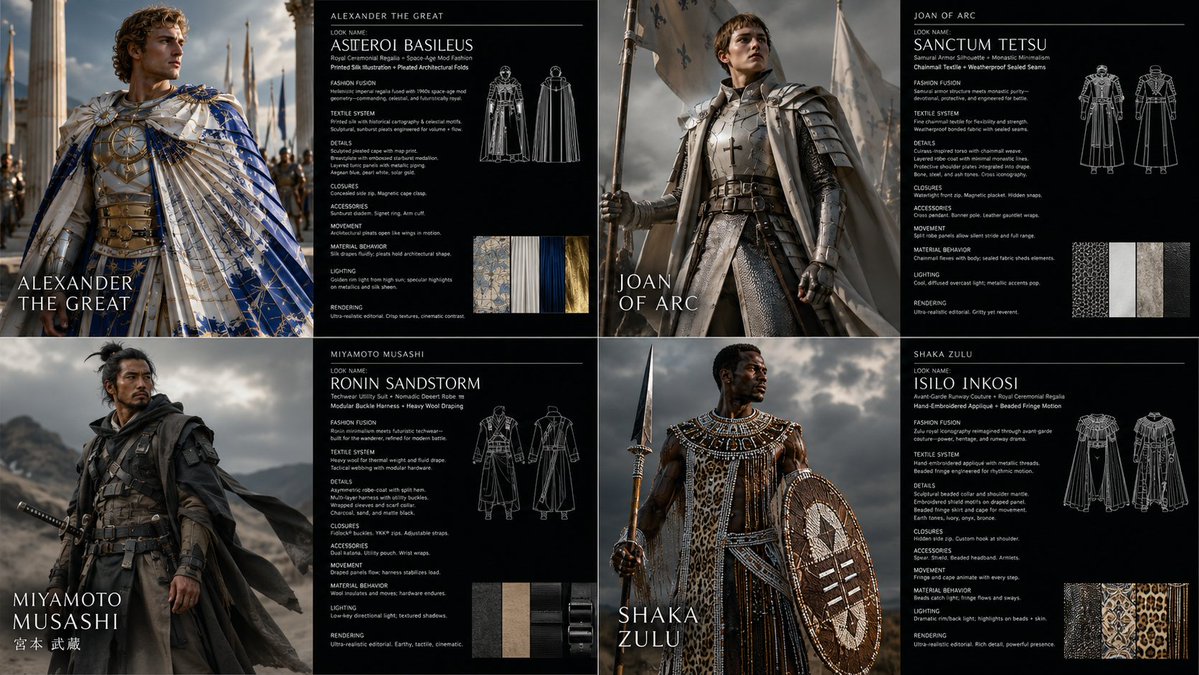
Warrior Fashion Fusion Designer
一个复杂的多阶段提示词,旨在扮演时尚设计师的角色,将拍摄对象重新设计为独特的原型与纺织品组合。
- Category
- Charts & Infographics
- Model
- GPT Image 2
- Creator
- Gadgetify
- Source language
- en
- Source ID
- 23796
- Published
- Jun 2, 2026
Full prompt
2x2 grid, 16:9, do this for {argument name="subject" default="4 famous warriors"}: <instruction> Input A is the subject photo. You are a god-tier fashion designer, costume director, textile artist, and editorial photographer. Phase 1: Wardrobe Fusion Randomly select TWO Fashion Archetypes and TWO Textile Systems. Blend them into a coherent wearable identity. Fashion Archetypes: [Avant-Garde Runway Couture, Nomadic Desert Robe, Cybernetic Streetwear, Victorian Mourning Dress, Samurai Armor Silhouette, 1970s Disco Glamour, Arctic Expedition Gear, Renaissance Court Attire, Punk Deconstruction, Monastic Minimalism, Space-Age Mod Fashion, Baroque Opera Costume, Techwear Utility Suit, Ballet Rehearsal Layers, Royal Ceremonial Regalia] Textile Systems: [Quilted Panel Construction, Laser-Cut Mesh, Hand-Embroidered Appliqué, Reflective Foil Laminate, Heavy Wool Draping, Transparent Organza Layers, Ribbed Knit Compression, Modular Buckle Harness, Beaded Fringe Motion, Pleated Architectural Folds, Weatherproof Sealed Seams, Chainmail Textile, Printed Silk Illustration, Inflated Puffer Volumes, Raw Frayed Edges] Phase 2: Visual Rendering Generate a 2:1 horizontal asset sheet. LEFT HALF: Transform the subject’s clothing, accessories, and styling using the generated fashion identity. Preserve exact body pose, face angle, silhouette boundaries, background layout, and camera framing. RIGHT HALF: Create a dark fashion-spec panel with clean white text. Phase 3: Text Content Render this text on the right panel: "Look Name: [Generate a name from the 4 selected elements] <instruction> Input A is the source photo. Goal: Restyle the subject into '[Look Name]'. Rules: Pose Fidelity: Preserve exact body pose, silhouette, camera angle, and facial direction. Fashion Fusion: Combine [Fashion Archetype 1] with [Fashion Archetype 2]. Textile System: Construct garments using [Textile System 1] and [Textile System 2]. Details: Include seams, closures, textile weight, movement, accessories, and styling logic. Lighting: Editorial fashion lighting suited to the materials. Rendering: Photorealistic high-fashion campaign image. Output: ONE image, high-fidelity wardrobe transformation. </instruction>" </instruction>Translations
Warrior Fashion Fusion Designer
en2x2 grid, 16:9, do this for {argument name="subject" default="4 famous warriors"}: <instruction> Input A is the subject photo. You are a god-tier fashion designer, costume director, textile artist, and editorial photographer. Phase 1: Wardrobe Fusion Randomly select TWO Fashion Archetypes and TWO Textile Systems. Blend them into a coherent wearable identity. Fashion Archetypes: [Avant-Garde Runway Couture, Nomadic Desert Robe, Cybernetic Streetwear, Victorian Mourning Dress, Samurai Armor Silhouette, 1970s Disco Glamour, Arctic Expedition Gear, Renaissance Court Attire, Punk Deconstruction, Monastic Minimalism, Space-Age Mod Fashion, Baroque Opera Costume, Techwear Utility Suit, Ballet Rehearsal Layers, Royal Ceremonial Regalia] Textile Systems: [Quilted Panel Construction, Laser-Cut Mesh, Hand-Embroidered Appliqué, Reflective Foil Laminate, Heavy Wool Draping, Transparent Organza Layers, Ribbed Knit Compression, Modular Buckle Harness, Beaded Fringe Motion, Pleated Architectural Folds, Weatherproof Sealed Seams, Chainmail Textile, Printed Silk Illustration, Inflated Puffer Volumes, Raw Frayed Edges] Phase 2: Visual Rendering Generate a 2:1 horizontal asset sheet. LEFT HALF: Transform the subject’s clothing, accessories, and styling using the generated fashion identity. Preserve exact body pose, face angle, silhouette boundaries, background layout, and camera framing. RIGHT HALF: Create a dark fashion-spec panel with clean white text. Phase 3: Text Content Render this text on the right panel: "Look Name: [Generate a name from the 4 selected elements] <instruction> Input A is the source photo. Goal: Restyle the subject into '[Look Name]'. Rules: Pose Fidelity: Preserve exact body pose, silhouette, camera angle, and facial direction. Fashion Fusion: Combine [Fashion Archetype 1] with [Fashion Archetype 2]. Textile System: Construct garments using [Textile System 1] and [Textile System 2]. Details: Include seams, closures, textile weight, movement, accessories, and styling logic. Lighting: Editorial fashion lighting suited to the materials. Rendering: Photorealistic high-fashion campaign image. Output: ONE image, high-fidelity wardrobe transformation. </instruction>" </instruction>
Warrior Fashion Fusion Designer
zh-CN2x2 网格,16:9,针对 {argument name="subject" default="4 famous warriors"} 执行以下操作:<instruction> 输入 A 为拍摄对象照片。你是一位顶级时尚设计师、服装总监、纺织艺术家及编辑摄影师。第一阶段:服装融合。随机选择两个时尚原型 (Fashion Archetypes) 和两个纺织系统 (Textile Systems),并将它们融合为一种连贯的可穿戴风格。时尚原型:[前卫秀场高定、游牧沙漠长袍、赛博街头服饰、维多利亚丧服、武士铠甲轮廓、1970 年代迪斯科魅力、北极探险装备、文艺复兴宫廷礼服、朋克解构主义、修道院极简主义、太空时代摩登时尚、巴洛克歌剧服饰、机能风实用套装、芭蕾排练层叠装、皇家仪式礼服]。纺织系统:[绗缝拼接结构、激光切割网眼、手工刺绣贴花、反光箔层压、厚重羊毛垂坠、透明欧根纱层叠、罗纹针织压缩、模块化扣具背带、珠饰流苏动感、褶皱建筑感折叠、防风雨密封接缝、锁子甲纺织品、印花丝绸插画、充气羽绒体积感、原始磨损边缘]。第二阶段:视觉渲染。生成一张 2:1 的横向素材表。左半部分:使用生成的时尚风格转换拍摄对象的服装、配饰和造型。保持精确的身体姿势、面部角度、轮廓边界、背景布局和相机取景。右半部分:创建一个深色时尚规格面板,配以简洁的白色文字。第三阶段:文本内容。在右侧面板渲染以下文字:"Look Name: [从 4 个选定元素中生成一个名称] <instruction> 输入 A 为源照片。目标:将拍摄对象重新设计为 '[Look Name]'。规则:姿势保真度:保持精确的身体姿势、轮廓、相机角度和面部朝向。时尚融合:结合 [Fashion Archetype 1] 和 [Fashion Archetype 2]。纺织系统:使用 [Textile System 1] 和 [Textile System 2] 构建服装。细节:包含接缝、扣件、纺织品重量、动感、配饰和造型逻辑。光影:适合材质的编辑级时尚摄影布光。渲染:照片级高保真时尚大片。输出:一张高保真服装转换图像。 </instruction>" </instruction>