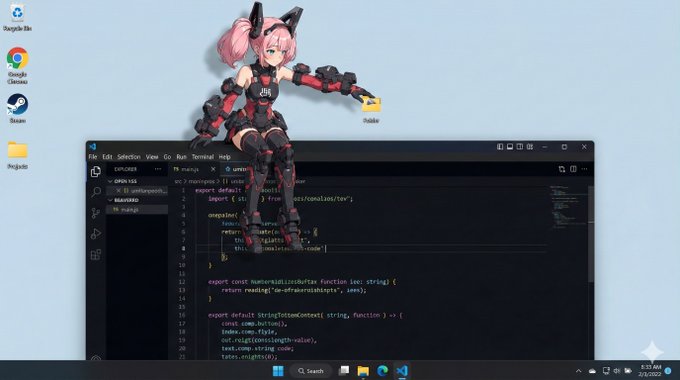
吉祥物坐在操作系统窗口边框上
os_environment: - Choose one: "Windows 11 风格桌面" 或 "macOS Sonoma 风格桌面" - If not specified: 让模型选择最自然的操作系统 UI - Use authentic UI elements: 基于所选操作系统使用真实的 UI 元素 subject: - 基于参考图 A 的角色 - 采用半 3D、动漫风格的渲染 - 清晰的实色阴影和高光定义体积感 - 表现为与真实操作系统 UI 互动的桌面吉祥物覆盖
- Category
- UI & Interfaces
- Model
- Nano Banana Pro
- Creator
- @munou_ac
- Source language
- zh-CN
- Source ID
- 1476
- Published
- Jan 8, 2026
Full prompt
os_environment:
  - Choose one: "Windows 11 style desktop" or "macOS Sonoma style desktop"
  - If not specified, let the model choose the most natural OS UI
  - Use authentic UI elements based on the selected OS

subject:
  - A character based on reference image A
  - Rendered with semi-3D, anime-style shading
  - Clear solid shadows and highlights defining volume
  - Appears as a desktop mascot overlay interacting with real OS UI

composition:
  - A realistic computer desktop in 16:9 aspect ratio
  - Include authentic-looking application windows and icons
  - Character positioned naturally on or around these UI elements

action:
  - Allow the model to freely choose mascot-like behaviors such as:
    - lying across the top edge of a window
    - sitting on a window frame
    - touching, inspecting, or reacting to icons
    - peeking from behind folders or apps
  - Actions should feel physically grounded and slightly playful

location:
  - Displayed on a real OS-style desktop (Windows/macOS)
  - Show recognizable UI elements (e.g., Chrome window, folder icons, taskbar/dock)
  - Icons and windows appear authentic but used only as background elements

style:
  - Semi-3D anime shading (soft cel-shaded look)
  - Defined shadows instead of rim lighting
  - Clean digital rendering that blends naturally with real desktop UI

camera_lighting:
  - Neutral frontal or top lighting to create solid, directional shadows
  - Soft ambient light to keep color harmony with the desktop
  - Screenshot-like straight-on camera angle

colors:
  - Desktop in cool OS-like tones
  - Character colors follow reference A accurately
  - Shadows emphasized for 3D volume

text:
  - None unless needed

edit_instructions:
  - Use reference A for character accuracy
  - Emphasize 3D-like volume with clear shadow planes
  - Ensure the character appears layered above real desktop UI elements
  - Keep real UI assets unmodified and only as contextual background

references:
  A: "Character appearance reference"

extras:
  - high resolution
  - realistic OS UI rendering
  - clean compositing and precise layer separation
  - allow creative mascot-like movement
Translations
吉祥物坐在操作系统窗口边框上
enos_environment: - Choose one: "Windows 11 style desktop" or "macOS Sonoma style desktop" - If not specified, let the model choose the most natural OS UI - Use authentic UI elements based on the selected OS subject: - A character based on reference image A - Rendered with semi-3D, anime-style shading - Clear solid shadows and highlights defining volume - Appears as a desktop mascot overlay interacting with real OS UI composition: - A realistic computer desktop in 16:9 aspect ratio - Include authentic-looking application windows and icons - Character positioned naturally on or around these UI elements action: - Allow the model to freely choose mascot-like behaviors such as: - lying across the top edge of a window - sitting on a window frame - touching, inspecting, or reacting to icons - peeking from behind folders or apps - Actions should feel physically grounded and slightly playful location: - Displayed on a real OS-style desktop (Windows/macOS) - Show recognizable UI elements (e.g., Chrome window, folder icons, taskbar/dock) - Icons and windows appear authentic but used only as background elements style: - Semi-3D anime shading (soft cel-shaded look) - Defined shadows instead of rim lighting - Clean digital rendering that blends naturally with real desktop UI camera_lighting: - Neutral frontal or top lighting to create solid, directional shadows - Soft ambient light to keep color harmony with the desktop - Screenshot-like straight-on camera angle colors: - Desktop in cool OS-like tones - Character colors follow reference A accurately - Shadows emphasized for 3D volume text: - None unless needed edit_instructions: - Use reference A for character accuracy - Emphasize 3D-like volume with clear shadow planes - Ensure the character appears layered above real desktop UI elements - Keep real UI assets unmodified and only as contextual background references: A: "Character appearance reference" extras: - high resolution - realistic OS UI rendering - clean compositing and precise layer separation - allow creative mascot-like movement
吉祥物坐在操作系统窗口边框上
zh-CNos_environment: - Choose one: "Windows 11 风格桌面" 或 "macOS Sonoma 风格桌面" - If not specified: 让模型选择最自然的操作系统 UI - Use authentic UI elements: 基于所选操作系统使用真实的 UI 元素 subject: - 基于参考图 A 的角色 - 采用半 3D、动漫风格的渲染 - 清晰的实色阴影和高光定义体积感 - 表现为与真实操作系统 UI 互动的桌面吉祥物覆盖层 composition: - 16:9 比例的真实电脑桌面 - 包含看起来真实的应用程序窗口和图标 - 角色自然地位于这些 UI 元素之上或周围 action: - 允许模型自由选择类似吉祥物的行为,例如: - 趴在窗口顶边 - 坐在窗口边框上 - 触摸、检查或对图标做出反应 - 从文件夹或应用程序后面探出头 - 动作应感觉有物理落地感且略带顽皮感 location: - 显示在真实的操作系统风格桌面(Windows/macOS)上 - 展示可识别的 UI 元素(如 Chrome 窗口、文件夹图标、任务栏/程序坞) - 图标和窗口显得真实,但仅作为背景元素使用 style: - 半 3D 动漫渲染(柔和的赛璐璐风格外观) - 轮廓分明的阴影,而非边缘光 - 干净的数字渲染,与真实桌面 UI 自然融合 camera_lighting: - 中性正面或顶部照明,以产生实色、定向的阴影 - 柔和的环境光,保持与桌面的色彩和谐 - 类似屏幕截图的平视摄像机角度 colors: - 桌面采用冷色调 OS 风格 - 角色颜色准确遵循参考图 A - 强调阴影以体现 3D 体积感 text: - 无,除非必要 edit_instructions: - 使用参考图 A 以确保角色准确性 - 通过清晰的阴影面强调类 3D 的体积感 - 确保角色看起来像是分层叠加在真实桌面 UI 元素之上 - 保持真实 UI 资源不做修改,仅作为上下文背景 references: A: "角色外观参考" extras: - 高分辨率 - 逼真的操作系统 UI 渲染 - 干净的合成和精确的图层分离 - 允许富有创意的吉祥物般动作