社交媒体产品发布模拟图
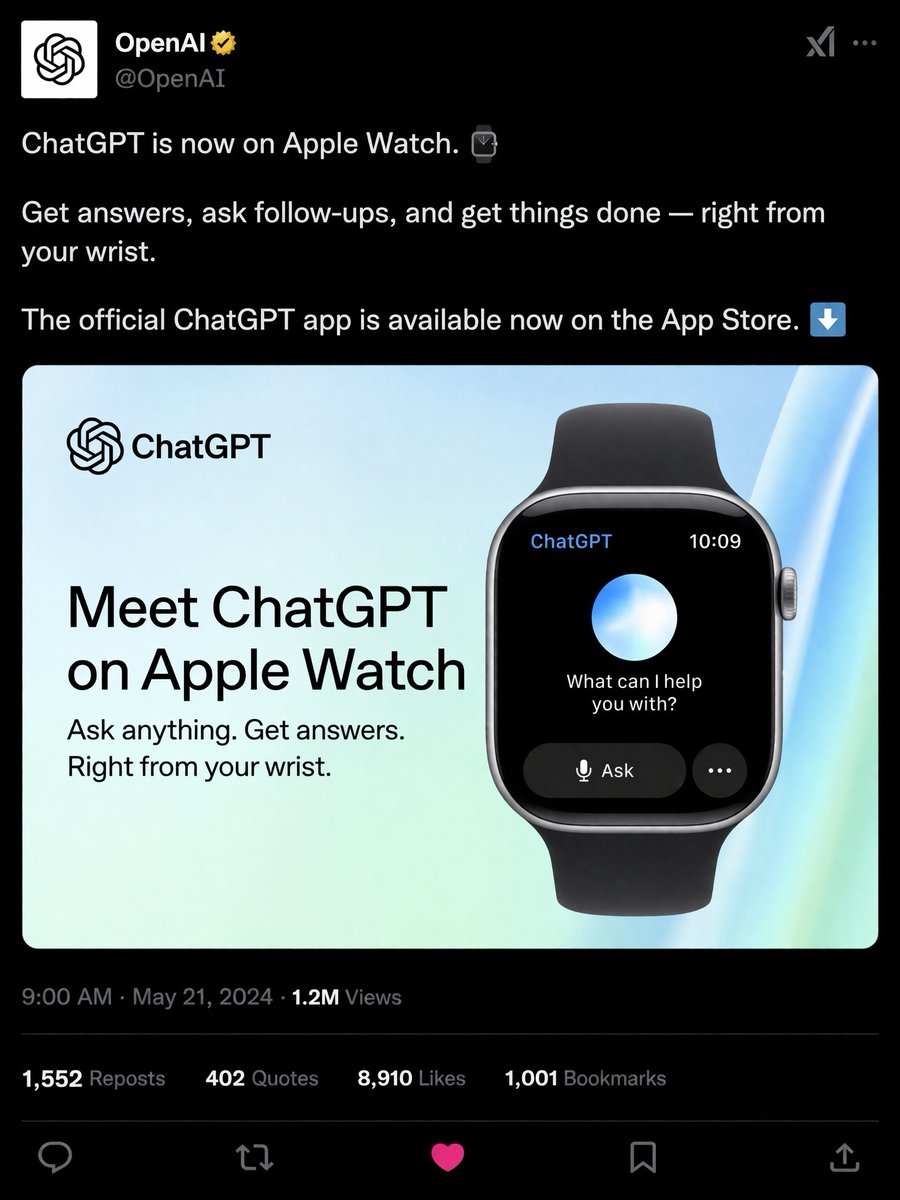
生成一张逼真的深色模式社交媒体帖子,展示智能手表应用的宣传图。
- Category
- UI & Interfaces
- Model
- GPT Image 2
- Creator
- Vi
- Source language
- en
- Source ID
- 13831
- Published
- Apr 16, 2026
Full prompt
{
  "type": "social media post mockup",
  "theme": "dark mode",
  "header": {
    "avatar": "OpenAI logo",
    "account_name": "{argument name=\"account name\" default=\"OpenAI\"}",
    "badge": "gold checkmark",
    "handle": "@OpenAI"
  },
  "post_text": [
    "{argument name=\"post text\" default=\"ChatGPT is now on Apple Watch.\"}",
    "Get answers, ask follow-ups, and get things done — right from your wrist.",
    "The official ChatGPT app is available now on the App Store."
  ],
  "embedded_card": {
    "background": "light blue and green gradient",
    "left_column": {
      "logo": "ChatGPT",
      "headline": "{argument name=\"card headline\" default=\"Meet ChatGPT on Apple Watch\"}",
      "subheadline": "Ask anything. Get answers. Right from your wrist."
    },
    "right_column": {
      "device": "smartwatch with black band",
      "screen_elements": {
        "top_bar": 2,
        "top_bar_labels": ["ChatGPT", "10:09"],
        "center": "glowing blue and white orb",
        "text": "{argument name=\"watch screen text\" default=\"What can I help you with?\"}",
        "buttons": 2,
        "button_labels": ["Ask", "..."]
      }
    }
  },
  "footer": {
    "metadata": "9:00 AM · May 21, 2024 · 1.2M Views",
    "engagement_stats": {
      "count": 4,
      "labels": ["1,552 Reposts", "402 Quotes", "{argument name=\"likes count\" default=\"8,910\"} Likes", "1,001 Bookmarks"]
    },
    "action_icons": {
      "count": 5,
      "types": ["reply", "repost", "like", "bookmark", "share"]
    }
  }
}
Translations
社交媒体产品发布模拟图
en{ "type": "social media post mockup", "theme": "dark mode", "header": { "avatar": "OpenAI logo", "account_name": "{argument name=\"account name\" default=\"OpenAI\"}", "badge": "gold checkmark", "handle": "@OpenAI" }, "post_text": [ "{argument name=\"post text\" default=\"ChatGPT is now on Apple Watch.\"}", "Get answers, ask follow-ups, and get things done — right from your wrist.", "The official ChatGPT app is available now on the App Store." ], "embedded_card": { "background": "light blue and green gradient", "left_column": { "logo": "ChatGPT", "headline": "{argument name=\"card headline\" default=\"Meet ChatGPT on Apple Watch\"}", "subheadline": "Ask anything. Get answers. Right from your wrist." }, "right_column": { "device": "smartwatch with black band", "screen_elements": { "top_bar": 2, "top_bar_labels": ["ChatGPT", "10:09"], "center": "glowing blue and white orb", "text": "{argument name=\"watch screen text\" default=\"What can I help you with?\"}", "buttons": 2, "button_labels": ["Ask", "..."] } } }, "footer": { "metadata": "9:00 AM · May 21, 2024 · 1.2M Views", "engagement_stats": { "count": 4, "labels": ["1,552 Reposts", "402 Quotes", "{argument name=\"likes count\" default=\"8,910\"} Likes", "1,001 Bookmarks"] }, "action_icons": { "count": 5, "types": ["reply", "repost", "like", "bookmark", "share"] } } }
社交媒体产品发布模拟图
zh-CN{ "type": "社交媒体帖子模拟图", "theme": "深色模式", "header": { "avatar": "OpenAI 标志", "account_name": "{argument name=\"account name\" default=\"OpenAI\"}", "badge": "金色认证徽章", "handle": "@OpenAI" }, "post_text": [ "{argument name=\"post text\" default=\"ChatGPT 现已登陆 Apple Watch。\"}", "随时随地提问、追问并处理事务——一切尽在腕间。", "ChatGPT 官方应用现已在 App Store 上架。" ], "embedded_card": { "background": "浅蓝色与绿色渐变", "left_column": { "logo": "ChatGPT", "headline": "{argument name=\"card headline\" default=\"体验 Apple Watch 版 ChatGPT\"}", "subheadline": "随时提问。获取解答。一切尽在腕间。" }, "right_column": { "device": "配有黑色表带的智能手表", "screen_elements": { "top_bar": 2, "top_bar_labels": ["ChatGPT", "10:09"], "center": "发光的蓝白球体", "text": "{argument name=\"watch screen text\" default=\"有什么我可以帮您的吗?\"}", "buttons": 2, "button_labels": ["提问", "..."] } } }, "footer": { "metadata": "上午 9:00 · 2024 年 5 月 21 日 · 120 万次浏览", "engagement_stats": { "count": 4, "labels": ["1,552 次转发", "402 次引用", "{argument name=\"likes count\" default=\"8,910\"} 次点赞", "1,001 次书签"] }, "action_icons": { "count": 5, "types": ["回复", "转发", "点赞", "书签", "分享"] } } }