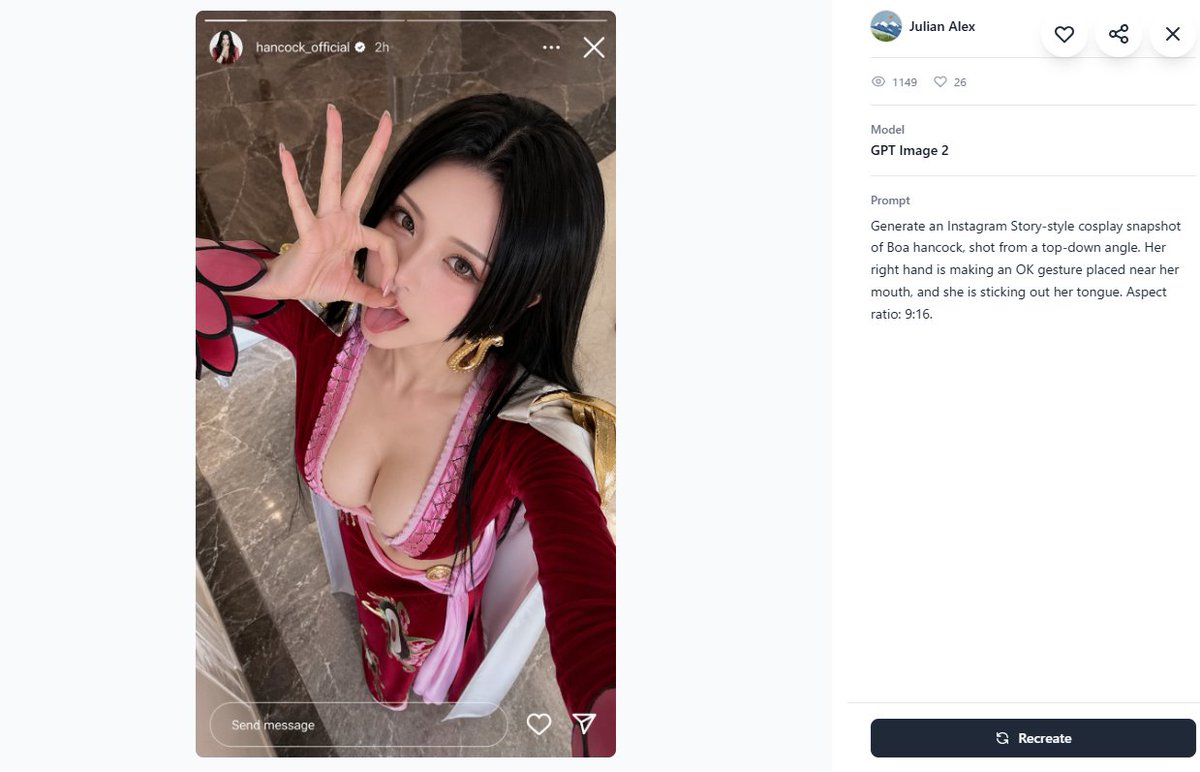
Cosplay 提示词画廊截图
生成一张桌面端提示词画廊页面截图,展示 Instagram 快拍风格的 Cosplay 自拍及其 GPT Image 2 元数据面板。
- Category
- UI & Interfaces
- Model
- GPT Image 2
- Creator
- モリー
- Source language
- en
- Source ID
- 23245
- Published
- Apr 24, 2026
Full prompt
Create a 16:9 desktop webpage screenshot of a prompt-gallery detail page showing one generated image on the left and its metadata on the right. The left side contains a tall Instagram Story-style cosplay snapshot mockup in a rounded rectangle, aspect ratio 9:16, with a realistic top-down selfie of {argument name="character name" default="Boa Hancock"} cosplay. The cosplayer is an adult woman with long straight {argument name="hair color" default="black"} hair, wearing a red and pink anime-inspired outfit with a low neckline, gold hoop earrings, white shoulder accents, and red sleeves with a pink-and-black petal-like cuff detail. Her face is intentionally obscured by a square blur/pixelated censor block, but her right hand is clearly making an OK gesture near her mouth and she appears to be sticking out her tongue behind the blur. Camera angle is high above, like a phone selfie, with polished gray-brown marble flooring in the background. Add Instagram Story UI overlays: a thin progress bar across the top, a small circular profile photo, username {argument name="Instagram username" default="hancock_official"}, a verified check, “2h”, three-dot menu, and an X close icon; at the bottom include a rounded “Send message” field plus heart and paper-plane icons. The right panel is a clean white gallery interface with a small circular avatar, the name {argument name="creator name" default="Julian Alex"}, floating circular action buttons for heart, share, and close, a stats row with exactly 2 items: an eye icon with “1149” and a heart icon with “26”, a Model section reading “GPT Image 2”, and a Prompt section containing the exact text: {argument name="visible prompt text" default="Generate an Instagram Story-style cosplay snapshot of Boa hancock, shot from a top-down angle. Her right hand is making an OK gesture placed near her mouth, and she is sticking out her tongue. Aspect ratio: 9:16."}. At the bottom right place a dark navy rounded “Recreate” button with a refresh icon. Use lots of white space, soft gray dividers, modern minimal UI styling, and make the screenshot look like a real browser/app capture rather than a polished poster.Translations
Cosplay 提示词画廊截图
enCreate a 16:9 desktop webpage screenshot of a prompt-gallery detail page showing one generated image on the left and its metadata on the right. The left side contains a tall Instagram Story-style cosplay snapshot mockup in a rounded rectangle, aspect ratio 9:16, with a realistic top-down selfie of {argument name="character name" default="Boa Hancock"} cosplay. The cosplayer is an adult woman with long straight {argument name="hair color" default="black"} hair, wearing a red and pink anime-inspired outfit with a low neckline, gold hoop earrings, white shoulder accents, and red sleeves with a pink-and-black petal-like cuff detail. Her face is intentionally obscured by a square blur/pixelated censor block, but her right hand is clearly making an OK gesture near her mouth and she appears to be sticking out her tongue behind the blur. Camera angle is high above, like a phone selfie, with polished gray-brown marble flooring in the background. Add Instagram Story UI overlays: a thin progress bar across the top, a small circular profile photo, username {argument name="Instagram username" default="hancock_official"}, a verified check, “2h”, three-dot menu, and an X close icon; at the bottom include a rounded “Send message” field plus heart and paper-plane icons. The right panel is a clean white gallery interface with a small circular avatar, the name {argument name="creator name" default="Julian Alex"}, floating circular action buttons for heart, share, and close, a stats row with exactly 2 items: an eye icon with “1149” and a heart icon with “26”, a Model section reading “GPT Image 2”, and a Prompt section containing the exact text: {argument name="visible prompt text" default="Generate an Instagram Story-style cosplay snapshot of Boa hancock, shot from a top-down angle. Her right hand is making an OK gesture placed near her mouth, and she is sticking out her tongue. Aspect ratio: 9:16."}. At the bottom right place a dark navy rounded “Recreate” button with a refresh icon. Use lots of white space, soft gray dividers, modern minimal UI styling, and make the screenshot look like a real browser/app capture rather than a polished poster.
Cosplay 提示词画廊截图
zh-CN创建一个 16:9 的桌面端网页截图,展示一个提示词画廊详情页,左侧为生成的图像,右侧为对应的元数据。左侧包含一个圆角矩形内的 Instagram 快拍风格 Cosplay 快照模型,比例为 9:16,展示了一张逼真的俯拍自拍,角色为 {argument name="character name" default="波雅·汉库克"}。Coser 是一位成年女性,留着长直的 {argument name="hair color" default="黑色"} 头发,身穿红粉相间的动漫风格服装,低领设计,佩戴金色圆环耳环,肩部有白色装饰,袖子为红色,袖口带有粉黑相间的花瓣状细节。她的面部被一个方形模糊/马赛克遮挡,但右手在嘴边清晰地做着“OK”手势,且似乎在模糊遮挡后吐着舌头。拍摄角度为高处俯拍,类似手机自拍,背景为抛光灰褐色大理石地面。添加 Instagram 快拍 UI 覆盖层:顶部有一条细进度条、一个小圆形头像、用户名 {argument name="Instagram username" default="hancock_official"}、认证勾选图标、“2h”、三点菜单和 X 关闭图标;底部包含一个圆角的“发送消息”输入框,以及爱心和纸飞机图标。右侧面板为简洁的白色画廊界面,包含一个小圆形头像、名称 {argument name="creator name" default="Julian Alex"}、悬浮的圆形操作按钮(爱心、分享和关闭)、一行统计数据(包含两个项目:带“1149”的眼睛图标和带“26”的爱心图标)、显示为“GPT Image 2”的模型部分,以及包含以下确切文本的提示词部分:{argument name="visible prompt text" default="生成一张 Instagram 快拍风格的波雅·汉库克 Cosplay 快照,采用俯拍角度。她的右手在嘴边做着 OK 手势,并吐着舌头。长宽比:9:16。"}。在右下角放置一个深蓝色的圆角“重新生成”按钮,并配有刷新图标。使用大量留白、浅灰色分割线和现代简约的 UI 设计,使截图看起来像真实的浏览器/应用界面,而非精修海报。