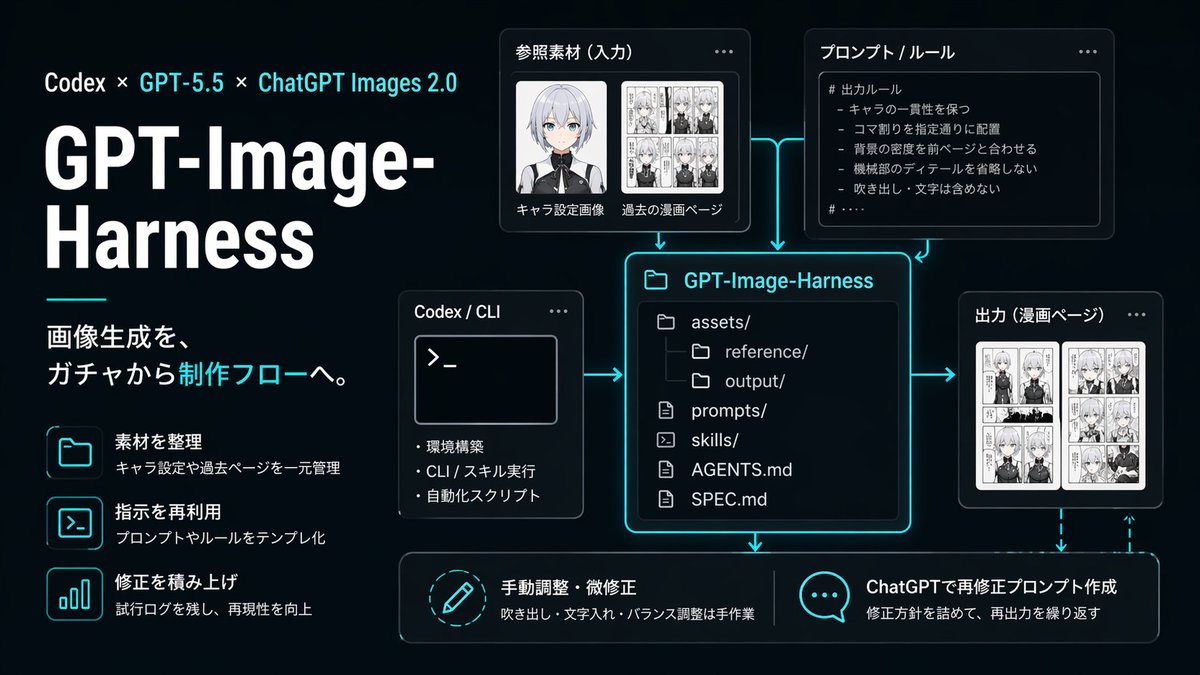
Neon AI 图像工作流信息图
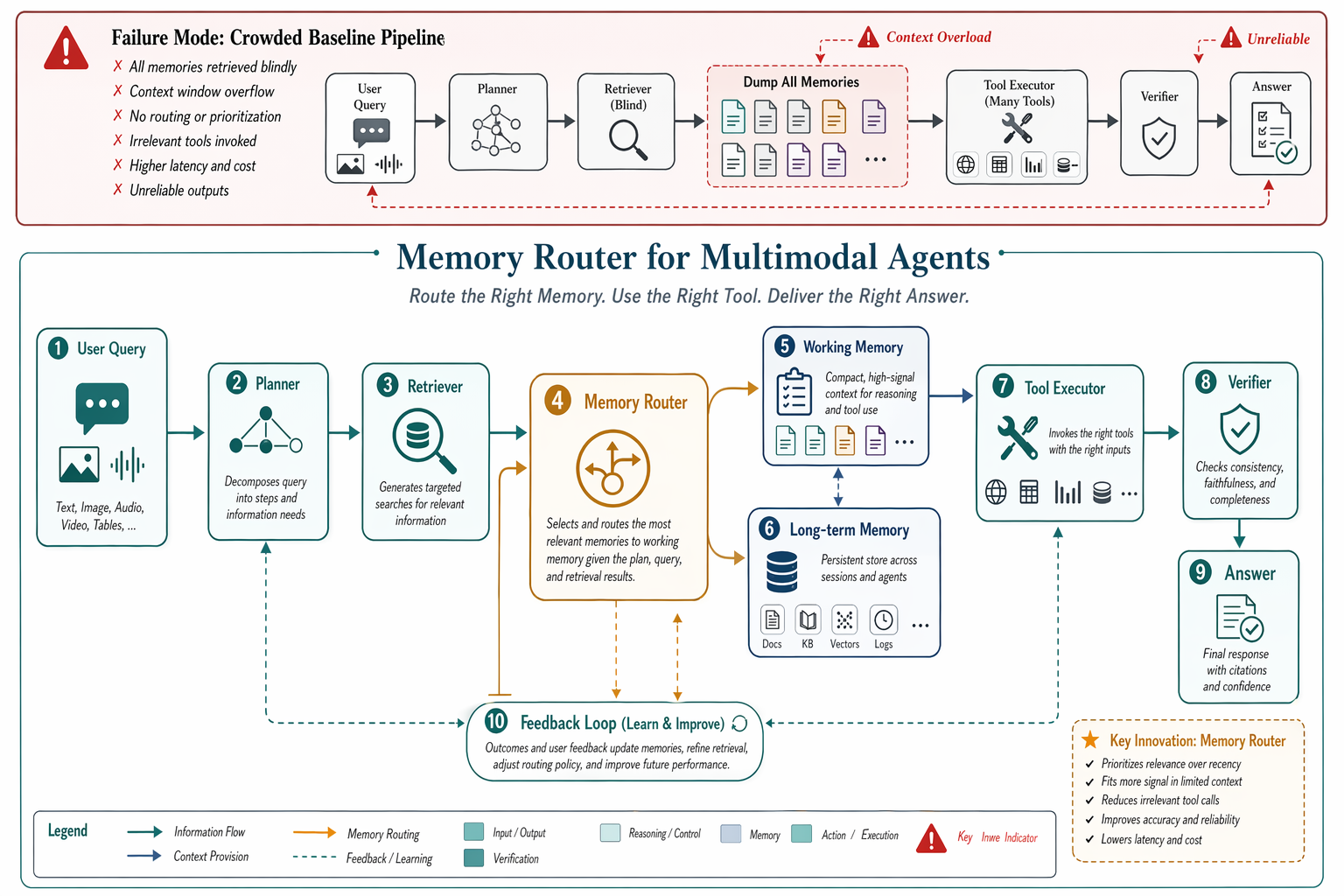
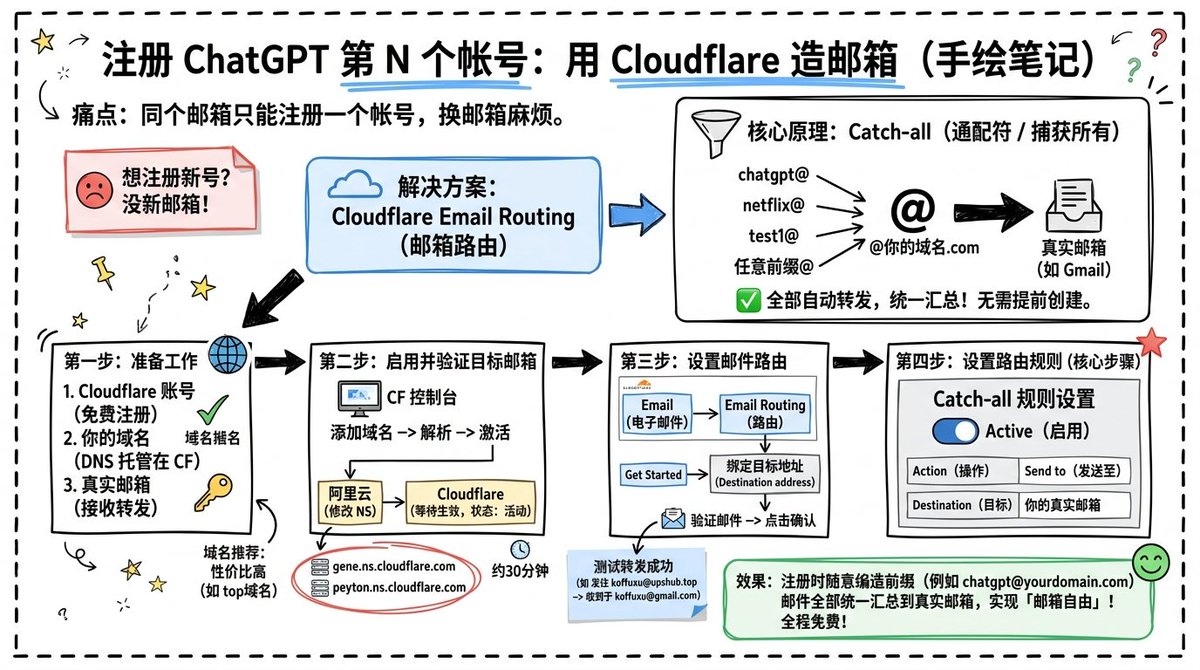
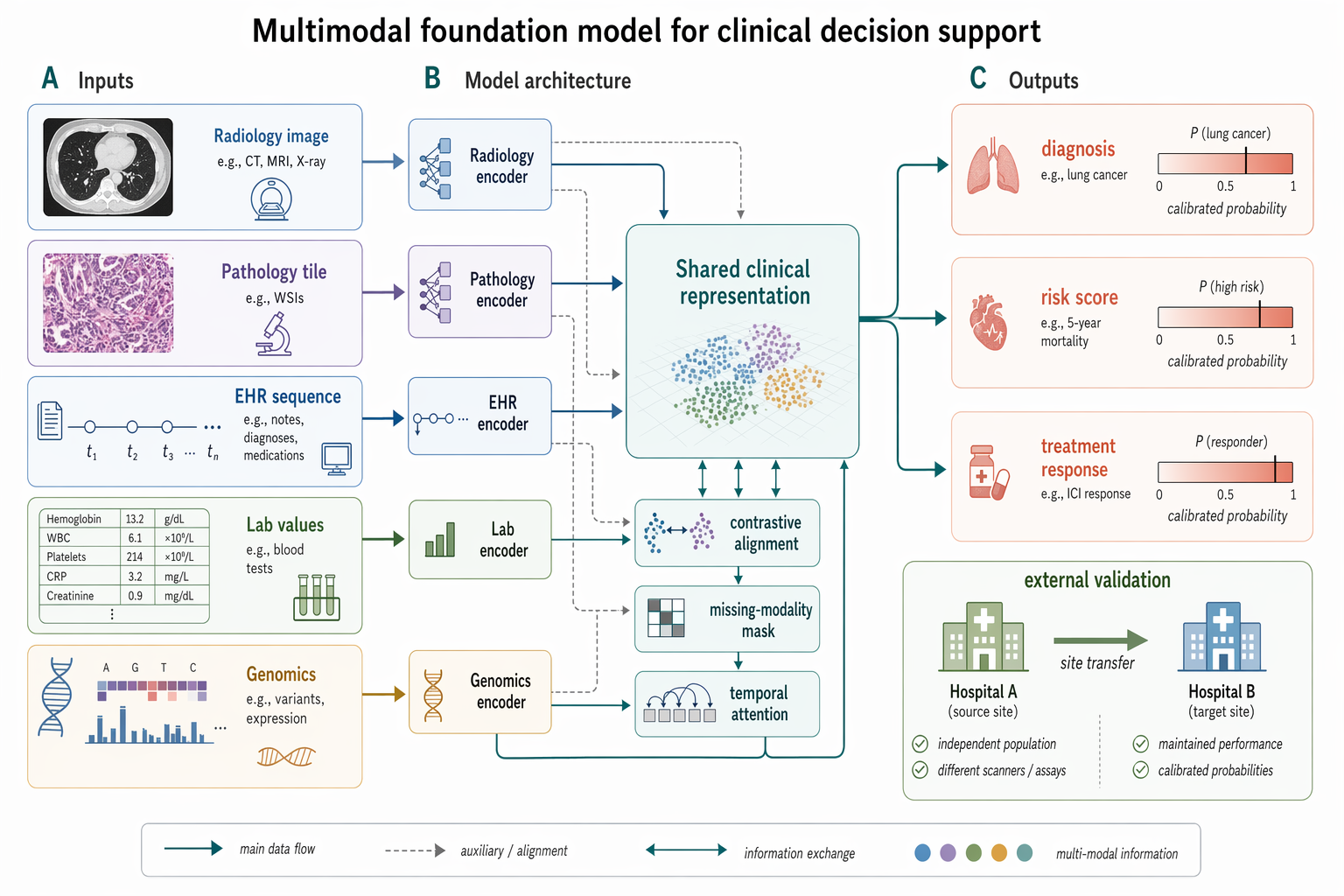
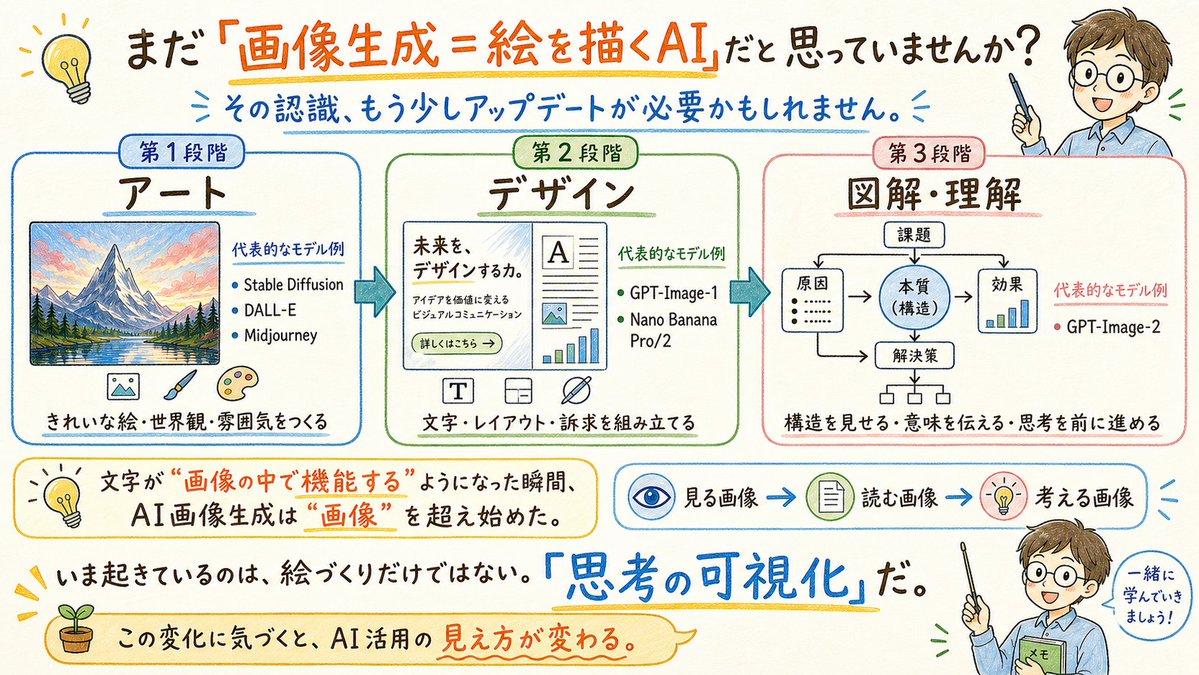
一张简洁的深色 UI 风格信息图,展示了 GPT-Image-Harness 的生产工作流,适用于技术演示、产品说明及关于可复现图像生成管线的社交媒体发布。
- Category
- Charts & Infographics
- Model
- GPT Image 2
- Creator
- みかみ.ai|AI発信と個人開発
- Source language
- en
- Source ID
- 16072
- Published
- Apr 25, 2026
Full prompt
{"type":"dark tech workflow infographic","style":"clean futuristic presentation slide, black to deep navy gradient background, neon cyan glow accents, thin cyan connector arrows, modern UI cards with rounded corners, subtle shadows, high contrast white typography, polished startup branding aesthetic","canvas":{"aspect_ratio":"16:9","composition":"left-aligned title block with modular diagram on the right and bottom"},"branding":{"topline":"Codex × GPT-5.5 × ChatGPT Images 2.0","title":"GPT-Image-Harness","subtitle":"画像生成を、ガチャから制作フローへ。"},"layout":{"sections":[{"title":"left feature list","position":"left column","count":3,"labels":["素材を整理","指示を再利用","修正を積み上げ"]},{"title":"参照素材(入力)","position":"upper center-left","count":2,"labels":["キャラ設定画像","過去の漫画ページ"]},{"title":"プロンプト / ルール","position":"upper center-right","count":1,"labels":["# 出力ルール"]},{"title":"Codex / CLI","position":"middle left of center","count":3,"labels":["環境構築","CLI / スキル実行","自動化スクリプト"]},{"title":"GPT-Image-Harness","position":"center","count":6,"labels":["assets/","reference/","output/","prompts/","skills/","AGENTS.md","SPEC.md"]},{"title":"出力(漫画ページ)","position":"middle right","count":1,"labels":["漫画ページ"]},{"title":"bottom actions","position":"bottom row","count":2,"labels":["手動調整・微修正","ChatGPTで再修正プロンプト作成"]}]},"left_panel":{"headline_scale":"very large","title_weight":"bold extra-heavy","decorative_line":"short horizontal cyan line under title block","feature_items":[{"icon":"folder outline glowing cyan","title":"素材を整理","description":"キャラ設定や過去ページを一元管理"},{"icon":"terminal window outline glowing cyan","title":"指示を再利用","description":"プロンプトやルールをテンプレ化"},{"icon":"bar chart outline glowing cyan","title":"修正を積み上げ","description":"試行ログを残し、再現性を向上"}]},"diagram":{"nodes":[{"kind":"input card","title":"参照素材(入力)","visual":"two thumbnail areas, one anime character bust portrait with face softly blurred, one black-and-white manga page collage"},{"kind":"rule card","title":"プロンプト / ルール","visual":"bullet list inside code-like panel","body_text":["# 出力ルール","- キャラの一貫性を保つ","- コマ割りを指定通りに配置","- 背景の密度を前ページと合わせる","- 機械部のディテールを省略しない","- 吹き出し・文字は含めない"]},{"kind":"tool card","title":"Codex / CLI","visual":"terminal window with prompt symbol >_ and three bullet points"},{"kind":"repository card","title":"GPT-Image-Harness","visual":"large central file-tree panel with glowing cyan border"},{"kind":"output card","title":"出力(漫画ページ)","visual":"two manga page thumbnails side by side"},{"kind":"action card","title":"手動調整・微修正","visual":"circular pencil icon","description":"吹き出し・文字入れ・バランス調整は手作業"},{"kind":"action card","title":"ChatGPTで再修正プロンプト作成","visual":"speech bubble icon with three dots","description":"修正方針を詰めて、再出力を繰り返す"}],"connectors":"cyan glowing arrows connecting input, rules, and CLI into the central repository card; arrows from repository to output and downward to the two bottom action cards; dashed cyan feedback arrow looping from output back toward the bottom-right action area"},"typography":{"language":"Japanese","title_color":"white","accent_color":"bright cyan","body_color":"light gray-white"},"lighting":"soft neon edge glow around cards and icons","quality":"crisp vector-like infographic, presentation-ready, precise alignment, no watermarks"}Translations
Neon AI 图像工作流信息图
en{"type":"dark tech workflow infographic","style":"clean futuristic presentation slide, black to deep navy gradient background, neon cyan glow accents, thin cyan connector arrows, modern UI cards with rounded corners, subtle shadows, high contrast white typography, polished startup branding aesthetic","canvas":{"aspect_ratio":"16:9","composition":"left-aligned title block with modular diagram on the right and bottom"},"branding":{"topline":"Codex × GPT-5.5 × ChatGPT Images 2.0","title":"GPT-Image-Harness","subtitle":"画像生成を、ガチャから制作フローへ。"},"layout":{"sections":[{"title":"left feature list","position":"left column","count":3,"labels":["素材を整理","指示を再利用","修正を積み上げ"]},{"title":"参照素材(入力)","position":"upper center-left","count":2,"labels":["キャラ設定画像","過去の漫画ページ"]},{"title":"プロンプト / ルール","position":"upper center-right","count":1,"labels":["# 出力ルール"]},{"title":"Codex / CLI","position":"middle left of center","count":3,"labels":["環境構築","CLI / スキル実行","自動化スクリプト"]},{"title":"GPT-Image-Harness","position":"center","count":6,"labels":["assets/","reference/","output/","prompts/","skills/","AGENTS.md","SPEC.md"]},{"title":"出力(漫画ページ)","position":"middle right","count":1,"labels":["漫画ページ"]},{"title":"bottom actions","position":"bottom row","count":2,"labels":["手動調整・微修正","ChatGPTで再修正プロンプト作成"]}]},"left_panel":{"headline_scale":"very large","title_weight":"bold extra-heavy","decorative_line":"short horizontal cyan line under title block","feature_items":[{"icon":"folder outline glowing cyan","title":"素材を整理","description":"キャラ設定や過去ページを一元管理"},{"icon":"terminal window outline glowing cyan","title":"指示を再利用","description":"プロンプトやルールをテンプレ化"},{"icon":"bar chart outline glowing cyan","title":"修正を積み上げ","description":"試行ログを残し、再現性を向上"}]},"diagram":{"nodes":[{"kind":"input card","title":"参照素材(入力)","visual":"two thumbnail areas, one anime character bust portrait with face softly blurred, one black-and-white manga page collage"},{"kind":"rule card","title":"プロンプト / ルール","visual":"bullet list inside code-like panel","body_text":["# 出力ルール","- キャラの一貫性を保つ","- コマ割りを指定通りに配置","- 背景の密度を前ページと合わせる","- 機械部のディテールを省略しない","- 吹き出し・文字は含めない"]},{"kind":"tool card","title":"Codex / CLI","visual":"terminal window with prompt symbol >_ and three bullet points"},{"kind":"repository card","title":"GPT-Image-Harness","visual":"large central file-tree panel with glowing cyan border"},{"kind":"output card","title":"出力(漫画ページ)","visual":"two manga page thumbnails side by side"},{"kind":"action card","title":"手動調整・微修正","visual":"circular pencil icon","description":"吹き出し・文字入れ・バランス調整は手作業"},{"kind":"action card","title":"ChatGPTで再修正プロンプト作成","visual":"speech bubble icon with three dots","description":"修正方針を詰めて、再出力を繰り返す"}],"connectors":"cyan glowing arrows connecting input, rules, and CLI into the central repository card; arrows from repository to output and downward to the two bottom action cards; dashed cyan feedback arrow looping from output back toward the bottom-right action area"},"typography":{"language":"Japanese","title_color":"white","accent_color":"bright cyan","body_color":"light gray-white"},"lighting":"soft neon edge glow around cards and icons","quality":"crisp vector-like infographic, presentation-ready, precise alignment, no watermarks"}
Neon AI 图像工作流信息图
zh-CN{"type":"深色科技工作流信息图","style":"简洁的未来感演示 Slides,黑色至深海军蓝渐变背景,霓虹青色光效点缀,纤细的青色连接箭头,带有圆角的现代 UI 卡片,柔和阴影,高对比度白色字体,精致的初创公司品牌美学","canvas":{"aspect_ratio":"16:9","composition":"左对齐标题块,右侧及底部为模块化图表"},"branding":{"topline":"Codex × GPT-5.5 × ChatGPT Images 2.0","title":"GPT-Image-Harness","subtitle":"将图像生成从“抽卡”转变为生产流程。"},"layout":{"sections":[{"title":"左侧功能列表","position":"左侧栏","count":3,"labels":["整理素材","复用指令","积累修正"]},{"title":"参考素材(输入)","position":"中上方偏左","count":2,"labels":["角色设定图","过往漫画页"]},{"title":"提示词 / 规则","position":"中上方偏右","count":1,"labels":["# 输出规则"]},{"title":"Codex / CLI","position":"中心左侧","count":3,"labels":["环境搭建","CLI / 技能执行","自动化脚本"]},{"title":"GPT-Image-Harness","position":"中心","count":6,"labels":["assets/","reference/","output/","prompts/","skills/","AGENTS.md","SPEC.md"]},{"title":"输出(漫画页)","position":"中心右侧","count":1,"labels":["漫画页"]},{"title":"底部操作","position":"底行","count":2,"labels":["手动调整与微调","通过 ChatGPT 生成再修正提示词"]}]},"left_panel":{"headline_scale":"超大","title_weight":"加粗超重","decorative_line":"标题块下方的短水平青色线条","feature_items":[{"icon":"folder outline glowing cyan","title":"整理素材","description":"统一管理角色设定和过往页面"},{"icon":"terminal window outline glowing cyan","title":"复用指令","description":"将提示词和规则模板化"},{"icon":"bar chart outline glowing cyan","title":"积累修正","description":"保留测试日志,提升可复现性"}]},"diagram":{"nodes":[{"kind":"input card","title":"参考素材(输入)","visual":"两个缩略图区域,一个动漫角色半身像(面部柔和模糊),一个黑白漫画页拼贴"},{"kind":"rule card","title":"提示词 / 规则","visual":"代码风格面板内的项目符号列表","body_text":["# 输出规则","- 保持角色一致性","- 按指定要求配置分镜","- 背景密度与前页保持一致","- 不省略机械细节","- 不包含对话气泡与文字"]},{"kind":"tool card","title":"Codex / CLI","visual":"带有提示符 >_ 和三个项目符号的终端窗口"},{"kind":"repository card","title":"GPT-Image-Harness","visual":"带有青色发光边框的大型中央文件树面板"},{"kind":"output card","title":"输出(漫画页)","visual":"并排的两个漫画页缩略图"},{"kind":"action card","title":"手动调整与微调","visual":"圆形铅笔图标","description":"对话气泡、文字添加及平衡调整均为手动完成"},{"kind":"action card","title":"通过 ChatGPT 生成再修正提示词","visual":"带有三个点的对话气泡图标","description":"明确修正方向,重复进行再输出"}],"connectors":"连接输入、规则和 CLI 到中央项目卡片的青色发光箭头;从项目卡片指向输出,并向下指向两个底部操作卡片的箭头;从输出循环回右下角操作区域的虚线青色反馈箭头"},"typography":{"language":"简体中文","title_color":"白色","accent_color":"亮青色","body_color":"浅灰白色"},"lighting":"卡片和图标周围柔和的霓虹边缘光","quality":"清晰的矢量风格信息图,演示级品质,精准对齐,无水印"}