AI 职业照应用 App Store 宣传海报
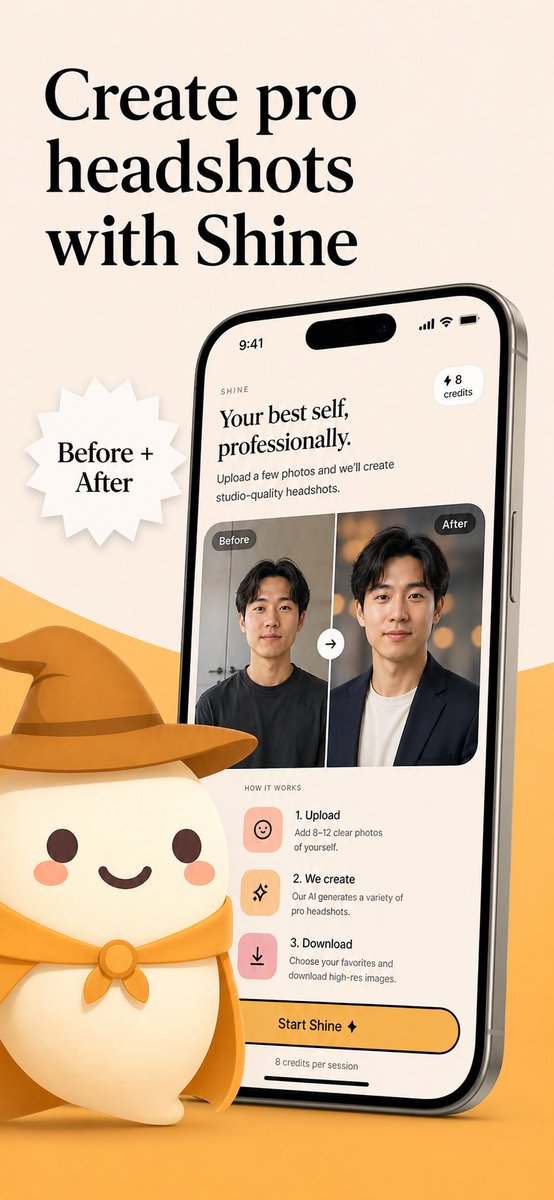
一张品牌化的移动应用营销视觉图,展示了 AI 职业照应用的界面、前后对比效果以及可爱的吉祥物,适用于 App Store 截图或发布活动。
- Category
- UI & Interfaces
- Model
- GPT Image 2
- Creator
- ashen
- Source language
- en
- Source ID
- 16942
- Published
- Apr 28, 2026
Full prompt
Create a polished App Store promotional poster for an AI headshot app called {argument name="app name" default="Shine"}, in a warm minimalist brand style. Use a vertical smartphone screenshot ad layout on a soft beige background with a curved golden-yellow shape rising from the bottom edge. Place a large elegant black serif headline in the upper left, split across 3 lines, reading {argument name="headline text" default="Create pro headshots with Shine"}. Add a white jagged starburst badge to the left-center with black serif text reading {argument name="badge text" default="Before + After"}. On the right side, show a large angled modern smartphone mockup, slightly tilted left, with thin metallic edges and a realistic screen. The phone display should show the app interface for AI-generated professional headshots. At the top of the screen, include a small wordmark reading SHINE, a large serif subheadline saying "Your best self, professionally.", supporting body text saying "Upload a few photos and we’ll create studio-quality headshots.", a small rounded pill in the upper right that says "⚡ 8 credits", and an iPhone-style status bar showing 9:41. In the middle of the phone screen, show a before-and-after comparison card with 2 portrait panels side by side, each labeled exactly once: 1 left label "Before" and 1 right label "After". The left portrait is a casual man in a dark T-shirt against a plain indoor background; the right portrait is the same man transformed into a professional headshot wearing a dark blazer over a light shirt with a warm studio bokeh background. Put a circular swap arrow button centered between the 2 panels. Below that, include a "HOW IT WORKS" section with exactly 3 steps arranged vertically: 1) "1. Upload" with the text "Add 8–12 clear photos of yourself.", 2) "2. We create" with the text "Our AI generates a variety of pro headshots.", 3) "3. Download" with the text "Choose your favorites and download high-res images." Give each step a rounded square pastel icon tile in peach or pink tones. Near the bottom of the phone screen, add a large rounded yellow CTA button reading {argument name="button text" default="Start Shine ✦"}, and beneath it small text saying "8 credits per session". In the lower left foreground, place a cute stylized white mascot character with a rounded body, tiny arms, blush cheeks, dot eyes, and a smiling mouth, wearing a golden-yellow cowboy hat and matching neckerchief; the oversized hat should extend toward the center and overlap the base area in front of the phone. Use soft 3D illustration for the mascot, premium UI design for the phone screen, consistent beige-and-gold branding, subtle shadows, clean spacing, and a refined startup-marketing aesthetic.Translations
AI 职业照应用 App Store 宣传海报
enCreate a polished App Store promotional poster for an AI headshot app called {argument name="app name" default="Shine"}, in a warm minimalist brand style. Use a vertical smartphone screenshot ad layout on a soft beige background with a curved golden-yellow shape rising from the bottom edge. Place a large elegant black serif headline in the upper left, split across 3 lines, reading {argument name="headline text" default="Create pro headshots with Shine"}. Add a white jagged starburst badge to the left-center with black serif text reading {argument name="badge text" default="Before + After"}. On the right side, show a large angled modern smartphone mockup, slightly tilted left, with thin metallic edges and a realistic screen. The phone display should show the app interface for AI-generated professional headshots. At the top of the screen, include a small wordmark reading SHINE, a large serif subheadline saying "Your best self, professionally.", supporting body text saying "Upload a few photos and we’ll create studio-quality headshots.", a small rounded pill in the upper right that says "⚡ 8 credits", and an iPhone-style status bar showing 9:41. In the middle of the phone screen, show a before-and-after comparison card with 2 portrait panels side by side, each labeled exactly once: 1 left label "Before" and 1 right label "After". The left portrait is a casual man in a dark T-shirt against a plain indoor background; the right portrait is the same man transformed into a professional headshot wearing a dark blazer over a light shirt with a warm studio bokeh background. Put a circular swap arrow button centered between the 2 panels. Below that, include a "HOW IT WORKS" section with exactly 3 steps arranged vertically: 1) "1. Upload" with the text "Add 8–12 clear photos of yourself.", 2) "2. We create" with the text "Our AI generates a variety of pro headshots.", 3) "3. Download" with the text "Choose your favorites and download high-res images." Give each step a rounded square pastel icon tile in peach or pink tones. Near the bottom of the phone screen, add a large rounded yellow CTA button reading {argument name="button text" default="Start Shine ✦"}, and beneath it small text saying "8 credits per session". In the lower left foreground, place a cute stylized white mascot character with a rounded body, tiny arms, blush cheeks, dot eyes, and a smiling mouth, wearing a golden-yellow cowboy hat and matching neckerchief; the oversized hat should extend toward the center and overlap the base area in front of the phone. Use soft 3D illustration for the mascot, premium UI design for the phone screen, consistent beige-and-gold branding, subtle shadows, clean spacing, and a refined startup-marketing aesthetic.
AI 职业照应用 App Store 宣传海报
zh-CN为一款名为 {argument name="app name" default="Shine"} 的 AI 职业照应用制作一张精致的 App Store 宣传海报,采用温暖简约的品牌风格。使用垂直手机截图广告布局,背景为柔和的米色,底部边缘有向上延伸的弧形金黄色形状。在左上方放置一个优雅的大号黑色衬线体标题,分为 3 行,内容为 {argument name="headline text" default="用 Shine 打造专业职业照"}。在左侧中心添加一个白色锯齿状星形徽章,内含黑色衬线体文字 {argument name="badge text" default="Before + After"}。在右侧,展示一个大型倾斜的现代智能手机模型,向左微倾,带有纤细的金属边框和逼真的屏幕。手机屏幕应显示 AI 生成专业职业照的应用界面。屏幕顶部包含一个小型的 SHINE 字标,一行大号衬线体副标题“展现最专业的你。”,以及辅助正文“上传几张照片,我们将为您生成影棚级职业照。”,右上角有一个小型的圆角胶囊按钮,显示“⚡ 8 积分”,以及显示 9:41 的 iPhone 风格状态栏。在手机屏幕中间,展示一张前后对比卡片,并排两个肖像面板,每个面板各标注一次:左侧标签为“Before”,右侧标签为“After”。左侧肖像是一位穿着深色 T 恤、背景为普通室内的休闲男士;右侧肖像则是同一位男士变身为穿着深色西装外套搭配浅色衬衫、背景为温暖影棚虚化效果的专业职业照。在两个面板之间居中放置一个圆形切换箭头按钮。在下方,包含一个“HOW IT WORKS”部分,垂直排列 3 个步骤:1) “1. Upload”,文字为“上传 8–12 张清晰的个人照片。”,2) “2. We create”,文字为“我们的 AI 将生成多种专业职业照。”,3) “3. Download”,文字为“选择您最喜欢的照片并下载高清图像。”为每个步骤配上桃色或粉色调的圆角方形图标。在手机屏幕底部附近,添加一个大型圆角黄色 CTA 按钮,文字为 {argument name="button text" default="开始 Shine ✦"},下方小字显示“每场次 8 积分”。在左下角前景处,放置一个可爱的风格化白色吉祥物,身体圆润,手臂短小,脸颊红润,眼睛呈点状,嘴巴微笑着,戴着一顶金黄色牛仔帽和配套的领巾;超大的帽子应向中心延伸,并覆盖在手机前方的底部区域。吉祥物采用柔和的 3D 插画风格,手机屏幕采用高级 UI 设计,保持米色与金色的品牌一致性,辅以细腻的阴影、整洁的间距以及精致的初创公司营销美学。