日系 AI 游戏启动仪表盘
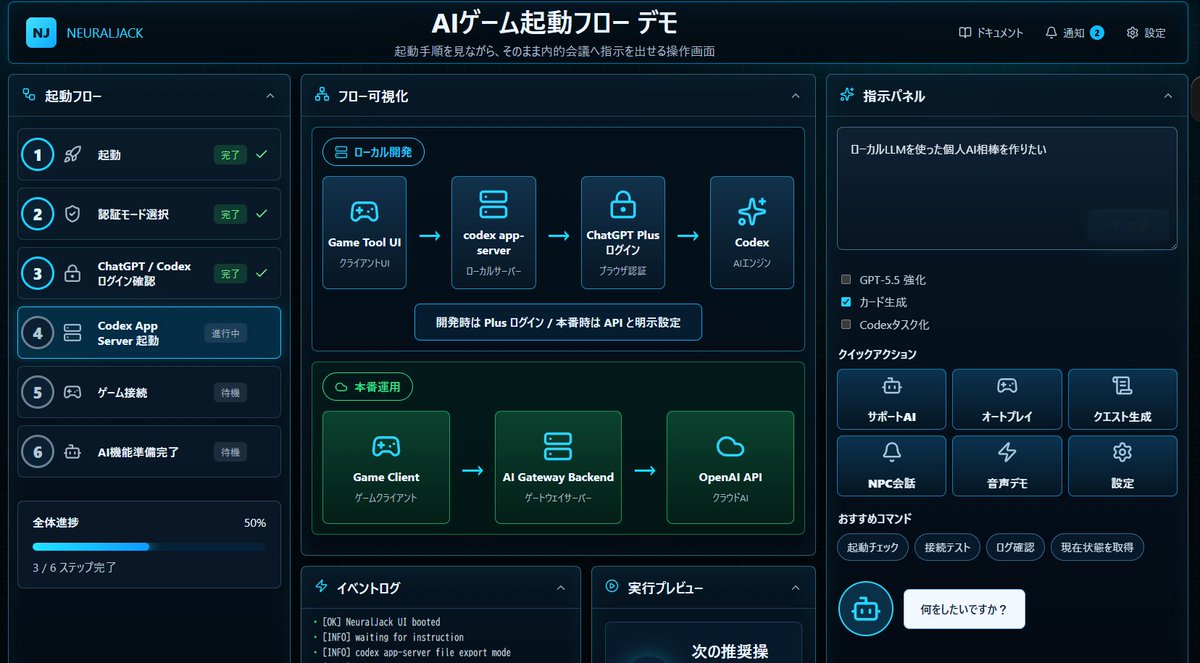
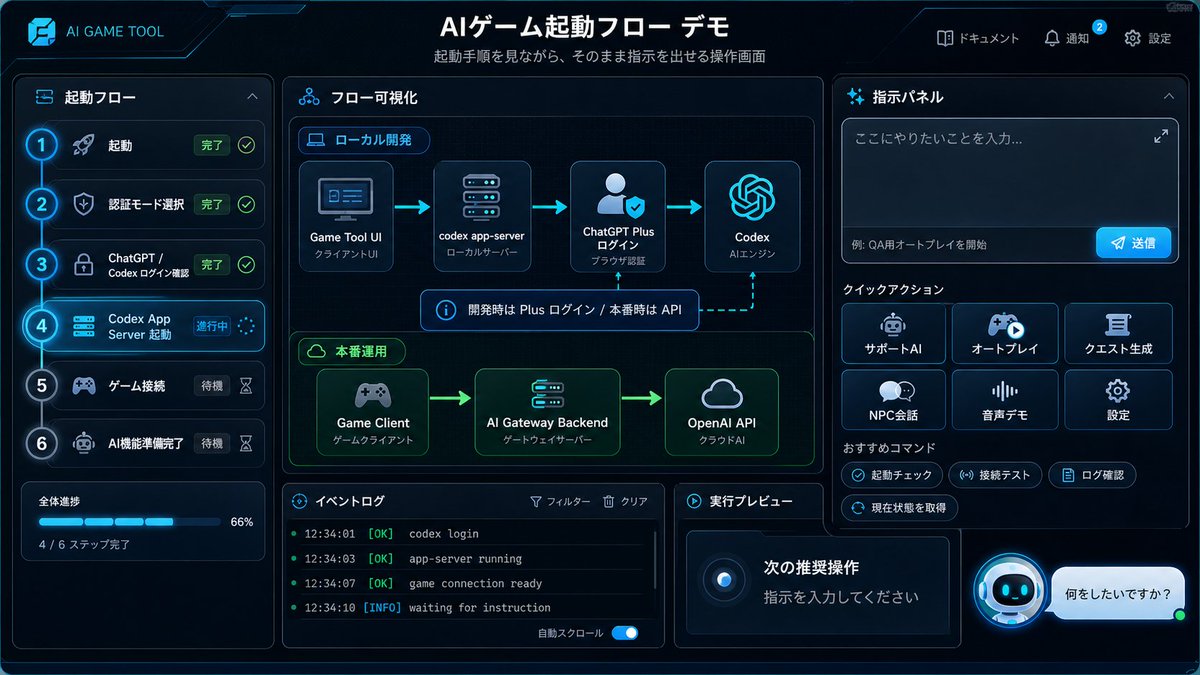
生成一个具有未来感的日系深色模式仪表盘模型,用于可视化 AI 游戏启动流程并发布自动化指令。
- Category
- Charts & Infographics
- Model
- GPT Image 2
- Creator
- null
- Source language
- en
- Source ID
- 18415
- Published
- May 4, 2026
Full prompt
{"type":"futuristic dark-mode Japanese web dashboard UI mockup","app_brand":"{argument name=\"app brand\" default=\"NEURALJACK\"}","main_title":"{argument name=\"main title\" default=\"AIゲーム起動フロー デモ\"}","subtitle":"起動手順を見ながら、そのまま内的会議へ指示を出せる操作画面","style":{"theme":"cyberpunk SaaS control panel, deep navy and black background, glowing cyan borders, neon blue accents, rounded cards, subtle gradients, compact Japanese typography","canvas":"wide 16:9 screenshot-like composition","lighting":"soft blue glow, high contrast, polished product demo look"},"layout":{"top_bar":{"position":"full width top","left_logo":"rounded square cyan NJ icon plus brand text","center_title":"large bold Japanese title","right_nav_count":3,"right_nav_items":["ドキュメント","通知 with blue badge 2","設定"]},"left_sidebar":{"title":"起動フロー","position":"left column","step_count":6,"steps":[{"number":1,"label":"起動","status":"完了","icon":"rocket","state":"completed with green check"},{"number":2,"label":"認証モード選択","status":"完了","icon":"shield","state":"completed with green check"},{"number":3,"label":"ChatGPT / Codex ログイン確認","status":"完了","icon":"lock","state":"completed with green check"},{"number":4,"label":"Codex App Server 起動","status":"進行中","icon":"server","state":"active highlighted cyan"},{"number":5,"label":"ゲーム接続","status":"待機","icon":"gamepad","state":"waiting dim"},{"number":6,"label":"AI機能準備完了","status":"待機","icon":"robot","state":"waiting dim"}],"progress_card":{"label":"全体進捗","value":"50%","detail":"3 / 6 ステップ完了","bar":"cyan progress bar halfway filled"}},"center_panel":{"title":"フロー可視化","position":"main center column","sections_count":2,"sections":[{"title":"ローカル開発","position":"upper center","node_count":4,"nodes":["Game Tool UI / クライアントUI","codex app-server / ローカルサーバー","ChatGPT Plus ログイン / ブラウザ認証","Codex / AIエンジン"],"connectors":"three cyan arrows left to right","note":"開発時は Plus ログイン / 本番時は API と明示設定"},{"title":"本番運用","position":"middle center","node_count":3,"nodes":["Game Client / ゲームクライアント","AI Gateway Backend / ゲートウェイサーバー","OpenAI API / クラウドAI"],"connectors":"two cyan arrows left to right","accent":"green glowing section border"}]},"bottom_center":{"panel_count":2,"panels":[{"title":"イベントログ","position":"bottom left of center","visible_log_lines_count":3,"visible_log_lines":["[OK] NeuralJack UI booted","[INFO] waiting for instruction","[INFO] codex app-server file export mode"]},{"title":"実行プレビュー","position":"bottom right of center","content":"dark preview card with large text 次の推奨操 visible near bottom"}]},"right_panel":{"title":"指示パネル","position":"right column","instruction_box":{"text":"{argument name=\"instruction text\" default=\"ローカルLLMを使った個人AI相棒を作りたい\"}","appearance":"large dark textarea with subtle send button area"},"checkbox_count":3,"checkboxes":[{"label":"GPT-5.5 強化","state":"unchecked"},{"label":"カード生成","state":"checked cyan"},{"label":"Codexタスク化","state":"unchecked"}],"quick_actions":{"title":"クイックアクション","button_count":6,"buttons":["サポートAI","オートプレイ","クエスト生成","NPC会話","音声デモ","設定"],"arrangement":"2 rows by 3 columns, icon above label on each button"},"recommended_commands":{"title":"おすすめコマンド","chip_count":4,"chips":["起動チェック","接続テスト","ログ確認","現在状態を取得"]},"chat_prompt":{"bot_icon":"cyan circular robot icon","speech_bubble":"{argument name=\"chat bubble text\" default=\"何をしたいですか?\"}"}}},"rendering_notes":"Make the interface look like an actual implemented browser app screenshot rather than a flat illustration. Use crisp Japanese text, thin cyan outlines, rounded rectangles, small icons, active step glow, and dense but readable spacing."}Translations
日系 AI 游戏启动仪表盘
en{"type":"futuristic dark-mode Japanese web dashboard UI mockup","app_brand":"{argument name=\"app brand\" default=\"NEURALJACK\"}","main_title":"{argument name=\"main title\" default=\"AIゲーム起動フロー デモ\"}","subtitle":"起動手順を見ながら、そのまま内的会議へ指示を出せる操作画面","style":{"theme":"cyberpunk SaaS control panel, deep navy and black background, glowing cyan borders, neon blue accents, rounded cards, subtle gradients, compact Japanese typography","canvas":"wide 16:9 screenshot-like composition","lighting":"soft blue glow, high contrast, polished product demo look"},"layout":{"top_bar":{"position":"full width top","left_logo":"rounded square cyan NJ icon plus brand text","center_title":"large bold Japanese title","right_nav_count":3,"right_nav_items":["ドキュメント","通知 with blue badge 2","設定"]},"left_sidebar":{"title":"起動フロー","position":"left column","step_count":6,"steps":[{"number":1,"label":"起動","status":"完了","icon":"rocket","state":"completed with green check"},{"number":2,"label":"認証モード選択","status":"完了","icon":"shield","state":"completed with green check"},{"number":3,"label":"ChatGPT / Codex ログイン確認","status":"完了","icon":"lock","state":"completed with green check"},{"number":4,"label":"Codex App Server 起動","status":"進行中","icon":"server","state":"active highlighted cyan"},{"number":5,"label":"ゲーム接続","status":"待機","icon":"gamepad","state":"waiting dim"},{"number":6,"label":"AI機能準備完了","status":"待機","icon":"robot","state":"waiting dim"}],"progress_card":{"label":"全体進捗","value":"50%","detail":"3 / 6 ステップ完了","bar":"cyan progress bar halfway filled"}},"center_panel":{"title":"フロー可視化","position":"main center column","sections_count":2,"sections":[{"title":"ローカル開発","position":"upper center","node_count":4,"nodes":["Game Tool UI / クライアントUI","codex app-server / ローカルサーバー","ChatGPT Plus ログイン / ブラウザ認証","Codex / AIエンジン"],"connectors":"three cyan arrows left to right","note":"開発時は Plus ログイン / 本番時は API と明示設定"},{"title":"本番運用","position":"middle center","node_count":3,"nodes":["Game Client / ゲームクライアント","AI Gateway Backend / ゲートウェイサーバー","OpenAI API / クラウドAI"],"connectors":"two cyan arrows left to right","accent":"green glowing section border"}]},"bottom_center":{"panel_count":2,"panels":[{"title":"イベントログ","position":"bottom left of center","visible_log_lines_count":3,"visible_log_lines":["[OK] NeuralJack UI booted","[INFO] waiting for instruction","[INFO] codex app-server file export mode"]},{"title":"実行プレビュー","position":"bottom right of center","content":"dark preview card with large text 次の推奨操 visible near bottom"}]},"right_panel":{"title":"指示パネル","position":"right column","instruction_box":{"text":"{argument name=\"instruction text\" default=\"ローカルLLMを使った個人AI相棒を作りたい\"}","appearance":"large dark textarea with subtle send button area"},"checkbox_count":3,"checkboxes":[{"label":"GPT-5.5 強化","state":"unchecked"},{"label":"カード生成","state":"checked cyan"},{"label":"Codexタスク化","state":"unchecked"}],"quick_actions":{"title":"クイックアクション","button_count":6,"buttons":["サポートAI","オートプレイ","クエスト生成","NPC会話","音声デモ","設定"],"arrangement":"2 rows by 3 columns, icon above label on each button"},"recommended_commands":{"title":"おすすめコマンド","chip_count":4,"chips":["起動チェック","接続テスト","ログ確認","現在状態を取得"]},"chat_prompt":{"bot_icon":"cyan circular robot icon","speech_bubble":"{argument name=\"chat bubble text\" default=\"何をしたいですか?\"}"}}},"rendering_notes":"Make the interface look like an actual implemented browser app screenshot rather than a flat illustration. Use crisp Japanese text, thin cyan outlines, rounded rectangles, small icons, active step glow, and dense but readable spacing."}
日系 AI 游戏启动仪表盘
zh-CN{"type":"futuristic dark-mode Japanese web dashboard UI mockup","app_brand":"{argument name=\"app brand\" default=\"NEURALJACK\"}","main_title":"{argument name=\"main title\" default=\"AI 游戏启动流程演示\"}","subtitle":"在查看启动步骤的同时,可直接向内部会议发送指令的操作界面","style":{"theme":"cyberpunk SaaS control panel, deep navy and black background, glowing cyan borders, neon blue accents, rounded cards, subtle gradients, compact Japanese typography","canvas":"wide 16:9 screenshot-like composition","lighting":"soft blue glow, high contrast, polished product demo look"},"layout":{"top_bar":{"position":"full width top","left_logo":"rounded square cyan NJ icon plus brand text","center_title":"large bold Japanese title","right_nav_count":3,"right_nav_items":["文档","通知 (带蓝色徽章 2)","设置"]},"left_sidebar":{"title":"启动流程","position":"left column","step_count":6,"steps":[{"number":1,"label":"启动","status":"已完成","icon":"rocket","state":"completed with green check"},{"number":2,"label":"选择认证模式","status":"已完成","icon":"shield","state":"completed with green check"},{"number":3,"label":"ChatGPT / Codex 登录确认","status":"已完成","icon":"lock","state":"completed with green check"},{"number":4,"label":"Codex App Server 启动","status":"进行中","icon":"server","state":"active highlighted cyan"},{"number":5,"label":"游戏连接","status":"待机","icon":"gamepad","state":"waiting dim"},{"number":6,"label":"AI 功能准备就绪","status":"待机","icon":"robot","state":"waiting dim"}],"progress_card":{"label":"整体进度","value":"50%","detail":"已完成 3 / 6 步","bar":"cyan progress bar halfway filled"}},"center_panel":{"title":"流程可视化","position":"main center column","sections_count":2,"sections":[{"title":"本地开发","position":"upper center","node_count":4,"nodes":["Game Tool UI / 客户端 UI","codex app-server / 本地服务器","ChatGPT Plus 登录 / 浏览器认证","Codex / AI 引擎"],"connectors":"three cyan arrows left to right","note":"开发时使用 Plus 登录 / 正式环境明确设置为 API"},{"title":"正式运营","position":"middle center","node_count":3,"nodes":["Game Client / 游戏客户端","AI Gateway Backend / 网关服务器","OpenAI API / 云端 AI"],"connectors":"two cyan arrows left to right","accent":"green glowing section border"}]},"bottom_center":{"panel_count":2,"panels":[{"title":"事件日志","position":"bottom left of center","visible_log_lines_count":3,"visible_log_lines":["[OK] NeuralJack UI 已启动","[INFO] 等待指令中","[INFO] codex app-server 文件导出模式"]},{"title":"执行预览","position":"bottom right of center","content":"dark preview card with large text 下一步建议操作 visible near bottom"}]},"right_panel":{"title":"指令面板","position":"right column","instruction_box":{"text":"{argument name=\"instruction text\" default=\"我想用本地 LLM 制作一个个人 AI 伙伴\"}","appearance":"large dark textarea with subtle send button area"},"checkbox_count":3,"checkboxes":[{"label":"GPT-5.5 增强","state":"unchecked"},{"label":"卡片生成","state":"checked cyan"},{"label":"Codex 任务化","state":"unchecked"}],"quick_actions":{"title":"快速操作","button_count":6,"buttons":["支持 AI","自动游玩","任务生成","NPC 对话","语音演示","设置"],"arrangement":"2 rows by 3 columns, icon above label on each button"},"recommended_commands":{"title":"推荐指令","chip_count":4,"chips":["启动检查","连接测试","日志确认","获取当前状态"]},"chat_prompt":{"bot_icon":"cyan circular robot icon","speech_bubble":"{argument name=\"chat bubble text\" default=\"您想做什么?\"}"}}},"rendering_notes":"Make the interface look like an actual implemented browser app screenshot rather than a flat illustration. Use crisp Japanese text, thin cyan outlines, rounded rectangles, small icons, active step glow, and dense but readable spacing."}