空间资产库 UI
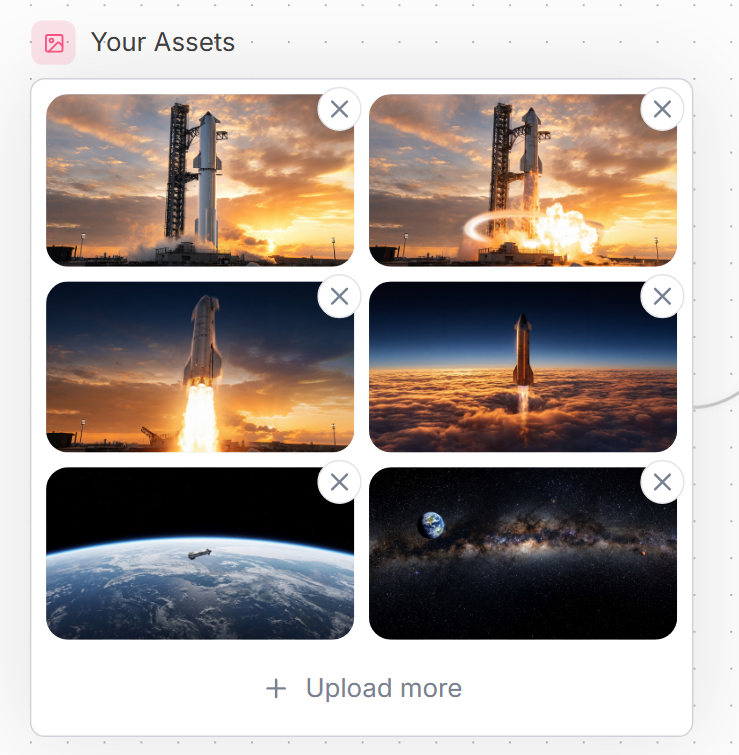
一个精致的 SaaS 风格资产上传库模型,包含六个航天缩略图和用于网站界面设计的删除控件。
- Category
- UI & Interfaces
- Model
- GPT Image 2
- Creator
- Noa • Dev Web
- Source language
- en
- Source ID
- 21591
- Published
- May 19, 2026
Full prompt
Goal: Create a clean website UI asset manager panel titled {argument name="headline text" default="Your Assets"}, showing a grid of uploaded spaceflight images.

Canvas: Square-ish web mockup on a very light background with a subtle dotted grid pattern and faint curved decorative line on the right edge. Use a modern SaaS style with soft shadows, rounded corners, and muted blue-gray text.

Layout: At the top left, place a small rounded pink square icon containing a simple outlined image/photo symbol, followed by the headline. Below it, create one large white rounded rectangle card with a thin pale gray border. Inside the card, place exactly 6 image thumbnails in a 2-column by 3-row grid, each thumbnail with rounded corners. Each thumbnail has a floating circular delete button overlapping its top-right corner; there are exactly 6 delete buttons, each white with a gray X icon. At the bottom of the card, center an upload action row with a plus sign and the text {argument name="upload text" default="Upload more"}.

Thumbnail contents, exactly 6: 1) top-left: a tall rocket standing on a launch pad at sunset with orange clouds; 2) top-right: the same rocket launch pad scene with bright explosion/flame and a glowing circular shockwave effect; 3) middle-left: a rocket lifting off vertically with a large bright plume against a sunset sky; 4) middle-right: a rocket ascending above a dense orange cloud layer into a dark blue upper atmosphere; 5) bottom-left: Earth seen from low orbit with a small spacecraft over the curved horizon; 6) bottom-right: a starry deep-space panorama with the Milky Way band and Earth visible near the upper left.

Visual style: Polished web component screenshot, realistic cinematic space thumbnails, crisp UI edges, generous spacing, rounded 16px thumbnail corners, subtle shadows, soft neutral palette. Use {argument name="accent color" default="soft pink"} for the small image icon background and {argument name="text color" default="slate blue-gray"} for the title and upload text.

Constraints: Keep all text in English, include no extra labels, no watermark, no browser chrome, no cursor. Maintain the exact counts: 1 title, 1 icon, 1 bordered card, 6 thumbnails, 6 circular X delete buttons, and 1 bottom upload action.
Translations
空间资产库 UI
enGoal: Create a clean website UI asset manager panel titled {argument name="headline text" default="Your Assets"}, showing a grid of uploaded spaceflight images. Canvas: Square-ish web mockup on a very light background with a subtle dotted grid pattern and faint curved decorative line on the right edge. Use a modern SaaS style with soft shadows, rounded corners, and muted blue-gray text. Layout: At the top left, place a small rounded pink square icon containing a simple outlined image/photo symbol, followed by the headline. Below it, create one large white rounded rectangle card with a thin pale gray border. Inside the card, place exactly 6 image thumbnails in a 2-column by 3-row grid, each thumbnail with rounded corners. Each thumbnail has a floating circular delete button overlapping its top-right corner; there are exactly 6 delete buttons, each white with a gray X icon. At the bottom of the card, center an upload action row with a plus sign and the text {argument name="upload text" default="Upload more"}. Thumbnail contents, exactly 6: 1) top-left: a tall rocket standing on a launch pad at sunset with orange clouds; 2) top-right: the same rocket launch pad scene with bright explosion/flame and a glowing circular shockwave effect; 3) middle-left: a rocket lifting off vertically with a large bright plume against a sunset sky; 4) middle-right: a rocket ascending above a dense orange cloud layer into a dark blue upper atmosphere; 5) bottom-left: Earth seen from low orbit with a small spacecraft over the curved horizon; 6) bottom-right: a starry deep-space panorama with the Milky Way band and Earth visible near the upper left. Visual style: Polished web component screenshot, realistic cinematic space thumbnails, crisp UI edges, generous spacing, rounded 16px thumbnail corners, subtle shadows, soft neutral palette. Use {argument name="accent color" default="soft pink"} for the small image icon background and {argument name="text color" default="slate blue-gray"} for the title and upload text. Constraints: Keep all text in English, include no extra labels, no watermark, no browser chrome, no cursor. Maintain the exact counts: 1 title, 1 icon, 1 bordered card, 6 thumbnails, 6 circular X delete buttons, and 1 bottom upload action.
空间资产库 UI
zh-CN目标:创建一个简洁的网站 UI 资产管理面板,标题为 {argument name="headline text" default="Your Assets"},展示一个已上传航天图像的网格。 画布:正方形的网页模型,背景为极浅的颜色,带有微妙的点状网格图案,右侧边缘有淡淡的弧形装饰线。采用现代 SaaS 风格,配以柔和的阴影、圆角和柔和的蓝灰色文本。 布局:在左上角放置一个小的圆形粉色方形图标,内含简单的轮廓图像/照片符号,后跟标题。在其下方,创建一个大的白色圆角矩形卡片,带有细浅灰色边框。在卡片内部,放置 6 个图像缩略图,排列为 2 列 3 行的网格,每个缩略图均带有圆角。每个缩略图的右上角都有一个悬浮的圆形删除按钮;共有 6 个删除按钮,均为白色,带有灰色 X 图标。在卡片底部,居中放置一行上传操作,包含一个加号和文本 {argument name="upload text" default="Upload more"}。 缩略图内容,共 6 个:1) 左上:一枚高耸的火箭矗立在日落时的发射台上,背景是橙色的云;2) 右上:同样的火箭发射台场景,带有明亮的爆炸/火焰和发光的圆形冲击波效果;3) 中左:一枚火箭在日落天空的背景下垂直升空,带有巨大的明亮烟柱;4) 中右:一枚火箭穿过厚厚的橙色云层,上升到深蓝色的高层大气中;5) 下左:从低轨道俯瞰地球,地平线弧线上方有一艘小型航天器;6) 下右:星光熠熠的深空全景,可见银河带,左上方可见地球。 视觉风格:精致的网页组件截图,逼真的电影级空间缩略图,清晰的 UI 边缘,宽敞的间距,16px 圆角缩略图,微妙的阴影,柔和的中性色调。小图标背景使用 {argument name="accent color" default="soft pink"},标题和上传文本使用 {argument name="text color" default="slate blue-gray"}。 约束:保持所有文本为英文,不包含额外标签、水印、浏览器边框或光标。严格保持数量:1 个标题,1 个图标,1 个带边框卡片,6 个缩略图,6 个圆形 X 删除按钮,以及 1 个底部上传操作。