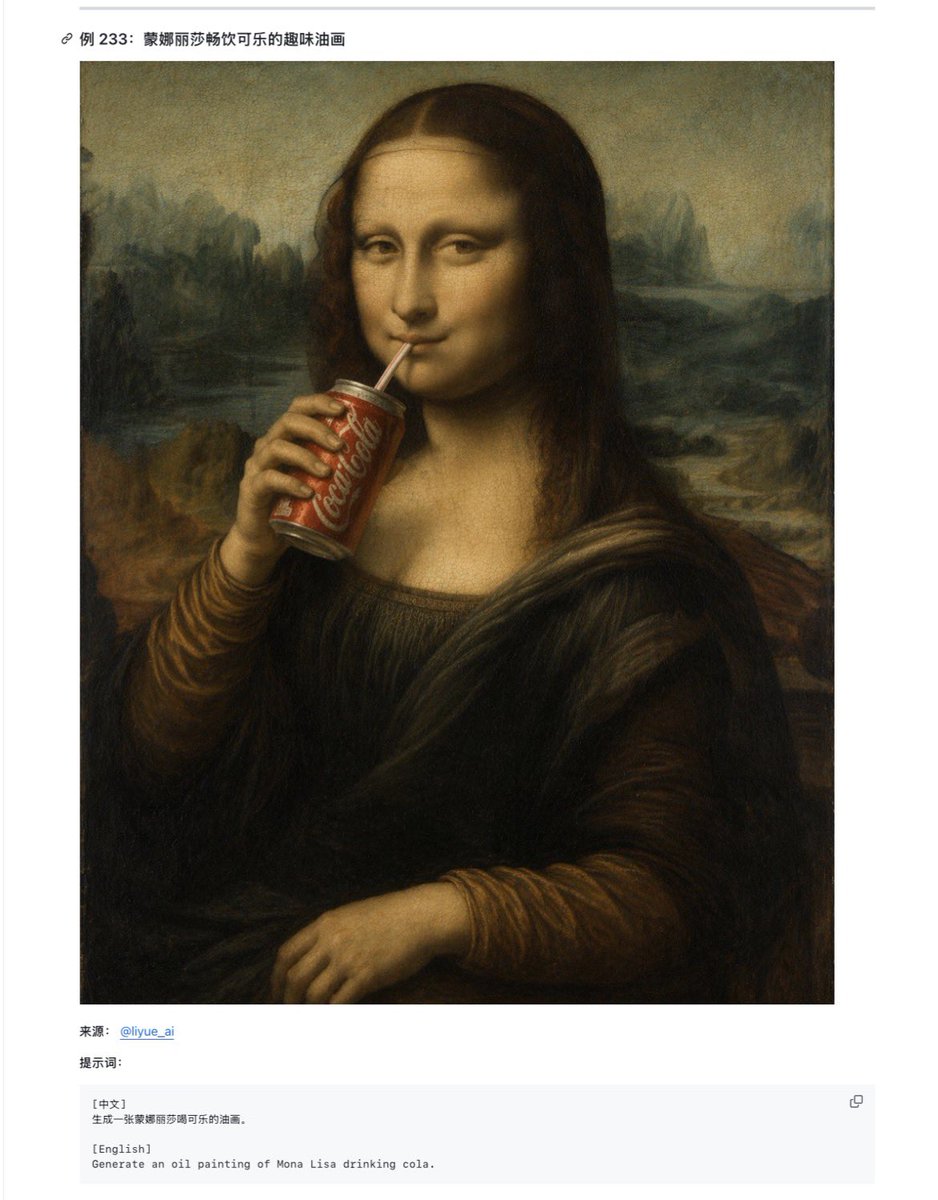
蒙娜丽莎喝可乐的网页示例
创建一个文档风格的截图,展示一幅文艺复兴风格的蒙娜丽莎喝可乐的恶搞油画,并在下方附带双语提示词。
- Category
- UI & Interfaces
- Model
- GPT Image 2
- Creator
- serein
- Source language
- en
- Source ID
- 22381
- Published
- May 24, 2026
Full prompt
Goal: Create a clean documentation-style webpage screenshot showing an example entry about Mona Lisa drinking Coca-Cola, with a large generated artwork preview and a small bilingual prompt box below it.

Canvas: Portrait-oriented screenshot on a white page, approximately 768 × 984 px, with generous margins and a very light gray horizontal rule near the top.

Layout: At the top left, place a small link/chain icon followed by the bold Chinese title “例 233: 蒙娜丽莎畅饮可乐的趣味油画”. Below it, center a large square artwork image with a thin white margin around it. Under the artwork, add exactly 3 lower content elements: 1 source line, 1 prompt label line, and 1 pale gray code-style prompt box.

Main artwork: Generate an old-master oil painting parody of {argument name="painting subject" default="Mona Lisa"} drinking {argument name="drink brand" default="Coca-Cola"}. The figure is seated in the classic Mona Lisa pose with dark brown hair, Renaissance clothing, folded lower hand, and a misty landscape background in muted green, brown, and ochre tones. The left hand holds a red soda can near the mouth, with the white Coca-Cola script visible on the can. The painting should look aged, softly blended, and varnished, imitating a Renaissance oil portrait. Add one opaque dark brown square censorship block over the face, centered from forehead to chin, obscuring the facial features while leaving hair, neck, hand, and soda can visible.

Lower text content: The source line reads “来源: @liyue_ai” with the handle in blue like a hyperlink. The next line reads “提示词:”. The code box contains exactly 2 labeled language blocks: “[中文]” followed by “生成一张蒙娜丽莎畅饮可乐的油画。” and “[English]” followed by “Generate an oil painting of Mona Lisa drinking cola.” Add one small copy icon at the upper right of the code box.

Visual style: Minimal Chinese web article interface, white background, black and gray sans-serif UI text, light gray code box, subtle borders, no decorative clutter. Keep the artwork painterly and historically styled, while the surrounding page remains crisp like a browser screenshot.

Constraints: Include exactly 1 main artwork, exactly 1 soda can, exactly 1 face-obscuring square, exactly 1 title line, exactly 1 source line, exactly 1 prompt label, exactly 1 code box, and exactly 2 language sections inside the code box. Do not add extra images, comments, watermarks, or unrelated UI panels.
Translations
蒙娜丽莎喝可乐的网页示例
enGoal: Create a clean documentation-style webpage screenshot showing an example entry about Mona Lisa drinking Coca-Cola, with a large generated artwork preview and a small bilingual prompt box below it. Canvas: Portrait-oriented screenshot on a white page, approximately 768 × 984 px, with generous margins and a very light gray horizontal rule near the top. Layout: At the top left, place a small link/chain icon followed by the bold Chinese title “例 233: 蒙娜丽莎畅饮可乐的趣味油画”. Below it, center a large square artwork image with a thin white margin around it. Under the artwork, add exactly 3 lower content elements: 1 source line, 1 prompt label line, and 1 pale gray code-style prompt box. Main artwork: Generate an old-master oil painting parody of {argument name="painting subject" default="Mona Lisa"} drinking {argument name="drink brand" default="Coca-Cola"}. The figure is seated in the classic Mona Lisa pose with dark brown hair, Renaissance clothing, folded lower hand, and a misty landscape background in muted green, brown, and ochre tones. The left hand holds a red soda can near the mouth, with the white Coca-Cola script visible on the can. The painting should look aged, softly blended, and varnished, imitating a Renaissance oil portrait. Add one opaque dark brown square censorship block over the face, centered from forehead to chin, obscuring the facial features while leaving hair, neck, hand, and soda can visible. Lower text content: The source line reads “来源: @liyue_ai” with the handle in blue like a hyperlink. The next line reads “提示词:”. The code box contains exactly 2 labeled language blocks: “[中文]” followed by “生成一张蒙娜丽莎畅饮可乐的油画。” and “[English]” followed by “Generate an oil painting of Mona Lisa drinking cola.” Add one small copy icon at the upper right of the code box. Visual style: Minimal Chinese web article interface, white background, black and gray sans-serif UI text, light gray code box, subtle borders, no decorative clutter. Keep the artwork painterly and historically styled, while the surrounding page remains crisp like a browser screenshot. Constraints: Include exactly 1 main artwork, exactly 1 soda can, exactly 1 face-obscuring square, exactly 1 title line, exactly 1 source line, exactly 1 prompt label, exactly 1 code box, and exactly 2 language sections inside the code box. Do not add extra images, comments, watermarks, or unrelated UI panels.
蒙娜丽莎喝可乐的网页示例
zh-CN目标:创建一个简洁的文档风格网页截图,展示一个关于蒙娜丽莎喝可乐的示例条目,包含一张大型生成式艺术预览图以及下方的双语提示词框。 画布:纵向截图,白色页面,尺寸约为 768 × 984 像素,留有宽裕的边距,顶部附近有一条极浅的灰色水平线。 布局:左上方放置一个小链接/链条图标,后跟加粗的中文标题“例 233: 蒙娜丽莎畅饮可乐的趣味油画”。下方居中放置一张大型方形艺术图,周围带有细白色边框。在艺术图下方,添加 3 个下部内容元素:1 行来源信息、1 行提示词标签,以及 1 个浅灰色代码风格的提示词框。 主要艺术作品:生成一幅古典大师风格的油画恶搞,内容为 {argument name="painting subject" default="蒙娜丽莎"} 正在喝 {argument name="drink brand" default="可口可乐"}。人物采用经典的蒙娜丽莎姿势,深棕色头发,穿着文艺复兴时期的服装,双手交叠,背景为柔和的绿色、棕色和赭石色调的朦胧风景。左手拿着一个红色的汽水罐靠近嘴边,罐身上可见白色的可口可乐字样。画作应呈现出陈旧、柔和混合且带有光泽的效果,模仿文艺复兴时期的油画肖像。在面部添加一个不透明的深棕色方形遮挡块,从额头到下巴居中,遮住面部特征,但保留头发、颈部、手部和汽水罐可见。 下部文本内容:来源行显示为“来源: @liyue_ai”,其中账号名显示为蓝色,类似超链接。下一行显示为“提示词:”。代码框内包含 2 个明确标记的语言区块:“[中文]”后跟“生成一张蒙娜丽莎畅饮可乐的油画。”以及“[English]”后跟“Generate an oil painting of Mona Lisa drinking cola.”。在代码框的右上角添加一个小型的复制图标。 视觉风格:极简的中文网页文章界面,白色背景,黑色和灰色无衬线 UI 文本,浅灰色代码框,细微边框,无装饰性杂物。保持艺术作品的绘画感和历史风格,同时周围页面保持如浏览器截图般的清晰感。 约束:包含 1 张主艺术图、1 个汽水罐、1 个遮挡面部的方形块、1 行标题、1 行来源、1 个提示词标签、1 个代码框,以及代码框内 2 个语言部分。不要添加额外的图像、评论、水印或不相关的 UI 面板。