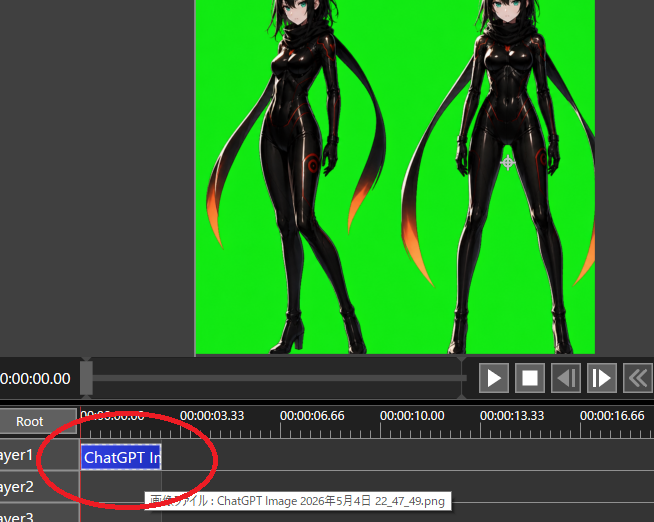
Chroma Key 视频编辑器截图
创建一个深色视频编辑界面截图,展示绿幕上的两个动漫角色,并用红圈标出时间轴片段,用于透明度工作流程教程。
- Category
- Charts & Infographics
- Model
- GPT Image 2
- Creator
- コード・アリス(Code_Alice)
- Source language
- en
- Source ID
- 22406
- Published
- May 24, 2026
Full prompt
Goal: Create a screenshot-style image of a video editing/compositing workspace demonstrating chroma-key preparation for transparency.

Canvas: 654×522 pixel landscape screenshot, dark gray software interface, no browser chrome or desktop frame. The main preview occupies the upper half, timeline occupies the lower half.

Preview area: Center a bright pure green chroma-key background rectangle. On it, place exactly 2 full-body anime cyber-ninja women as imported image artwork: the left figure is a three-quarter pose with one leg crossed forward, the right figure is front-facing with legs apart. Both have {argument name="hair color" default="black"} hair, pale skin, teal eyes, glossy black bodysuits with subtle red/orange glowing seams, black gloves, high-heeled boots, and long black scarf/ribbon shapes trailing behind them with orange-red glowing tips. Crop the top of both heads slightly at the top edge of the preview, matching a real editor viewport. Leave dark gray margins outside the green preview.

Interface layout: Below the preview, show a playback bar and transport controls. Include exactly 6 visible transport buttons on the right: play triangle, stop square, step/back button, step/forward button, double-chevron rewind, and a partially visible extra control at the far right. At the left of the time display, show white timecode text {argument name="current timecode" default="0:00:00.00"}. Use small white UI text and gray panels.

Timeline: Show a ruler with time labels exactly 5 visible labels: 0:00:00.00, 0:00:03.33, 0:00:06.66, 0:00:10.00, and 0:00:13.33, plus a partially visible 0:00:16.66 at the far right. Show exactly 3 layer rows labeled Layer1, Layer2, and Layer3, with a Root row above them. Add a red vertical playhead at the start near 0:00:00.00. On Layer1, place one blue selected clip beginning at the start, labeled {argument name="clip label" default="ChatGPT Im"}. Draw a thick hand-drawn red oval/circle around the Layer1 clip and the beginning of the timeline, as if annotating where to click. Show a small tooltip near Layer2 with Japanese text beginning with {argument name="tooltip text" default="画像ファイル : ChatGPT Image 2026年5月4日 22_47_49.png"}.

Visual style: Realistic low-resolution software screenshot, crisp UI elements, slight aliasing, functional dark theme, no decorative framing. The anime artwork should look like polished AI-generated character art embedded in the editor rather than a flat icon.

Constraints: Keep the chroma-key green solid and vivid. Do not add extra characters, extra clips, or extra annotation circles. Do not include watermarks. Preserve the screenshot crop so the right-side controls and far-right time label are partially cut off.
Translations
Chroma Key 视频编辑器截图
enGoal: Create a screenshot-style image of a video editing/compositing workspace demonstrating chroma-key preparation for transparency. Canvas: 654×522 pixel landscape screenshot, dark gray software interface, no browser chrome or desktop frame. The main preview occupies the upper half, timeline occupies the lower half. Preview area: Center a bright pure green chroma-key background rectangle. On it, place exactly 2 full-body anime cyber-ninja women as imported image artwork: the left figure is a three-quarter pose with one leg crossed forward, the right figure is front-facing with legs apart. Both have {argument name="hair color" default="black"} hair, pale skin, teal eyes, glossy black bodysuits with subtle red/orange glowing seams, black gloves, high-heeled boots, and long black scarf/ribbon shapes trailing behind them with orange-red glowing tips. Crop the top of both heads slightly at the top edge of the preview, matching a real editor viewport. Leave dark gray margins outside the green preview. Interface layout: Below the preview, show a playback bar and transport controls. Include exactly 6 visible transport buttons on the right: play triangle, stop square, step/back button, step/forward button, double-chevron rewind, and a partially visible extra control at the far right. At the left of the time display, show white timecode text {argument name="current timecode" default="0:00:00.00"}. Use small white UI text and gray panels. Timeline: Show a ruler with time labels exactly 5 visible labels: 0:00:00.00, 0:00:03.33, 0:00:06.66, 0:00:10.00, and 0:00:13.33, plus a partially visible 0:00:16.66 at the far right. Show exactly 3 layer rows labeled Layer1, Layer2, and Layer3, with a Root row above them. Add a red vertical playhead at the start near 0:00:00.00. On Layer1, place one blue selected clip beginning at the start, labeled {argument name="clip label" default="ChatGPT Im"}. Draw a thick hand-drawn red oval/circle around the Layer1 clip and the beginning of the timeline, as if annotating where to click. Show a small tooltip near Layer2 with Japanese text beginning with {argument name="tooltip text" default="画像ファイル : ChatGPT Image 2026年5月4日 22_47_49.png"}. Visual style: Realistic low-resolution software screenshot, crisp UI elements, slight aliasing, functional dark theme, no decorative framing. The anime artwork should look like polished AI-generated character art embedded in the editor rather than a flat icon. Constraints: Keep the chroma-key green solid and vivid. Do not add extra characters, extra clips, or extra annotation circles. Do not include watermarks. Preserve the screenshot crop so the right-side controls and far-right time label are partially cut off.
Chroma Key 视频编辑器截图
zh-CN目标:创建一个视频编辑/合成工作区的截图风格图像,演示用于透明度处理的 Chroma Key 准备工作。 画布:654×522 像素横向截图,深灰色软件界面,无浏览器边框或桌面框架。主预览区占据上半部分,时间轴占据下半部分。 预览区域:居中放置一个明亮的纯绿色 Chroma Key 背景矩形。在背景上放置 2 个全身动漫赛博忍者女性作为导入的图像素材:左侧人物为四分之三侧身姿势,一条腿向前交叉;右侧人物为正面站立,双腿分开。两人均拥有 {argument name="hair color" default="黑色"} 头发、苍白皮肤、青色眼睛、带有细微红/橙色发光接缝的亮黑色紧身衣、黑色手套、高跟靴子,以及身后拖曳的长黑色围巾/丝带,末端带有橙红色光芒。将两人的头顶在预览区域顶部边缘处略微裁剪,以匹配真实的编辑器视口。在绿色预览区外留出深灰色边距。 界面布局:在预览下方,显示播放栏和传输控件。右侧显示 6 个可见的传输按钮:播放三角形、停止方形、后退/前进单帧按钮、双箭头快退按钮,以及最右侧部分可见的额外控件。在时间显示左侧,显示白色时间码文本 {argument name="current timecode" default="0:00:00.00"}。使用小型白色 UI 文字和灰色面板。 时间轴:显示一个带有时间标签的标尺,包含 5 个可见标签:0:00:00.00、0:00:03.33、0:00:06.66、0:00:10.00 和 0:00:13.33,最右侧还有一个部分可见的 0:00:16.66。显示 3 个标记为 Layer1、Layer2 和 Layer3 的图层行,上方有一个 Root 行。在靠近 0:00:00.00 的起始处添加一个红色垂直播放头。在 Layer1 上放置一个从起始处开始的蓝色选中片段,标记为 {argument name="clip label" default="ChatGPT Im"}。在 Layer1 片段和时间轴起始处绘制一个粗的手绘红色椭圆/圆圈,如同标注点击位置。在 Layer2 附近显示一个小提示框,包含以 {argument name="tooltip text" default="画像ファイル : ChatGPT Image 2026年5月4日 22_47_49.png"} 开头的日语文本。 视觉风格:逼真的低分辨率软件截图,UI 元素清晰,带有轻微锯齿,功能性深色主题,无装饰性边框。动漫素材应看起来像是嵌入编辑器中的精致 AI 生成角色艺术,而非扁平图标。 约束:保持 Chroma Key 绿色纯净且鲜艳。不要添加额外角色、额外片段或额外的标注圆圈。不要包含水印。保留截图裁剪效果,使右侧控件和最右侧的时间标签部分被切断。