
日语课程推广 Slides
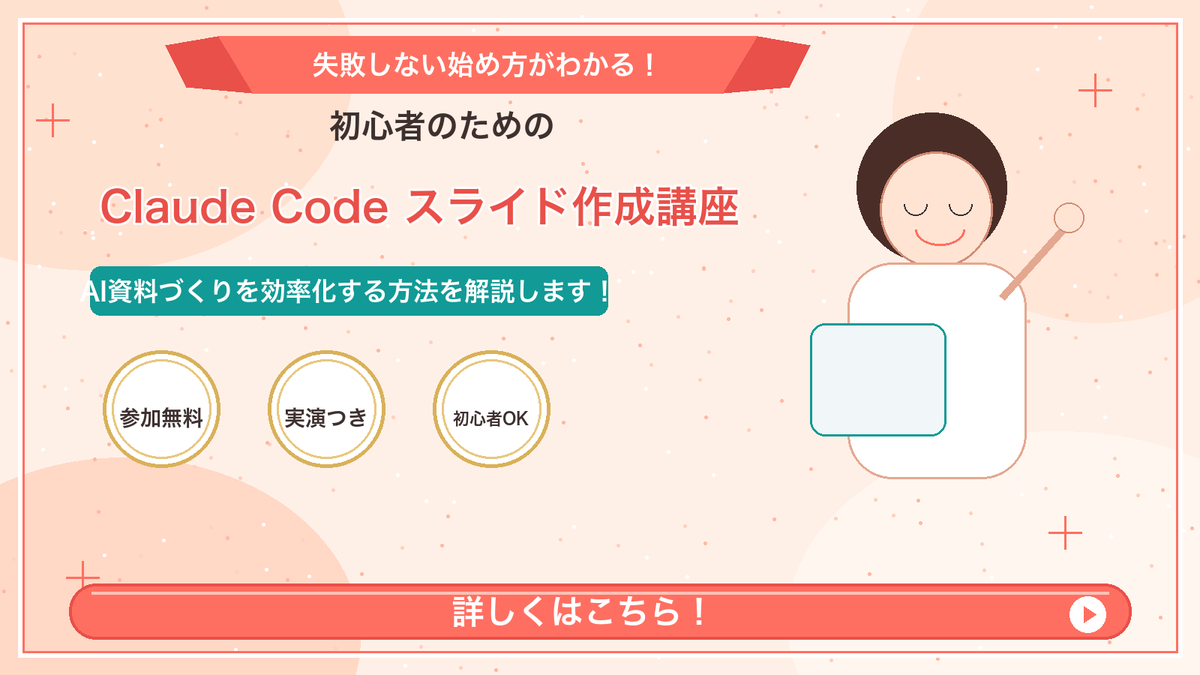
生成一张可爱的日语推广网络研讨会 Slides,包含标题文本、徽章、吉祥物插图以及底部的行动号召栏。
- Category
- Charts & Infographics
- Model
- GPT Image 2
- Creator
- おのだまーしー@AIウラカタ×マーケ
- Source language
- en
- Source ID
- 23247
- Published
- May 29, 2026
Full prompt
Goal: Create a Japanese webinar/lesson announcement slide in a cute, simple “Marcy-style” presentation design for {argument name="course topic" default="Claude Code slide creation course"}.

Canvas: 16:9 horizontal slide, 1200×675 px, warm cream-peach background with soft abstract circular blobs in pale peach and off-white. Add a thin coral-red rectangular border inset about 20 px from the edge.

Layout: Center-left text-heavy composition with a simple mascot illustration on the right. At the top center, place a wide coral-red folded ribbon banner with angled darker red folded ends. Below it, stack the main headline and subheadline. Place three circular badges in a row under the subheadline. Along the bottom, add one large rounded coral-red call-to-action bar spanning almost the full width.

Text content: Use Japanese text exactly as follows. Top ribbon text: {argument name="top ribbon text" default="失敗しない始め方がわかる!"}. Small centered heading below ribbon: {argument name="audience line" default="初心者のための"}. Large main title in coral-red with white outline/drop shadow: {argument name="main title" default="Claude Code スライド作成講座"}. Teal rounded label below title: {argument name="supporting line" default="AI資料づくりを効率化する方法を解説します!"}. Three badge labels, exactly 3 badges from left to right: 「参加無料」, 「実演つき」, 「初心者OK」. Bottom CTA text: 「詳しくはこちら!」 in large bold white letters. Add a white circular play button at the right end of the CTA bar with a small coral-red triangle inside.

Subject details: On the right side, draw one minimalist female presenter mascot with a round face, closed eyes, simple smile, short dark-brown bob hair, peach outline, and a white body. Her right arm is raised diagonally holding a small circular pointer. In front of her torso, place one pale blue rounded rectangle laptop/tablet with teal outline.

Decorative elements: Add exactly 4 thin coral plus signs: one near the upper-left edge, one near the upper-right area, one near the lower-left area above the CTA, and one near the lower-right area. Scatter many tiny coral and white dots across the background like confetti, keeping them subtle and not text-like.

Visual style: Flat vector illustration, soft pastel colors, clean Japanese slide design, friendly educational seminar aesthetic. Coral red, teal, cream, gold, and dark brown palette. Use bold rounded sans-serif Japanese typography. Keep all text crisp and centered/aligned like a polished promotional slide.

Constraints: Include exactly 3 circular badges, exactly 1 mascot, exactly 1 CTA bar, exactly 1 play icon, and exactly 4 plus-sign decorations. Do not add logos, watermarks, extra characters, extra badges, QR codes, or additional text.
Translations
日语课程推广 Slides
enGoal: Create a Japanese webinar/lesson announcement slide in a cute, simple “Marcy-style” presentation design for {argument name="course topic" default="Claude Code slide creation course"}. Canvas: 16:9 horizontal slide, 1200×675 px, warm cream-peach background with soft abstract circular blobs in pale peach and off-white. Add a thin coral-red rectangular border inset about 20 px from the edge. Layout: Center-left text-heavy composition with a simple mascot illustration on the right. At the top center, place a wide coral-red folded ribbon banner with angled darker red folded ends. Below it, stack the main headline and subheadline. Place three circular badges in a row under the subheadline. Along the bottom, add one large rounded coral-red call-to-action bar spanning almost the full width. Text content: Use Japanese text exactly as follows. Top ribbon text: {argument name="top ribbon text" default="失敗しない始め方がわかる!"}. Small centered heading below ribbon: {argument name="audience line" default="初心者のための"}. Large main title in coral-red with white outline/drop shadow: {argument name="main title" default="Claude Code スライド作成講座"}. Teal rounded label below title: {argument name="supporting line" default="AI資料づくりを効率化する方法を解説します!"}. Three badge labels, exactly 3 badges from left to right: 「参加無料」, 「実演つき」, 「初心者OK」. Bottom CTA text: 「詳しくはこちら!」 in large bold white letters. Add a white circular play button at the right end of the CTA bar with a small coral-red triangle inside. Subject details: On the right side, draw one minimalist female presenter mascot with a round face, closed eyes, simple smile, short dark-brown bob hair, peach outline, and a white body. Her right arm is raised diagonally holding a small circular pointer. In front of her torso, place one pale blue rounded rectangle laptop/tablet with teal outline. Decorative elements: Add exactly 4 thin coral plus signs: one near the upper-left edge, one near the upper-right area, one near the lower-left area above the CTA, and one near the lower-right area. Scatter many tiny coral and white dots across the background like confetti, keeping them subtle and not text-like. Visual style: Flat vector illustration, soft pastel colors, clean Japanese slide design, friendly educational seminar aesthetic. Coral red, teal, cream, gold, and dark brown palette. Use bold rounded sans-serif Japanese typography. Keep all text crisp and centered/aligned like a polished promotional slide. Constraints: Include exactly 3 circular badges, exactly 1 mascot, exactly 1 CTA bar, exactly 1 play icon, and exactly 4 plus-sign decorations. Do not add logos, watermarks, extra characters, extra badges, QR codes, or additional text.
日语课程推广 Slides
zh-CN目标:为 {argument name="course topic" default="Claude Code Slides 制作课程"} 创建一张采用可爱、简洁“Marcy 风格”设计的日语网络研讨会/课程公告 Slides。 画布:16:9 横向 Slides,1200×675 像素,暖奶油桃色背景,带有浅桃色和灰白色的柔和抽象圆形斑点。在距离边缘约 20 像素处添加一个细珊瑚红矩形边框。 布局:左侧居中文字排版,右侧放置一个简单的吉祥物插图。在顶部中央放置一个宽大的珊瑚红折叠丝带横幅,两端带有深红色的折叠角。在横幅下方堆叠主标题和副标题。在副标题下方横向放置三个圆形徽章。沿底部添加一个几乎横跨整个宽度的圆角珊瑚红行动号召栏。 文本内容:请严格使用以下日语文本。顶部丝带文字:{argument name="top ribbon text" default="失敗しない始め方がわかる!"}。丝带下方居中的小标题:{argument name="audience line" default="初心者のための"}。带有白色描边/投影的珊瑚红色大主标题:{argument name="main title" default="Claude Code スライド作成講座"}。标题下方的青色圆角标签:{argument name="supporting line" default="AI資料づくりを効率化する方法を解説します!"}。三个徽章标签,从左到右依次为: 「参加無料」、「実演つき」、「初心者OK」。底部行动号召文字:大号加粗白色字体「詳しくはこちら!」。在行动号召栏的右端添加一个白色圆形播放按钮,内部带有一个小的珊瑚红色三角形。 主体细节:在右侧绘制一个极简主义的女性演讲者吉祥物,圆脸、闭眼、简单的微笑、深棕色短波波头、桃色轮廓、白色身体。她的右臂斜向上举,拿着一个小的圆形指示棒。在她的躯干前放置一个浅蓝色圆角矩形笔记本电脑/平板电脑,带有青色轮廓。 装饰元素:添加 4 个细珊瑚色加号:一个在左上边缘附近,一个在右上区域附近,一个在左下区域行动号召栏上方,一个在右下区域附近。在背景中散布许多微小的珊瑚色和白色圆点,如同五彩纸屑,保持微妙且非文字感。 视觉风格:扁平化矢量插图,柔和的粉彩色调,简洁的日语 Slides 设计,友好的教育研讨会美学。珊瑚红、青色、奶油色、金色和深棕色调色板。使用加粗的圆角无衬线日语字体。保持所有文本清晰,并像精美的推广 Slides 一样居中/对齐。 约束条件:必须包含 3 个圆形徽章、1 个吉祥物、1 个行动号召栏、1 个播放图标和 4 个加号装饰。请勿添加徽标、水印、额外字符、额外徽章、二维码或任何其他文本。