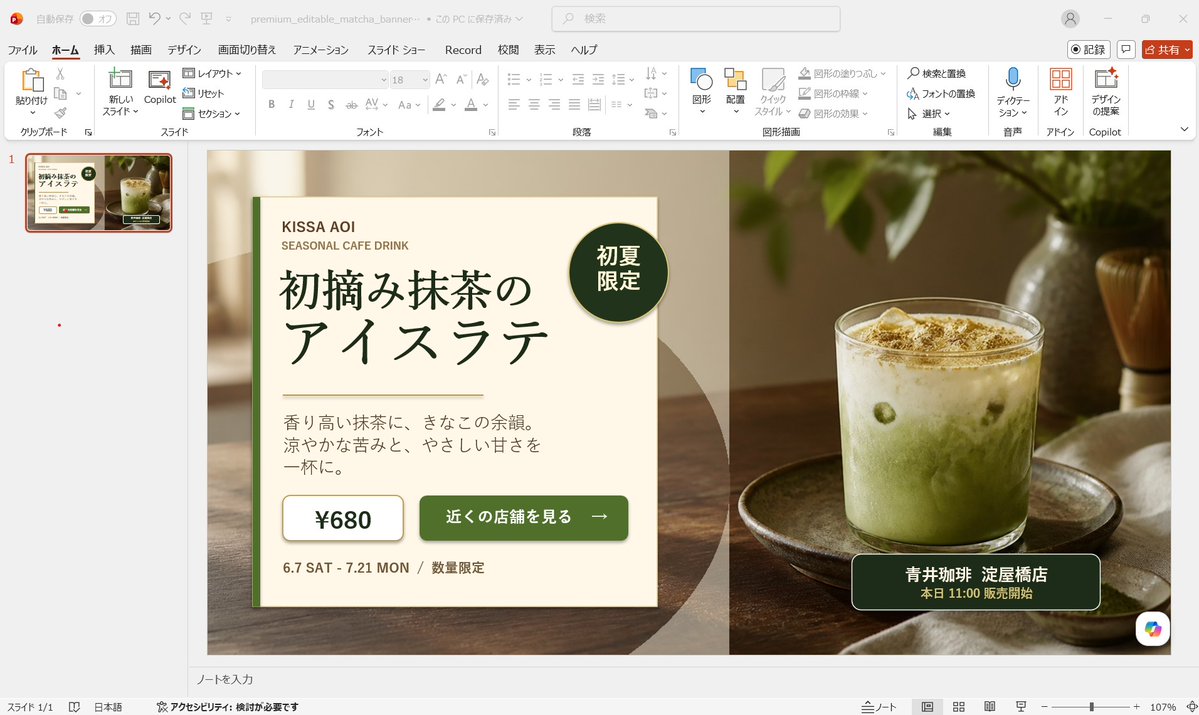
PowerPoint 中可编辑的抹茶横幅广告
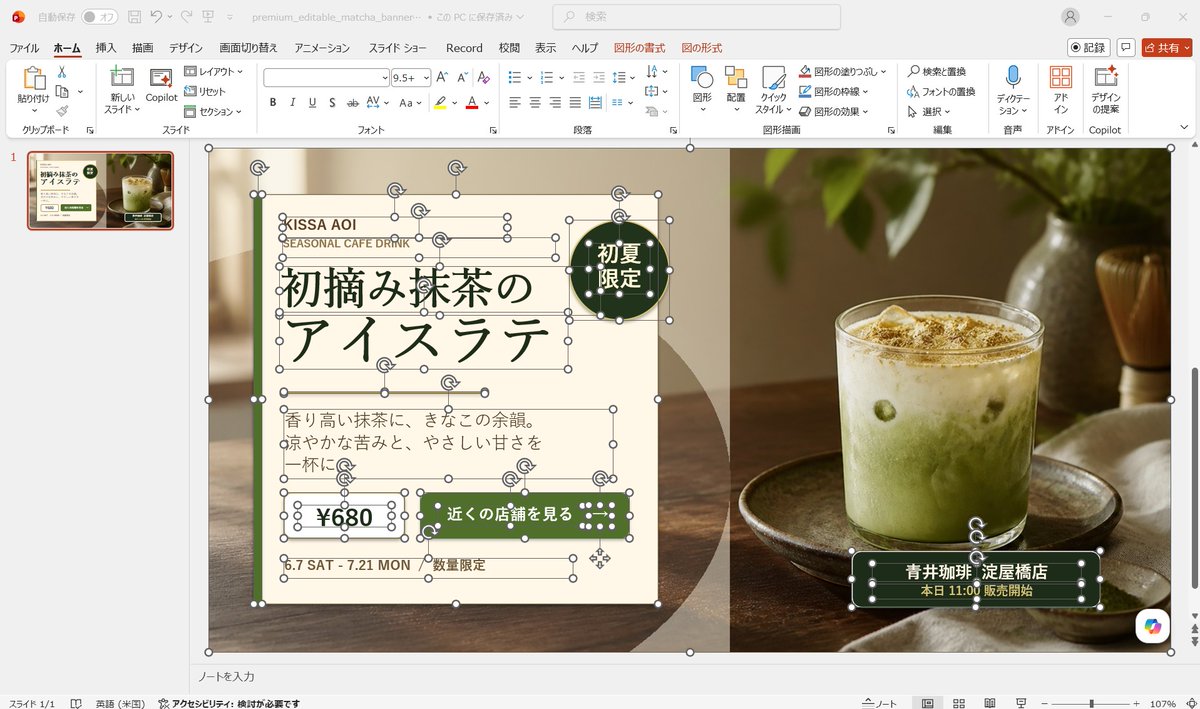
生成一张逼真的日文版 PowerPoint 编辑截图,展示一个高级的可编辑抹茶拿铁横幅广告。
- Category
- Charts & Infographics
- Model
- GPT Image 2
- Creator
- 中崎工房 | AIで1時間の仕事を5分で終わらせる人
- Source language
- en
- Source ID
- 24190
- Published
- Jun 4, 2026
Full prompt
Goal: Create a realistic desktop screenshot of Microsoft PowerPoint in Japanese, showing an editable banner advertisement design for a matcha drink. The scene should look like the banner is being built from separate selectable PowerPoint objects, with many resize handles, rotation icons, and bounding boxes visible.

Canvas: 16:9 widescreen screenshot, approximately 1200×675 px, with the full PowerPoint application window visible. Use a light gray Windows/Office interface, Japanese ribbon labels, one slide thumbnail on the left, the main slide centered, status bar at the bottom, and a zoom level around 107%.

PowerPoint interface: Show the Home tab active with Japanese menu items across the top such as File, Home, Insert, Draw, Design, Transitions, Animations, Slide Show, Record, Review, View, Help, plus contextual Shape Format and Picture Format tabs. Include a search box near the top, a red Share button at top right, and a single slide thumbnail in the left navigation pane. The filename area should suggest a saved presentation named similar to “premium_editable_matcha_banner”.

Main slide layout: The slide itself is a premium café banner split into two visual halves. The left half is a cream paper-like advertisement panel over a warm blurred café/table background, and the right half is a close-up photo of an iced matcha latte in a clear glass on a wooden tray, with soft natural window light, green leaves above, a bamboo whisk in the background, and warm brown tones. Add a subtle vertical division between the cream text panel and the photo. Use a dark green, cream, beige, and warm wood color palette.

Visible editable objects: Show many individual PowerPoint selection boxes and handles on the banner, as if almost every text box, line, shape, icon, and photo is selected or editable. Include white circular resize handles, rotation arrows, thin gray bounding boxes, and overlapping object outlines. Count and show exactly 13 selected/editable object groups: 1 large slide background/image frame, 1 cream left panel, 1 small brand text group, 1 English subtitle text box, 1 large Japanese headline text group, 1 round dark-green badge, 1 description paragraph text box, 1 price box, 1 green call-to-action button, 1 date text box, 1 limited-quantity text box, 1 store information label on the photo, and 1 small dotted decorative icon group.

Text content on the banner: Preserve Japanese text accurately where visible. Brand area: “KISSA AOI” and “SEASONAL CAFE DRINK”. Main headline: “初摘み抹茶の” on the first line and “アイスラテ” on the second line. Round badge: “初夏限定”. Description paragraph: “香り高い抹茶に、きなこの余韻。涼やかな苦みと、やさしい甘さを一杯に。” Price: “¥680”. CTA button: “近くの店舗を見る”. Date: “6.7 SAT - 7.21 MON”. Small note: “数量限定”. Store label over the photo: “青井珈琲 淀屋橋店” and below it “本日 11:00 販売開始”.

Design details: Use elegant Japanese typography with a dark forest-green headline, thin decorative horizontal rules around the headline, cream rectangles with fine green borders, rounded dark-green buttons, and small dotted white decorations on green shapes. The badge should be a dark-green circle near the upper right of the cream panel. The store label should be a dark-green rounded rectangle near the bottom right of the drink photo. The overall ad should feel premium, calm, seasonal, and café-like.

Customization slots: Use the drink concept as {argument name="drink name" default="初摘み抹茶のアイスラテ"}, brand as {argument name="brand name" default="KISSA AOI"}, price as {argument name="price" default="¥680"}, CTA as {argument name="call to action" default="近くの店舗を見る"}, and store as {argument name="store name" default="青井珈琲 淀屋橋店"}.

Constraints: Make it a screenshot of PowerPoint, not a clean exported poster. Keep the editing handles and object outlines highly visible. Do not add extra slides, extra products, watermarks, or unrelated UI panels. Keep the photo realistic and the ad elements editable-looking rather than flattened.
Translations
PowerPoint 中可编辑的抹茶横幅广告
enGoal: Create a realistic desktop screenshot of Microsoft PowerPoint in Japanese, showing an editable banner advertisement design for a matcha drink. The scene should look like the banner is being built from separate selectable PowerPoint objects, with many resize handles, rotation icons, and bounding boxes visible. Canvas: 16:9 widescreen screenshot, approximately 1200×675 px, with the full PowerPoint application window visible. Use a light gray Windows/Office interface, Japanese ribbon labels, one slide thumbnail on the left, the main slide centered, status bar at the bottom, and a zoom level around 107%. PowerPoint interface: Show the Home tab active with Japanese menu items across the top such as File, Home, Insert, Draw, Design, Transitions, Animations, Slide Show, Record, Review, View, Help, plus contextual Shape Format and Picture Format tabs. Include a search box near the top, a red Share button at top right, and a single slide thumbnail in the left navigation pane. The filename area should suggest a saved presentation named similar to “premium_editable_matcha_banner”. Main slide layout: The slide itself is a premium café banner split into two visual halves. The left half is a cream paper-like advertisement panel over a warm blurred café/table background, and the right half is a close-up photo of an iced matcha latte in a clear glass on a wooden tray, with soft natural window light, green leaves above, a bamboo whisk in the background, and warm brown tones. Add a subtle vertical division between the cream text panel and the photo. Use a dark green, cream, beige, and warm wood color palette. Visible editable objects: Show many individual PowerPoint selection boxes and handles on the banner, as if almost every text box, line, shape, icon, and photo is selected or editable. Include white circular resize handles, rotation arrows, thin gray bounding boxes, and overlapping object outlines. Count and show exactly 13 selected/editable object groups: 1 large slide background/image frame, 1 cream left panel, 1 small brand text group, 1 English subtitle text box, 1 large Japanese headline text group, 1 round dark-green badge, 1 description paragraph text box, 1 price box, 1 green call-to-action button, 1 date text box, 1 limited-quantity text box, 1 store information label on the photo, and 1 small dotted decorative icon group. Text content on the banner: Preserve Japanese text accurately where visible. Brand area: “KISSA AOI” and “SEASONAL CAFE DRINK”. Main headline: “初摘み抹茶の” on the first line and “アイスラテ” on the second line. Round badge: “初夏限定”. Description paragraph: “香り高い抹茶に、きなこの余韻。涼やかな苦みと、やさしい甘さを一杯に。” Price: “¥680”. CTA button: “近くの店舗を見る”. Date: “6.7 SAT - 7.21 MON”. Small note: “数量限定”. Store label over the photo: “青井珈琲 淀屋橋店” and below it “本日 11:00 販売開始”. Design details: Use elegant Japanese typography with a dark forest-green headline, thin decorative horizontal rules around the headline, cream rectangles with fine green borders, rounded dark-green buttons, and small dotted white decorations on green shapes. The badge should be a dark-green circle near the upper right of the cream panel. The store label should be a dark-green rounded rectangle near the bottom right of the drink photo. The overall ad should feel premium, calm, seasonal, and café-like. Customization slots: Use the drink concept as {argument name="drink name" default="初摘み抹茶のアイスラテ"}, brand as {argument name="brand name" default="KISSA AOI"}, price as {argument name="price" default="¥680"}, CTA as {argument name="call to action" default="近くの店舗を見る"}, and store as {argument name="store name" default="青井珈琲 淀屋橋店"}. Constraints: Make it a screenshot of PowerPoint, not a clean exported poster. Keep the editing handles and object outlines highly visible. Do not add extra slides, extra products, watermarks, or unrelated UI panels. Keep the photo realistic and the ad elements editable-looking rather than flattened.
PowerPoint 中可编辑的抹茶横幅广告
zh-CN目标:创建一张逼真的日文版 Microsoft PowerPoint 桌面截图,展示一个抹茶饮品的可编辑横幅广告设计。场景应呈现出该横幅正由多个可选择的 PowerPoint 对象构建的效果,并可见许多调整大小的句柄、旋转图标和边界框。 画布:16:9 宽屏截图,分辨率约为 1200×675 像素,显示完整的 PowerPoint 应用程序窗口。使用浅灰色 Windows/Office 界面,包含日文功能区标签、左侧的一个幻灯片缩略图、居中的主幻灯片、底部的状态栏,以及约 107% 的缩放比例。 PowerPoint 界面:显示处于激活状态的“开始”选项卡,顶部包含日文菜单项,如“文件”、“开始”、“插入”、“绘图”、“设计”、“切换”、“动画”、“幻灯片放映”、“录制”、“审阅”、“视图”、“帮助”,以及上下文相关的“形状格式”和“图片格式”选项卡。在顶部附近包含一个搜索框,右上角有一个红色的“共享”按钮,左侧导航窗格中有一个幻灯片缩略图。文件名区域应显示一个类似于“premium_editable_matcha_banner”的已保存演示文稿名称。 主幻灯片布局:幻灯片本身是一个高级咖啡馆横幅,分为左右两个视觉部分。左半部分是置于温暖模糊的咖啡馆/桌面背景上的奶油色纸质广告面板,右半部分是一张冰抹茶拿铁的特写照片,放置在木托盘上的透明玻璃杯中,配以柔和的自然窗光、上方的绿叶、背景中的竹制茶筅,以及温暖的棕色调。在奶油色文本面板和照片之间添加一条微妙的垂直分割线。使用深绿色、奶油色、米色和暖木色的配色方案。 可见的可编辑对象:在横幅上显示许多单独的 PowerPoint 选择框和句柄,仿佛几乎每一个文本框、线条、形状、图标和照片都是被选中或可编辑的状态。包含白色圆形调整大小句柄、旋转箭头、细灰色边界框和重叠的对象轮廓。计算并显示 13 组选定/可编辑的对象:1 个大型幻灯片背景/图像框、1 个奶油色左侧面板、1 组小型品牌文本、1 个英文副标题文本框、1 组大型日文标题文本、1 个深绿色圆形徽章、1 个描述段落文本框、1 个价格框、1 个绿色行动号召按钮、1 个日期文本框、1 个限量供应文本框、1 个照片上的商店信息标签,以及 1 组小型点状装饰图标。 横幅上的文本内容:准确保留可见的日文文本。品牌区域:“KISSA AOI”和“SEASONAL CAFE DRINK”。主标题:第一行“初摘み抹茶の”,第二行“アイスラテ”。圆形徽章:“初夏限定”。描述段落:“香り高い抹茶に、きなこの余韻。涼やかな苦みと、やさしい甘さを一杯に。” 价格:“¥680”。行动号召按钮:“近くの店舗を見る”。日期:“6.7 SAT - 7.21 MON”。小提示:“数量限定”。照片上的商店标签:“青井珈琲 淀屋橋店”,下方为“本日 11:00 販売開始”。 设计细节:使用优雅的日文字体,标题采用深森林绿色,标题周围环绕细装饰性水平线,奶油色矩形配有精致的绿色边框,圆角深绿色按钮,绿色形状上有白色小点装饰。徽章应为奶油色面板右上角附近的深绿色圆圈。商店标签应为饮料照片右下角附近的深绿色圆角矩形。整体广告应给人一种高级、宁静、时令且具有咖啡馆氛围的感觉。 自定义槽位:使用饮品概念作为 {argument name="drink name" default="初摘み抹茶のアイスラテ"},品牌作为 {argument name="brand name" default="KISSA AOI"},价格作为 {argument name="price" default="¥680"},行动号召作为 {argument name="call to action" default="近くの店舗を見る"},以及商店作为 {argument name="store name" default="青井珈琲 淀屋橋店"}。 约束:制作一张 PowerPoint 的截图,而不是导出的成品海报。保持编辑句柄和对象轮廓清晰可见。不要添加额外的幻灯片、多余的产品、水印或不相关的 UI 面板。保持照片的真实感,并使广告元素看起来是可编辑的,而不是扁平化的。