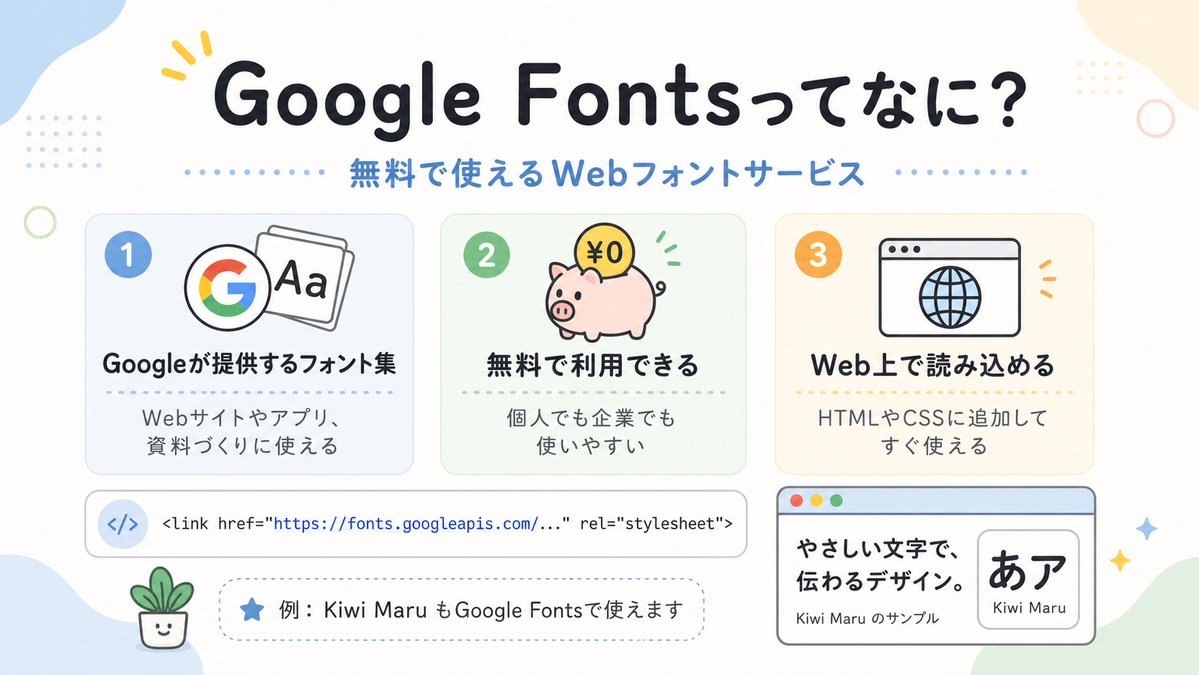
可爱的 Google Fonts 日语信息图
一张介绍 Google Fonts 的柔和色调日语说明信息图,非常适合社交媒体帖子、Slides 或初学者友好的网页设计教育视觉素材。
- Category
- Charts & Infographics
- Model
- GPT Image 2
- Creator
- HANDBALL ZIN|AI CREATOR
- Source language
- en
- Source ID
- 16953
- Published
- Apr 28, 2026
Full prompt
A clean, cute Japanese infographic on a soft off-white background with rounded pastel abstract corner blobs and tiny decorative dots and rings, designed like a friendly web-design explainer poster. At the top center, place a large bold rounded headline in Japanese reading {argument name="headline text" default="Google Fontsってなに?"}, in very dark navy, with a small yellow accent mark near the first word. Directly below it, add a medium-size blue subheading reading {argument name="subheadline text" default="無料で使えるWebフォントサービス"}, with dotted divider lines extending left and right. In the middle, arrange exactly 3 rounded rectangular feature cards in a horizontal row, evenly spaced. Card 1 is pale blue with a blue number badge "1" in the upper left, an icon showing the multicolor Google G beside overlapping font sheets with "Aa", a bold Japanese title "Googleが提供するフォント集", and smaller text below "Webサイトやアプリ、資料づくりに使える". Card 2 is pale mint green with a green number badge "2", an icon of a pink piggy bank with a gold coin labeled "¥0" and small green motion marks, a bold title "無料で利用できる", and smaller text "個人でも企業でも使いやすい". Card 3 is pale warm cream with an orange number badge "3", an icon of a simple browser window with a globe, a bold title "Web上で読み込める", and smaller text "HTMLやCSSに追加してすぐ使える". Below the three cards, place a wide horizontal white code bar with rounded corners and a subtle outline; on the left include a pale blue circular icon containing </>, and to the right show a single line of code in a monospaced style: "<link href=\"https://fonts.googleapis.com/...\" rel=\"stylesheet\">" with the URL in blue. Under that, add a dashed rounded pill-shaped note box containing a blue star icon and Japanese text {argument name="example text" default="例:Kiwi Maru もGoogle Fontsで使えます"}. At the bottom left, place a tiny smiling potted plant illustration. At the bottom right, add a larger browser-style sample panel with a light blue title bar and three small traffic-light circles in the top left; inside, on the left, show bold Japanese sample copy "やさしい文字で、伝わるデザイン。" and smaller text "Kiwi Maru のサンプル", and on the right a rounded white inset card displaying large black Japanese characters "あア" with the font name {argument name="font sample name" default="Kiwi Maru"} beneath. Scatter 4 small sparkle/star accents around the lower right area. Use a flat vector illustration style, crisp outlines, soft pastel palette, centered composition, generous spacing, rounded sans-serif typography, and a cheerful beginner-friendly tech education aesthetic.Translations
可爱的 Google Fonts 日语信息图
enA clean, cute Japanese infographic on a soft off-white background with rounded pastel abstract corner blobs and tiny decorative dots and rings, designed like a friendly web-design explainer poster. At the top center, place a large bold rounded headline in Japanese reading {argument name="headline text" default="Google Fontsってなに?"}, in very dark navy, with a small yellow accent mark near the first word. Directly below it, add a medium-size blue subheading reading {argument name="subheadline text" default="無料で使えるWebフォントサービス"}, with dotted divider lines extending left and right. In the middle, arrange exactly 3 rounded rectangular feature cards in a horizontal row, evenly spaced. Card 1 is pale blue with a blue number badge "1" in the upper left, an icon showing the multicolor Google G beside overlapping font sheets with "Aa", a bold Japanese title "Googleが提供するフォント集", and smaller text below "Webサイトやアプリ、資料づくりに使える". Card 2 is pale mint green with a green number badge "2", an icon of a pink piggy bank with a gold coin labeled "¥0" and small green motion marks, a bold title "無料で利用できる", and smaller text "個人でも企業でも使いやすい". Card 3 is pale warm cream with an orange number badge "3", an icon of a simple browser window with a globe, a bold title "Web上で読み込める", and smaller text "HTMLやCSSに追加してすぐ使える". Below the three cards, place a wide horizontal white code bar with rounded corners and a subtle outline; on the left include a pale blue circular icon containing </>, and to the right show a single line of code in a monospaced style: "<link href=\"https://fonts.googleapis.com/...\" rel=\"stylesheet\">" with the URL in blue. Under that, add a dashed rounded pill-shaped note box containing a blue star icon and Japanese text {argument name="example text" default="例:Kiwi Maru もGoogle Fontsで使えます"}. At the bottom left, place a tiny smiling potted plant illustration. At the bottom right, add a larger browser-style sample panel with a light blue title bar and three small traffic-light circles in the top left; inside, on the left, show bold Japanese sample copy "やさしい文字で、伝わるデザイン。" and smaller text "Kiwi Maru のサンプル", and on the right a rounded white inset card displaying large black Japanese characters "あア" with the font name {argument name="font sample name" default="Kiwi Maru"} beneath. Scatter 4 small sparkle/star accents around the lower right area. Use a flat vector illustration style, crisp outlines, soft pastel palette, centered composition, generous spacing, rounded sans-serif typography, and a cheerful beginner-friendly tech education aesthetic.
可爱的 Google Fonts 日语信息图
zh-CN一张简洁可爱的日语信息图,采用柔和的米白色背景,搭配圆润的粉彩色抽象角落色块以及细小的装饰性圆点和圆环,设计风格如同友好的网页设计说明海报。在顶部中心位置,放置一个大号粗体圆润的日语标题 {argument name="headline text" default="Google Fontsってなに?"},颜色为深海军蓝,第一个词附近带有一个黄色小强调标记。在其正下方,添加一个中等大小的蓝色副标题 {argument name="subheadline text" default="無料で使えるWebフォントサービス"},两侧带有虚线分割线。在中间部分,水平排列 3 张圆角矩形功能卡片,间距均匀。卡片 1 为淡蓝色,左上角带有蓝色数字徽章“1”,图标显示一个彩色 Google G 旁边叠放着写有“Aa”的字体页,粗体日语标题“Googleが提供するフォント集”,下方有较小的文字“Webサイトやアプリ、資料づくりに使える”。卡片 2 为淡薄荷绿,带有绿色数字徽章“2”,图标是一个粉色存钱罐,上面有一枚标有“¥0”的金币和绿色小动效标记,粗体标题“無料で利用できる”,下方文字“個人でも企業でも使いやすい”。卡片 3 为淡暖奶油色,带有橙色数字徽章“3”,图标是一个带有地球仪的简单浏览器窗口,粗体标题“Web上で読み込める”,下方文字“HTMLやCSSに追加してすぐ使える”。在三张卡片下方,放置一个带有圆角和细微轮廓的宽横向白色代码栏;左侧包含一个带有 </> 的淡蓝色圆形图标,右侧显示一行等宽字体的代码:"<link href=\"https://fonts.googleapis.com/...\" rel=\"stylesheet\">",其中 URL 为蓝色。在其下方,添加一个虚线圆角药丸状注释框,包含一个蓝色星形图标和日语文本 {argument name="example text" default="例:Kiwi Maru もGoogle Fontsで使えます"}。在左下角,放置一个微小的微笑盆栽插图。在右下角,添加一个较大的浏览器风格示例面板,带有浅蓝色标题栏和左上角的三个交通灯式小圆点;内部左侧显示粗体日语示例文案“やさしい文字で、伝わるデザイン。”以及较小的文字“Kiwi Maru のサンプル”,右侧是一个圆角白色嵌入式卡片,显示大号黑色日语字符“あア”,下方标注字体名称 {argument name="font sample name" default="Kiwi Maru"}。在右下角区域散布 4 个小闪光/星形装饰。采用扁平矢量插画风格、清晰的轮廓、柔和的粉彩调色板、居中构图、宽敞的间距、圆润的无衬线字体,以及欢快且适合初学者的科技教育美学。