7-Eleven 网络打印操作指南
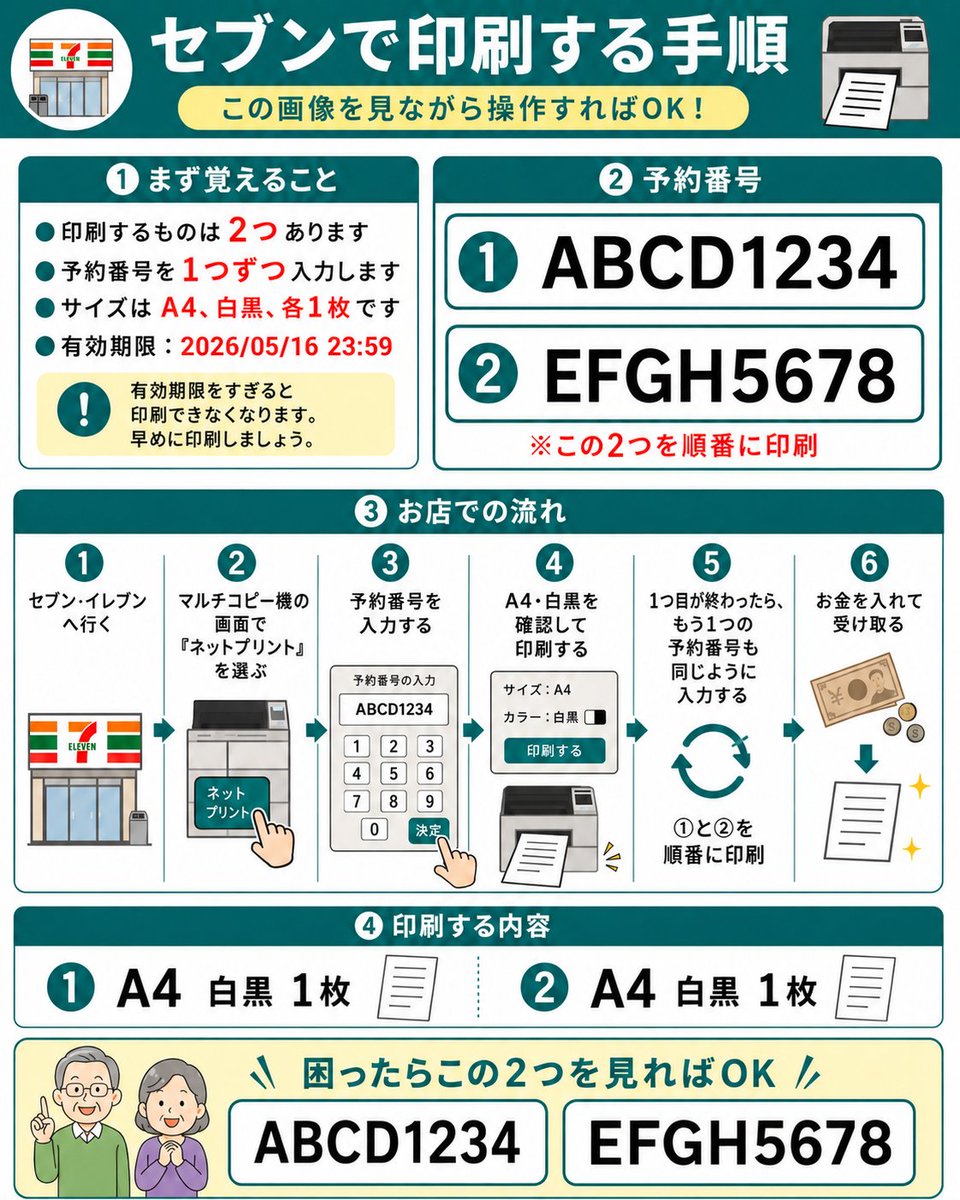
一张正方形的日文信息图,解释了如何使用预约号码在 7-Eleven 的网络打印复印机上打印两份预留文档。
- 分类
- 图表信息图
- 模型
- GPT Image 2
- 来源作者
- 中崎工房 | AIで1時間の仕事を5分で終わらせる人
- 原始语言
- en
- 来源 ID
- 20278
- 发布时间
- 2026年5月14日
完整提示词
目标:制作一份友好的日文分步操作指南,用于在 7-Eleven 多功能复印机上打印两份预留的网络打印文档,设计风格需确保老年长辈仅通过查看即可理解。

画布:正方形 1:1 信息图,白色背景,配有青色边框和圆角卡片,粗体青色章节标题,红色强调文字,简洁的扁平化矢量图标。整体风格整洁、高对比度,采用大号易读的日文字体,类似于塑封的操作指南。

主标题:顶部为一个深青色横幅,左侧带有圆形 7-Eleven 店面图标,右侧为打印机图标。居中放置大号白色标题 {argument name="headline text" default="セブンで印刷する手順"}。下方放置一个浅黄色圆角胶囊形副标题 {argument name="subtitle text" default="この画像を見ながら操作すればOK!"}。

第 1 部分,左上角卡片,标题 {argument name="section one title" default="① まず覚えること"}:包含 4 个青色项目符号和 1 个黄色警告框。项目符号内容为日文,说明共有 2 份文件需要打印,需逐个输入预约号码,规格为 A4 黑白各 1 份,过期时间为 2026 年 5 月 16 日 23:59。用红色强调数字 2、1、A4、黑白、各 1 份以及日期。警告框包含一个青色感叹号图标和文字,提示过期后将无法打印,请尽早打印。

第 2 部分,右上角卡片,标题 {argument name="section two title" default="② 予約番号"}:展示 2 行带有青色圆圈数字的大号预约号码:第 1 行是 {argument name="first reservation number" default="ABCD1234"},第 2 行是 {argument name="second reservation number" default="EFGH5678"}。每行位于带有青色轮廓的白色圆角矩形内。下方添加红色备注:请按顺序打印这两份文件。

第 3 部分,中间全宽卡片,标题为日文的“店内操作流程”:展示 6 个带编号的垂直步骤,步骤间以细青色线条分隔,每步上方带有青色圆圈数字。步骤 1:前往 7-Eleven,配店面图标。步骤 2:在多功能复印机屏幕上选择“Net Print”,配复印机触摸屏和手指点击图标。步骤 3:输入预约号码,配显示 ABCD1234 的键盘屏幕和手指点击确认图标。步骤 4:确认 A4 黑白并打印,配设置面板和打印输出图标。步骤 5:第一份完成后,以同样方式输入第二个预约号码,配循环箭头和提示按 1 到 2 顺序打印的文字。步骤 6:投入硬币并取走打印件,配纸币、硬币、向下箭头、纸张和闪光图标。

第 4 部分,下方卡片,标题为日文的“打印内容”:展示 2 个内容项。项目 1:青色圆圈 1,大号文字“A4 黑白 1 份”,配小纸张图标。项目 2:青色圆圈 2,大号文字“A4 黑白 1 份”,配小纸张图标。两项之间用青色虚线分隔。

底部帮助条:浅黄色圆角矩形,左侧带有两个友好的老年人图标,面部模糊或简化处理。添加青色标题,提示如果感到困惑,只需查看这两个号码即可。展示 2 个带有边框的大号方框,分别包含 ABCD1234 和 EFGH5678。

约束:使用 4 个主要编号章节加上底部帮助条,正好 2 个预约号码,正好 6 个工作流程步骤,正好 2 个打印内容项,第 1 部分正好 4 个项目符号,除简化的 7-Eleven 店面图案外不添加额外标志。保持所有日文文字大号、易读且整齐对齐。
多语言版本
7-Eleven 网络打印操作指南
enGoal: Create a friendly Japanese step-by-step instruction sheet for printing two reserved net-print documents at a 7-Eleven multifunction copier, designed so an elderly parent can understand it just by looking. Canvas: Square 1:1 infographic, white background with teal borders and rounded cards, bold teal section headers, red emphasis text, simple flat vector icons. Overall style is clean, high-contrast, large readable Japanese typography, like a laminated how-to guide. Main header: At the top, a dark teal banner with a circular 7-Eleven storefront icon on the left and a printer icon on the right. Center the large white headline {argument name="headline text" default="セブンで印刷する手順"}. Under it place a pale yellow rounded pill subtitle {argument name="subtitle text" default="この画像を見ながら操作すればOK!"}. Section 1, top left card, title {argument name="section one title" default="① まず覚えること"}: Include exactly 4 teal bullet points and 1 yellow warning box. The bullets say, in Japanese, that there are 2 things to print, enter reservation numbers one at a time, the size is A4 black-and-white one copy each, and the expiration deadline is 2026/05/16 23:59. Emphasize the numbers 2, 1, A4, black-and-white, one copy each, and the date in red. The warning box contains a teal exclamation icon and text warning that printing becomes unavailable after the expiration date, so print early. Section 2, top right card, title {argument name="section two title" default="② 予約番号"}: Show exactly 2 large reservation-number rows with teal circled numbers: row 1 is {argument name="first reservation number" default="ABCD1234"}, row 2 is {argument name="second reservation number" default="EFGH5678"}. Each row is inside a white rounded rectangle with teal outline. Add a red note below: print these two in order. Section 3, middle full-width card, title in Japanese meaning store workflow: Show exactly 6 numbered vertical steps separated by thin teal lines, each with a teal circle number at the top. Step 1: go to 7-Eleven, with storefront icon. Step 2: on the multifunction copier screen choose “Net Print,” with copier touchscreen icon and pointing hand. Step 3: enter the reservation number, with keypad screen showing ABCD1234 and a pointing hand pressing confirm. Step 4: confirm A4 black-and-white and print, with settings panel and printer output icon. Step 5: after the first one finishes, enter the second reservation number the same way, with circular repeat arrows and text indicating print 1 then 2 in order. Step 6: insert money and receive the printout, with banknote, coins, downward arrow, paper sheet, and sparkle icons. Section 4, lower card, title in Japanese meaning print contents: Show exactly 2 contents items. Item 1: teal circled 1, large text “A4 black-and-white 1 copy,” small paper icon. Item 2: teal circled 2, large text “A4 black-and-white 1 copy,” small paper icon. Separate the two items with a dotted teal divider. Bottom help strip: Pale yellow rounded rectangle with two friendly elderly people icons on the left, faces intentionally blurred or simplified. Add a teal headline saying that if they are confused, they only need to look at these two numbers. Show exactly 2 large bordered boxes containing ABCD1234 and EFGH5678. Constraints: Use exactly 4 major numbered sections plus the bottom help strip, exactly 2 reservation numbers, exactly 6 workflow steps, exactly 2 print-content items, exactly 4 bullet points in Section 1, and no extra logos except the simplified 7-Eleven storefront motif. Keep all Japanese text large, readable, and neatly aligned.
7-Eleven 网络打印操作指南
zh-CN目标:制作一份友好的日文分步操作指南,用于在 7-Eleven 多功能复印机上打印两份预留的网络打印文档,设计风格需确保老年长辈仅通过查看即可理解。 画布:正方形 1:1 信息图,白色背景,配有青色边框和圆角卡片,粗体青色章节标题,红色强调文字,简洁的扁平化矢量图标。整体风格整洁、高对比度,采用大号易读的日文字体,类似于塑封的操作指南。 主标题:顶部为一个深青色横幅,左侧带有圆形 7-Eleven 店面图标,右侧为打印机图标。居中放置大号白色标题 {argument name="headline text" default="セブンで印刷する手順"}。下方放置一个浅黄色圆角胶囊形副标题 {argument name="subtitle text" default="この画像を見ながら操作すればOK!"}。 第 1 部分,左上角卡片,标题 {argument name="section one title" default="① まず覚えること"}:包含 4 个青色项目符号和 1 个黄色警告框。项目符号内容为日文,说明共有 2 份文件需要打印,需逐个输入预约号码,规格为 A4 黑白各 1 份,过期时间为 2026 年 5 月 16 日 23:59。用红色强调数字 2、1、A4、黑白、各 1 份以及日期。警告框包含一个青色感叹号图标和文字,提示过期后将无法打印,请尽早打印。 第 2 部分,右上角卡片,标题 {argument name="section two title" default="② 予約番号"}:展示 2 行带有青色圆圈数字的大号预约号码:第 1 行是 {argument name="first reservation number" default="ABCD1234"},第 2 行是 {argument name="second reservation number" default="EFGH5678"}。每行位于带有青色轮廓的白色圆角矩形内。下方添加红色备注:请按顺序打印这两份文件。 第 3 部分,中间全宽卡片,标题为日文的“店内操作流程”:展示 6 个带编号的垂直步骤,步骤间以细青色线条分隔,每步上方带有青色圆圈数字。步骤 1:前往 7-Eleven,配店面图标。步骤 2:在多功能复印机屏幕上选择“Net Print”,配复印机触摸屏和手指点击图标。步骤 3:输入预约号码,配显示 ABCD1234 的键盘屏幕和手指点击确认图标。步骤 4:确认 A4 黑白并打印,配设置面板和打印输出图标。步骤 5:第一份完成后,以同样方式输入第二个预约号码,配循环箭头和提示按 1 到 2 顺序打印的文字。步骤 6:投入硬币并取走打印件,配纸币、硬币、向下箭头、纸张和闪光图标。 第 4 部分,下方卡片,标题为日文的“打印内容”:展示 2 个内容项。项目 1:青色圆圈 1,大号文字“A4 黑白 1 份”,配小纸张图标。项目 2:青色圆圈 2,大号文字“A4 黑白 1 份”,配小纸张图标。两项之间用青色虚线分隔。 底部帮助条:浅黄色圆角矩形,左侧带有两个友好的老年人图标,面部模糊或简化处理。添加青色标题,提示如果感到困惑,只需查看这两个号码即可。展示 2 个带有边框的大号方框,分别包含 ABCD1234 和 EFGH5678。 约束:使用 4 个主要编号章节加上底部帮助条,正好 2 个预约号码,正好 6 个工作流程步骤,正好 2 个打印内容项,第 1 部分正好 4 个项目符号,除简化的 7-Eleven 店面图案外不添加额外标志。保持所有日文文字大号、易读且整齐对齐。