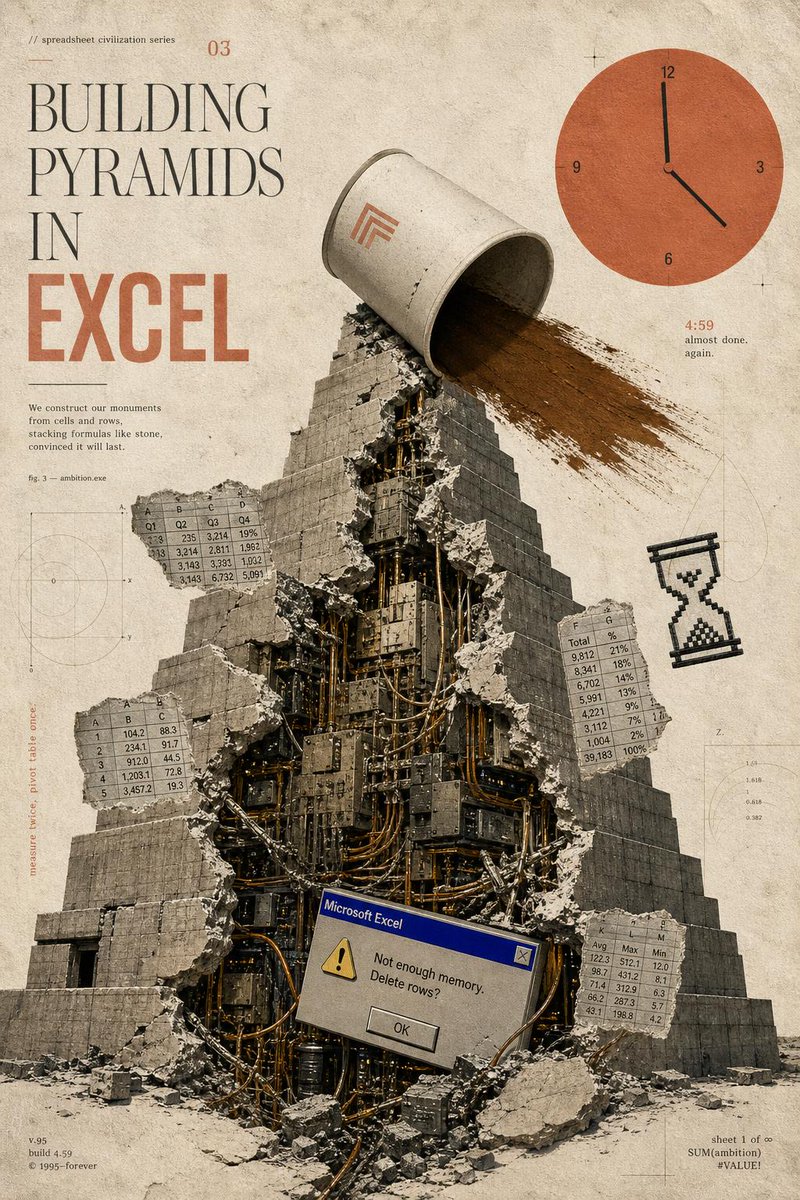
在 Excel 中建造金字塔海报
一张超现实主义复古海报提示词,描绘了一座由电子表格文化构建而成的破裂机械金字塔,非常适合编辑艺术或讽刺性科技印刷品。
- 分类
- 图表信息图
- 模型
- GPT Image 2
- 来源作者
- Horus He
- 原始语言
- en
- 来源 ID
- 20946
- 发布时间
- 2026年5月16日
完整提示词
目标:为虚构的“电子表格文明系列”创作一张超现实主义复古编辑海报,主题为 {argument name="headline concept" default="BUILDING PYRAMIDS IN EXCEL"},将古代纪念碑式建筑与过时的办公软件焦虑相结合。

画布:竖版海报,2:3 比例,陈旧的米色纸张背景,带有污渍、灰尘、划痕、模糊的技术绘图标记、细小的套准十字线以及柔和的深褐色调。使用做旧的印刷杂志质感,如同档案科学手册与粗野主义拼贴艺术的结合。

布局:大型排版占据左上象限。一座巨大的阶梯金字塔占据中心和下半部分,采用仰视视角,底部有碎石。右上象限包含一个巨大的扁平橙色时钟图形。小的电子表格、图表和页边笔记像技术注释一样漂浮在金字塔周围。

主体:一座巨大的灰色石制阶梯金字塔,正面垂直裂开。破裂的开口处露出由深色金属板、电缆、管道、服务器、电线和工业机械组成的密集机械内部。混凝土块和碎片向外散落。在金字塔顶部,一个巨大的倾倒的灰白色桶或圆柱形容器正向金字塔右侧倾泻出一大股棕色的沙子或泥土。在桶上放置一个极简的橙色几何标志。

排版与可见文字:左上角的小字写着“// spreadsheet civilization series”以及一个小期刊号“03”。主标题采用高挑优雅的衬线字体堆叠:“BUILDING”然后是“PYRAMIDS”然后是“IN”,下方是超大加粗压缩的橙色块状字母“EXCEL”。在标题下方添加一段小文字:“我们用单元格和行构建我们的纪念碑,像堆砌石头一样堆叠公式,坚信它会永存。”在附近添加“fig. 3 — ambition.exe”。左下角小页脚文字:“v.95”、“build 4.59”、“© 1995–forever”。右下角小页脚文字:“sheet 1 of ∞”、“SUM(ambition)”、“#VALUE!”。在时钟附近,包含橙色的“4:59”以及微小的说明文字“almost done. again.”。在左侧添加一条垂直页边笔记,写着“measure twice, pivot table once.”。

需包含的离散元素:1 座中心破裂的金字塔;1 个倾倒并倾泻沙子的桶;1 个位于右上角的橙色时钟,带有数字 12、3、6、9,黑色指针指向大约 4:59;1 个位于右侧的像素化黑色沙漏图标;1 个位于金字塔下部中心附近的 Microsoft Excel 风格错误对话框;4 个漂浮的电子表格片段。这 4 个电子表格片段分别是:左上角的片段,标有 A、B、C、D 列和十进制数值行;左中部的片段,标有 A、B、C 列和 1–5 行;右中部的片段,标有 F、G 列和标有“Total”及百分比的行;右下角的片段,标有 K、L、M 列以及 Avg、Max、Min 等标签。

错误对话框细节:使对话框看起来像旧版 Windows 95 Microsoft Excel 警告框,带有蓝色标题栏,写着“Microsoft Excel”,一个黄色警告三角形,消息内容为“Not enough memory. Delete rows?”,以及一个居中的“OK”按钮。

视觉风格:模拟拼贴,写实的石头和碎石与扁平的矢量 UI 元素混合,柔和的米色-灰色-黑色调色板,带有焦橙色点缀,高颗粒感,轻微的油墨套印不准,柔和的阴影,磨损的纸张质感,细细的绘图线条以及背景中模糊的圆形图表。
多语言版本
在 Excel 中建造金字塔海报
enGoal: Create a surreal vintage editorial poster for a fictional “spreadsheet civilization series” about {argument name="headline concept" default="BUILDING PYRAMIDS IN EXCEL"}, combining ancient monumental architecture with obsolete office software anxiety. Canvas: Vertical poster, 2:3 ratio, aged cream paper background with stains, dust, scratches, faint technical drafting marks, thin registration crosses, and muted sepia tones. Use a distressed printed-magazine texture, like an archival science pamphlet mixed with brutalist collage art. Layout: Large typography occupies the upper-left quadrant. A monumental stepped pyramid fills the center and lower half, viewed from slightly below, with rubble at the base. The upper-right quadrant contains a large flat orange clock graphic. Small spreadsheet tables, diagrams, and marginal notes float around the pyramid like technical annotations. Main subject: A massive gray stone stepped pyramid, cracked open vertically down the front. The broken opening reveals a dense mechanical interior made of dark metal panels, cables, pipes, servers, wires, and industrial machinery. Concrete chunks and debris scatter outward. At the top of the pyramid, a large tipped-over off-white bucket or cylindrical container pours a wide stream of brown sand or dirt down the right side of the pyramid. Put a small minimalist orange geometric logo on the bucket. Typography and visible text: Upper-left small text reads “// spreadsheet civilization series” and a small issue number “03”. The main title is stacked in tall elegant serif type: “BUILDING” then “PYRAMIDS” then “IN”, with “EXCEL” below in very large bold condensed orange block letters. Add a small paragraph under the title: “We construct our monuments from cells and rows, stacking formulas like stone, convinced it will last.” Add “fig. 3 — ambition.exe” nearby. Bottom-left small footer text: “v.95”, “build 4.59”, “© 1995–forever”. Bottom-right small footer text: “sheet 1 of ∞”, “SUM(ambition)”, “#VALUE!”. Near the clock, include “4:59” in orange and the tiny caption “almost done. again.” Add a vertical margin note on the left that reads “measure twice, pivot table once.” Discrete elements to include exactly: 1 central broken pyramid; 1 tipped bucket pouring sand; 1 orange clock in the upper right with numbers 12, 3, 6, 9 and black hands indicating roughly 4:59; 1 pixelated black hourglass icon on the right side; 1 Microsoft Excel-style error dialog near the lower center of the pyramid; 4 floating spreadsheet table fragments. The 4 spreadsheet fragments are: a top-left fragment labeled with columns A, B, C, D and rows of decimal values; a left-middle fragment with columns A, B, C and rows 1–5; a right-middle fragment with columns F, G and rows labeled “Total” plus percentages; a bottom-right fragment with columns K, L, M and labels like Avg, Max, Min. Error dialog detail: Make the dialog look like an old Windows 95 Microsoft Excel alert box with a blue title bar reading “Microsoft Excel”, a yellow warning triangle, the message “Not enough memory. Delete rows?”, and a centered “OK” button. Visual style: Analog collage, photoreal stone and rubble mixed with flat vector UI elements, muted beige-gray-black palette with burnt orange accents, high grain, slight ink misregistration, soft shadows, worn paper texture, thin drafting lines and faint circular graph diagrams in the background. Constraints: Keep the composition clean and poster-like, with no modern glossy interface, no people, no extra logos besides the small bucket mark and the Excel dialog, and no additional major objects beyond the counted elements.
在 Excel 中建造金字塔海报
zh-CN目标:为虚构的“电子表格文明系列”创作一张超现实主义复古编辑海报,主题为 {argument name="headline concept" default="BUILDING PYRAMIDS IN EXCEL"},将古代纪念碑式建筑与过时的办公软件焦虑相结合。 画布:竖版海报,2:3 比例,陈旧的米色纸张背景,带有污渍、灰尘、划痕、模糊的技术绘图标记、细小的套准十字线以及柔和的深褐色调。使用做旧的印刷杂志质感,如同档案科学手册与粗野主义拼贴艺术的结合。 布局:大型排版占据左上象限。一座巨大的阶梯金字塔占据中心和下半部分,采用仰视视角,底部有碎石。右上象限包含一个巨大的扁平橙色时钟图形。小的电子表格、图表和页边笔记像技术注释一样漂浮在金字塔周围。 主体:一座巨大的灰色石制阶梯金字塔,正面垂直裂开。破裂的开口处露出由深色金属板、电缆、管道、服务器、电线和工业机械组成的密集机械内部。混凝土块和碎片向外散落。在金字塔顶部,一个巨大的倾倒的灰白色桶或圆柱形容器正向金字塔右侧倾泻出一大股棕色的沙子或泥土。在桶上放置一个极简的橙色几何标志。 排版与可见文字:左上角的小字写着“// spreadsheet civilization series”以及一个小期刊号“03”。主标题采用高挑优雅的衬线字体堆叠:“BUILDING”然后是“PYRAMIDS”然后是“IN”,下方是超大加粗压缩的橙色块状字母“EXCEL”。在标题下方添加一段小文字:“我们用单元格和行构建我们的纪念碑,像堆砌石头一样堆叠公式,坚信它会永存。”在附近添加“fig. 3 — ambition.exe”。左下角小页脚文字:“v.95”、“build 4.59”、“© 1995–forever”。右下角小页脚文字:“sheet 1 of ∞”、“SUM(ambition)”、“#VALUE!”。在时钟附近,包含橙色的“4:59”以及微小的说明文字“almost done. again.”。在左侧添加一条垂直页边笔记,写着“measure twice, pivot table once.”。 需包含的离散元素:1 座中心破裂的金字塔;1 个倾倒并倾泻沙子的桶;1 个位于右上角的橙色时钟,带有数字 12、3、6、9,黑色指针指向大约 4:59;1 个位于右侧的像素化黑色沙漏图标;1 个位于金字塔下部中心附近的 Microsoft Excel 风格错误对话框;4 个漂浮的电子表格片段。这 4 个电子表格片段分别是:左上角的片段,标有 A、B、C、D 列和十进制数值行;左中部的片段,标有 A、B、C 列和 1–5 行;右中部的片段,标有 F、G 列和标有“Total”及百分比的行;右下角的片段,标有 K、L、M 列以及 Avg、Max、Min 等标签。 错误对话框细节:使对话框看起来像旧版 Windows 95 Microsoft Excel 警告框,带有蓝色标题栏,写着“Microsoft Excel”,一个黄色警告三角形,消息内容为“Not enough memory. Delete rows?”,以及一个居中的“OK”按钮。 视觉风格:模拟拼贴,写实的石头和碎石与扁平的矢量 UI 元素混合,柔和的米色-灰色-黑色调色板,带有焦橙色点缀,高颗粒感,轻微的油墨套印不准,柔和的阴影,磨损的纸张质感,细细的绘图线条以及背景中模糊的圆形图表。