Mintpage AI 着陆页首屏设计
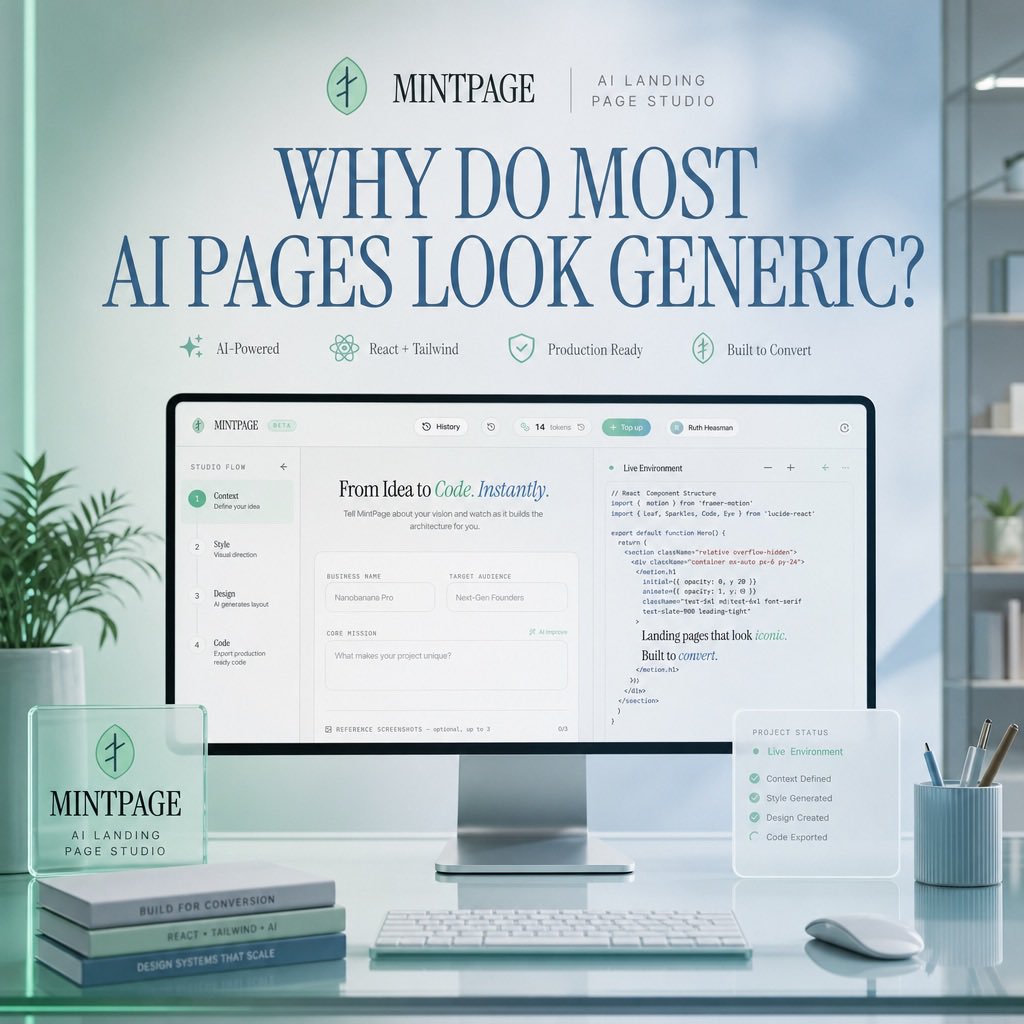
一个精致的 SaaS 首屏模型,展示了在柔和薄荷蓝办公场景中的 AI 着陆页工作室界面。
- 分类
- 图表信息图
- 模型
- GPT Image 2
- 来源作者
- Ruth Heasman 🌳🌷🦚🐉😃
- 原始语言
- en
- 来源 ID
- 21370
- 发布时间
- 2026年5月18日
完整提示词
目标:为宣传 {argument name="product name" default="MINTPAGE"}(一款 AI 着陆页工作室)的 SaaS 着陆页概念创建一个精致的方形首屏图像。

画布:1:1 方形构图,柔和的日光办公环境,淡薄荷色与浅蓝色调,简洁的高端科技美学,逼真的 3D 产品模型与精致的排版设计相结合。

布局:场景中心为一个放置在光面玻璃桌上的大型桌面显示器。顶部放置一排小型品牌信息,包括一个圆形的薄荷叶状 Logo、单词 {argument name="product name" default="MINTPAGE"}、一条细分割线以及副标题 {argument name="brand subtitle" default="AI LANDING PAGE STUDIO"}。下方使用深蓝色的大号优雅衬线字体作为标题:{argument name="headline text" default="WHY DO MOST AI PAGES LOOK GENERIC?"}。在标题下方,并排放置 4 个带有精致薄荷色图标和标签的小型功能徽章:1) AI 驱动,2) React + Tailwind,3) 生产就绪,4) 专为转化而生。

主体:显示器展示了一个简洁的 Web 应用构建器界面,用于创建着陆页。界面应包含顶部导航栏和分屏工作区。左侧显示一个垂直设置流程,包含 4 个编号步骤:1) Context — 定义你的想法,2) Style — 视觉方向,3) Design — AI 生成布局,4) Code — 导出生产就绪代码。在中间面板,显示标题“From Idea to Code. Instantly.”,其中“Code. Instantly.”采用薄荷色斜体样式,随后是“业务名称”、“目标受众”和“核心使命”等表单字段。在右侧面板,显示一个名为“Live Environment”的代码编辑器,其中包含可读性强但字号较小的 React/Tailwind 风格代码,以及一段简短的渲染文本片段,内容为“Landing pages that look iconic. Built to convert.”。

前景物体:在桌子左侧,放置一个半透明的亚克力桌面铭牌,上面印有圆形 Logo 以及文字“MINTPAGE”和“AI LANDING PAGE STUDIO”。在其下方或旁边,堆叠 3 本书脊标签清晰的薄书:1) BUILT FOR CONVERSION,2) REACT + TAILWIND + AI,3) DESIGN SYSTEMS THAT SCALE。在显示器前方,放置一个纤薄的白色键盘。在右侧,放置一张名为“PROJECT STATUS”的小型半透明悬浮状态卡片,列出 5 个已勾选的项目:1) Live Environment,2) Context Defined,3) Style Generated,4) Design Created,5) Code Exported。此外,放置一个淡蓝色罗纹笔筒,内含 4 支书写工具和一个白色鼠标。

环境:极简现代办公室,背景中有柔焦书架和植物,右侧有大窗户采光,玻璃桌面上有微妙的反射,柔和的景深,画面中无人。

视觉风格:高端初创公司发布图形,柔和的体积光,逼真的产品摄影,玻璃拟态叠加层,薄荷绿点缀,深蓝色衬线字体,清晰的 UI 细节,冷静的高端工作室氛围。

约束:使用上述列出的精确数量元素,保持图像整洁,使标题成为最突出的文字,避免额外的 Logo、水印或无关文字。
多语言版本
Mintpage AI 着陆页首屏设计
enGoal: Create a polished square hero image for a SaaS landing page concept advertising {argument name="product name" default="MINTPAGE"}, an AI landing page studio. Canvas: 1:1 square composition, soft daylight office setting, pastel mint and pale blue color palette, clean premium tech aesthetic, realistic 3D product mockup mixed with refined editorial typography. Layout: Center the scene around a large desktop monitor on a glossy glass desk. At the top, place a small brand row with a circular mint leaf-like logo, the word {argument name="product name" default="MINTPAGE"}, a thin divider line, and the subtitle {argument name="brand subtitle" default="AI LANDING PAGE STUDIO"}. Below it, use a very large elegant serif headline in dark blue: {argument name="headline text" default="WHY DO MOST AI PAGES LOOK GENERIC?"}. Under the headline, place exactly 4 small feature badges in one row with delicate mint icons and labels: 1) AI-Powered, 2) React + Tailwind, 3) Production Ready, 4) Built to Convert. Main subject: The monitor displays a clean web-app builder interface for creating landing pages. The interface should have a top navigation bar and a split workspace. On the left, show a vertical setup flow with exactly 4 numbered steps: 1) Context — Define your idea, 2) Style — Visual direction, 3) Design — AI generates layout, 4) Code — Export production ready code. In the center panel, show the headline “From Idea to Code. Instantly.” with “Code. Instantly.” in mint italic styling, followed by form fields such as Business Name, Target Audience, and Core Mission. On the right panel, show a code editor titled “Live Environment” with readable but small React/Tailwind-style code and a short rendered text snippet saying “Landing pages that look iconic. Built to convert.” Foreground objects: On the left side of the desk, place a translucent acrylic desk plaque with the circular logo and the text “MINTPAGE” and “AI LANDING PAGE STUDIO.” Beneath or beside it, stack exactly 3 slim books with visible spine labels: 1) BUILT FOR CONVERSION, 2) REACT + TAILWIND + AI, 3) DESIGN SYSTEMS THAT SCALE. In front of the monitor, place a slim white keyboard. On the right side, place a small translucent floating status card titled “PROJECT STATUS” listing exactly 5 checked items: 1) Live Environment, 2) Context Defined, 3) Style Generated, 4) Design Created, 5) Code Exported. Also include a pale blue ribbed pen cup with exactly 4 writing tools and a white mouse. Environment: Minimal modern office with soft-focus shelves and plants in the background, large window lighting from the right, subtle reflections on the glass desktop, gentle depth of field, no people. Visual style: Premium startup launch graphic, soft volumetric lighting, realistic product photography, glassmorphism overlays, mint-green accents, dark blue serif typography, crisp UI details, calm high-end studio atmosphere. Constraints: Use exactly the counted elements listed above, keep the image uncluttered, make the headline the most prominent text, avoid extra logos, watermarks, or unrelated text.
Mintpage AI 着陆页首屏设计
zh-CN目标:为宣传 {argument name="product name" default="MINTPAGE"}(一款 AI 着陆页工作室)的 SaaS 着陆页概念创建一个精致的方形首屏图像。 画布:1:1 方形构图,柔和的日光办公环境,淡薄荷色与浅蓝色调,简洁的高端科技美学,逼真的 3D 产品模型与精致的排版设计相结合。 布局:场景中心为一个放置在光面玻璃桌上的大型桌面显示器。顶部放置一排小型品牌信息,包括一个圆形的薄荷叶状 Logo、单词 {argument name="product name" default="MINTPAGE"}、一条细分割线以及副标题 {argument name="brand subtitle" default="AI LANDING PAGE STUDIO"}。下方使用深蓝色的大号优雅衬线字体作为标题:{argument name="headline text" default="WHY DO MOST AI PAGES LOOK GENERIC?"}。在标题下方,并排放置 4 个带有精致薄荷色图标和标签的小型功能徽章:1) AI 驱动,2) React + Tailwind,3) 生产就绪,4) 专为转化而生。 主体:显示器展示了一个简洁的 Web 应用构建器界面,用于创建着陆页。界面应包含顶部导航栏和分屏工作区。左侧显示一个垂直设置流程,包含 4 个编号步骤:1) Context — 定义你的想法,2) Style — 视觉方向,3) Design — AI 生成布局,4) Code — 导出生产就绪代码。在中间面板,显示标题“From Idea to Code. Instantly.”,其中“Code. Instantly.”采用薄荷色斜体样式,随后是“业务名称”、“目标受众”和“核心使命”等表单字段。在右侧面板,显示一个名为“Live Environment”的代码编辑器,其中包含可读性强但字号较小的 React/Tailwind 风格代码,以及一段简短的渲染文本片段,内容为“Landing pages that look iconic. Built to convert.”。 前景物体:在桌子左侧,放置一个半透明的亚克力桌面铭牌,上面印有圆形 Logo 以及文字“MINTPAGE”和“AI LANDING PAGE STUDIO”。在其下方或旁边,堆叠 3 本书脊标签清晰的薄书:1) BUILT FOR CONVERSION,2) REACT + TAILWIND + AI,3) DESIGN SYSTEMS THAT SCALE。在显示器前方,放置一个纤薄的白色键盘。在右侧,放置一张名为“PROJECT STATUS”的小型半透明悬浮状态卡片,列出 5 个已勾选的项目:1) Live Environment,2) Context Defined,3) Style Generated,4) Design Created,5) Code Exported。此外,放置一个淡蓝色罗纹笔筒,内含 4 支书写工具和一个白色鼠标。 环境:极简现代办公室,背景中有柔焦书架和植物,右侧有大窗户采光,玻璃桌面上有微妙的反射,柔和的景深,画面中无人。 视觉风格:高端初创公司发布图形,柔和的体积光,逼真的产品摄影,玻璃拟态叠加层,薄荷绿点缀,深蓝色衬线字体,清晰的 UI 细节,冷静的高端工作室氛围。 约束:使用上述列出的精确数量元素,保持图像整洁,使标题成为最突出的文字,避免额外的 Logo、水印或无关文字。