深色 JSON Diff 工具 UI 原型
生成一个精致的深色模式桌面 UI 原型,用于 JSON API diff 和代码对比工具。
- 分类
- 图表信息图
- 模型
- GPT Image 2
- 来源作者
- Hady
- 原始语言
- en
- 来源 ID
- 21928
- 发布时间
- 2026年5月21日
完整提示词
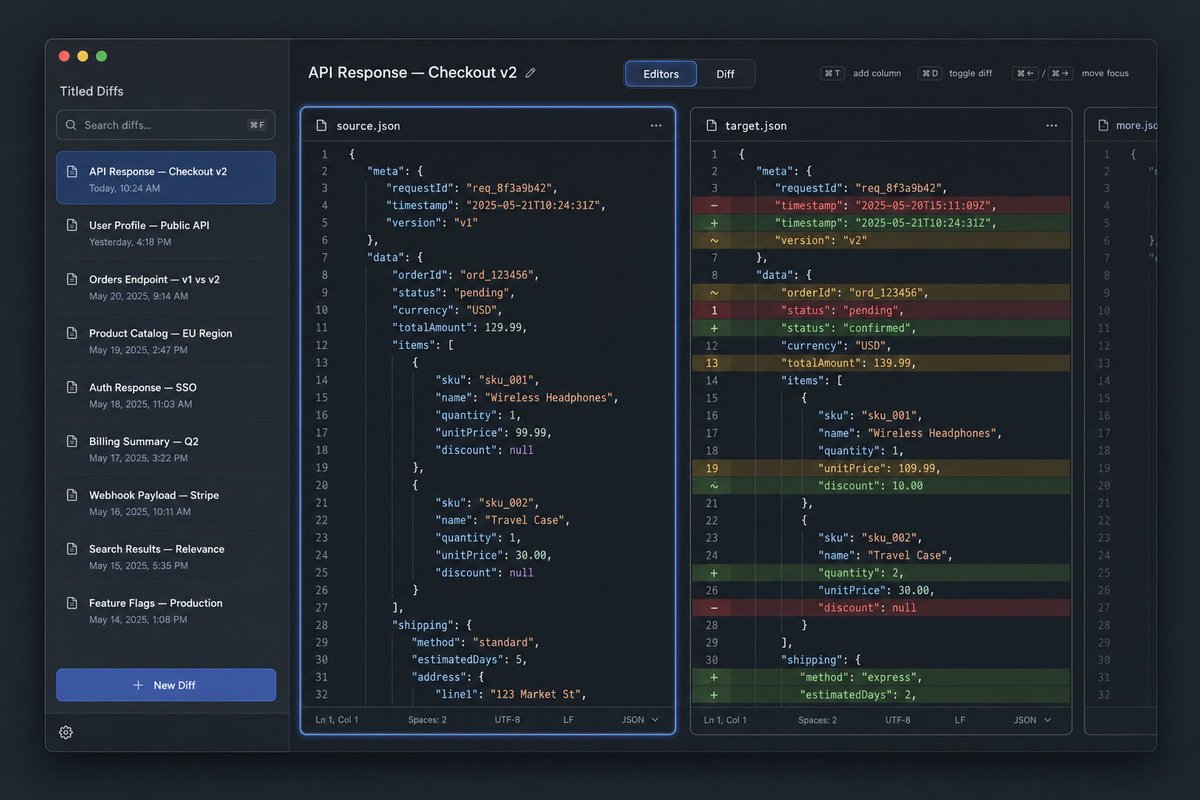
目标:创建一个深色模式的桌面应用 UI 原型,用于名为 {argument name="app name" default="Tilted Diffs"} 的 JSON diff 工具,展示标题为 {argument name="diff title" default="API Response — Checkout v2"} 的 API 响应对比。

画布:16:10 宽屏桌面截图,约 1152×768,带有 macOS 风格的应用窗口,悬浮在深蓝色渐变背景上。使用细微阴影、圆角、细边框和精致的开发者工具美学。

布局:应用包含 4 个主要区域:1 个左侧边栏,1 个横跨编辑器区域的顶部工具栏,3 个垂直代码编辑器面板。第一个编辑器面板被选中,并带有明亮的蓝色焦点光晕。中间面板显示带颜色的行内 diff 高亮。最右侧面板较窄且部分可见,类似于额外的文件标签或第三个对比列。

左侧边栏:左上角显示 macOS 交通灯按钮:3 个圆圈,分别为红色、黄色、绿色。在应用名称下方,包含 1 个搜索框,占位符文本为“Search diffs…”,并带有键盘提示。下方显示 8 个已保存的 diff 列表项,带有小文档图标和时间戳:1) “API Response — Checkout v2”,显示“Today, 10:24 AM”,以蓝色高亮显示为选中项;2) “User Profile — Public API”,显示“Yesterday, 4:18 PM”;3) “Orders Endpoint — v1 vs v2”,显示“May 20, 2025, 9:14 AM”;4) “Product Catalog — EU Region”,显示“May 19, 2025, 2:47 PM”;5) “Auth Response — SSO”,显示“May 18, 2025, 11:03 AM”;6) “Billing Summary — Q2”,显示“May 17, 2025, 3:22 PM”;7) “Webhook Payload — Stripe”,显示“May 16, 2025, 10:11 AM”;8) “Search Results — Relevance”,显示“May 15, 2025, 5:35 PM”。底部包含 1 个显眼的蓝色“+ New Diff”按钮和 1 个小型齿轮图标。

顶部工具栏:左侧显示标题“API Response — Checkout v2”,带有一个微小的编辑铅笔图标。中间放置一个分段控件,包含 2 个标签:选中蓝色的“Editors”和未选中的“Diff”。右侧包含 4 个紧凑的快捷键控件,标注为“⌘T add column”、“⌘D toggle diff”、“⌘← / ⌘→ move focus”,组间留有小间距。

编辑器面板:使用等宽代码字体、行号、JSON 语法高亮、深海军蓝面板和细圆角边框。左侧面板标题为“source.json”,带有文档图标和三点菜单。中间面板标题为“target.json”,带有文档图标和三点菜单。狭窄的右侧面板标题为“more.json”,仅显示代码的左侧部分,暗示溢出。每个完整编辑器面板底部都有一个状态栏,显示“Ln 1, Col 1”、“Spaces: 2”、“UTF-8”、“LF”和“JSON”。

代码内容:显示订单结账响应的 JSON。使用 requestId “req_8f3a9b42”、orderId “ord_123456”、货币 USD,以及无线耳机和旅行收纳包的商品信息和配送信息。左侧源版本应包含时间戳“2025-05-21T10:24:31Z”、版本“v1”、状态“pending”、totalAmount 129.99、无线耳机 unitPrice 99.99(折扣为 null)、旅行收纳包数量 1、unitPrice 30.00(折扣为 null)、配送方式“standard”、estimatedDays 5 以及地址“123 Market St”。中间目标版本应在左侧装订线显示 diff 标记,并使用彩色行高亮:红色为删除行,绿色为新增行,黄色为修改行。它应包含时间戳从“2025-05-20T15:11:09Z”更改为“2025-05-21T10:24:31Z”、版本更改为 v2、状态从 pending 更改为 confirmed、totalAmount 更改为 139.99、无线耳机 unitPrice 更改为 109.99 并添加了折扣 10.00、旅行收纳包数量更改为 2、配送方式更改为 express 且 estimatedDays 更改为 2。每个完整编辑器中显示约 32 行编号代码。

视觉风格:高级 SaaS 开发者工具界面,清晰的矢量级渲染,深色主题,钴蓝色强调色,柔和的灰色文本,真实但整洁的 UI 截图,无人像,无水印,应用窗口外无浏览器边框。保持所有文本清晰且对齐网格。
多语言版本
深色 JSON Diff 工具 UI 原型
enGoal: Create a dark-mode desktop app UI mockup for a JSON diff tool named {argument name="app name" default="Tilted Diffs"}, showing an API response comparison titled {argument name="diff title" default="API Response — Checkout v2"}. Canvas: 16:10 widescreen desktop screenshot, roughly 1152×768, with a macOS-style app window floating on a dark bluish gradient background. Use subtle shadows, rounded corners, thin borders, and a polished developer-tool aesthetic. Layout: The app has 4 main regions: 1 left sidebar, 1 top toolbar spanning the editor area, 3 vertical code editor panes. The first editor pane is selected and outlined with a bright blue focus glow. The middle pane shows colored inline diff highlights. The rightmost pane is narrow and partially visible, like an additional file tab or third comparison column. Left sidebar: Show macOS traffic-light buttons at top left: 3 circles, red, yellow, green. Under the app name, include 1 search field with placeholder text “Search diffs…” and a keyboard hint. Below it show exactly 8 saved diff list items with small document icons and timestamps: 1) “API Response — Checkout v2” with “Today, 10:24 AM”, highlighted in blue as the selected item; 2) “User Profile — Public API” with “Yesterday, 4:18 PM”; 3) “Orders Endpoint — v1 vs v2” with “May 20, 2025, 9:14 AM”; 4) “Product Catalog — EU Region” with “May 19, 2025, 2:47 PM”; 5) “Auth Response — SSO” with “May 18, 2025, 11:03 AM”; 6) “Billing Summary — Q2” with “May 17, 2025, 3:22 PM”; 7) “Webhook Payload — Stripe” with “May 16, 2025, 10:11 AM”; 8) “Search Results — Relevance” with “May 15, 2025, 5:35 PM”. At the bottom include exactly 1 prominent blue “+ New Diff” button and 1 small gear icon. Top toolbar: On the left, display the title “API Response — Checkout v2” with a tiny edit pencil icon. Center a segmented control with exactly 2 tabs: “Editors” selected in blue and “Diff” inactive. On the right include exactly 4 compact shortcut controls labeled “⌘T add column”, “⌘D toggle diff”, “⌘← / ⌘→ move focus” and one small spacing gap between groups. Editor panes: Use a monospaced code font, line numbers, JSON syntax highlighting, dark navy panels, and thin rounded borders. The left pane header is “source.json” with a document icon and a three-dot menu. The middle pane header is “target.json” with a document icon and a three-dot menu. The narrow right pane header is “more.json” and should show only the left portion of code, implying overflow. Each full editor pane has a bottom status bar with “Ln 1, Col 1”, “Spaces: 2”, “UTF-8”, “LF”, and “JSON”. Code content: Show JSON for an order checkout response. Use requestId “req_8f3a9b42”, orderId “ord_123456”, currency USD, items for Wireless Headphones and Travel Case, and shipping information. The left source version should include timestamp “2025-05-21T10:24:31Z”, version “v1”, status “pending”, totalAmount 129.99, Wireless Headphones unitPrice 99.99 with discount null, Travel Case quantity 1, unitPrice 30.00, discount null, shipping method “standard”, estimatedDays 5, and address line “123 Market St”. The middle target version should show diff markers in a left gutter and colored row highlights: red removed rows, green added rows, yellow changed rows. It should include timestamp changed from “2025-05-20T15:11:09Z” to “2025-05-21T10:24:31Z”, version changed to v2, status changed from pending to confirmed, totalAmount changed to 139.99, Wireless Headphones unitPrice changed to 109.99 and discount added as 10.00, Travel Case quantity changed to 2, and shipping method changed to express with estimatedDays 2. Show approximately 32 numbered lines in each full editor. Visual style: Premium SaaS developer tool interface, crisp vector-like rendering, dark theme, cobalt-blue accent color, muted gray text, realistic but clean UI screenshot, no people, no watermark, no browser chrome outside the app window. Keep all text legible and aligned to a grid.
深色 JSON Diff 工具 UI 原型
zh-CN目标:创建一个深色模式的桌面应用 UI 原型,用于名为 {argument name="app name" default="Tilted Diffs"} 的 JSON diff 工具,展示标题为 {argument name="diff title" default="API Response — Checkout v2"} 的 API 响应对比。 画布:16:10 宽屏桌面截图,约 1152×768,带有 macOS 风格的应用窗口,悬浮在深蓝色渐变背景上。使用细微阴影、圆角、细边框和精致的开发者工具美学。 布局:应用包含 4 个主要区域:1 个左侧边栏,1 个横跨编辑器区域的顶部工具栏,3 个垂直代码编辑器面板。第一个编辑器面板被选中,并带有明亮的蓝色焦点光晕。中间面板显示带颜色的行内 diff 高亮。最右侧面板较窄且部分可见,类似于额外的文件标签或第三个对比列。 左侧边栏:左上角显示 macOS 交通灯按钮:3 个圆圈,分别为红色、黄色、绿色。在应用名称下方,包含 1 个搜索框,占位符文本为“Search diffs…”,并带有键盘提示。下方显示 8 个已保存的 diff 列表项,带有小文档图标和时间戳:1) “API Response — Checkout v2”,显示“Today, 10:24 AM”,以蓝色高亮显示为选中项;2) “User Profile — Public API”,显示“Yesterday, 4:18 PM”;3) “Orders Endpoint — v1 vs v2”,显示“May 20, 2025, 9:14 AM”;4) “Product Catalog — EU Region”,显示“May 19, 2025, 2:47 PM”;5) “Auth Response — SSO”,显示“May 18, 2025, 11:03 AM”;6) “Billing Summary — Q2”,显示“May 17, 2025, 3:22 PM”;7) “Webhook Payload — Stripe”,显示“May 16, 2025, 10:11 AM”;8) “Search Results — Relevance”,显示“May 15, 2025, 5:35 PM”。底部包含 1 个显眼的蓝色“+ New Diff”按钮和 1 个小型齿轮图标。 顶部工具栏:左侧显示标题“API Response — Checkout v2”,带有一个微小的编辑铅笔图标。中间放置一个分段控件,包含 2 个标签:选中蓝色的“Editors”和未选中的“Diff”。右侧包含 4 个紧凑的快捷键控件,标注为“⌘T add column”、“⌘D toggle diff”、“⌘← / ⌘→ move focus”,组间留有小间距。 编辑器面板:使用等宽代码字体、行号、JSON 语法高亮、深海军蓝面板和细圆角边框。左侧面板标题为“source.json”,带有文档图标和三点菜单。中间面板标题为“target.json”,带有文档图标和三点菜单。狭窄的右侧面板标题为“more.json”,仅显示代码的左侧部分,暗示溢出。每个完整编辑器面板底部都有一个状态栏,显示“Ln 1, Col 1”、“Spaces: 2”、“UTF-8”、“LF”和“JSON”。 代码内容:显示订单结账响应的 JSON。使用 requestId “req_8f3a9b42”、orderId “ord_123456”、货币 USD,以及无线耳机和旅行收纳包的商品信息和配送信息。左侧源版本应包含时间戳“2025-05-21T10:24:31Z”、版本“v1”、状态“pending”、totalAmount 129.99、无线耳机 unitPrice 99.99(折扣为 null)、旅行收纳包数量 1、unitPrice 30.00(折扣为 null)、配送方式“standard”、estimatedDays 5 以及地址“123 Market St”。中间目标版本应在左侧装订线显示 diff 标记,并使用彩色行高亮:红色为删除行,绿色为新增行,黄色为修改行。它应包含时间戳从“2025-05-20T15:11:09Z”更改为“2025-05-21T10:24:31Z”、版本更改为 v2、状态从 pending 更改为 confirmed、totalAmount 更改为 139.99、无线耳机 unitPrice 更改为 109.99 并添加了折扣 10.00、旅行收纳包数量更改为 2、配送方式更改为 express 且 estimatedDays 更改为 2。每个完整编辑器中显示约 32 行编号代码。 视觉风格:高级 SaaS 开发者工具界面,清晰的矢量级渲染,深色主题,钴蓝色强调色,柔和的灰色文本,真实但整洁的 UI 截图,无人像,无水印,应用窗口外无浏览器边框。保持所有文本清晰且对齐网格。