鹦鹉数字油画工作表
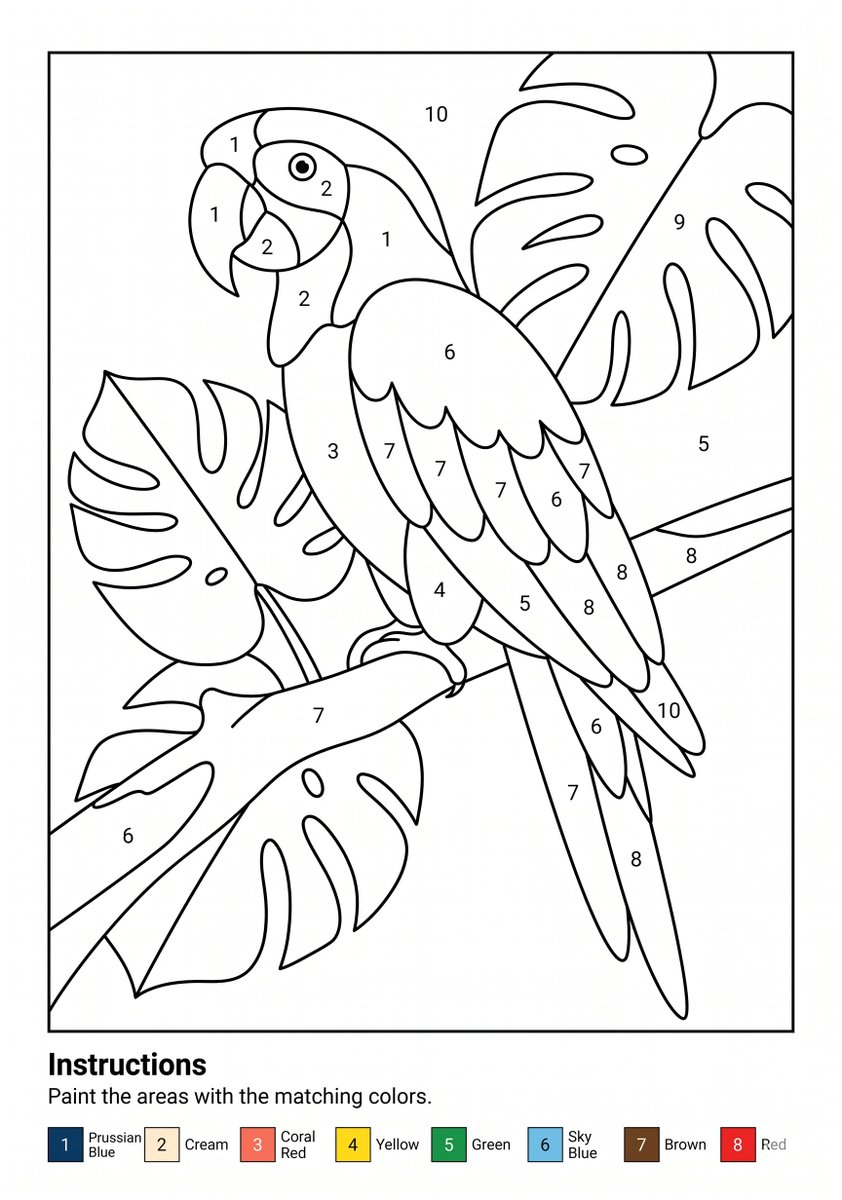
生成一张可打印的 A4 数字油画涂色工作表,包含热带鹦鹉、龟背竹叶、数字编号区域、说明以及颜色图例。
- 分类
- 图表信息图
- 模型
- GPT Image 2
- 来源作者
- Danny Q
- 原始语言
- en
- 来源 ID
- 21942
- 发布时间
- 2026年5月21日
完整提示词
目标:创建一张可打印的数字油画工作表,主题为 {argument name="subject" default="一只栖息在大型龟背竹叶丛中的热带鹦鹉"}。

画布:A4 纵向页面,纯白背景,黑白线条艺术,专为 300 DPI 打印设计。在主图周围添加细矩形边框,并在底部留出说明区域。

主图:在边框内,绘制一只简单的涂色书风格鹦鹉,面向左侧,斜向栖息在树枝上。鹦鹉具有弯曲的喙、圆形的眼睛、层叠的翅膀羽毛、长尾羽以及抓握树枝的脚。在背景和前景中环绕大型热带龟背竹叶,叶片宽大且有裂纹,并带有简单的叶脉线条。使用平滑、粗细一致的黑色轮廓线,无阴影或灰度填充。

数字编号区域:将插图划分为多个封闭的涂色区域,并在区域中心放置黑色数字。在整幅作品中使用 1 到 10 共 10 个编号标签,重复的数字出现在多个区域。标签应小巧、清晰且易于阅读,符合可打印工作表的标准。

底部说明区域:在插图下方,添加左对齐的粗体标题“Instructions”(说明),随后是句子“Paint the areas with the matching colors.”(用对应的颜色涂色)。在句子下方,包含一个水平颜色图例,包含 8 个编号色块:1 普鲁士蓝、2 米色、3 珊瑚红、4 黄色、5 绿色、6 天蓝色、7 棕色、8 红色。每个图例项应显示一个小色块,数字位于色块内或旁边,后跟颜色名称。

视觉风格:极简矢量工作表美学,清晰的黑色轮廓,白色填充区域,无纹理,无阴影,无水印,无多余装饰元素。最终图像应看起来像一张可直接打印的儿童数字油画涂色页。
多语言版本
鹦鹉数字油画工作表
enGoal: Create a printable paint-by-numbers worksheet featuring {argument name="subject" default="a tropical parrot perched among large monstera leaves"}. Canvas: A4 portrait page, clean white background, black-and-white line art, designed for printing at 300 DPI. Add a thin rectangular border around the main artwork, leaving a bottom instruction area. Main artwork: Inside the bordered frame, draw one large parrot in simple coloring-book style, facing left, perched diagonally on a branch. The parrot has a curved beak, round eye, layered wing feathers, long tail feathers, and visible feet gripping the branch. Surround it with large tropical monstera leaves in the background and foreground, with broad split-leaf shapes and simple vein lines. Use smooth, thick, consistent black outlines and no shading or grayscale fills. Numbered paint regions: Divide the illustration into many enclosed paint regions and place centered black numbers in the regions. Use exactly 10 numbered region labels across the artwork, numbered 1 through 10, with repeated numbers appearing in multiple areas. Make the labels small, clean, and readable, like a printable worksheet. Bottom instruction area: Below the artwork, add the bold heading "Instructions" aligned left, followed by the sentence "Paint the areas with the matching colors." Under the sentence, include a horizontal color legend with exactly 8 numbered color swatches: 1 Prussian Blue, 2 Cream, 3 Coral Red, 4 Yellow, 5 Green, 6 Sky Blue, 7 Brown, 8 Red. Each legend item should show a small colored square with the number inside or beside it, followed by the color name. Visual style: Minimal vector worksheet aesthetic, crisp black outlines, white fill areas, no texture, no shadows, no watermark, no extra decorative elements. The final image should look like a ready-to-print kids’ paint-by-numbers coloring page.
鹦鹉数字油画工作表
zh-CN目标:创建一张可打印的数字油画工作表,主题为 {argument name="subject" default="一只栖息在大型龟背竹叶丛中的热带鹦鹉"}。 画布:A4 纵向页面,纯白背景,黑白线条艺术,专为 300 DPI 打印设计。在主图周围添加细矩形边框,并在底部留出说明区域。 主图:在边框内,绘制一只简单的涂色书风格鹦鹉,面向左侧,斜向栖息在树枝上。鹦鹉具有弯曲的喙、圆形的眼睛、层叠的翅膀羽毛、长尾羽以及抓握树枝的脚。在背景和前景中环绕大型热带龟背竹叶,叶片宽大且有裂纹,并带有简单的叶脉线条。使用平滑、粗细一致的黑色轮廓线,无阴影或灰度填充。 数字编号区域:将插图划分为多个封闭的涂色区域,并在区域中心放置黑色数字。在整幅作品中使用 1 到 10 共 10 个编号标签,重复的数字出现在多个区域。标签应小巧、清晰且易于阅读,符合可打印工作表的标准。 底部说明区域:在插图下方,添加左对齐的粗体标题“Instructions”(说明),随后是句子“Paint the areas with the matching colors.”(用对应的颜色涂色)。在句子下方,包含一个水平颜色图例,包含 8 个编号色块:1 普鲁士蓝、2 米色、3 珊瑚红、4 黄色、5 绿色、6 天蓝色、7 棕色、8 红色。每个图例项应显示一个小色块,数字位于色块内或旁边,后跟颜色名称。 视觉风格:极简矢量工作表美学,清晰的黑色轮廓,白色填充区域,无纹理,无阴影,无水印,无多余装饰元素。最终图像应看起来像一张可直接打印的儿童数字油画涂色页。