未来感 AI Windows 登录海报
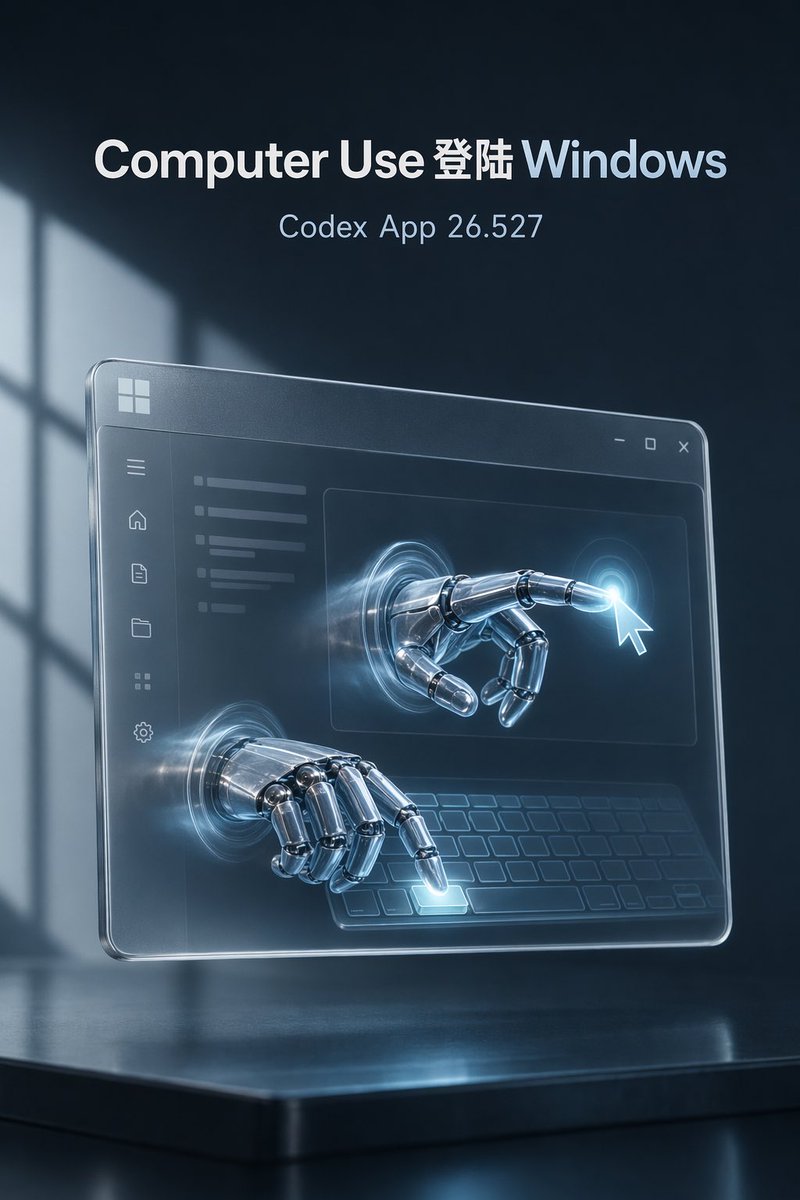
一张电影质感的科技海报,展示了铬合金机械手与透明 Windows 风格界面的交互,适用于 AI 产品发布。
- 分类
- 图表信息图
- 模型
- GPT Image 2
- 来源作者
- thinkthinking
- 原始语言
- en
- 来源 ID
- 23355
- 发布时间
- 2026年5月30日
完整提示词
目标:创作一张高端未来科技海报,展示 AI Agent 使用 Windows 的场景,营造电影般的蓝黑色氛围和高级产品发布感。

画布:垂直 2:3 构图,768×1152 风格,深海军蓝背景,带有柔和的体积光,左侧有模糊的窗影图案。场景位于底部光亮的黑色反射平台之上。

文字内容:在顶部中心放置 2 行文字:大号加粗标题“{argument name="headline text" default="Computer Use 登陆 Windows"}”,其中“Computer Use”为白色,“登陆”为白色,“Windows”为淡冰蓝色;下方为较小的细体文字“{argument name="subtitle text" default="Codex App 26.527"}”,颜色为浅蓝灰色。使用简洁的现代无衬线字体,居中对齐,清晰锐利,无需其他文字。

主体:一个透明的悬浮玻璃质感 Windows 风格应用面板,呈一定角度透视,悬浮在反射底座上方。面板具有圆角、斜面发光边缘、淡淡的磨砂玻璃表面,左上角有一个小的 Windows 标志。右上角添加一个标题栏,包含 3 个窗口控制按钮:最小化、最大化和关闭。

界面细节:在玻璃面板内,展示一个极简的深色 UI,左侧边栏垂直堆叠 6 个图标:菜单、主页、文档、文件夹、网格和设置。内容区域左上方有淡淡的水平文本条,中间有一个大矩形,底部区域有程式化的键盘轮廓。保持 UI 半透明且低调。

机械交互:展示 2 只铬合金机械手,从玻璃界面中圆形的闪光传送门中伸出。第 1 只手位于右上角内容区域,向前伸出并指向鼠标指针附近的明亮点击光晕。第 2 只手位于左下方,悬停在虚拟键盘上方并按下一个发光的按键。机械手应具有高度精细的抛光金属质感和关节细节,带有冷蓝色反射,传送门周围有微妙的动态光条。

光影与风格:使用电影级轮廓光、冰青色光效、逼真的反射、景深、柔和的雾气以及高端科幻写实感。整体色调应为深海军蓝、炭灰、银铬色、磨砂玻璃和电青色。使画面优雅、富有氛围感且技术精良。

约束:保持构图简洁且居中;包含 2 行文字、2 只机械手、6 个侧边栏图标和 3 个窗口控制按钮。除简单的 Windows 风格标志外,不要添加其他 Logo,不要添加额外的段落或水印,避免杂乱的 UI 文字。
多语言版本
未来感 AI Windows 登录海报
enGoal: Create a high-end futuristic tech poster about an AI agent using Windows, with a cinematic blue-black atmosphere and premium product-launch feel. Canvas: Vertical 2:3 composition, 768×1152 style, dark navy background with soft volumetric light and a blurred window-shadow pattern on the left. The scene sits above a glossy black reflective platform at the bottom. Text content: At the top center, place exactly 2 lines of text: the large bold headline “{argument name="headline text" default="Computer Use 登陆 Windows"}” with “Computer Use” in white, “登陆” in white, and “Windows” in pale icy blue; below it, smaller thin text “{argument name="subtitle text" default="Codex App 26.527"}” in light blue-gray. Use clean modern sans-serif typography, centered, crisp, no other text. Main subject: A transparent floating glass Windows-style application panel angled slightly in perspective, hovering above the reflective base. The panel has rounded corners, beveled glowing edges, a faint frosted-glass surface, and a small Windows logo in the upper-left corner. Add a title bar with exactly 3 window controls at the upper-right: minimize, maximize, and close. Interface details: Inside the glass panel, show a minimal dark UI with a left sidebar containing exactly 6 icons stacked vertically: menu, home, document, folder, grid, and settings. Add a content area with faint horizontal text bars on the upper left, a large central rectangle, and a stylized keyboard outline across the lower area. Keep the UI semi-transparent and understated. Robotic interaction: Show exactly 2 chrome robotic hands emerging through circular glowing portals in the glass interface. Hand 1 is in the upper-right content area, extended forward and pointing at a bright cursor-click glow near a white mouse pointer. Hand 2 is lower-left, hovering over the virtual keyboard and pressing one illuminated key. The robot hands should be highly detailed polished metal with articulated joints, cool blue reflections, and subtle motion-like light streaks around the portals. Lighting and style: Use cinematic rim lighting, icy cyan glow accents, realistic reflections, depth of field, soft haze, and premium sci-fi realism. Overall palette should be dark navy, charcoal, silver chrome, frosted glass, and electric cyan. Make the image elegant, atmospheric, and technically polished. Constraints: Keep the composition clean and centered; include exactly 2 text lines, exactly 2 robotic hands, exactly 6 sidebar icons, and exactly 3 window controls. Do not add logos other than the simple Windows-style mark, do not add extra paragraphs or watermark, and avoid cluttered UI text.
未来感 AI Windows 登录海报
zh-CN目标:创作一张高端未来科技海报,展示 AI Agent 使用 Windows 的场景,营造电影般的蓝黑色氛围和高级产品发布感。 画布:垂直 2:3 构图,768×1152 风格,深海军蓝背景,带有柔和的体积光,左侧有模糊的窗影图案。场景位于底部光亮的黑色反射平台之上。 文字内容:在顶部中心放置 2 行文字:大号加粗标题“{argument name="headline text" default="Computer Use 登陆 Windows"}”,其中“Computer Use”为白色,“登陆”为白色,“Windows”为淡冰蓝色;下方为较小的细体文字“{argument name="subtitle text" default="Codex App 26.527"}”,颜色为浅蓝灰色。使用简洁的现代无衬线字体,居中对齐,清晰锐利,无需其他文字。 主体:一个透明的悬浮玻璃质感 Windows 风格应用面板,呈一定角度透视,悬浮在反射底座上方。面板具有圆角、斜面发光边缘、淡淡的磨砂玻璃表面,左上角有一个小的 Windows 标志。右上角添加一个标题栏,包含 3 个窗口控制按钮:最小化、最大化和关闭。 界面细节:在玻璃面板内,展示一个极简的深色 UI,左侧边栏垂直堆叠 6 个图标:菜单、主页、文档、文件夹、网格和设置。内容区域左上方有淡淡的水平文本条,中间有一个大矩形,底部区域有程式化的键盘轮廓。保持 UI 半透明且低调。 机械交互:展示 2 只铬合金机械手,从玻璃界面中圆形的闪光传送门中伸出。第 1 只手位于右上角内容区域,向前伸出并指向鼠标指针附近的明亮点击光晕。第 2 只手位于左下方,悬停在虚拟键盘上方并按下一个发光的按键。机械手应具有高度精细的抛光金属质感和关节细节,带有冷蓝色反射,传送门周围有微妙的动态光条。 光影与风格:使用电影级轮廓光、冰青色光效、逼真的反射、景深、柔和的雾气以及高端科幻写实感。整体色调应为深海军蓝、炭灰、银铬色、磨砂玻璃和电青色。使画面优雅、富有氛围感且技术精良。 约束:保持构图简洁且居中;包含 2 行文字、2 只机械手、6 个侧边栏图标和 3 个窗口控制按钮。除简单的 Windows 风格标志外,不要添加其他 Logo,不要添加额外的段落或水印,避免杂乱的 UI 文字。