专业老照片修复
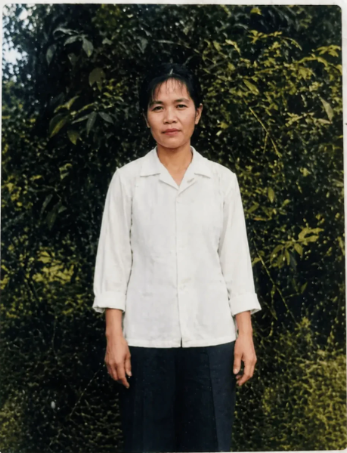
在保留原人物、姿态和构图的前提下,修复受损的复古肖像并进行逼真的上色处理。
- 分类
- 图表信息图
- 模型
- GPT Image 2
- 来源作者
- 自学Ai的鱼头叔叔
- 原始语言
- en
- 来源 ID
- 24173
- 发布时间
- 2026年6月4日
完整提示词
使用提供的参考图像,进行专业的老照片修复和逼真的上色处理。保持原始构图、单人站姿、服装轮廓、身体比例以及背景布局不变。去除所有可见的岁月痕迹:霉斑、脱落的乳剂层、划痕、污渍、裂纹、折痕、褪色的对比度以及磨损的边缘。自然地重构缺失的图像区域,不得凭空添加新物体或改变主体身份。将黑白受损照片转换为 {argument name="photo era" default="1970 年代"} 风格的清晰彩色照片:呈现绿色的户外植被、白色长袖衬衫、深色长裤、自然的肤色以及柔和的日光。在提升清晰度、曝光度和质感的同时,保留原始照片的纪实感;请勿进行美颜、瘦脸、重塑面部特征、更改服装、改变姿势、添加现代特效,或使其看起来像近期拍摄的摆拍肖像。多语言版本
专业老照片修复
enUsing the provided reference image, perform a professional old-photo restoration and realistic colorization. Keep the original composition, the single standing person, pose, clothing shape, body proportions, and background layout unchanged. Remove all visible aging damage: mold-like white patches, peeling emulsion, scratches, stains, cracks, creases, faded contrast, and worn borders. Reconstruct missing image areas naturally without inventing new objects or changing the subject's identity. Convert the black-and-white damaged photo into a clean natural-color photograph from the {argument name="photo era" default="1970s"}: green outdoor foliage, a white long-sleeve shirt, dark trousers, natural skin tones, and soft daylight. Improve clarity, exposure, and texture while preserving the original documentary look; do not beautify, slim, reshape facial features, alter clothing, change the pose, add modern effects, or make it look like a newly staged portrait.
专业老照片修复
zh-CN使用提供的参考图像,进行专业的老照片修复和逼真的上色处理。保持原始构图、单人站姿、服装轮廓、身体比例以及背景布局不变。去除所有可见的岁月痕迹:霉斑、脱落的乳剂层、划痕、污渍、裂纹、折痕、褪色的对比度以及磨损的边缘。自然地重构缺失的图像区域,不得凭空添加新物体或改变主体身份。将黑白受损照片转换为 {argument name="photo era" default="1970 年代"} 风格的清晰彩色照片:呈现绿色的户外植被、白色长袖衬衫、深色长裤、自然的肤色以及柔和的日光。在提升清晰度、曝光度和质感的同时,保留原始照片的纪实感;请勿进行美颜、瘦脸、重塑面部特征、更改服装、改变姿势、添加现代特效,或使其看起来像近期拍摄的摆拍肖像。